Before a disk can be used, it must be formatted with a specific logical layout so that the operating system can recognise it. This layout is not only about the number or size of partitions. It also covers low-level details such as how the disk boots, which systems it is compatible with, which firmware it interacts with and how the data is organised. At the physical level, a raw disk is only a large address space made up of consecutive sectors, and the operating system needs a defined metadata layer to recognise this space as meaningful units. The structure that performs this function is called the partition table.
In other words, the partition table is like a map that states where each partition starts on the disk, where it ends, what it is used for and how the operating system recognises it. This structure is the link between the firmware and the operating system. When the system starts, the BIOS or UEFI reads the first sectors of the disk and identifies the bootable partition from the partition table. After the operating system loads, the same structural information is passed to the volume manager and file system layers, and the access hierarchy is built. For this reason, the partition table is not only a structure for "dividing a disk into partitions". It is a critical definition mechanism that forms the lowest layer of the storage stack.
You can think of a disk as 1 large empty space. Until this space is divided into partitions, the operating system cannot write data to it and cannot even recognise it. On modern disks, addressing uses Logical Block Addressing (LBA), which replaced the older CHS (Cylinder, Head, Sector) scheme, and each sector is accessed through a unique block number that starts at 0. The partition table maps these LBA ranges to logical partitions and defines which blocks belong to which partition. All information about these partitions, such as their definition, location, type and properties, is stored in the partition table.
For example, a typical Windows disk configuration can contain the following partitions.
|
Partition |
Partition Type |
Drive Letter |
Purpose |
|
1 |
Primary partition |
C |
Operating system |
|
2 |
Primary partition |
D |
Data storage |
|
3 |
Recovery partition |
Not assigned |
System recovery tools |
The operating system uses the data in the partition table to determine where these partitions start and end, which file system each one uses and what each partition is reserved for. If this table is corrupted or missing, access to the data on the disk is either lost completely or becomes faulty. The integrity of the partition table directly affects not only data access but also boot processes, backup operations and disaster recovery scenarios. Modern file systems include their own journaling and self-healing mechanisms, but the partition table layer is a much lower-level foundation that sits below these mechanisms and makes it possible for them to work.
In short, the partition table is a low-level definition structure that describes the layout of the disk and is critical for the system to understand where each piece of data is. It is the core structure that protects the logical integrity of the disk, makes the disk bootable, provides the base for file systems and makes long-term management of the storage infrastructure possible. Structures such as GPT and MBR are in fact formats of this partition table. They try to do the same job in different ways: dividing the disk, organising it and making it understandable to the system. However, these 2 formats differ significantly in the period they were designed in, the hardware generation they target and the capacity and security features they offer.
The 2 most common partition table formats are Master Boot Record (MBR) and GUID Partition Table (GPT). The first is the classic structure from the early period of the personal computer architecture, designed to work with legacy BIOS firmware. The second is the modern structure developed as an integral part of the UEFI standard, and it meets the needs of modern hardware, high-capacity storage systems, virtualisation platforms and scenarios with high security requirements. Each structure has its own strengths and limits. The right choice depends on the hardware architecture of the target environment, the operating system version and the scalability expected in the future.
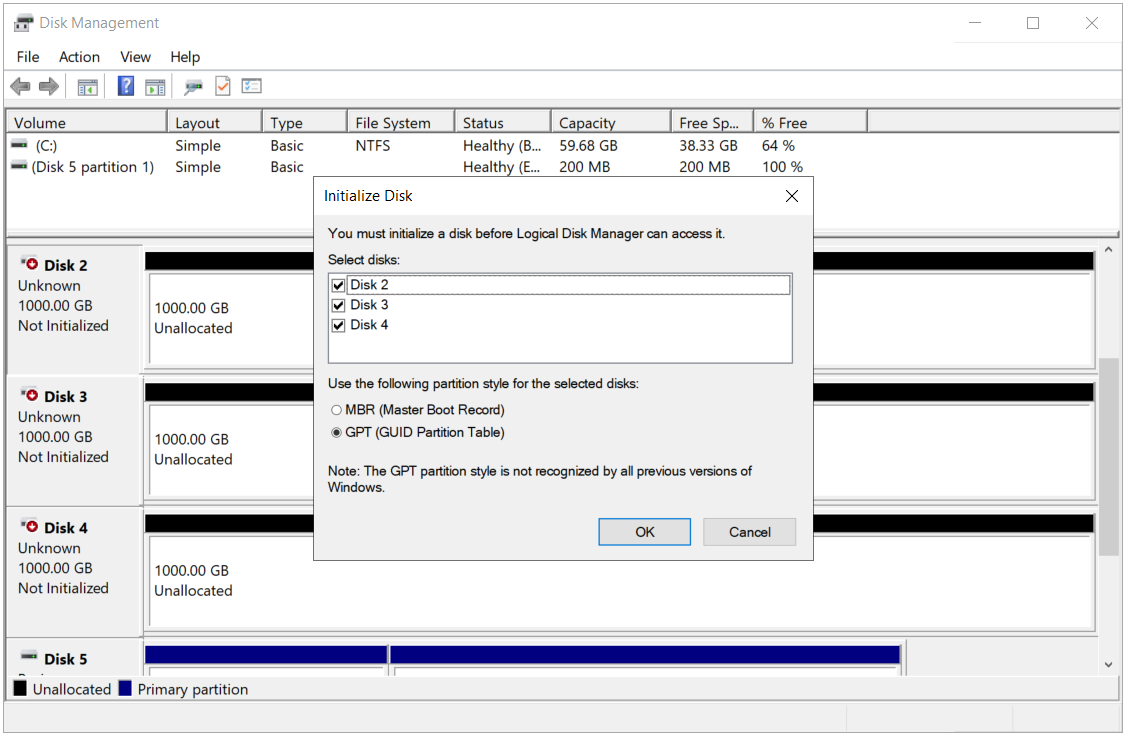
MBR is a classic structure that has been in use since the 1980s and works with BIOS-based systems. It uses the first 512-byte sector of the disk, and this sector is divided into 3 main components. The first 446 bytes are reserved for the bootstrap code, the next 64 bytes for the partition table as 4 entries, and the last 2 bytes for the boot signature, 0x55AA.
The MBR structure can define a maximum of 4 primary partitions. To get past this limit, 1 of the 4 primary partition entries is reserved as an extended partition, and multiple logical drives can be created inside it. In practice, MBR disks can therefore hold 3 primary partitions and an unlimited number of logical drives inside 1 extended partition. However, this structure is still not sufficient for modern scenarios.
MBR also supports only disks of up to 2 TB. The reason is that MBR uses 32-bit Logical Block Addressing (LBA): 232 sectors multiplied by a sector size of 512 bytes gives approximately 2.2 TB of addressable space. The operating system cannot see any space above this limit. In addition, MBR has no mechanism that checks data integrity, so if the partition table is corrupted, the disk structure can easily be damaged as well. MBR can still be required today for old hardware or systems that depend on BIOS.
GPT is a much more modern structure. It was developed together with the UEFI architecture and removes the limitations of MBR completely. First, it allows up to 128 partitions to be defined by default in Windows, and there is no 2 TB limit. GPT can manage the space however large the disk capacity is. Each partition is identified by a unique Globally Unique Identifier (GUID), so the system can clearly distinguish each partition. In addition, in the GPT structure the partition table is stored not only at the start of the disk but also at the end as a backup. This makes recovery possible when the structure is corrupted. In addition to all of this, GPT continuously checks data integrity with Cyclic Redundancy Check 32-bit (CRC32).
Another important feature of the GPT structure is the Protective MBR. An MBR that has only 1 partition entry and covers the whole disk space is placed in the first sector of a GPT disk. This structure prevents old MBR-only tools from treating the GPT disk as unformatted and deleting or overwriting it by mistake. The Protective MBR is therefore a safety layer that preserves backward compatibility.
CRC32 (Cyclic Redundancy Check 32-bit) is an error detection algorithm used to verify data integrity. It is used in many areas, such as disks, network traffic, file transfers and file systems, to determine whether data loss, corruption or an error has occurred. The GUID Partition Table (GPT) structure also uses the CRC32 checksum method to check whether the partition table is corrupted.
The CRC32 logic is quite simple: a 32-bit number, the checksum, is calculated from the content of the data. This number accompanies the data. Later, when the data is read, the same calculation is performed again and the new CRC value is compared with the earlier value. If the 2 values are equal, the data is unchanged and not corrupted. If the values do not match, corruption has occurred during data transfer or on the disk.
In the GPT structure, separate CRC32 values are calculated and stored for both the partition table and the GPT header. When the computer reads these areas, it generates the CRC32 value again and compares the results. If an inconsistency is detected, GPT can automatically bring the backup partition table at the end of the disk into use, or it notifies the user that the structure is faulty.
Because CRC32 runs very fast, it is preferred where real-time error checking is needed at hardware level, such as disk, network and firmware. However, remember that CRC32 detects errors but cannot correct them. When data is corrupted, it only makes the problem visible. It has no data recovery function.
As a result, the use of CRC32 in GPT adds a built-in protection layer against structural corruption. This gives a much more reliable data structure than MBR.
Today, most modern systems come with GPT support, and on devices that use UEFI in particular, booting in native UEFI boot mode is possible only from GPT. For backward compatibility, UEFI firmware can also boot from an MBR disk by emulating legacy BIOS behaviour through the Compatibility Support Module (CSM), but CSM has been officially removed on many modern platforms from Intel 11th generation onwards. GPT is therefore not only a preference but also a requirement of hardware and software compatibility. MBR is a limited method that mainly provides compatibility with the past and is still useful on some systems.
The structure chosen before a disk is formatted affects not only the current installation but also future usage scenarios. This is because a conversion from MBR to GPT, or the reverse, usually cannot be completed without deleting all partitions. On Windows, the MBR2GPT.exe tool makes conversion without data loss possible, but its prerequisites are strict and it cannot be applied in every scenario. The choice must therefore be a deliberate decision, not a random one. This prevents possible future limitations from the very start.
Differences Between GPT and MBR Disk Formatting
Understanding the difference between the GPT and MBR structures correctly is decisive not only during installation but also when planning how the system will be managed in the long term. The structure chosen during formatting directly shapes many basic behaviours, from the number of partitions to the disk access method. The choice must therefore match not only the hardware but also the software and architecture that will run on it.
GPT, which is more widely used today, stands out not only for its support for large disks but also for its redundant layout and integrity checking mechanisms. This structure focuses on preventing corruption of data structures and provides extra protection layers that prevent the loss of critical information on the disk. MBR can still be functional for simpler needs, but it cannot meet advanced boot scenarios.
In GPT, each partition is identified not by simple location information but by a unique Globally Unique Identifier (GUID). These GUIDs allow the system to distinguish the partitions on the disk clearly. For example, an EFI System Partition or a Microsoft Reserved Partition is identified not only by its order but also by a GUID specific to its function type. This prevents partitions from being confused in multi-boot installations, disk cloning or backup processes.
Software-based management tools can also use these GUIDs to determine directly what each partition is defined for. This provides more transparent and automated management that integrates with the system and needs no manual intervention. On the MBR side, definitions are based on fixed type codes and the precision of the definition is low. The flexibility of identification in GPT not only improves data organisation but also makes automation and troubleshooting considerably easier.
When making the choice, it is not enough to focus only on disk size or hardware generation. Factors such as how the infrastructure will evolve, ease of maintenance and how current the system components are also play a direct part in this choice. When the right structure is chosen at the start, the following steps proceed in a more stable and trouble-free way, because this choice also prepares the system today for many technical scenarios it may meet in the future.
1- GUID Partition Table (GPT)
✔ Uses a GUID (Globally Unique Identifier), a unique identifier, for each partition.
✔ Up to 128 partitions can be defined by default in Windows.
✔ There is no 2 TB limit. The practical upper limit depends on the file system in use: modern Windows NTFS supports volumes of up to 8 PB with a 2 MB cluster size, and ReFS scales to much larger capacities.
✔ Designed to work with UEFI-based systems.
✔ More reliable than MBR because it contains a backup partition table.
✔ More compatible with modern hardware, virtualisation platforms and high-capacity storage systems.
When Is GPT Preferred?
✔ When disks larger than 2 TB will be used.
✔ When working on servers with UEFI support.
✔ When a Failover Cluster, Hyper-V, SAN or high-capacity volume layout is being designed.
✔ When Secure Boot, BitLocker or modern security features will be used.
2- MBR (Master Boot Record)
✔ A legacy partition structure located in the first sector of the disk, where the disk partitions are defined.
✔ A maximum of 4 primary partitions can be defined. 1 of these entries can be reserved as an extended partition and hold multiple logical drives.
✔ Does not work with disks larger than 2 TB. It cannot see or use the space above 2 TB.
✔ Designed to work with BIOS-based systems.
✔ Can still be preferred in environments that run old hardware or 32-bit operating systems.
✔ Simple, compatible and sufficient for low-capacity disks.
When Is MBR Preferred?
✔ When disks smaller than 2 TB will be used.
✔ When working on servers with BIOS support.
✔ When compatibility with old operating systems is required.
|
Feature |
BIOS (Legacy Boot) |
UEFI (Unified Extensible Firmware Interface) |
|
Full Name |
Basic Input/Output System |
Unified Extensible Firmware Interface |
|
Hardware Generation |
Old-generation hardware, traditional systems |
Modern hardware |
|
Bootable Partition Structure |
MBR only |
GPT only in native UEFI boot mode, MBR in CSM mode |
|
Maximum Disk Size |
2 TB |
Theoretically 9.4 ZB with GPT |
|
Number of Partitions |
Maximum of 4 primary partitions, logical drive support with an extended partition |
128 partitions by default in Windows |
|
Boot Mode |
Legacy boot only |
UEFI boot, legacy boot compatibility with CSM (CSM is being removed on modern platforms) |
|
Interface |
Text-based, keyboard-controlled |
GUI support, mouse-controlled |
|
Fast Boot Support |
No |
Yes |
|
Secure Boot |
Not supported |
Supported |
|
Software Update Capability |
Depends on the hardware vendor, usually difficult |
UEFI firmware updates can be applied easily |
|
32-bit / 64-bit Compatibility |
x86 software running in 16-bit Real Mode |
32-bit and 64-bit UEFI firmware is possible |
|
Application Support |
No |
UEFI applications such as diagnostic tools and update modules can be run |
|
Features Integrated with the System |
Limited |
Advanced features such as network boot, disk encryption and a driver layer |
Sources give different values for the maximum disk capacity that GPT supports. Some mention a limit of 256 TB or 8 PB, while some technical documents state that this value reaches a huge level such as 9 zettabytes (ZB). This looks like a contradiction, but it comes from 2 different concepts: the theoretical limit and the practical limit.
Because GPT uses 64-bit Logical Block Addressing (LBA), it can theoretically address disks of up to 9.4 ZB. This limit is the highest value calculated when the sector size is taken as 512 bytes. The GPT architecture therefore has an addressing capacity far beyond today's technologies.
In the real world, however, the matter is not limited to GPT alone. To use the whole of a disk efficiently, the operating system, the file system and the hardware firmware must also support this capacity.
In addition, although the GPT structure removes a hardware-level barrier, limits set by the operating system and file systems still exist at the application level. On modern Windows, NTFS supports volumes of up to 256 TB with the default 4 KB cluster size, and this limit rises to 8 PB when a 2 MB cluster size is used. The ReFS file system scales to much larger capacities. So although 9 ZB is the theoretical maximum of the GPT architecture, the limit that can be reached in practice depends on the file system in use and the operating system version.
In conclusion, MBR offers an older and limited structure, while GPT is much more flexible and scalable and suits modern systems. The choice must be made according to the architecture of the target environment, the operating system version and the disk size. If the disk is not configured correctly at the start, it may have to be reformatted later, which means data loss. The first choice therefore determines everything.
With the following PowerShell command, you can easily see which structure each disk in the system is formatted with. This command lists the number and partition table type of each disk.
Get-Disk | Sort Number | Select-Object Number, PartitionStyle
This command is a very practical and functional solution, especially in a server environment with a large number of physical or virtual disks. With it, you can quickly see in 1 line which partition structure, MBR or GPT, each disk is formatted with. Getting this information for all disks in a readable form saves time and helps to prevent possible errors, especially when planning installation, disk configuration, backup scenarios or conversion. It is an ideal method for getting clear information from a simple output in complex environments.
When you run the PowerShell command, you get a list similar to the one below, which shows how the disks in the system are configured by partition table type. The output shows the number of each disk and the format it uses.
|
Number |
PartitionStyle |
|
0 |
GPT |
|
1 |
MBR |
|
2 |
GPT |
|
3 |
MBR |
|
4 |
RAW, not yet formatted |
|
5 |
GPT |

Understanding the MBR and GPT concepts used in disk configuration correctly makes a big difference to the long-term stability of the system and to data management. Disk size, boot method and hardware architecture in particular directly affect the choice between these 2 structures. MBR is a structure from the past that works within certain limits, while GPT offers a much more flexible solution for future scenarios with higher capacity support, a redundant layout and UEFI compatibility.
Each has different advantages, use cases and technical limits. So when choosing the format, consider not only the current setup but also future expansion or platform changes. MBR is sufficient for classic compatibility needs, while GPT becomes almost unavoidable in modern system architectures.
All the differences covered in this article clearly show that disk configuration is not only a first step but 1 of the basic parameters that determine how the system behaves throughout its whole operating life. When deciding which structure to use, take into account not only the technical requirements but also where the system will evolve in the coming years.
I hope you find it useful...
Feel free to share your thoughts and questions about this article in the comments below. Every contribution helps the content reach more people and makes for a more useful discussion.