A company can rarely move all of its mailboxes to the cloud at once. In most cases, some users stay in the on-premises Exchange environment, others move to Exchange Online, and the 2 environments have to work together for months, sometimes for years. A hybrid deployment establishes this coexistence model between on-premises Exchange and Exchange Online. Free/busy information is visible in both directions, mail flow is routed between the 2 platforms and protected with TLS, and mailbox migration is carried out in stages and does not have to be completed in a single night.
The Hybrid Configuration Wizard (HCW) applies the hybrid configuration, and one of the most decisive questions that the wizard asks is the choice of topology. Classic Hybrid Topology is the traditional approach, in which Exchange Online reaches the on-premises Exchange services directly over the Internet. Modern Hybrid Topology carries the free/busy and migration requests that come from the cloud to on-premises through the Hybrid Agent. Both reach the same hybrid goal; the difference is the path that the cloud side uses to reach on-premises Exchange and the features that this choice leaves out of scope.
Below, I examine the Full options of the 2 topologies, that is, the Classic Full and Modern Full configurations. I start with the prerequisites that apply to both, continue with the communication logic and the limits of each topology, and finish with the changes made to hybrid in 2025 and 2026 and the topology comparison.
The HCW offers the Minimal, Express and Full options under Classic Topology, and the Minimal and Full options under Modern Topology. The Minimal and Express options do not configure connectors, OAuth or a federation trust; they focus on migration.
1- Common Prerequisites for a Hybrid Deployment
Before the topology is chosen, the requirements that are the same in both models must be clear. The HCW cannot complete until these conditions are met.
|
Prerequisite |
Requirement |
|
Exchange Version |
The servers used for hybrid must run the latest Cumulative Update (CU) or the CU before it.
» Support for Exchange Server 2013 ended in April 2023, and support for Exchange Server 2016 and 2019 ended on 14 October 2025.
» The version supported today is Exchange Server Subscription Edition (SE). |
|
Server Role |
Exchange Server 2016 and later require at least 1 Mailbox server. If Edge Transport is going to be used, EdgeSync must be configured before the HCW is run. |
|
Directory Synchronisation |
Microsoft Entra Connect or Microsoft Entra Cloud Sync must be running between on-premises Active Directory and Microsoft Entra ID. I described the installation steps in my Microsoft Entra Connect installation article. |
|
Custom Domain |
All SMTP domains that are going to be used in the hybrid deployment must be added to the Microsoft 365 tenant and verified. |
|
Autodiscover DNS Record |
The Autodiscover record in public DNS must point to on-premises Exchange. |
|
Certificate |
A certificate issued by a trusted public CA must be assigned to the Exchange services. A self-signed certificate cannot be used for the Exchange services in a hybrid deployment.
» The EWS external URL and the Autodiscover address defined in public DNS must be listed in the SAN field of the certificate.
» All certificates installed on the servers for hybrid mail flow must be issued by the same CA and must have the same Subject value. |
2- Classic Hybrid Topology (Classic Full)
In Classic Hybrid Topology, Exchange Online connects directly over the Internet to the on-premises services that it needs. On the HTTPS side, Autodiscover and EWS must be reachable from outside, and on the SMTP side, TCP/25 must be reachable from outside. Client protocols such as OWA, ECP or MAPI do not have to be published for hybrid; that is a separate decision.
When the HCW is run, the configuration is written to both sides. On the on-premises side, it creates the Send and Receive connectors, the federation trust, the Organization Relationship and the OAuth components. On the Exchange Online side, it creates the inbound and outbound connectors, the Organization Relationship, the IntraOrganizationConnector and the migration endpoint. Hybrid behaviour is therefore not defined on one side only; it is defined by the objects in the 2 environments working together.
Communication Flow
Exchange Online does not connect to on-premises Exchange for the daily operations of a user whose mailbox is in the cloud. A connection is needed in 3 cases. When a cloud user queries the free/busy information of an on-premises user, when cross-premises features such as MailTips run, and when a mailbox migration is started.
For a free/busy query, Exchange Online first has to find the target EWS address. If the TargetSharingEpr value is not defined on the Organization Relationship, it discovers this address with Autodiscover and then connects to EWS. This is the reason why Autodiscover must be reachable from outside in the Classic model.
Cloud -> On-Premises (Free/Busy, MailTips, Migration)

Exchange Online
      |
      |  HTTPS / TCP 443 (Inbound)
      v
Firewall / Reverse Proxy / Load Balancer
      |
      v
On-Premises Exchange (Autodiscover, EWS, MRSProxy)


On-Premises -> Cloud (Free/Busy, MailTips)

On-Premises Exchange
      |
      |  HTTPS / TCP 443 (Outbound)
      v
Exchange Online


Mail Flow (both directions)

Exchange Online  <-- SMTP / TCP 25 + TLS -->  On-Premises Exchange or Edge Transport
The on-premises addresses that Exchange Online connects to are listed below.
|
Function |
Port |
On-Premises Endpoint |
|
Autodiscover |
TCP/443 |
/autodiscover/autodiscover.svc/wssecurity |
|
Free/Busy, MailTips, Message Tracking |
TCP/443 |
/ews/exchange.asmx/wssecurity |
|
Mailbox Migration |
TCP/443 |
/ews/mrsproxy.svc |
|
Mail Flow |
TCP/25 |
Receive connector on the Mailbox server or on Edge Transport |
Pre-authentication is not supported on these endpoints. If pre-authentication is enabled on the reverse proxy, free/busy and migration do not work; the traffic must be passed to Exchange without authentication.
Publishing and Management Responsibilities
In the Classic model, the company is responsible for the whole publishing layer. The HCW performs the Exchange configuration, but the company designs and operates the following components.
» Obtaining and renewing the public certificate and assigning it to the Exchange services.
» Publishing Autodiscover and EWS through a reverse proxy, load balancer or firewall.
» Public DNS and NAT records.
» Inbound and outbound firewall rules for TCP/25.
In return, the traffic passes from end to end through the company's own devices. The IIS logs, the reverse proxy records and the firewall sessions make it possible to trace where a request is interrupted. If the endpoints are published only for hybrid, limiting inbound traffic to the Microsoft 365 IP ranges reduces the attack surface considerably.
Mailbox Migration and MRSProxy
In a hybrid migration, the Mailbox Replication service in Exchange Online starts the move and connects to MRSProxy on the on-premises side. MRSProxy is not a separate service; it is the /EWS/mrsproxy.svc path that runs under the EWS virtual directory. Therefore, if EWS publishing works, no additional address has to be published for migration; it is enough for MRSProxy to be enabled.
The HCW can also enable this setting itself. However, enabling it before the HCW gives a more reliable result, because it allows time for the IIS cache to clear. The command runs in the Exchange Management Shell.
Set-WebServicesVirtualDirectory -Identity "EWS (Default Web Site)" -MRSProxyEnabled $true
In the Classic model, more than 1 migration endpoint can be defined, and each one can point to a different URL. Large environments use this flexibility to distribute the migration load across different servers or locations.
Hybrid Modern Authentication (HMA)
With HMA, Outlook clients that access on-premises mailboxes authenticate with a token obtained from Microsoft Entra ID. This makes it possible to apply MFA and Conditional Access to on-premises mailboxes as well.
For HMA to work, clients must be able to reach the Autodiscover, EWS, ActiveSync, MAPI and OAB endpoints over the Internet. For this reason, HMA is supported only in the Classic topology. HCW Full prepares the infrastructure that HMA requires but does not enable HMA; it is enabled in separate steps.
Teams Calendar Integration
For a user whose mailbox is on-premises to create and view meetings in Teams, the Teams service must be able to reach on-premises Exchange. Microsoft Learn lists the following requirements for this scenario.
» The mailbox must be hosted on Exchange Server 2016 CU3 or a later version.
» Autodiscover and EWS must be published externally.
» OAuth must be configured. The preferred method is the Full option of the HCW.
» The user must be synchronised to Microsoft Entra ID and must have a Teams licence assigned.
» The Exchange Hybrid Deployment option must be selected in Microsoft Entra Connect.
The requirement here is OAuth, not HMA. The 2 are often confused: OAuth allows services such as Teams and Exchange Online to connect to on-premises Exchange with a token, whereas HMA concerns the authentication of user clients. HMA does not have to be enabled for Teams calendar.
For on-premises integration, Microsoft recommends Classic Full hybrid with Exchange Server 2016 or later. The reason is simple: the Autodiscover and EWS publishing that Teams needs already exists in the Classic model.
Who Is It Suitable For?
Classic Full is the correct choice for companies that are going to operate the hybrid deployment for a long time and continue to host on-premises mailboxes. If HMA, cross-premises message tracking or multi-mailbox search is going to be used, Classic is no longer a preference; it becomes a requirement. It is also the topology that Microsoft recommends for Teams calendar.
3- Modern Hybrid Topology (Modern Full)
Modern Hybrid Topology carries the free/busy and migration requests that come from the cloud to on-premises through the Hybrid Agent and not through an endpoint that is open to the Internet. The Hybrid Agent is built on the same technology as Microsoft Entra Application Proxy. The Agent opens an outbound HTTPS connection to the proxy infrastructure on the Microsoft side, and the requests from Exchange Online are passed over this connection to the Exchange Server in the internal network.
As a result, for free/busy and migration there is no need to publish EWS externally, to create an external DNS record for this purpose, to update a certificate or to define an inbound rule on the firewall. The setup is faster than Classic.
This simplicity has a cost. The Agent carries only certain types of traffic, and for everything that it does not carry, either the Classic requirements still apply or the feature cannot be used at all. Using Modern Hybrid in the correct scenario depends on knowing these limits before the installation.
How Does It Work?
The topology is chosen on the Hybrid Topology page of the HCW. The image below shows the Classic and Modern options together with the short description that the wizard gives for each one.
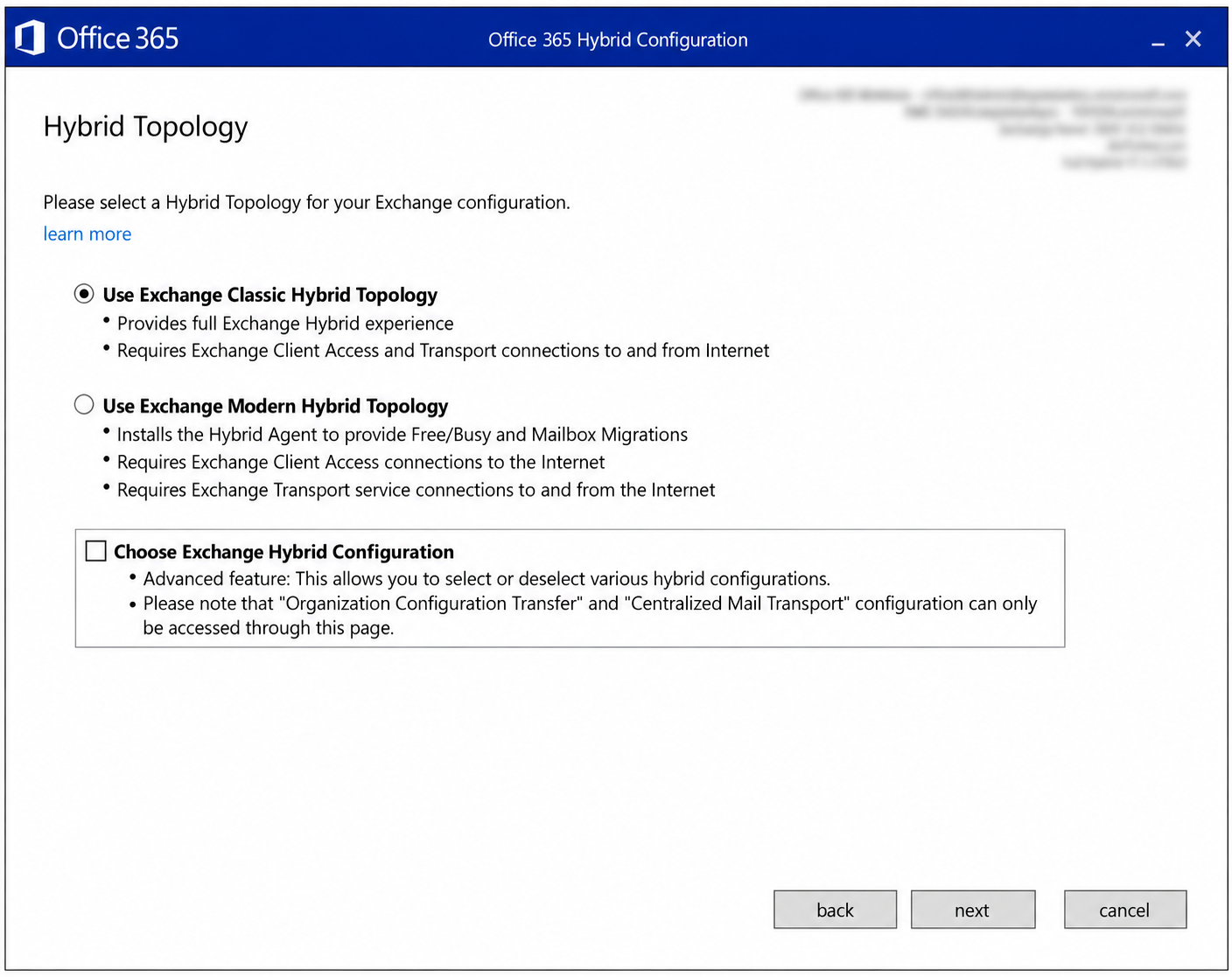
When Use Exchange Modern Hybrid Topology is selected on this page and the wizard continues, it downloads the Agent installation package, installs the Agent on the computer, registers the Agent in Microsoft Entra ID and tests that migration from Exchange Online to on-premises is possible. This process can take up to 10 minutes.
During registration, a URL that is specific to the tenant is created: [GUID].resource.mailboxmigration.his.msappproxy.net
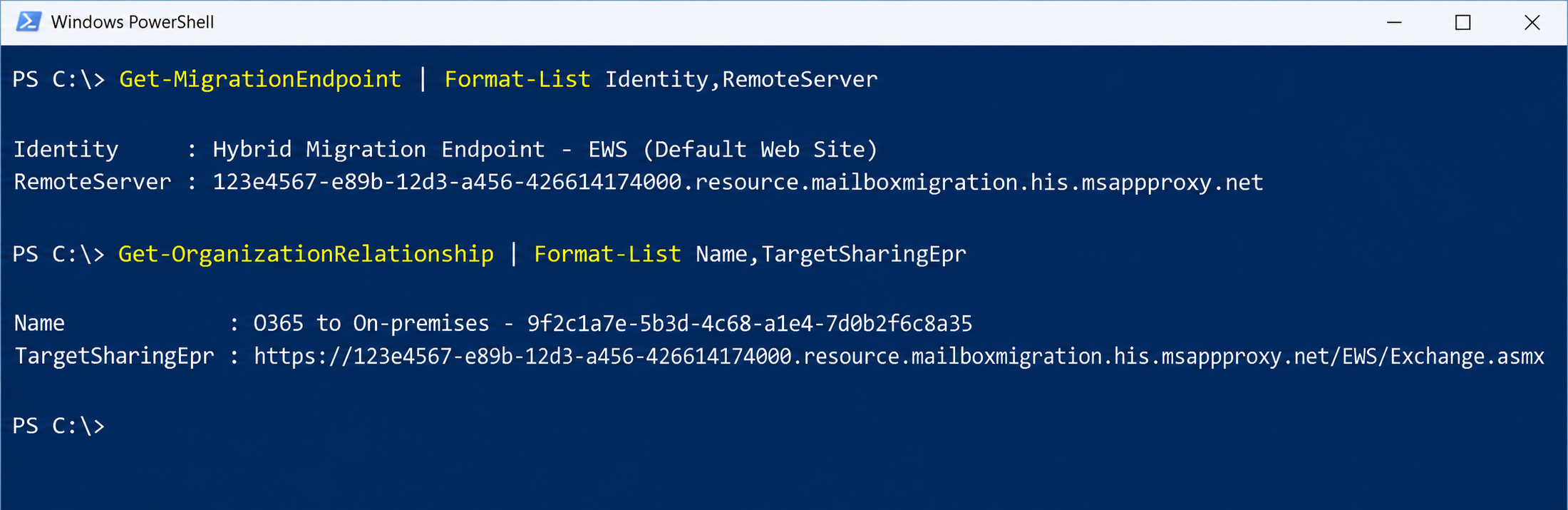
The HCW points the migration endpoint in Exchange Online to this address. It also writes the same address to the TargetSharingEpr value on the Organization Relationship and on the IntraOrganizationConnector. Exchange Online therefore does not try to discover an address with Autodiscover for free/busy; it goes directly to this URL.
Cloud -> On-Premises (Free/Busy, Migration)

Exchange Online
      |
      v
[GUID].resource.mailboxmigration.his.msappproxy.net
      ^
      |  HTTPS / TCP 443 (Outbound, connection initiated by the Agent)
      |
Hybrid Agent
      |
      |  HTTPS / TCP 443 (internal network)
      v
On-Premises Exchange (EWS, MRSProxy)


On-Premises -> Cloud (Free/Busy)

On-Premises Exchange  -- HTTPS / TCP 443 (Outbound) -->  Exchange Online
(Agent not used)


Mail Flow (both directions)

Exchange Online  <-- SMTP / TCP 25 + TLS -->  On-Premises Exchange or Edge Transport
(Agent not used)
The asymmetry in the diagram is important. The Agent carries only the requests that come from the cloud to on-premises. When an on-premises user queries the free/busy information of a cloud user, the request does not pass through the Agent; it goes from the Exchange server directly to Exchange Online.
In Modern Hybrid, all Mailbox servers must also have outbound access to the Microsoft 365 endpoints over TCP/443. Isolating the Exchange servers completely from the Internet is not possible in this model either.
I view the resulting values with the following commands in an Exchange Online PowerShell session.
Get-MigrationEndpoint | Format-List Identity,RemoteServer
Get-OrganizationRelationship | Format-List Name,TargetSharingEpr
Hybrid Agent Requirements
The Hybrid Agent can be installed in 2 different locations. The first is directly on an Exchange server: the Mailbox role on Exchange Server 2016 and later, and the Client Access role on Exchange Server 2013. The second is a standalone Windows Server dedicated to the Agent. Both locations are supported. The HCW must be run on the computer where the Agent is going to be installed.
Whichever location is chosen, the basic requirements that the computer must meet are the same.
|
Component |
Requirement |
|
Operating System |
Windows Server 2012 R2, 2016, 2019 or 2022. |
|
.NET Framework |
4.7.2 or later. If the Agent is installed on an Exchange server, the Exchange Server supportability matrix determines the valid version. |
|
TLS |
TLS 1.2 must be enabled. |
|
Internet Access |
Outbound TCP/443 and TCP/80.
» The destinations include *.msappproxy.net and *.servicebus.windows.net.
» For the full list, refer to the Microsoft Entra Application Proxy connector requirements. |
|
Exchange Access |
If the Agent is on a separate server, TCP/443, TCP/80, TCP/5985 and TCP/5986 must be open to the Exchange server selected in the HCW. |
|
Outbound Proxy |
Only a proxy that does not require authentication is supported, and it is configured separately after the installation. |
For the HCW to download and install the Agent MSI package itself, additional conditions are required.
|
Component |
Condition for Automatic Installation with the HCW |
|
Domain Membership |
The computer must be a member of an Active Directory domain. |
|
Remote PowerShell |
The computer must be able to establish a Remote PowerShell connection to the Exchange server selected for hybrid. |
|
Browser |
A browser that supports ClickOnce, for example Microsoft Edge. |
|
On-Premises Account |
It must be a member of the Organization Management role group in Exchange and a member of the local Administrators group on the computer where the Agent is going to be installed. |
|
Microsoft 365 Account |
The HCW and the Agent registration ask for Global Administrator credentials. |
Testing whether the computer can reach the required endpoints before the installation starts prevents the HCW from stopping before it completes. Microsoft's HybridManagement.psm1 module performs this test.
Import-Module .\HybridManagement.psm1
Test-HybridConnectivity -TestO365Endpoints
If the environment has an outbound proxy, the proxy address is defined separately after the Agent is installed. The script is located in the \Program Files\Microsoft Hybrid Service\ folder on the computer where the Agent is installed.
.\ConfigureOutBoundProxy.ps1 -ProxyAddress http://proxyserver:8080
If the proxy blocks the Agent registration, the installation and the connection test after the installation fail. Microsoft recommends that the Agent traffic bypasses the proxy until the configuration is complete.
The proxy setting of the Exchange server itself is also important. The HCW connects outbound from the Exchange server for the federation trust, and the free/busy requests from on-premises to the cloud also leave from the server. If the InternetWebProxy value on the server is wrong, these 2 operations fail.
External Publishing Requirements
In Modern Full, the publishing workload decreases but it does not disappear. The requirements that are removed and the requirements that remain must be looked at separately.
|
Component |
Status |
Description |
|
EWS |
Not required |
External DNS, a public certificate and inbound TCP/443 are not required for free/busy and migration. |
|
Mail Flow |
Required |
The Agent does not carry SMTP. The requirements for a public CA certificate, external DNS for transport and TCP/25 in both directions are the same as in Classic. |
|
Autodiscover |
Depends on the situation |
If there are mobile clients that use ActiveSync with the built-in mail app, an external Autodiscover record and a public certificate are still required. |
|
Outbound |
Required |
TCP/443 from the Exchange servers to Exchange Online and TCP/80 for certificate revocation checks must be open. |
Functions That the Hybrid Agent Leaves Out of Scope
All of the limitations below are documented on Microsoft Learn. If one of the company's requirements is on this list, Modern Hybrid is not the suitable topology.
1. SMTP Mail Flow
SMTP traffic is outside the scope of the Hybrid Agent. Mail flow between Exchange Online and on-premises requires a public certificate and TCP/25 access. The assumption "If I use Modern Hybrid, I do not open anything to the Internet" is not valid for the Full option.
2. Hybrid Modern Authentication (HMA)
HMA is not supported with the Hybrid Agent. Outlook clients must reach the Autodiscover, EWS, ActiveSync, MAPI and OAB endpoints over the Internet, and this is possible only with the publishing done in the Classic topology. If MFA or Conditional Access is planned for on-premises mailboxes, the topology must be Classic.
3. Cross-Premises Message Tracking and Multi-Mailbox Search
These 2 features do not pass through the Agent. Both need the Classic connection model, in which EWS and Autodiscover are published externally and Exchange Online can reach them. Cross-premises MailTips is outside this limitation and is supported in Modern Full.
4. Teams Calendar (On-Premises Mailbox)
According to Microsoft Learn, Modern Hybrid support is limited to free/busy and does not provide calendar integration from Teams to on-premises mailboxes. The reason is not the absence of HMA; the Autodiscover and EWS publishing that the Teams service needs does not exist in this model. Users whose mailbox is in Exchange Online are not affected by this limitation.
5. Multiple Migration Endpoints and Exchange Organisations
The Hybrid Agent supports a single migration endpoint with the default service limits. Multiple migration endpoints with custom URLs cannot be defined. In the same way, a single Exchange organisation is supported; Modern Hybrid cannot be used in deployments where more than 1 Exchange organisation is connected to the same tenant.
6. Sovereign Cloud Environments
Modern Hybrid is not supported in the GCC, GCC High and Gallatin (Microsoft 365 operated by 21Vianet) environments. In these environments, hybrid is configured with the Classic topology.
7. Publishing OWA and ECP with Application Proxy
Publishing OWA and ECP through Microsoft Entra Application Proxy is not supported. This does not mean that a company that uses Modern Hybrid cannot publish OWA. OWA and ECP can be published with a reverse proxy or a load balancer, as in Classic; what is not supported is publishing them through Application Proxy.
Extended Protection and the Hybrid Agent
Windows Extended Protection must not be enabled on the Front-End EWS virtual directory on Exchange servers that are published with the Hybrid Agent. Because the Agent is a proxy placed in the connection path, the channel binding check fails, and free/busy and migration stop.
The main risk is in CU upgrades. Exchange Server 2019 CU14 and later Setup versions enable Extended Protection by default. If a server published with the Hybrid Agent is upgraded in the standard way, Extended Protection is enabled on EWS and the hybrid features stop working. On these servers, Setup must be run with the following parameter.
Setup.exe /IAcceptExchangeServerLicenseTerms_DiagnosticDataON /Mode:Upgrade /DoNotEnableEP_FEEWS
The same exception applies when Extended Protection is configured with the script. The server names in the command are the Exchange servers that are published with the Agent.
.\ExchangeExtendedProtectionManagement.ps1 -ExchangeServerNames MHServer1, MHServer2 -ExcludeVirtualDirectories "EWSFrontEnd"
The script changes the authentication setting on all virtual directories. Before you run it, verify that SSL offloading is not used and that the TLS configuration is the same on all Exchange servers.
Because Extended Protection stays disabled on EWS, Microsoft recommends 2 additional measures. Connections to the Exchange servers published with the Agent must be restricted on the firewall so that only the computer where the Agent is installed is allowed, and these servers must not host mailboxes. This recommendation is given for the scenario in which the Agent runs outside Exchange and in a different network segment.
High Availability and Agent Management
Modern Hybrid has 2 separate single points of failure, and each one is removed with a different method.
The first is the Agent itself. More than 1 Agent can be installed for redundancy. When the HCW is run on a second computer and Modern Hybrid is selected, the page that shows the status of the existing Agents offers the Install an additional agent option. Alternatively, the MSHybridService.msi package can be downloaded and installed manually. After the installation, the Microsoft Hybrid Service (mshybridsvc) service is shown as running in the Windows Services console.
The second is the target Exchange server. The Agent registers the internal FQDN of the server selected in the HCW with the proxy infrastructure. If that server goes offline, free/busy and migration from the cloud to on-premises do not work, regardless of how many Agents are installed. If the server is permanently out of service, the HCW must be run again and a new server must be registered.
The way to remove this dependency is to change the target from a single server to the load balancer address. First, I import the module and check the status of the Agents.
Import-Module .\HybridManagement.psm1
Get-HybridAgent -UserPrincipalName admin@contoso.onmicrosoft.com
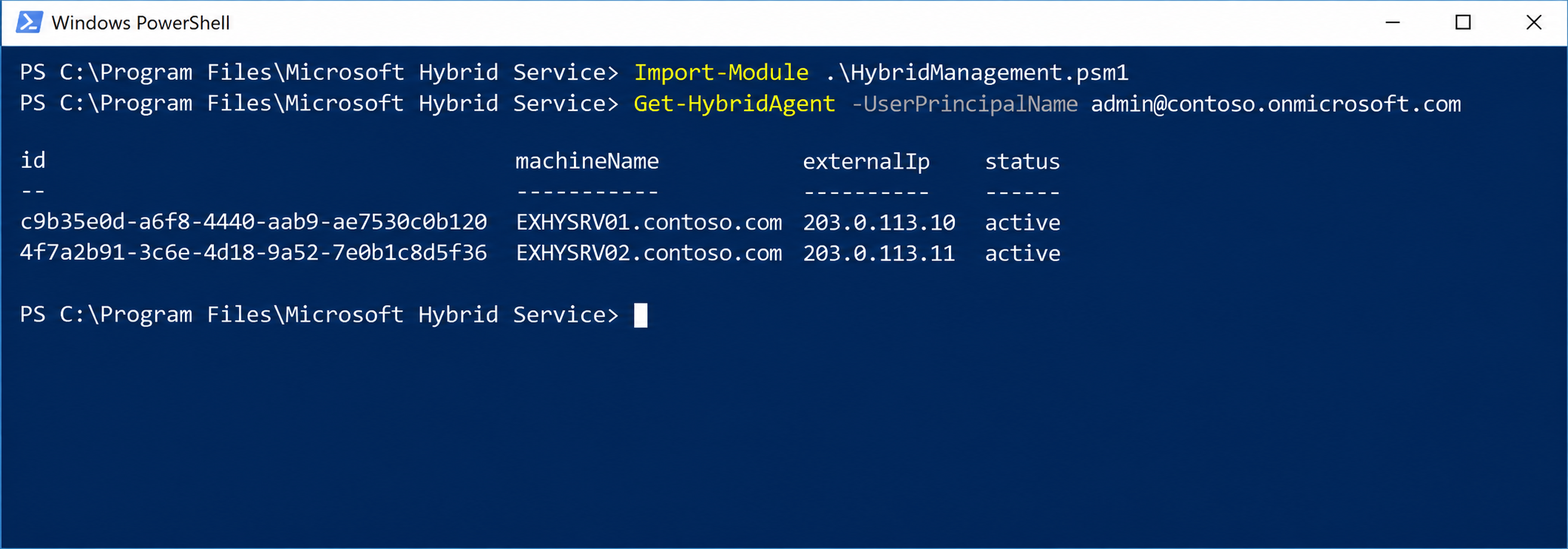
Then I change the target address. The appId value here is not the Agent ID; it is the tenant-specific GUID at the start of the URL in the migration endpoint.
Update-HybridApplication -TargetUri "https://mail.contoso.com" -AppId 123e4567-e89b-12d3-a456-426614174000 -UserPrincipalName admin@contoso.onmicrosoft.com
This command changes the target of the free/busy and migration traffic that goes from the cloud to on-premises. A wrong address stops both functions; the change must always be verified afterwards.
To verify it, I run the migration test in Exchange Online PowerShell. The command asks for the on-premises credentials.
Test-MigrationServerAvailability -ExchangeRemoteMove:$true -RemoteServer '123e4567-e89b-12d3-a456-426614174000.resource.mailboxmigration.his.msappproxy.net' -Credentials (Get-Credential)
When the test succeeds, the # requests counter of the Microsoft AD App Proxy Connector object increases in Performance Monitor on the computer where the Agent is installed. If the test fails with the load balancer address, Microsoft recommends changing the target temporarily to a single Exchange server and trying again.
For Agent management, the module contains the Get-HybridAgent, Get-HybridApplication, New-HybridApplication, Update-HybridApplication and Remove-HybridApplication cmdlets. Apart from these, there is no area where detailed tuning is possible; Microsoft manages the ports, the routing and the proxy infrastructure.
When Is It Preferred?
Modern Hybrid is suitable for companies whose aim is to move their mailboxes to Exchange Online and that do not need any cross-premises feature other than free/busy and MailTips during the move. In environments that do not want to publish EWS to the Internet or that have no publishing infrastructure, it is the shortest way to start the migration quickly.
However, in an environment where on-premises mailboxes are going to stay for a long time, and that uses Teams or plans HMA, the same simplicity soon becomes an obstacle.
4- Dedicated Exchange Hybrid App and EWS Changes
Whichever topology is used, there is a change that has affected all hybrid deployments since 2025. Previously, Exchange Server used a shared service principal that belongs to Microsoft for OAuth communication with Exchange Online, and the HCW uploaded the auth certificate to this shared object. Microsoft has left this model and moved to the dedicated Exchange hybrid app model, in which a separate app is created in each tenant.
Since 31 October 2025, EWS access through the shared service principal has been permanently blocked. In environments where the dedicated app is not configured, free/busy, MailTips and profile pictures from on-premises to the cloud do not work.
The change affects the hybrid calls made from on-premises servers to Exchange Online. Mailbox migration is not affected by this change. According to Microsoft's statement, the app applies to both Classic and Modern Hybrid and is configured once per tenant.
Supported Versions
|
Version |
Build |
EWS-Based Flow |
Graph API-Based Flow |
|
Exchange Server SE RTM, May 2026 HU |
15.2.2562.41 |
Yes |
Yes |
|
Exchange Server SE RTM |
15.2.2562.17 |
Yes |
No |
|
Exchange Server 2019 CU15, April 2025 HU |
15.2.1748.24 |
Yes |
No |
|
Exchange Server 2019 CU14, April 2025 HU |
15.2.1544.25 |
Yes |
No |
|
Exchange Server 2016 CU23, April 2025 HU |
15.1.2507.55 |
Yes |
No |
Servers below these builds, including Exchange Server 2013, cannot use the dedicated app and therefore cannot use the free/busy, MailTips and profile picture features in the direction of the cloud.
Configuration
The prerequisite is that Classic Full or Modern Full hybrid has been set up with the HCW. The method that Microsoft recommends is to run the ConfigureExchangeHybridApplication.ps1 script in all-in-one mode. The script creates the app in Microsoft Entra ID, uploads the auth certificate, updates the auth server object and enables the feature. Creating the app requires at least the Application Administrator role, and the Exchange side requires Organization Management permissions.
.\ConfigureExchangeHybridApplication.ps1 -FullyConfigureExchangeHybridApplication
The script grants tenant-wide admin consent and changes the OAuth configuration of the Exchange organisation. The change can take up to 60 minutes to take effect on all servers; during this time, free/busy, MailTips and pictures can be interrupted.
The current version of the HCW can also create the app, but it does not enable the feature itself. If the app was created with the HCW, the following commands must be run separately in the Exchange Management Shell.
New-SettingOverride -Name "EnableExchangeHybrid3PAppFeature" -Component "Global" -Section "ExchangeOnpremAsThirdPartyAppId" -Parameters @("Enabled=true") -Reason "Enable dedicated Exchange hybrid app feature"
Get-ExchangeDiagnosticInfo -Process Microsoft.Exchange.Directory.TopologyService -Component VariantConfiguration -Argument Refresh
I verify that the configuration works with the OAuth test. In the result, the ResultType value must be Success, and the Detail field must show the appId value of the dedicated app.
Test-OAuthConnectivity -Service EWS -TargetUri https://outlook.office365.com -Mailbox user@contoso.com | Format-List ResultType,Detail
After the move, it is also recommended to remove the old certificates that remain on the shared service principal. This step is part of the mitigation specified for CVE-2025-53786 and requires Global Administrator permissions.
.\ConfigureExchangeHybridApplication.ps1 -ResetFirstPartyServicePrincipalKeyCredentials
If the HCW is run again with the OAuth option selected, the auth certificate is uploaded to the shared service principal again. In this case, the clean-up step must be repeated.
EWS Retirement and Graph API
The dedicated app is created with the EWS permission by default. According to the schedule that Microsoft has announced, the retirement of EWS in Exchange Online starts in October 2026. For this reason, Exchange Server SE can make the hybrid calls through Graph API as of the May 2026 HU.
The Graph API-based flow currently supports free/busy and profile pictures fully, and supports MailTips only for automatic replies. Scenarios such as moving items to an archive mailbox in the cloud continue to depend on EWS. The flow is available today only in the Microsoft 365 Global environment; if it is enabled in an unsupported cloud environment, the hybrid features stop.
Environments that use DAuth for free/busy, which relies on the federation trust and the Organization Relationship and not on OAuth, must pay particular attention. Microsoft states that DAuth will not work with Exchange Online once EWS is retired, and recommends moving to OAuth. HMA is not affected by this change; it continues to use the shared service principal.
The EWS schedule has been updated several times. Before you plan, check the current dates on the "Deploy dedicated Exchange hybrid app" page on Microsoft Learn.
5- Differences Between Classic Full and Modern Full
The point where the 2 topologies differ is how Exchange Online reaches on-premises Exchange. In Classic, the connection is made directly to the published addresses. In Modern, the free/busy and migration requests are passed to Exchange in the internal network over the connection opened by the Agent. This single difference changes the publishing requirements, the supported features and the operating model together. The tables below summarise the differences by subject.
Port and Publishing Requirements
|
Requirement |
Classic Full |
Modern Full |
|
Inbound TCP/443 |
Required. Autodiscover and EWS are published. |
Not required for the Agent. If Autodiscover is needed, it is required only for Autodiscover. |
|
Outbound TCP/443 |
Required. |
Required. For both the Exchange servers and the Agent. |
|
Inbound and Outbound TCP/25 |
Required. |
Required. The Agent does not carry SMTP. |
|
Outbound TCP/80 |
Required. Certificate revocation check. |
Required. Certificate revocation check. |
|
External DNS and Public Certificate for EWS |
Required. |
Not required. |
|
External DNS and Public Certificate for Transport |
Required. |
Required. |
|
External DNS and Public Certificate for Autodiscover |
Required. |
Depends on the situation. For example, it is required if there are mobile clients that use ActiveSync with the built-in mail app. |
Migration and Free/Busy
|
Scope |
Classic Full |
Modern Full |
|
Mailbox Migration |
Direct MRSProxy connection.
» Exchange Online connects to the /EWS/mrsproxy.svc path through the published EWS address.
» Multiple migration endpoints and custom URLs are supported. |
Move through the Agent.
» The migration endpoint points to the tenant-specific msappproxy.net address.
» A single migration endpoint and a single Exchange organisation are supported. |
|
Free/Busy, Cloud to On-Premises |
Exchange Online connects directly to on-premises EWS. |
The request is passed through the Agent. The TargetSharingEpr value points to the Agent URL. |
|
Free/Busy, On-Premises to Cloud |
The Exchange server connects to Exchange Online over outbound TCP/443. |
The same. This direction does not pass through the Agent. |
|
Mail Flow |
The HCW configures the connectors. Traffic flows with TLS, either directly or through Edge Transport. |
The same. Centralized Mail Transport is optional in both topologies. |
Authentication and Client Integration
|
Scope |
Classic Full |
Modern Full |
|
OAuth, Federation Trust and Organization Relationship |
Configured by the HCW. |
Configured by the HCW. |
|
Dedicated Exchange Hybrid App |
Required. |
Required. |
|
Hybrid Modern Authentication |
Supported.
» The HCW prepares the infrastructure, and HMA is enabled separately.
» Autodiscover, EWS, ActiveSync, MAPI and OAB must be published. |
Not supported.
» The endpoints that the clients need are not published with the Agent. |
|
Teams Calendar, On-Premises Mailbox |
The topology that Microsoft recommends.
» Exchange Server 2016 CU3 or later, OAuth, and published Autodiscover and EWS are required. |
Not provided.
» Support is limited to free/busy.
» Users with a cloud mailbox are not affected. |
Cross-Premises Features and Platform Limitations
|
Scope |
Classic Full |
Modern Full |
|
Cross-Premises MailTips |
Supported. |
Supported. |
|
Cross-Premises Message Tracking |
Supported. |
Not supported. It does not pass through the Agent. |
|
Cross-Premises Multi-Mailbox Search |
Supported. |
Not supported. It does not pass through the Agent. |
|
GCC, GCC High, Gallatin |
Available. |
Not supported. |
|
Extended Protection |
It can be enabled with the recommended values on all virtual directories. |
Front-End EWS must be excluded on servers published with the Agent. |
|
High Availability |
The company designs it with multiple Mailbox servers, load balancer and reverse proxy layers. |
More than 1 Agent can be installed. The target must be changed to the load balancer address with Update-HybridApplication. |
Security, Management and Suitable Scenarios
|
Scope |
Classic Full |
Modern Full |
|
Attack Surface |
Wider, with control held by the company.
» Autodiscover, EWS and SMTP are reachable from the Internet.
» Inbound traffic can be limited to the Microsoft 365 IP ranges. |
Narrower on the HTTPS side.
» There is no inbound HTTPS for free/busy and migration.
» The SMTP surface is the same as in Classic.
» The Agent server is a new trust point registered in the tenant. |
|
Management |
The company manages publishing, certificates and traffic routing. The scope for monitoring and intervention is wide. |
The Agent is managed with the cmdlets in the HybridManagement module. The proxy infrastructure is at Microsoft and cannot be customised. |
|
Suitable Scenarios |
» Long-term hybrid operation.
» A need for HMA or Teams calendar.
» A need for message tracking and multi-mailbox search.
» Multiple migration endpoints or Exchange organisations.
» GCC, GCC High and Gallatin environments. |
» Companies that are going to move their mailboxes and stop hosting on-premises mailboxes.
» Environments that do not want to publish EWS to the Internet.
» Small and medium-sized environments that have no publishing infrastructure. |
I have a note about the Agent server. The Microsoft documentation does not define a specific security tier for this server. Because the Agent server is registered in the tenant and has direct access to Exchange, I treat it with the same level of care as the Microsoft Entra Connect server, and I restrict access and administrator accounts accordingly.
6- Switching Between Topologies
The choice of topology is not an irreversible decision, but the cost of the 2 directions is different.
From Modern to Classic: The HCW is run again on the computer where the Agent is installed, and Classic Connectivity is selected. This selection removes the Agent from the computer and deletes its registration in Microsoft Entra ID. The wizard then continues with the Classic configuration. Before the switch, the Autodiscover and EWS publishing, the certificate and the DNS records must be ready.
From Classic to Modern: The existing migration batches and the migration endpoint in Exchange Online are deleted, the HCW is run again and Modern Hybrid is selected. Microsoft recommends this switch only if mailbox migration is not possible although the Classic setup is complete, because some hybrid features that work in Classic are not supported with the Agent.
In both directions, free/busy from the cloud to on-premises and the migrations in progress are interrupted during the switch. In a switch from Classic to Modern, the incomplete migration batches are deleted, so they have to be started again.
When I compare the 2 topologies, in most cases the decision depends on a single question: will mailboxes stay on-premises? If they will, the requirements for HMA, Teams calendar and cross-premises search arise sooner or later, and all of them require Classic Full. If the aim is to move the mailboxes and keep on-premises Exchange only for management, Modern Full is the shortest way to start the migration without publishing EWS. Whichever one is chosen, the requirement for TCP/25 and a public certificate for mail flow, and for the dedicated Exchange hybrid app for the hybrid features, does not change.
I hope you find it useful...
Feel free to share your thoughts and questions about this article in the comments below. Every contribution helps the content reach more people and makes for a more useful discussion.