Microsoft Entra ID is Microsoft's cloud-based Identity and Access Management (IAM) service. It makes the authentication and authorisation decision for every user, device and application that signs in to Microsoft 365, Azure, Dynamics 365 and thousands of Software-as-a-Service (SaaS) applications. The traditional Active Directory (AD) model was designed around Kerberos and LDAP for resources inside the corporate network. Applications accessed over the internet, unmanaged devices and external users are outside the natural scope of this model. Microsoft Entra ID closes this gap with the Identity-as-a-Service (IDaaS) model and makes it possible to manage access to both on-premises resources and cloud applications through a single identity.
Microsoft renamed Azure Active Directory to Microsoft Entra ID in July 2023 and expanded the Microsoft Entra product family in the same period. This rebranding did not change the technical infrastructure, APIs, licence plans or sign-in URLs of the product. What changed was the positioning. The identity platform is no longer treated as a directory service that belongs to Azure. It is treated as a platform that covers all identity types, such as employees, customers, partners, workloads and AI agents.
The capabilities of the service that are seen most often in daily use complement each other. Single Sign-On (SSO) lets a user access multiple applications with a single sign-in. Multi-Factor Authentication (MFA) protects the account with a second factor in scenarios where the password is compromised. Conditional Access evaluates every sign-in request against user, device, location, application and risk signals, and then allows access, requires additional verification or blocks access. Microsoft Entra ID Protection analyses sign-in behaviour with machine learning and produces sign-in risk and user risk signals. Privileged Identity Management (PIM) activates highly privileged roles with the Just-in-Time (JIT) model, at the time of need and for a limited period, instead of through permanent assignment. The way these components work together is the identity-layer equivalent of the "verify every request explicitly" principle of the Zero Trust approach.
In this article, I cover the Microsoft Entra product family, the licence tiers, the authentication methods, the hybrid identity architecture, the basic technical concepts and the management tools.

Microsoft Entra Product Family
Microsoft Entra ID is the core component of a wider product family. Under the Entra name, Microsoft offers a portfolio that extends from human identities to workload identities and from customer identities to AI agent identities. The table below summarises the main components of the Microsoft Entra product family and their main use cases as of 2026.
|
Product |
Scope and Use Case |
|
Microsoft Entra ID |
It is the core component of the product family. It provides cloud-based identity and access management for employees, devices and applications. It is the authentication and authorisation engine for Microsoft 365, Azure and thousands of integrated SaaS applications. |
|
Microsoft Entra External ID |
It combines B2B collaboration scenarios, which involve guest users, and CIAM scenarios, which involve customer-facing applications, in a single product. It is positioned as the successor to Azure AD B2C. |
|
Microsoft Entra ID Protection |
It analyses sign-in risk and user risk signals with machine learning, in real time and offline. It feeds risk-based Conditional Access policies. It is included in the Microsoft Entra ID P2 licence. |
|
Microsoft Entra ID Governance |
It provides identity lifecycle management, entitlement management based on access packages, advanced access reviews, Lifecycle Workflows and separation of duties capabilities. It is purchased as an add-on licence on top of P1 or P2. |
|
Microsoft Entra Verified ID |
It provides a verifiable credentials and Decentralized Identifiers (DID) structure based on W3C standards. It is used in scenarios such as education, KYC and digital diplomas. The basic issuance and verification capabilities are free in all Microsoft Entra ID subscriptions. The Face Check feature is included in Microsoft Entra Suite. |
|
Microsoft Entra Internet Access |
It is the component of Microsoft's Security Service Edge (SSE) solution for internet traffic. It provides web filtering, protection against malicious content and the evaluation of internet access with Conditional Access. |
|
Microsoft Entra Private Access |
It is the component of the SSE solution for private applications. It reduces the dependency on VPN and provides Conditional Access-based access to on-premises and private cloud applications with the Zero Trust Network Access (ZTNA) model. |
|
Microsoft Entra Workload ID |
It provides identity and access management for non-human workload identities such as applications, services and containers. With the Workload ID Premium licence, Conditional Access and access reviews can also be applied to workloads. |
|
Microsoft Entra Agent ID |
It is the identity and security framework for AI agents. Its first preview was released in May 2025, and it reached general availability (GA) in 2026. It gives agents their own identity type in Microsoft Entra and provides least privilege access and an audit trail. Microsoft Agent 365 takes the agent inventory and control plane role, and Agent ID is the identity foundation of this structure. Applying Entra security capabilities such as Conditional Access and ID Protection to agents requires an Agent 365 licence. |
|
Microsoft Entra Domain Services |
It provides a managed domain on Azure without the need to deploy domain controllers. It is used for workloads that need traditional AD services such as domain join, Group Policy, LDAP and Kerberos/NTLM. |
There is 1 product that is no longer in this table. Microsoft Entra Permissions Management, formerly known as CloudKnox, was offered as a multicloud Cloud Infrastructure Entitlement Management (CIEM) solution for Azure, AWS and GCP. Microsoft stopped selling this product to new Enterprise Agreement and direct customers on 1 April 2025 and to new CSP customers on 1 May 2025. Support and service ended completely on 1 November 2025. In Microsoft Defender for Cloud, the CIEM capabilities that came with Permissions Management continue as part of the Defender CSPM plan. For customers who need more advanced CIEM, Microsoft points to Delinea as its partner.
Microsoft Entra Permissions Management was retired on 1 November 2025. This product must not be used as a reference in new multicloud access management projects.
Who Uses Microsoft Entra ID?
Microsoft Entra ID meets different needs depending on the role in the organisation.
✅ IT administrators use Microsoft Entra ID to control access to applications and application resources according to business requirements. For example, Multi-Factor Authentication (MFA) can be required for access to important corporate resources. In addition, user provisioning can be automated between the existing on-premises Active Directory and cloud applications, including Microsoft 365.
I use the term provisioning without translating it into Turkish, because it has no established Turkish equivalent. The concept itself is simple. Provisioning is the creation of an object according to specific conditions, keeping it up to date, and removing it when the conditions no longer apply. An employee who joins the organisation is first entered into the HR system. With HR-driven provisioning, this record automatically becomes a user account in Microsoft Entra ID, in on-premises Active Directory if required, and in the applications that the employee needs to access. The employee can access the required systems from the first day, and the accounts are disabled through the same flow when the employee leaves.
Inbound provisioning from HR systems such as Workday and SuccessFactors, and automatic provisioning to SaaS applications, require a Microsoft Entra ID P1 licence.
✅ Application developers use Microsoft Entra ID as a standards-based authentication provider that adds Single Sign-On (SSO) to applications that work with the user's existing credentials. Microsoft Entra ID supports the OAuth 2.0, OpenID Connect (OIDC), SAML 2.0 and WS-Federation protocols. Developers can also access directory data through the Microsoft Graph API to build experiences based on organisational data.
✅ Microsoft 365, Office 365, Azure and Dynamics 365 subscribers automatically have a Microsoft Entra tenant, so all subscribers of these services already use Microsoft Entra ID.
What Are the Microsoft Entra ID Licences?
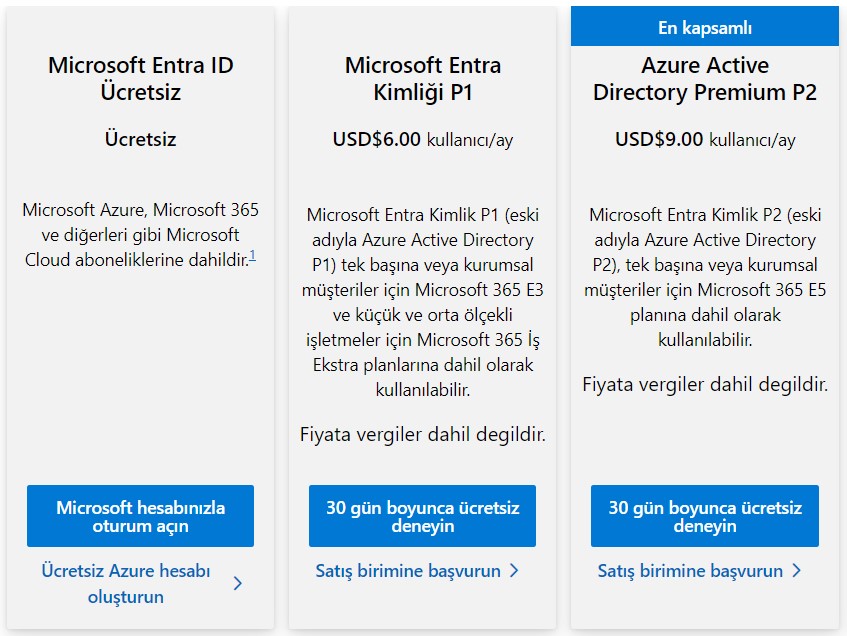
Microsoft Online business services such as Microsoft 365 or Microsoft Azure use Microsoft Entra ID for sign-in and for identity protection. When you subscribe to any of these services, you get access to the Microsoft Entra ID Free tier automatically and at no cost. You can use the Microsoft Entra admin center or the Azure portal for management.
Microsoft Entra ID P1 or P2 licences are added on top of the Free tier to get access to advanced security and management features. Paid licences do not create a separate directory. They are added to the existing tenant.
✔ Microsoft Entra ID Free provides user and group management, on-premises directory synchronisation, basic reports, self-service password change for cloud users, and Single Sign-On to Azure, Microsoft 365 and thousands of SaaS applications. In the Free tier, MFA is applied only through security defaults and in the same way to all users. MFA policies that differ by user, application or location need Conditional Access, and this capability starts with the P1 licence. I cover the methods that can be used to enforce MFA separately in my article MFA Configuration and Enforcement Methods in Microsoft Entra ID.
✔ Microsoft Entra ID P1 adds secure access to both on-premises and cloud resources for hybrid users on top of the Free features. This tier includes Conditional Access, dynamic membership groups, self-service group management, usage rights for Microsoft Identity Manager (MIM), Microsoft Entra application proxy, and Self-Service Password Reset (SSPR) with password writeback for on-premises users. The P1 licence is included in the Microsoft 365 E3, Microsoft 365 Business Premium, Microsoft 365 F1/F3 and Enterprise Mobility + Security E3 plans.
✔ Microsoft Entra ID P2 adds Microsoft Entra ID Protection and Privileged Identity Management (PIM) on top of the P1 features. With ID Protection, you can configure risk-based Conditional Access policies that use the sign-in risk and user risk conditions. With PIM, you can provide Just-in-Time (JIT) and time-limited access to Microsoft Entra roles, Azure resource roles and PIM for Groups scenarios. The P2 licence is included in bundles such as Microsoft 365 E5, Enterprise Mobility + Security E5 and Microsoft Defender Suite.
✔ Microsoft Entra ID Governance is a separate licence for P1 and P2 customers that contains advanced identity governance capabilities. It covers scenarios such as entitlement management through access packages, advanced access reviews, Lifecycle Workflows and separation of duties. Customers who have P2 can add these capabilities on top of P2 with the Microsoft Entra ID Governance Step Up licence.
✔ Microsoft Entra Suite combines several components of the product family in a single bundle. It includes Microsoft Entra Private Access, Microsoft Entra Internet Access, Microsoft Entra ID Protection, Microsoft Entra ID Governance and the Microsoft Entra Verified ID Premium components, including Face Check. It is intended for organisations that want to apply the Zero Trust architecture at both the identity layer and the network access layer. Its prerequisite is P1 or a Microsoft 365 plan that includes P1.
✔ Microsoft Entra Workload ID Premium is a standalone licence that provides Conditional Access, access reviews and ID Protection capabilities for service principals and applications. It is charged monthly per workload identity and is not included in any Microsoft 365 plan, EM+S bundle or Microsoft Entra Suite.
✔ Microsoft Entra External ID is used for Customer Identity and Access Management (CIAM) scenarios. External ID is billed with the Monthly Active Users (MAU) model, and the first 50,000 MAU are free.
Microsoft 365 E7, which was announced on 9 March 2026 and became generally available on 1 May 2026, brings Microsoft 365 E5, Microsoft 365 Copilot, Microsoft Agent 365 and Microsoft Entra Suite together under a single SKU with the name Frontier Suite. For now, E7 is the Microsoft 365 plan that includes the full scope of Microsoft Entra Suite.
On the CIAM side, the older product Azure AD B2C was closed to new customers on 1 May 2025. For existing customers who created a B2C tenant before this date, Microsoft commits to continuing support until at least May 2030. The B2C Premium P2 tier was retired for all customers on 15 March 2026, and existing P2 tenants were moved to the P1 tier automatically. With this change, the ID Protection capabilities also became unavailable in B2C tenants.
Azure AD B2C is closed to new customers and does not receive new features. New CIAM projects must be planned on
Microsoft Entra External ID.
For the current pricing options of these licences, see the Microsoft Entra Plans and Pricing page.
Microsoft Entra ID Authentication Methods
The first decision to make in a hybrid identity architecture is where the user's password is validated. This decision directly determines the point at which authentication takes place, which components become a single point of failure, and how far capabilities such as Microsoft Entra ID Protection and Conditional Access can be used.
It is easier to think of the methods in 2 main categories. The first category is the managed authentication model. In this model, Microsoft Entra ID handles the sign-in request, and cloud-only, Password Hash Synchronization (PHS) and Pass-through Authentication (PTA) belong to this category. The second category is the federated authentication model. In this model, Microsoft Entra ID hands the validation over to an external, trusted system such as Active Directory Federation Services (AD FS) or a third-party identity provider.
The authentication method is not set for the whole tenant. It is set separately for each verified domain. A domain is either managed or federated. In a federated domain, all sign-in requests are redirected to the federation service, so Microsoft Entra ID does not validate the password. For this reason, PHS, PTA and federated authentication cannot work as the primary method for the same domain at the same time.
Where is the password validated? (Decided per domain)
│
├── Managed Domain
│   ├── Cloud-Only ....... Microsoft Entra ID
│   ├── PHS .............. Microsoft Entra ID (with the synchronised hash)
│   └── PTA .............. On-Premises Domain Controller (through the agent)
│
└── Federated Domain
    └── AD FS or third-party identity provider

Complementary SSO layer .... Seamless SSO (with PHS or PTA), PRT
Passwordless credentials ... CBA, Windows Hello for Business, FIDO2, Passkey
Seamless SSO does not replace these primary methods. It is a complementary layer that adds a transparent sign-in experience with Kerberos for users inside the corporate network. Certificate-based authentication and methods such as Windows Hello for Business, FIDO2 and passkeys are credential types that work independently of the password validation path. I cover these 2 topics in separate sections after the primary methods.
PHS does not depend on the on-premises infrastructure at the time of authentication, so it is the option that Microsoft recommends by default. In environments that use PTA or federated authentication, PHS can also be kept enabled and positioned as a backup. The switch to this backup is not automatic. When an outage occurs on-premises, the sign-in method must be changed to PHS manually in Microsoft Entra Connect.
For the move from federation to managed authentication, Microsoft offers the Staged Rollout capability for a gradual migration. With Staged Rollout, selected groups are moved to PHS or PTA before the whole domain is converted, so the migration can be tested in a controlled way. A group can contain a maximum of 200 members at the time it is first added to Staged Rollout. After the group is added, new users can be added directly to it. When the migration is complete and the domain is converted to managed, the Staged Rollout configuration must be turned off.
Staged Rollout does not support nested group and dynamic membership group memberships. Users must be direct members of the group.
1- Cloud-Only Authentication
In the cloud-only model, users are created directly in Microsoft Entra ID and are not synchronised from on-premises Active Directory. It is the simplest identity architecture for organisations that have no Active Directory infrastructure, and it removes the need for a synchronisation component such as Microsoft Entra Connect Sync or Cloud Sync.
In this model, the password policy is managed directly by Microsoft Entra ID. The password length and complexity rules cannot be customised. The password must have a minimum of 8 and a maximum of 256 characters and must contain at least 3 of the uppercase letter, lowercase letter, number and symbol groups. Password expiry depends on the date the tenant was created. In tenants created in 2021 or later, passwords do not expire by default, and in older tenants the default value is 90 days. This value can be viewed and changed at domain level. To make the password of a single user never expire, the DisablePasswordExpiration policy is assigned to the user.
Connect-MgGraph -Scopes "Domain.ReadWrite.All","User.ReadWrite.All"

# View the current password expiry settings per domain
Get-MgDomain | Select-Object Id, PasswordValidityPeriodInDays, PasswordNotificationWindowInDays

# Set the password for the domain to never expire
Update-MgDomain -DomainId "firatboyan.com" -PasswordValidityPeriodInDays 2147483647

# Turn off password expiry for a single user
Update-MgUser -UserId "firat.boyan@firatboyan.com" -PasswordPolicies DisablePasswordExpiration
The commands run with the Microsoft Graph PowerShell SDK. The domain setting requires the Domain Name Administrator role, and the user setting requires at least the User Administrator role.
Update-MgDomain changes the password expiry of all cloud-only users in the domain. Record the current value before you apply it in a production environment.
Because authentication takes place completely in the cloud, capabilities such as Conditional Access, Microsoft Entra ID Protection, Multi-Factor Authentication (MFA), Self-Service Password Reset and passwordless can be used without any hybrid component.
2- Password Hash Synchronization (PHS)
PHS is the most widely used method in hybrid identity architectures and the one that Microsoft recommends by default. In this model, the password hashes in on-premises Active Directory go through an additional transformation and are then synchronised to Microsoft Entra ID. Microsoft Entra Connect does not send the MD4 hash value in Active Directory directly. It combines this value with a per-user salt, processes it with 1,000 iterations of PBKDF2-HMAC-SHA256 and sends only the result of this operation to the cloud. The original MD4 hash value does not reach Microsoft Entra ID at any stage. Password synchronisation runs approximately every 2 minutes, independently of the directory synchronisation cycle.
The biggest advantage of PHS is that it does not depend on the on-premises infrastructure at the time of authentication. Users continue to sign in to cloud services even if the domain controllers or the WAN connection are unavailable. In addition, for hybrid users, the leaked credentials detection in Microsoft Entra ID Protection works only when PHS is enabled. For cloud-only users, this detection needs no additional configuration.
3- Pass-through Authentication (PTA)
In the PTA model, Microsoft Entra ID forwards the password validation request to on-premises Active Directory, and the validation takes place on a domain controller. This flow runs through PTA Authentication Agent components deployed inside the corporate network. The agents make outbound connections, so no inbound port needs to be opened. PTA is preferred in scenarios where sending password hash data to the cloud is not accepted for compliance or company policy reasons. Another result of this model is that on-premises account policies, such as account lockout and logon hours, are applied at the time of sign-in.
For high availability, Microsoft recommends deploying at least 3 PTA Authentication Agents on different servers. When all agents or domain controllers are unreachable, users cannot sign in to cloud services. The agent servers are part of the password validation flow, so they must be protected as Tier 0 assets.
PTA cannot be configured with Microsoft Entra Cloud Sync and is not sufficient for Microsoft Entra Domain Services. Domain Services requires PHS to be enabled.
4- Federated Authentication
In the federated model, Microsoft Entra ID redirects the sign-in request to a federation provider. The most common example is Active Directory Federation Services, and third-party identity providers such as PingFederate work with the same model. The federation provider performs the validation and sends the result to Microsoft Entra ID as a SAML or WS-Federation token. This model is preferred in scenarios such as special authentication policies that are enforced on-premises, or third-party MFA solutions that cannot be integrated directly with Microsoft Entra ID. Smart card and certificate sign-in used to be the strongest reason for federation, and Microsoft Entra certificate-based authentication has removed this dependency.
The operational cost of the federated model is high. AD FS and Web Application Proxy servers need high availability, certificate renewal and regular patch management. When these servers are unreachable, all cloud sign-ins stop. PHS must be enabled separately for leaked credentials detection, and whether the MFA claim that comes from federation is accepted must be configured separately. For these reasons, Microsoft explicitly recommends that environments using AD FS move to PHS or PTA.
Seamless Single Sign-On and Primary Refresh Token
Seamless SSO lets users on domain-joined devices inside the corporate network sign in to Microsoft Entra ID transparently with Kerberos. It can be used together with PHS and PTA. In federated domains, the federation service itself provides this experience, so Seamless SSO does not apply.
For Windows 10 and later and Windows Server 2016 and later, Microsoft recommends the Primary Refresh Token (PRT)-based SSO mechanism instead of Seamless SSO. The PRT is obtained automatically when the user signs in on Microsoft Entra joined, Microsoft Entra hybrid joined and Microsoft Entra registered devices. For this reason, Seamless SSO is relevant today mainly for older or unregistered domain-joined clients that cannot obtain a PRT. For a more detailed review, see my article Entra ID Seamless SSO: The Kerberos-Based Authentication Layer.
When Seamless SSO is enabled, a computer account named AZUREADSSOACC is created in Active Directory. Microsoft Entra ID depends on the decryption key of this account to decrypt Kerberos tickets. On the client side, the address https://autologon.microsoftazuread-sso.com must be added to the intranet zone with a GPO.
The Kerberos decryption key of the AZUREADSSOACC account is not renewed automatically. Microsoft recommends a manual rollover at least every 30 days. The account must be protected as a Tier 0 asset.
Phishing-Resistant and Passwordless Credential Types
The methods I have covered so far are about where the password is validated. The methods in this section remove the password from the process. The user proves their identity directly to Microsoft Entra ID, regardless of whether the domain is managed or federated. As part of Zero Trust, Microsoft recommends the move to phishing-resistant methods as a priority step.
1- Microsoft Entra Certificate-Based Authentication
Microsoft Entra CBA lets users sign in directly to Microsoft Entra ID with X.509 certificates and removes the AD FS dependency that this previously required. CBA itself is a free feature. Enforcing it through Conditional Access with authentication strength requires a Microsoft Entra ID P1 licence, because Conditional Access requires it.
The configuration is based on 2 bindings. Username binding maps a field in the certificate to a user attribute in order to find the user. High-affinity binding, which maps unique fields such as SKI or SHA1PublicKey to the certificateUserIds value, is more secure and is recommended. Low-affinity binding, which maps reusable fields such as PrincipalName to the userPrincipalName value, is weaker. Authentication binding determines whether the authentication counts as single-factor or multifactor. The default is single-factor. Specific certificates can be defined as multifactor according to the issuer or policy OID field of the certificate.
At sign-in, the user selects their certificate and Microsoft Entra ID matches it to the user account. For this, the CAs that issue the certificates must be defined as trusted in the tenant. CBA is one of the phishing-resistant methods, together with FIDO2 security keys and Windows Hello for Business.
If no CRL is defined for the CA, no revocation check is performed and revoked certificates are not blocked. If a CRL is defined but cannot be reached, authentication fails.
2- Passwordless Authentication
Microsoft Entra ID supports several methods that remove the password completely. The main ones are Windows Hello for Business, Platform Credential for macOS, FIDO2 security keys, passkeys (FIDO2) and Microsoft Authenticator passwordless phone sign-in. Key-based methods use a public/private key pair instead of a password. The private key stays in secure hardware, such as the TPM of the device, the Windows Hello container or a security key, and does not leave it. Microsoft Entra ID stores only the public key, so no shared secret that could be stolen travels over the network.
There is an important distinction here. The methods that Microsoft counts as phishing-resistant are Windows Hello for Business, Platform Credential, FIDO2 security keys, passkeys (FIDO2) and certificate-based authentication. Passkeys in Microsoft Authenticator are also in this group. Microsoft Authenticator passwordless phone sign-in is passwordless, but it is not in the phishing-resistant category.
Passkeys can be device-bound or synced. The passkey profiles in the Authentication methods policy determine which user group can use which type. The Microsoft Entra passkeys on Windows feature, which became generally available in 2026, makes it possible to create a device-bound passkey in the Windows Hello container on Windows devices that are not Microsoft Entra joined or registered, and to use it for phishing-resistant sign-in. This passkey is not used to sign in to Windows on the device itself and does not replace Windows Hello for Business.
With GA, the Windows Hello AAGUIDs no longer need to be added to the allow list separately. Users in scope of a passkey profile that is device-bound and does not enforce attestation can use this feature by default.
All of these methods are enabled with the Authentication methods policy and can be enforced with the authentication strength capability of Conditional Access. A Temporary Access Pass can be used so that new users register their first passwordless credential without ever using a password.
What Are the Features of Microsoft Entra ID?
After you choose your Microsoft Entra ID licence, you get access to some or all of the features in the table below.
|
Feature |
Description |
|
Application Management |
You manage your cloud and on-premises applications with Microsoft Entra application proxy, Single Sign-On (SSO), the My Apps portal and SaaS application integrations. The SAML, OAuth 2.0 and OpenID Connect protocols are supported. |
|
Authentication |
You manage Self-Service Password Reset (SSPR), Multi-Factor Authentication (MFA), Password Protection with its custom banned password list, Smart Lockout, the Authentication methods policy, and passwordless methods such as Windows Hello for Business, Microsoft Authenticator and FIDO2. |
|
Microsoft Identity Platform |
You build applications that sign in with Microsoft identities and get access tokens, refresh tokens and ID tokens to call Microsoft Graph, other Microsoft APIs or custom APIs. Flows such as OAuth 2.0 authorization code with PKCE, client credentials, device code and on-behalf-of are supported. |
|
Business-to-Business (B2B) Collaboration |
You manage your guest users and external partners while you keep control over your own corporate data. B2B collaboration is part of Microsoft Entra External ID. |
|
Microsoft Entra External ID |
It provides a Customer Identity and Access Management (CIAM) solution for your customer-facing applications. You can customise the user sign-up, sign-in and profile management flows. It supports integration with social identity providers such as Google and Facebook. It is the successor to Azure AD B2C. |
|
Conditional Access |
You manage access to your resources with policies that evaluate user, device, location, application, sign-in risk and user risk signals. Grant controls such as MFA, authentication strength, compliant device and Microsoft Entra hybrid joined device requirements are available, together with session controls such as app-enforced restrictions, sign-in frequency and customised continuous access evaluation. |
|
Device Management |
You manage how your devices access corporate data through the Microsoft Entra joined, Microsoft Entra hybrid joined and Microsoft Entra registered models. With Microsoft Intune integration, you can enforce device compliance through Conditional Access. |
|
Microsoft Entra Domain Services |
You join your Azure VMs to a managed domain without deploying domain controllers, and you use traditional AD services such as Group Policy, LDAP and Kerberos/NTLM. Users and groups are synchronised one way from Microsoft Entra ID to the managed domain. PHS must be enabled for hybrid users to sign in to this domain. |
|
Enterprise Users |
You automate licence assignments with group-based licensing, manage application access, and configure Role-Based Access Control (RBAC) with groups and administrator roles. |
|
Hybrid Identity |
You use Microsoft Entra Connect Sync, Microsoft Entra Cloud Sync and Microsoft Entra Connect Health to provide a single user identity across all resources, regardless of location. |
|
Microsoft Entra ID Governance |
You govern access for employees, partners, suppliers, services and applications with entitlement management based on access packages, access reviews, Lifecycle Workflows and separation of duties capabilities. |
|
Microsoft Entra ID Protection |
You detect the risk signals that affect your identities with machine learning, in real time and offline, evaluate sign-in risk and user risk, configure risk-based Conditional Access policies and apply automatic remediation actions. |
|
Managed Identities for Azure Resources |
You give your Azure resources an automatically managed identity that can access services supporting Microsoft Entra authentication without managing secrets. There are 2 types, system-assigned and user-assigned. It is used with services such as Azure Key Vault, Azure Storage and Azure SQL Database. |
|
Privileged Identity Management (PIM) |
You manage, audit and monitor access to highly privileged roles with the Just-in-Time (JIT) model. It provides eligible assignment, active assignment, time-bound assignment, approval workflow and access review capabilities. It covers Microsoft Entra roles, Azure resource roles and PIM for Groups scenarios. |
|
Monitoring and Health |
You monitor the security and usage patterns in your environment through sign-in logs, audit logs, provisioning logs and Microsoft Entra Connect Health. You can send the logs to Microsoft Sentinel and correlate them with Microsoft Defender XDR. |
|
Workload Identities |
You manage non-human identities such as service principals and managed identities. With the Microsoft Entra Workload ID Premium licence, Conditional Access, ID Protection and access reviews can also be applied to these identities. |
Hybrid Identity Architecture
The hybrid identity architecture is based on 2 synchronisation tools that connect on-premises Active Directory and Microsoft Entra ID. Both let users access on-premises and cloud resources with the same identity, but their architectures and scopes are different.
1- Microsoft Entra Connect Sync
Microsoft Entra Connect Sync, formerly Azure AD Connect, is the classic tool that is installed on an on-premises server and has extensive synchronisation capabilities. The synchronisation engine runs on-premises, so it offers high flexibility in advanced filtering, attribute transformation and custom sync rule scenarios. It supports a wide feature set, such as PHS, PTA, federated authentication configuration, password writeback, device writeback and the device synchronisation required for Microsoft Entra hybrid join. I cover the server prerequisites, the TLS 1.2 configuration and the endpoints that must be allowed on the firewall in my article Microsoft Entra ID Connect Installation Part 1, and I go through the User sign-in, Domain and OU Filtering, Source Anchor and Optional Features steps of the wizard step by step in my Part 2 article.
As part of the security hardening in its back-end services, Microsoft introduced a minimum version requirement for Connect Sync. As of 30 September 2026, all synchronisation services stop working on installations older than version 2.5.79.0, and synchronisation does not resume until the server is upgraded to a current version. Microsoft does not consider it enough to meet only the minimum version and recommends moving to the latest version. The installation file can now be downloaded only from the Microsoft Entra admin center, and .NET Framework 4.7.2 and TLS 1.2 are required as prerequisites. I shared the details of the announcement in the news item 2026 Upgrade, Hard Match Hardening and Cloud Sync Migration Announcement for Microsoft Entra Connect Sync.
Auto-upgrade might not complete successfully in every environment. Verify the installed version directly on the Connect Sync server.
2- Microsoft Entra Cloud Sync
Microsoft Entra Cloud Sync runs only a lightweight provisioning agent on-premises and keeps the synchronisation configuration in the cloud. The main advantages of this architecture are high availability with multiple agents, synchronisation of disconnected multi-forest environments to a single tenant, and central management from the cloud. Cloud Sync supports PHS, password writeback, Exchange hybrid writeback and the Group Provisioning to AD scenario. Password writeback requires provisioning agent version 1.1.977.0 or later.
The scope of Cloud Sync is not as wide as that of Connect Sync. It does not synchronise device objects, so the Microsoft Entra hybrid join scenario requires Connect Sync. In my article How Clients Register with Entra ID Through the SCP During Hybrid Join, I examine how a domain-joined client in this scenario reads the tenant information from the Service Connection Point object in Active Directory and how it registers with Microsoft Entra ID. PTA and federated authentication setup are also not supported with Cloud Sync. Its attribute filtering and transformation capabilities are limited compared to Connect Sync. Microsoft positions Cloud Sync as the preferred option in new hybrid identity deployments, and especially in multi-forest scenarios. Connect Sync and Cloud Sync can run in parallel in the same tenant, but the same set of users must not be synchronised by both tools.
Deployments that require PTA or Microsoft Entra hybrid join must use Microsoft Entra Connect Sync.
Technical Concepts
To understand Microsoft Entra ID better, I recommend that you review the technical concepts below. You will always see these concepts in English, so I deliberately did not translate them into Turkish.
|
Technical Concept |
Description |
|
Identity |
It is any entity that can be authenticated. It can be a user with a username and password, or an application or service that proves its identity with a secret or a certificate. |
|
Account |
It is an identity that has data associated with it. There is no account without an identity. |
|
Microsoft Entra Account |
It is an identity created through Microsoft Entra ID or a Microsoft cloud service such as Microsoft 365. It is stored in Microsoft Entra ID and used by the cloud service subscriptions of your organisation. It is also called a work or school account. |
|
Microsoft Account (MSA) |
These are personal accounts that give access to consumer-oriented Microsoft products such as Outlook.com, OneDrive, Xbox or Microsoft 365 Family. They are stored in Microsoft's consumer identity system and must not be confused with a work or school account. |
|
Microsoft Entra Tenant |
It is a dedicated, isolated and trusted instance of Microsoft Entra ID for an organisation. It is created automatically when your organisation signs up for a Microsoft cloud service subscription. Microsoft Azure, Microsoft Intune and Microsoft 365 subscriptions are associated with this tenant. |
|
Tenant ID |
It is the unique identifier of the Microsoft Entra tenant. It is in GUID format and is used as part of the authority URL in token requests to the Microsoft identity platform. |
|
Microsoft Entra Directory |
It is the data store of the Microsoft Entra tenant. It contains the users, groups, applications, devices and other identity objects of the tenant. |
|
Custom Domain |
Every new tenant comes with an initial domain in the format tenantname.onmicrosoft.com. In addition, you can add the domains that your organisation owns to the tenant by verifying them through DNS. This produces User Principal Name (UPN) values that your users are familiar with, such as firat.boyan@firatboyan.com. |
|
Application Object |
It is the globally unique definition of an application, kept in the home tenant where the application is registered. It holds the credentials of the application, its redirect URIs and the API permissions it requests. A service principal is created from this definition in every tenant where the application is used. |
|
Service Principal |
It is the local representation of an application object in a specific tenant. It gives the application an identity within that tenant and holds the access permissions of the application to the resources in that tenant. |
|
Managed Identity |
It is a type of service principal for Azure resources that is managed automatically and removes the need to manage secret values manually. The lifecycle of the system-assigned type is tied to the resource it belongs to. The user-assigned type has an independent lifecycle and can be shared by multiple resources. |
|
Single Tenant Application |
It is an application registration where only the accounts in the tenant in which it is registered can sign in. The Supported account types setting of the application is limited to a single tenant. |
|
Multi-Tenant Application |
It is an application registration where the accounts in any Microsoft Entra tenant can sign in. It is generally used by SaaS providers. The service principal is created in each target tenant through the consent process. |
|
Microsoft Identity Platform |
It is the developer platform built on Microsoft Entra ID and based on the OAuth 2.0 and OpenID Connect standards. The Microsoft Authentication Library (MSAL), Microsoft Graph SDK and Microsoft Identity Web libraries are parts of this platform. |
|
Access Token |
It is the short-lived token used to access a protected resource. It is generally in JWT format, its default lifetime is assigned randomly between 60 and 90 minutes, and it is specific to the target resource through the audience claim that identifies that resource. |
|
Refresh Token |
It is the long-lived token used to renew expired access tokens without authenticating the user again. By default, it becomes invalid when it is not used for 90 days. A password change, the account being disabled or the sessions being revoked by an administrator invalidates the refresh token. |
|
ID Token |
It is a token in JWT format that is produced by the OpenID Connect protocol and tells the client application who the user is. It is not used for authorisation in API calls. |
|
Primary Refresh Token (PRT) |
It is a special, device-bound token type that provides Single Sign-On on Microsoft Entra joined, Microsoft Entra hybrid joined and Microsoft Entra registered devices. It is valid for 14 days and is renewed continuously as long as the device is used. |
|
Azure Subscription |
It is the billing and management boundary for Azure services. An organisation can have multiple subscriptions. Each subscription trusts a single Microsoft Entra tenant, and a tenant can serve multiple subscriptions. |
|
Owner (Azure RBAC) |
It is the Azure Role-Based Access Control role that grants permission to manage all Azure resources, including access management. It can be assigned at management group, subscription, resource group or single resource scope. |
|
Classic Subscription Administrator Roles |
This is the old authorisation model that consists of the Account Administrator, Service Administrator and Co-Administrator roles. These roles were retired on 31 August 2024. From December 2025, users who still had the Service Administrator or Co-Administrator role were automatically assigned the Owner role at subscription scope, and the Classic administrators tab was removed from the Azure portal in May 2026. Access management is now done completely with Azure RBAC. |
|
Microsoft Entra Global Administrator |
It is the most privileged Microsoft Entra role and is assigned automatically to the person who creates the tenant. Microsoft recommends keeping the number of accounts with this role below 5, making the assignments as eligible with PIM, protecting the accounts with phishing-resistant methods such as FIDO2 or Windows Hello for Business, and also keeping emergency access accounts. |
Microsoft Entra ID Management Tools
Microsoft Entra ID can be managed through web-based portals and through API-based and script-based interfaces. API-based access is the main choice in automation and Infrastructure-as-Code (IaC) approaches.
1- Microsoft Entra admin center
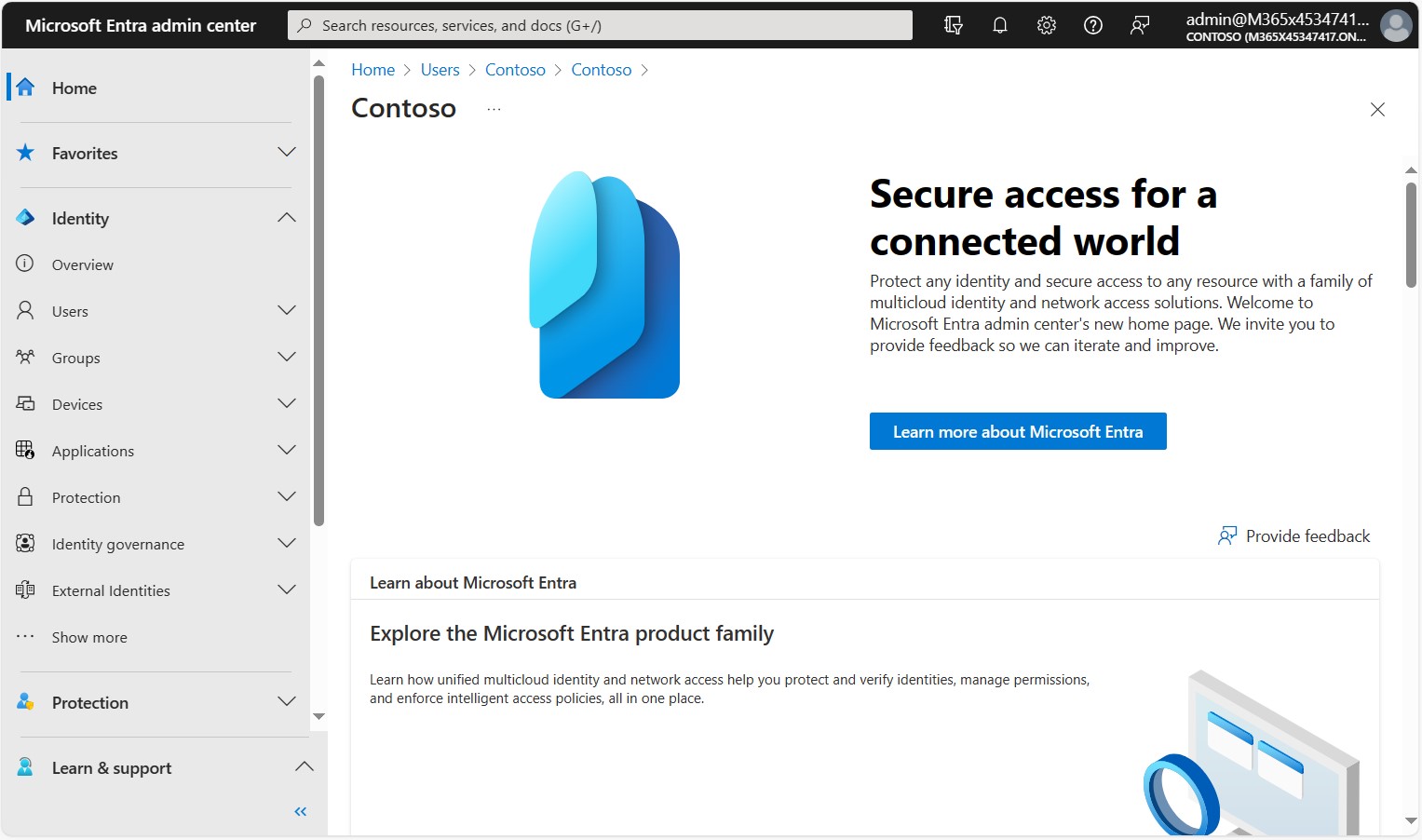
The Microsoft Entra admin center is the unified web portal for managing the Microsoft Entra product family, and Microsoft positions it as the primary management interface. Microsoft Entra ID can also be managed in the Azure portal, but the admin center is used for components such as Global Secure Access, ID Governance and Agent ID.
MFA is mandatory for sign-ins to the Azure portal, the Microsoft Entra admin center and the Intune admin center. Microsoft enforces this requirement independently of your Conditional Access policies.
2- Microsoft Graph API
Microsoft Graph is the unified REST API endpoint for Microsoft cloud services, including Microsoft 365 and Microsoft Entra ID. Users, groups, devices, applications, Conditional Access policies and many other Microsoft Entra objects are managed programmatically through this API. The old Azure AD Graph API has been retired, so all development must be done on Microsoft Graph.
3- PowerShell Modules
There are 2 current options for PowerShell. The Microsoft Graph PowerShell SDK is the module that covers the whole Microsoft Graph API, and it makes it possible to install only the submodules that are needed, such as Microsoft.Graph.Users and Microsoft.Graph.Groups. The Microsoft Entra PowerShell module is built on the Graph PowerShell SDK, focuses on Microsoft Entra management scenarios and stays close to the cmdlet naming of the AzureAD module. In a migration from the AzureAD module, it lets existing scripts be moved with fewer changes. Both modules can be used together in the same session.
# Microsoft Graph PowerShell SDK
Install-Module Microsoft.Graph -Scope CurrentUser
Connect-MgGraph -Scopes "User.Read.All"

# Microsoft Entra PowerShell
Install-Module Microsoft.Entra -Scope CurrentUser
Connect-Entra -Scopes "User.Read.All"
The MSOnline and AzureAD PowerShell modules have been retired and are no longer supported. Scripts that use these modules must be migrated to the Microsoft Graph PowerShell SDK or Microsoft Entra PowerShell.
4- Azure CLI
Microsoft Entra ID objects can also be managed with Azure CLI. The az ad command group uses Microsoft Graph in the background and provides the basic capabilities for user, group, service principal and application registration operations. In advanced scenarios such as Conditional Access, PIM or authentication methods, the Microsoft Graph PowerShell SDK or the Microsoft Graph API directly is a more comprehensive option.
Conclusion
Microsoft Entra ID brings components such as SSO, MFA, Conditional Access, ID Protection and PIM together in a single identity platform and provides a consistent access model for the cloud applications, unmanaged devices and external users that on-premises Active Directory cannot cover. From an architecture point of view, the most decisive choice is the authentication method. PHS is not affected by on-premises outages and makes leaked credentials detection possible, so it is the right starting point in most hybrid environments. The target is the phishing-resistant methods that remove the password completely.
On the synchronisation side, Cloud Sync is becoming the preferred option for new deployments, while scenarios such as PTA and Microsoft Entra hybrid join still require Connect Sync. In environments that use Connect Sync, I strongly recommend checking the 30 September 2026 minimum version requirement.
The product family has also grown beyond Microsoft Entra ID. With External ID, ID Governance, Verified ID, Workload ID, Private Access, Internet Access and Agent ID for AI agents, identity management now covers customer, partner, workload and agent identities as well as employees.
I hope you find it useful...
Feel free to share your thoughts and questions about this article in the comments below. Every contribution helps the content reach more people and makes for a more useful discussion.