In Exchange Server, each service such as OWA, ECP, EWS, OAB, MAPI over HTTP, ActiveSync and Outlook Anywhere runs as a separate virtual directory on IIS. The internal and external address values defined on each virtual directory determine which address the client uses to connect to these services. Outlook does not know these addresses one by one when it opens a profile. It first goes to the Autodiscover service, and Autodiscover returns the addresses written in the virtual directories to the client. For this reason, if the value written here is wrong, the client also goes to the wrong address.
Most of the connection problems that I see in the field come from this point. If the name in the URL is not in the certificate, Outlook shows a certificate warning. If the name does not resolve in DNS or points to the wrong IP address, the service becomes unreachable. If the nodes behind the same namespace present different addresses, the user sees different behaviour depending on which server the connection reaches. The same addresses are also used in the Classic Hybrid topology. The Free/Busy queries that Exchange Online sends to the on-premises side use the externally reachable Autodiscover and EWS addresses, and mailbox moves connect to the MRS Proxy endpoint under the EWS virtual directory.
When the Exchange installation is complete, these addresses are not ready for use. The internal URLs are created with the server's own FQDN, and the external access side is left unconfigured, as in OWA. In most environments the server FQDN is not in the public SSL certificate, and behind a load balancer it means a separate name for each node, so I reconfigure all services with a common namespace after the installation.
In this article, I first check the addresses, then configure them with a single command and verify the result. Certificate installation, the creation of DNS records and the publishing rules on the firewall are outside the scope of this article, and I assume that they are ready.
The same configuration can also be done in the Exchange admin center (EAC), but the settings are not gathered on a single screen. The service URLs are set on the Virtual directories tab under Servers, and the Outlook Anywhere hostname values are set on the Outlook Anywhere tab of the relevant server under Servers. The Autodiscover SCP address is not available in the EAC and is changed only with the Exchange Management Shell. Instead of repeating this operation in 3 separate places for each node, I do it in a single run with a PowerShell script.
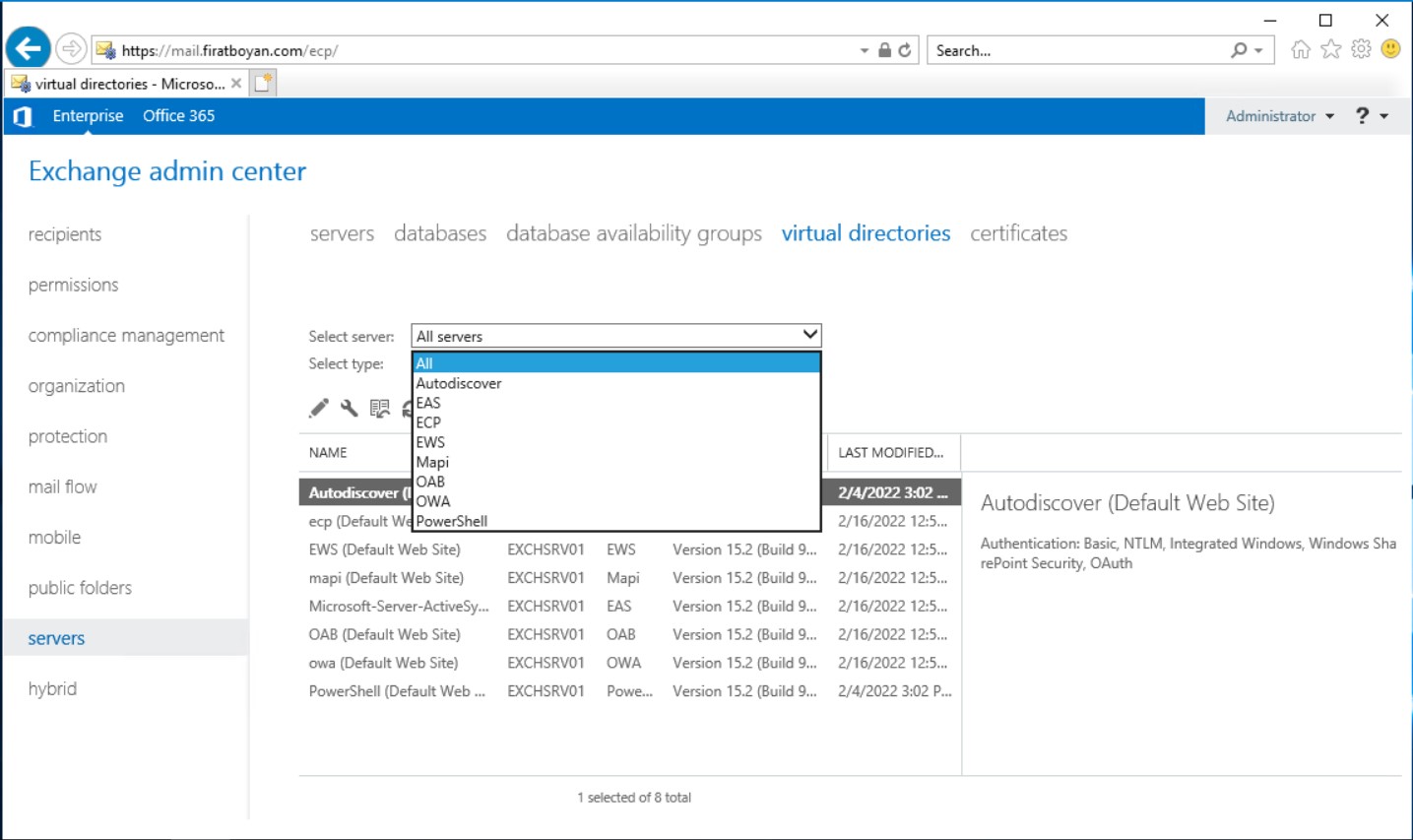
1- Internal URL and External URL Logic
The OWA, ECP, ActiveSync, EWS, OAB and MAPI virtual directories have 2 separate address fields. The Internal URL is the address given to clients inside the corporate network. The External URL is given to clients that connect over the Internet. Outlook Anywhere is outside this structure. It uses InternalHostname and ExternalHostname values instead of URLs. After installation, the internal URLs contain the server FQDN, as in the example https://exchsrv01.firatboyan.local/owa.
If you have configured split DNS on your internal DNS server, that is, if the name mail.firatboyan.com resolves to the internal IP address of the Exchange server internally and to the public IP address externally, you can define the internal and external addresses with the same name. This is also the common practice, because a single name is covered by a single certificate entry and the address does not change when the client changes network.
Autodiscover has a separate place in this structure. A domain-joined Outlook client learns the Autodiscover address from the Service Connection Point (SCP) object in Active Directory, not from the virtual directory. The address is stored in the serviceBindingInformation attribute of this object. In the Exchange Management Shell, the same value is displayed and changed under the name AutoDiscoverServiceInternalUri. The Internal URL and External URL fields of the Autodiscover virtual directory itself are not used in Exchange Server 2013 and later, so I do not change those fields in the steps below.
In environments that have more than 1 node and use a Database Availability Group (DAG), 2 concepts must be kept separate. The DAG protects the mailbox database copies. The namespace, together with DNS or the load balancer, determines which node the client connects to. For the client to continue with the same address when a node goes out of service, the nodes behind that namespace must present the same addresses, traffic must be directed to the healthy node, and the certificate must cover the name in use. This does not mean that all servers in the organisation carry the same values. In designs with more than 1 Active Directory site, site-specific SCP records can be used.
2- Preliminary Checklist
Before I change the addresses, I make sure that the items below are ready. If the change is made before the new names exist in the certificate and in DNS, clients receive the new address through Autodiscover and cannot reach it.
|
Check |
Expected State |
|
Permissions |
The account that performs the operation is a member of the Organization Management or Server Management role group. |
|
Execution environment |
The scripts are run on a server that has the Exchange Management Tools installed. |
|
Certificate |
The names mail.firatboyan.com and autodiscover.firatboyan.com are in the certificate (as a SAN entry or a wildcard), and the certificate is assigned to the IIS service. |
|
DNS |
Both names resolve to the internal IP address of the Exchange server or the load balancer in internal DNS, and to the public IP address in external DNS. |
The address change affects all clients that connect to the relevant server. If it is applied before the certificate and DNS records are ready, Outlook shows a certificate warning or cannot reach the services.
3- Checking the Current URLs
First, I look at the current state of the addresses with the GetExchangeURLs.ps1 script. Both scripts that I use in this article were written by Paul Cunningham for Exchange Server 2013 and 2016. I run them on Exchange Server 2019. The script loads the Exchange Management Shell components itself, so it can also be run from a normal PowerShell window.
.\GetExchangeURLs.ps1
Because the Server parameter is mandatory and accepts more than 1 value, the script asks for the server names one by one when it is run without parameters. You can query all nodes in your environment in a single run by typing the hostname of the first node in the Server[0]: field and the hostname of the second node in the Server[1]: field. My environment has 1 node, so I type EXCHSRV01 in the Server[0]: field, leave the Server[1]: field empty and press Enter.
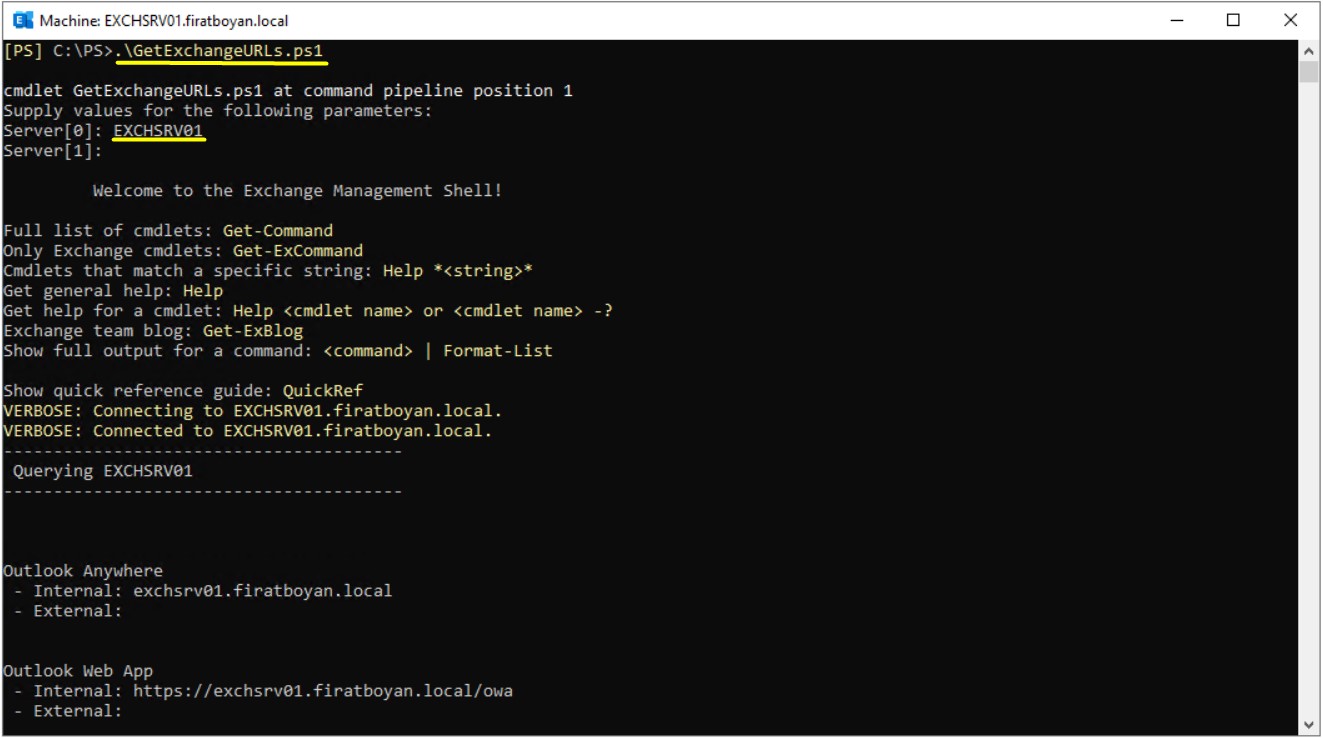
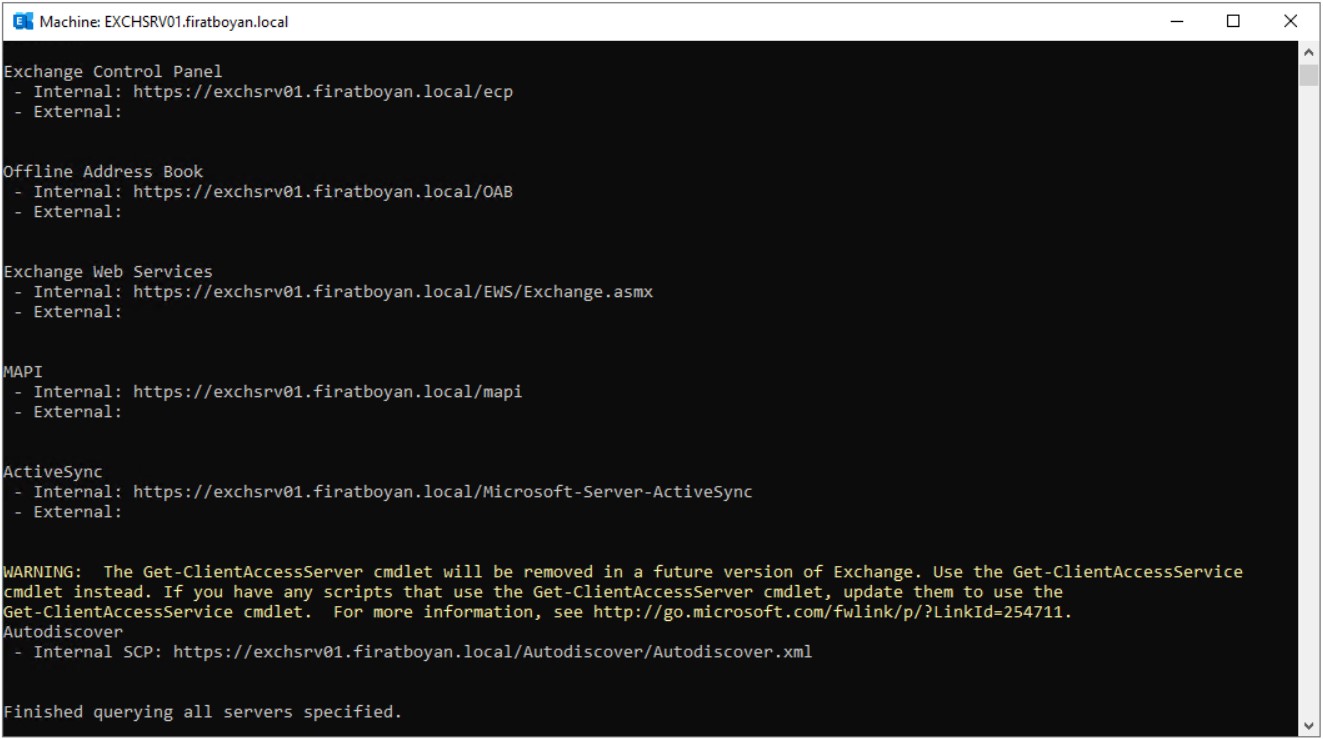
Checkpoint
In the output, I see that the Internal values contain the server FQDN.
Instead of the script, you can also check the addresses one by one with the commands below in the Exchange Management Shell. When the commands are run without the -Server parameter, they list all nodes in the organisation.
Get-OutlookAnywhere | Select Server,ExternalHostname,Internalhostname,ExternalClientsRequireSsl,InternalClientsRequireSsl

Get-OwaVirtualDirectory | ft identity,internalurl,externalurl -AutoSize

Get-MapiVirtualDirectory | fl identity,internalurl,externalurl,iisauthenticationmethods

Get-EcpVirtualDirectory | ft identity,internalurl,externalurl -AutoSize

Get-ActiveSyncVirtualDirectory | ft identity,internalurl,externalurl -AutoSize

Get-WebServicesVirtualDirectory | ft identity,internalurl,externalurl -AutoSize

Get-OabVirtualDirectory | ft identity,internalurl,externalurl -AutoSize

Get-ClientAccessService | fl identity,autodiscoverserviceinternaluri
I save the output of these commands before the change, because it is the record of the old values if I need to revert. GetExchangeURLs.ps1 shows only the hostname values for Outlook Anywhere and only the URLs for MAPI. To see the ExternalClientsRequireSsl, InternalClientsRequireSsl and IISAuthenticationMethods values that I need in the next step, the commands above must be run separately.
4- Configuring the URLs
For the configuration, I use the ConfigureExchangeURLs.ps1 script. The script writes the namespace that I provide to all services at the same time. It does not support designs that use a separate namespace for each service. It takes the following parameters.
|
Parameter |
Required |
Purpose |
-Server |
Yes |
The hostname of the server to configure. More than 1 node is written separated by commas. |
-InternalURL |
Yes |
The name used in the internal addresses. https:// is not written in front of it. |
-ExternalURL |
Yes |
The name used in the external addresses. If it is given as "", the External URLs are left empty. |
-AutodiscoverSCP |
No |
The name written to the SCP. If it is not given, the -InternalURL value is used. |
-InternalSSL, -ExternalSSL |
No |
The SSL requirement for Outlook Anywhere. If they are not given, both are written as $true. |
I apply the configuration with a single command, using the name mail.firatboyan.com for the internal and external addresses and the name autodiscover.firatboyan.com for the Autodiscover SCP. If your environment has more than 1 Exchange Server node, you can configure all of them in a single run by writing the hostnames separated by commas after the -Server parameter.
.\ConfigureExchangeURLs.ps1 -Server EXCHSRV01 -InternalURL mail.firatboyan.com -ExternalURL mail.firatboyan.com -AutodiscoverSCP autodiscover.firatboyan.com
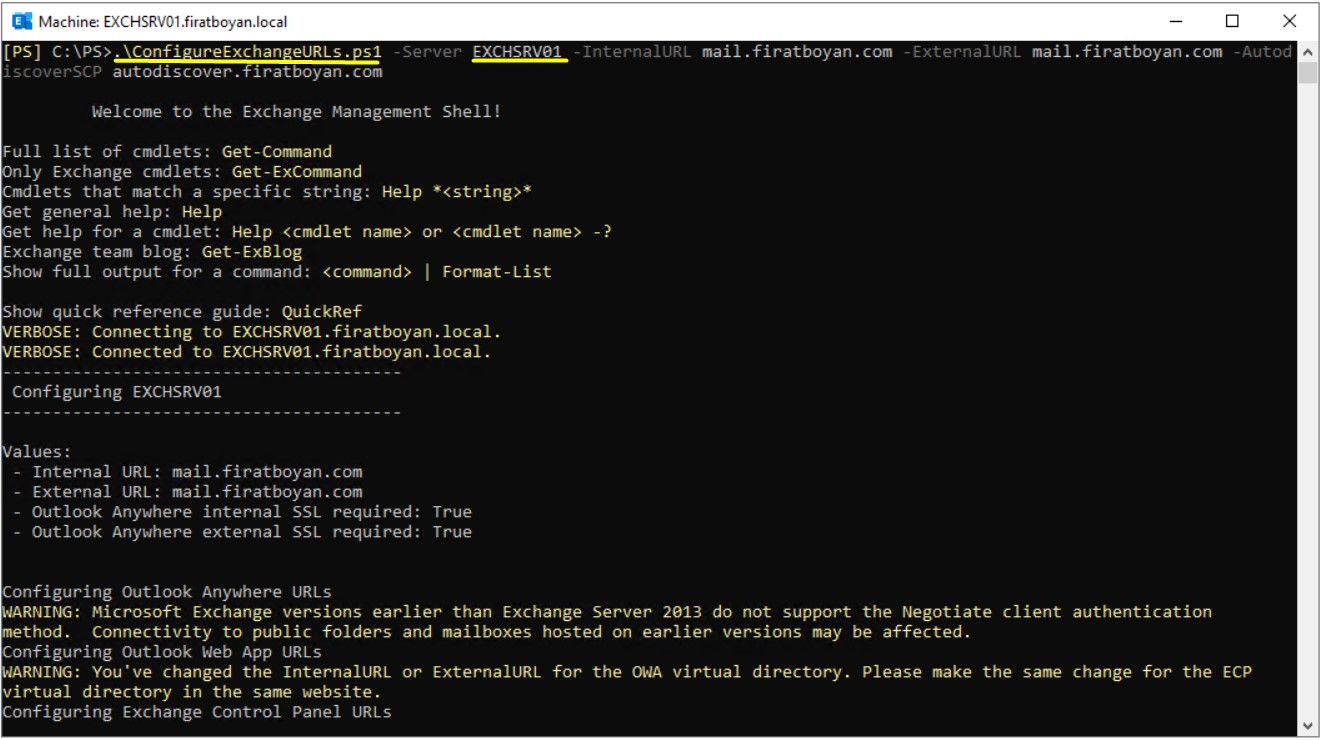
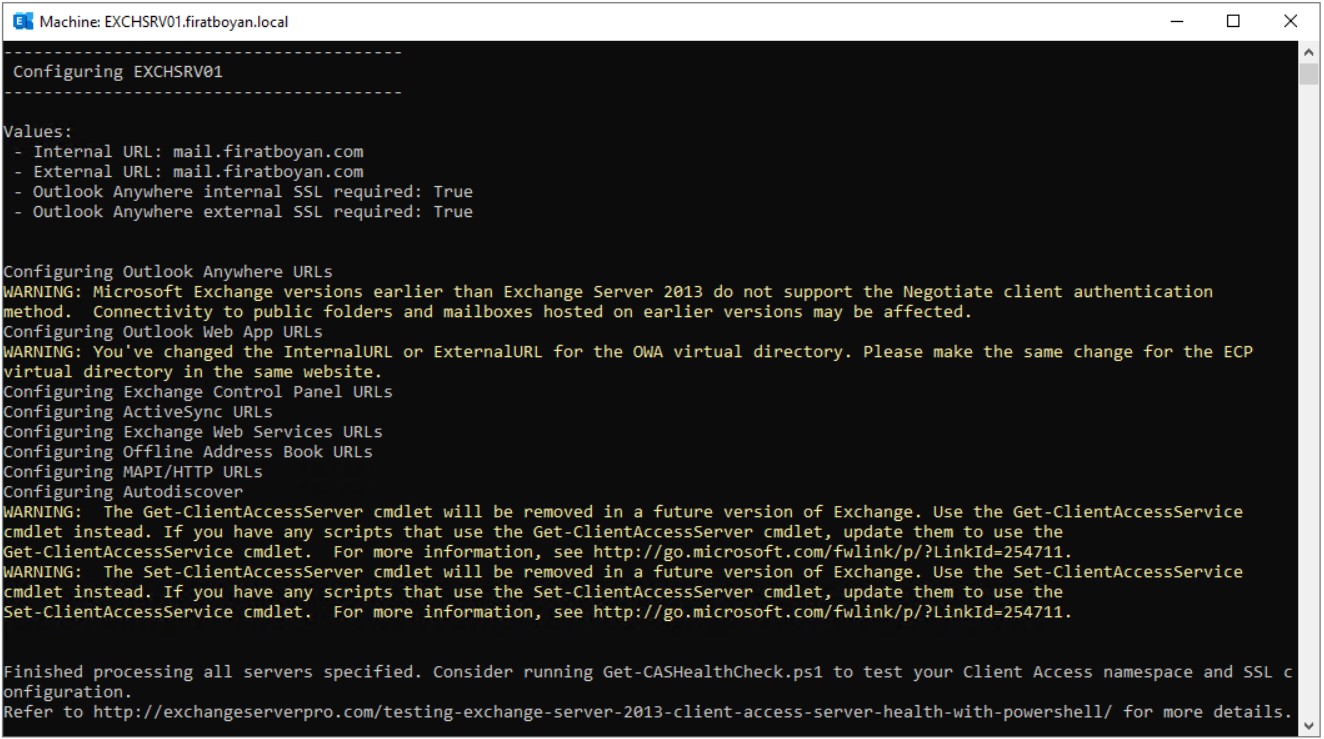
The values that the script writes to each service with this command are as follows.
|
Service |
Value Written (Internal and External) |
|
Outlook Anywhere |
mail.firatboyan.com (as a hostname) |
|
OWA |
https://mail.firatboyan.com/owa |
|
ECP |
https://mail.firatboyan.com/ecp |
|
ActiveSync |
https://mail.firatboyan.com/Microsoft-Server-ActiveSync |
|
EWS |
https://mail.firatboyan.com/EWS/Exchange.asmx |
|
OAB |
https://mail.firatboyan.com/OAB |
|
MAPI over HTTP |
https://mail.firatboyan.com/mapi |
|
Autodiscover SCP |
https://autodiscover.firatboyan.com/Autodiscover/Autodiscover.xml (Internal only) |
The setting that the script changes apart from the addresses is on the Outlook Anywhere side. It writes the InternalClientsRequireSsl and ExternalClientsRequireSsl values as $true unless the parameters are given. It keeps the external authentication method of Outlook Anywhere at its current value. The PowerShell virtual directory is outside the scope of the script.
There is a difference to note in the MAPI virtual directory. The Microsoft documentation for Set-MapiVirtualDirectory requires the authentication methods to be given in the same call with the -IISAuthenticationMethods parameter when InternalUrl or ExternalUrl is changed. The script writes only the URLs without this parameter. For this reason, after the script I write the MAPI URLs once more in the documented form, together with the current authentication methods that I recorded in section 3. The command below reads the current methods of the MAPI virtual directory on the server and passes them back in the same call as the URLs. If there is more than 1 node, the command must be run for each node.
Get-MapiVirtualDirectory -Server EXCHSRV01 | ForEach-Object { Set-MapiVirtualDirectory -Identity $_.Identity -InternalUrl https://mail.firatboyan.com/mapi -ExternalUrl https://mail.firatboyan.com/mapi -IISAuthenticationMethods $_.IISAuthenticationMethods }
When it writes the SCP value, the script also uses the Set-ClientAccessServer cmdlet, which belongs to the period in which the script was written. In current versions, Microsoft recommends the Set-ClientAccessService cmdlet instead. If you configure the SCP manually, use the current one.
5- Verifying the Configuration
I run the GetExchangeURLs.ps1 script again to check the changes.
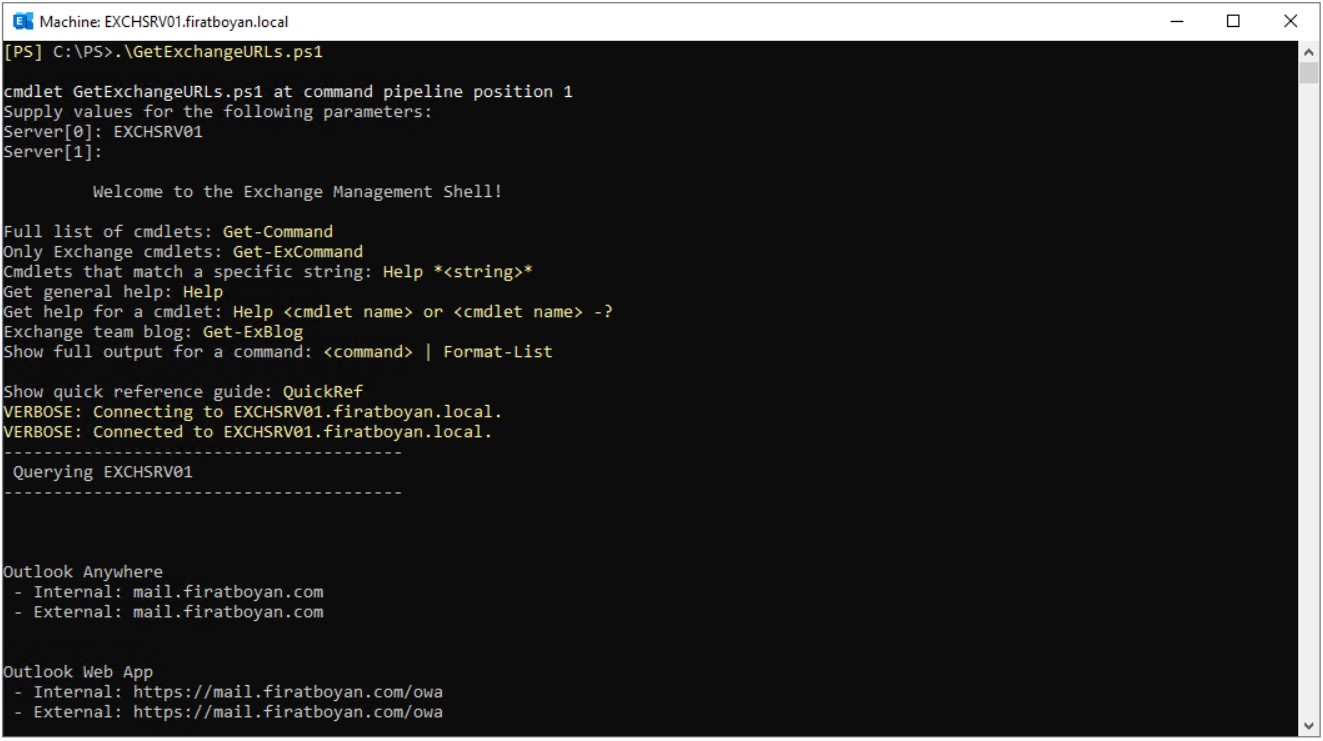
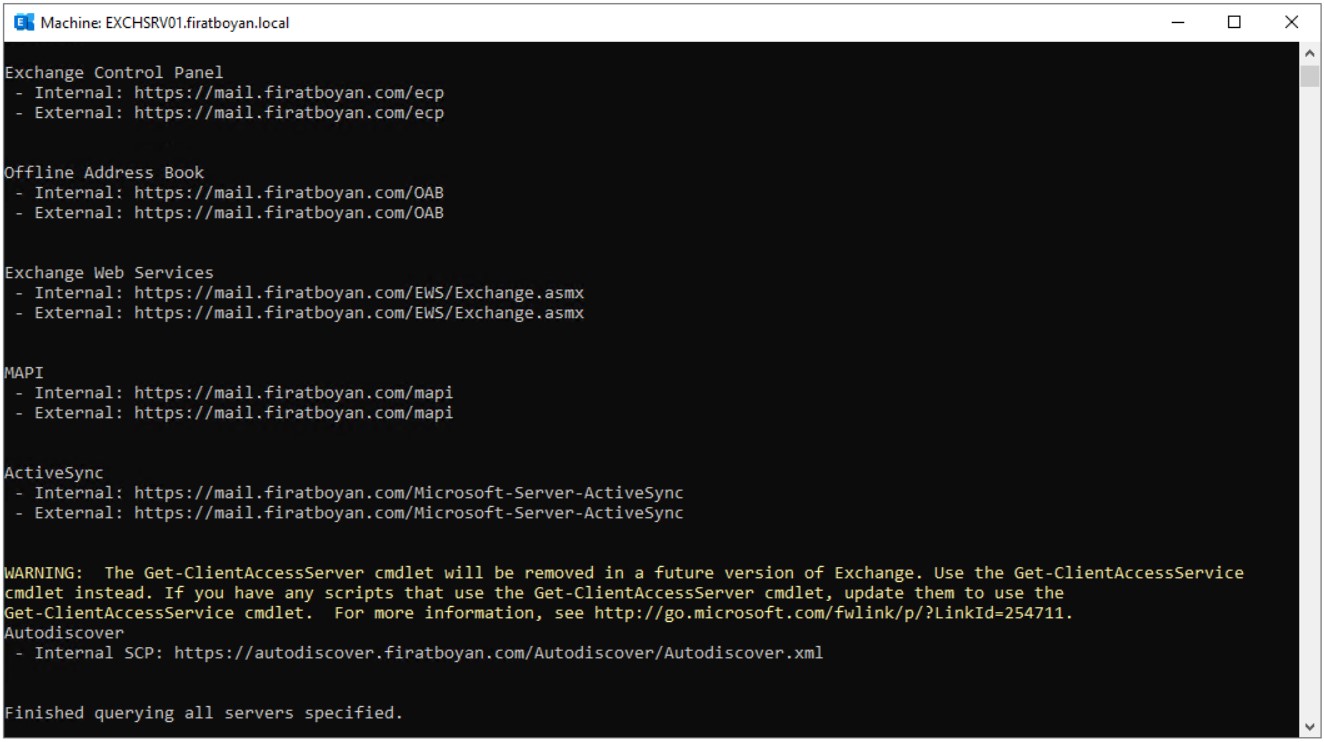
Checkpoint
I see that the Internal and External values of all services contain the name mail.firatboyan.com, and that the Autodiscover SCP value contains the name autodiscover.firatboyan.com.
Next, I check the URLs and the authentication methods of the MAPI virtual directory together.
Get-MapiVirtualDirectory | fl Server,InternalUrl,ExternalUrl,IISAuthenticationMethods
I check 2 things in the output. The URLs must be https://mail.firatboyan.com/mapi, and the IISAuthenticationMethods field must be the same as the values that I recorded in section 3. The default values of this field are the Ntlm, OAuth and Negotiate methods. If only the URLs differ from what I expect, I run the MAPI command in section 4 again. If the authentication methods differ from the values that I recorded in section 3, I apply the methods that I recorded for the relevant virtual directory together with the target URLs, giving them explicitly to the -IISAuthenticationMethods parameter.
If you configured more than 1 node behind the same namespace, you must see the same values for each of these nodes in the output. If the old FQDN remains on a single node, clients that reach that server receive a different address.
If I need to revert, I use the output that I saved in section 3. When I run the script again with the old names, I also give the old values that I recorded to the -InternalSSL and -ExternalSSL parameters, otherwise the script writes these 2 values as $true again. If the external address fields were empty at the start, -ExternalURL "" is used.
Because the script writes a single name to all services, this method is not enough in an environment where the services had different names at the start. In that case, the old values must be written back one by one with each service's own Set- cmdlet.
This article covered the values that the virtual directory addresses have after installation in Exchange Server 2019, the difference between the Internal URL, the External URL, the Outlook Anywhere hostname values and the Autodiscover SCP, and what must be ready on the certificate and DNS side before the change. I then checked and saved the current values, moved all services to the common namespace with a single command, rewrote the MAPI URLs together with the authentication methods and verified the result.
I hope you find it useful...
Feel free to share your thoughts and questions about this article in the comments below. Every contribution helps the content reach more people and makes for a more useful discussion.