When 2 devices that use IPv4 communicate, the IP address determines who the packet goes to, but the Ethernet frame that carries the packet over the cable finds its destination by MAC address. Even if the sending device knows the IP address of the destination, it cannot build the frame without knowing the MAC address of the device that it will deliver the frame to. ARP (Address Resolution Protocol) is the protocol that finds the MAC address of a known IPv4 address, and it is defined in RFC 826.
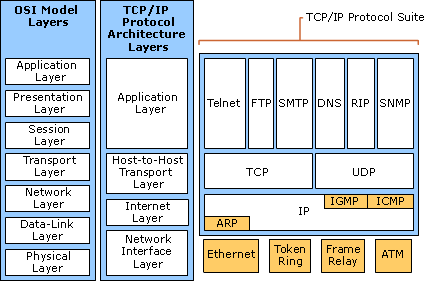
An ARP message is not an IP packet. It carries no IP header and is sent directly inside an Ethernet frame with the EtherType value 0x0806. For this reason, routers do not forward an ARP message to another network, and ARP traffic stays inside the broadcast domain where it was sent. ARP is not used on the IPv6 side, where Neighbor Discovery Protocol (NDP) does the same job.
If a device does not have the MAC address of a destination whose IP address is known and which is on its own network, it sends an ARP request to the network as a broadcast. The device that owns that IP address answers as a unicast with an ARP reply that contains its own MAC address. The learned mapping is kept in the ARP table for a period of time, so a new broadcast is not generated for every packet that goes to the same destination. I examine the process step by step on an example network with no VLAN configured, showing how the request spreads across the whole system.
Structure of the ARP Message
Before moving on to the steps, 2 layers must be separated from each other. What travels across the network is an Ethernet frame, and the header of this frame contains the source MAC and the destination MAC. The ARP message is the payload carried inside this frame, and it has its own address fields. The address that makes the request go out as a broadcast is in the Ethernet header, while the IP address to be resolved is inside the ARP message.
|
Field |
Description |
|
Hardware Type |
Specifies the Layer 2 technology. The value is 1 for Ethernet. |
|
Protocol Type |
Specifies the Layer 3 protocol being resolved. The value is 0x0800 for IPv4. |
|
Hardware Address Length |
The length of the MAC address in bytes. It is 6 for Ethernet. |
|
Protocol Address Length |
The length of the IP address in bytes. It is 4 for IPv4. |
|
Opcode |
Specifies the type of the message. 1 means ARP request, 2 means ARP reply. |
|
Sender MAC Address |
The MAC address of the device that sends the message. |
|
Sender IP Address |
The IP address of the device that sends the message. |
|
Target MAC Address |
The MAC address of the device that the message is aimed at. In a request it carries no meaningful value because it is not yet known, and in a reply it carries the MAC address of the device that sent the request. |
|
Target IP Address |
The IP address of the device that the message is aimed at. In a request it carries the IP address of the device whose MAC address is being looked for, and in a reply it carries the IP address of the device that sent the request. |
The ARP Request and ARP Reply Process
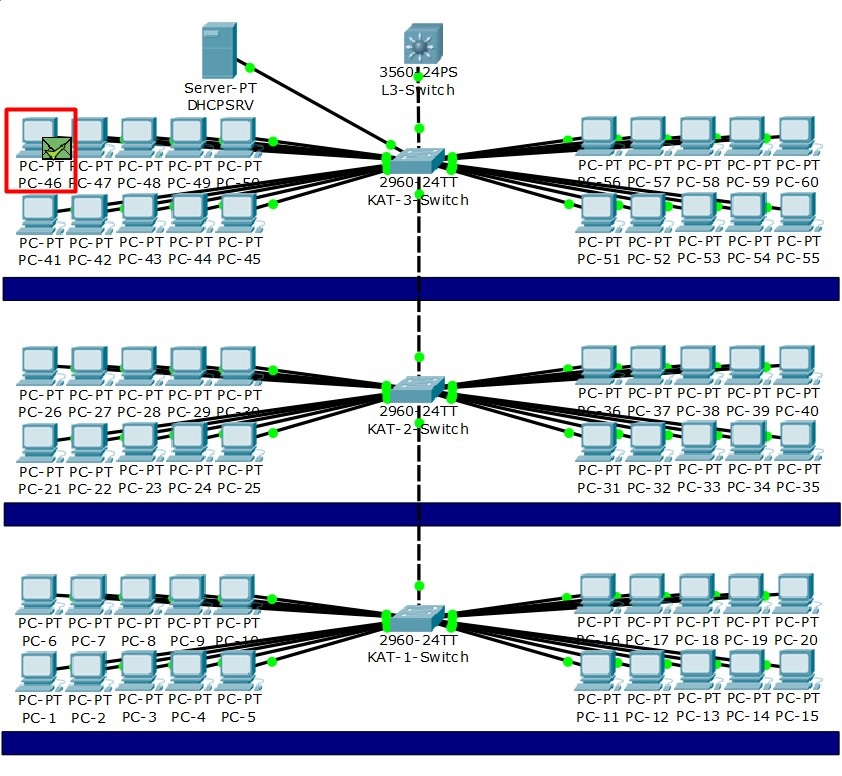
1- In my example network diagram, I send a data packet from PC-46 on the 3rd floor to PC-20 on the 1st floor. Every computer keeps an ARP table in RAM and, before sending a packet, looks up the MAC address for the destination IP address in this table. As shown, the ARP table of PC-46, which will send the packet, is empty.

2- The data packet cannot be sent immediately because the ARP table of PC-46 has no entry for PC-20. The packet is held and ARP runs first. PC-46 prepares an ARP message to ask for the MAC address of the destination IP address and places it inside an Ethernet frame. The content of the frame is as follows.
|
Layer |
Field |
Value |
Details |
|
Ethernet header |
Source MAC Address |
00-60-3E-09-7C-07 |
MAC address of PC-46 |
|
Ethernet header |
Destination MAC Address |
FF-FF-FF-FF-FF-FF |
Broadcast MAC address |
|
ARP message |
Opcode |
1 |
ARP request |
|
ARP message |
Sender MAC Address |
00-60-3E-09-7C-07 |
MAC address of PC-46 |
|
ARP message |
Sender IP Address |
10.10.10.12 |
IP address of PC-46 |
|
ARP message |
Target MAC Address |
00-00-00-00-00-00 |
Not yet known, usually filled with zeros in practice |
|
ARP message |
Target IP Address |
10.10.10.58 |
IP address of PC-20 |
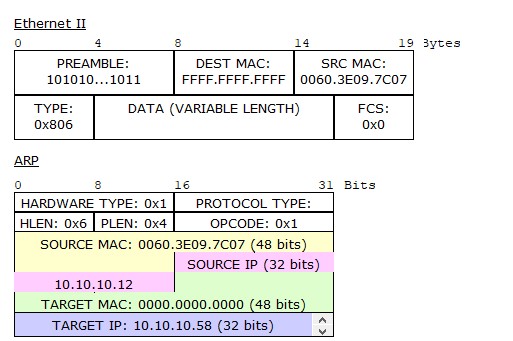
3- This message is called an ARP request. In this example, PC-46 cannot address the frame to a specific device because it does not know the MAC address of PC-20. For this reason, FF-FF-FF-FF-FF-FF, which is the broadcast MAC address, is written to the Destination MAC Address field in the Ethernet header. Switches send a frame that goes to this address out of their other ports in the same VLAN, except the port it arrived on. An ARP request is not always used to find an unknown address. It can also be sent as a unicast to verify an existing entry or to announce an IP address, and I cover these uses in the last section of the article.
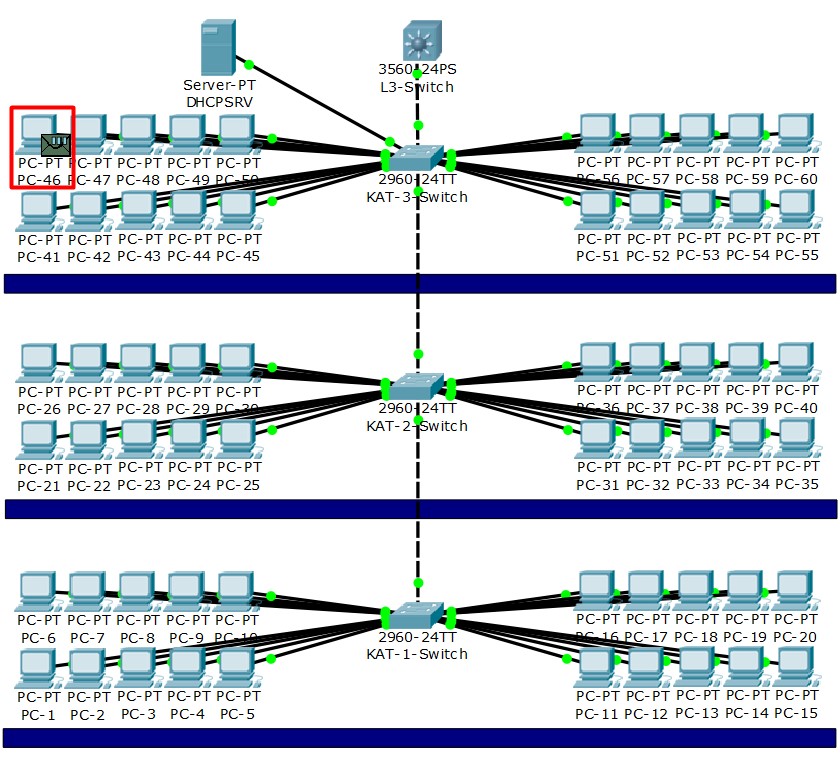
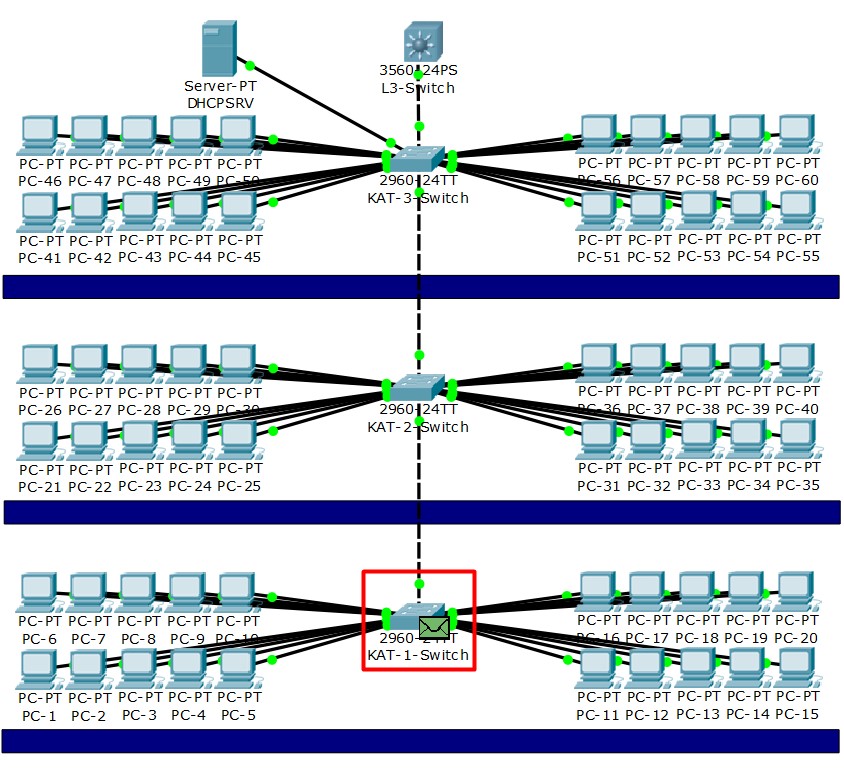
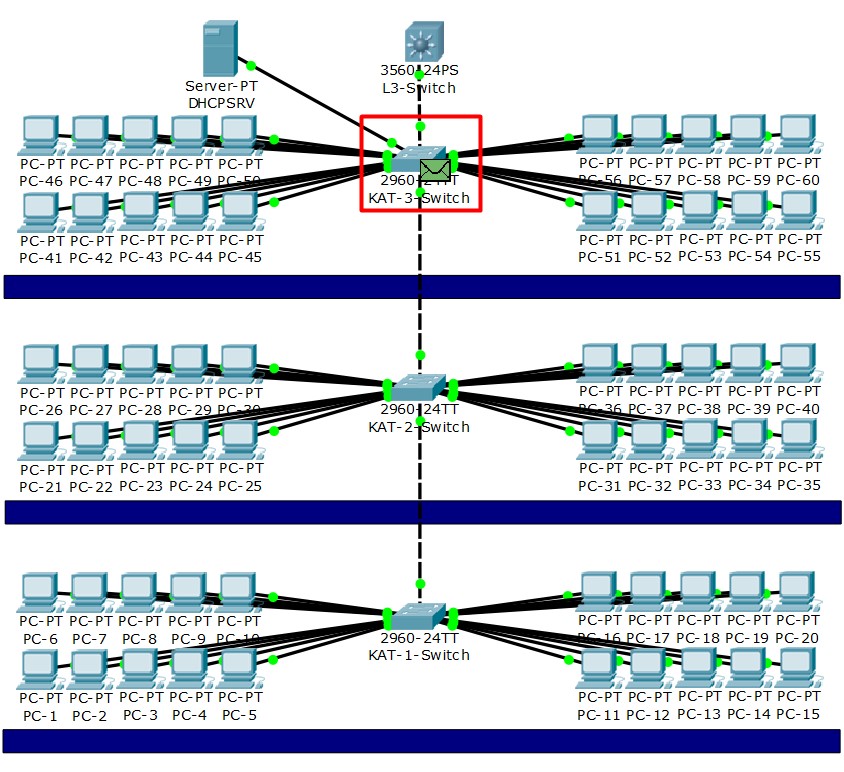
4- As shown below, the ARP request sent by PC-46 reached all computers on the 3rd floor because its destination MAC address was FF-FF-FF-FF-FF-FF. The network interface card of each computer accepted the broadcast frame and delivered it to the ARP layer. The ARP layer compared the Target IP Address in the message with its own IP address, and because the address did not belong to it, none of these computers replied. No rejection message is returned to the sender here. A device that is not the target leaves the ARP request unanswered.
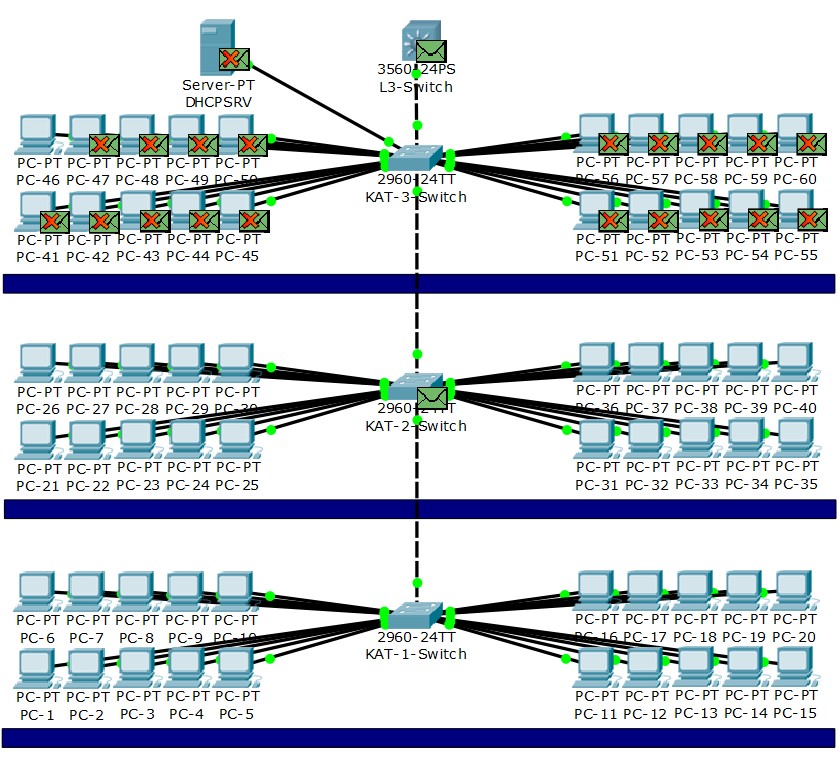
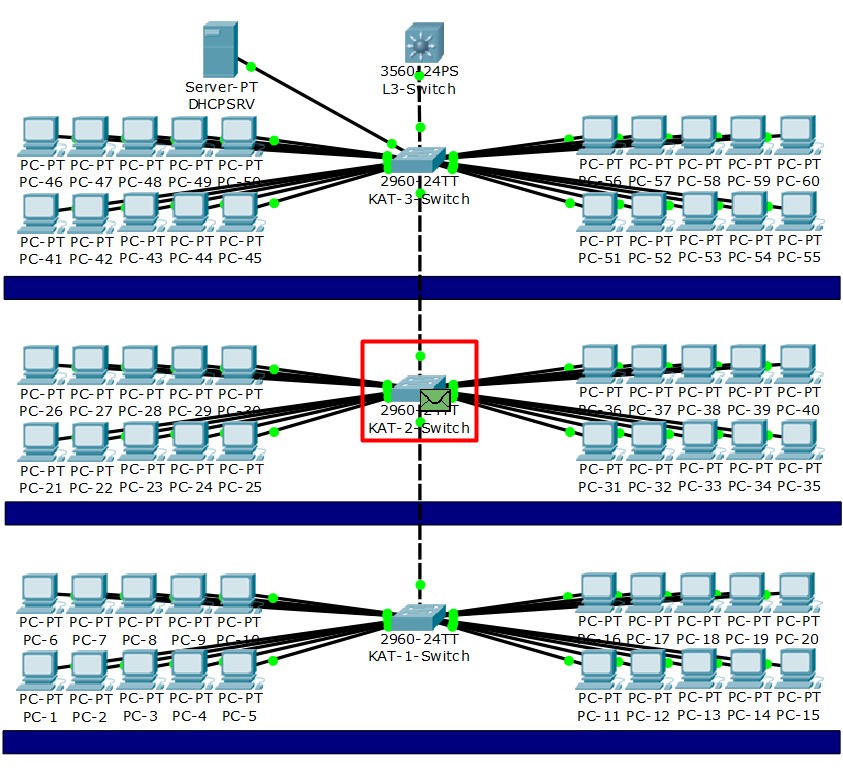
In the images, the broadcast reaching the floors in sequence is how the simulation displays it. In reality, the switch distributes the frame to its other ports in the same VLAN without following any floor order.
5- The same ARP request also reached all computers on the 2nd floor over the links between the switches. The Target IP Address in the message did not belong to any of these computers, so none of them replied. According to the algorithm in RFC 826, a device that is not the target does not create a new entry for the sender in its ARP table. If its table already contains an entry for PC-46, it only updates the MAC address in that entry.
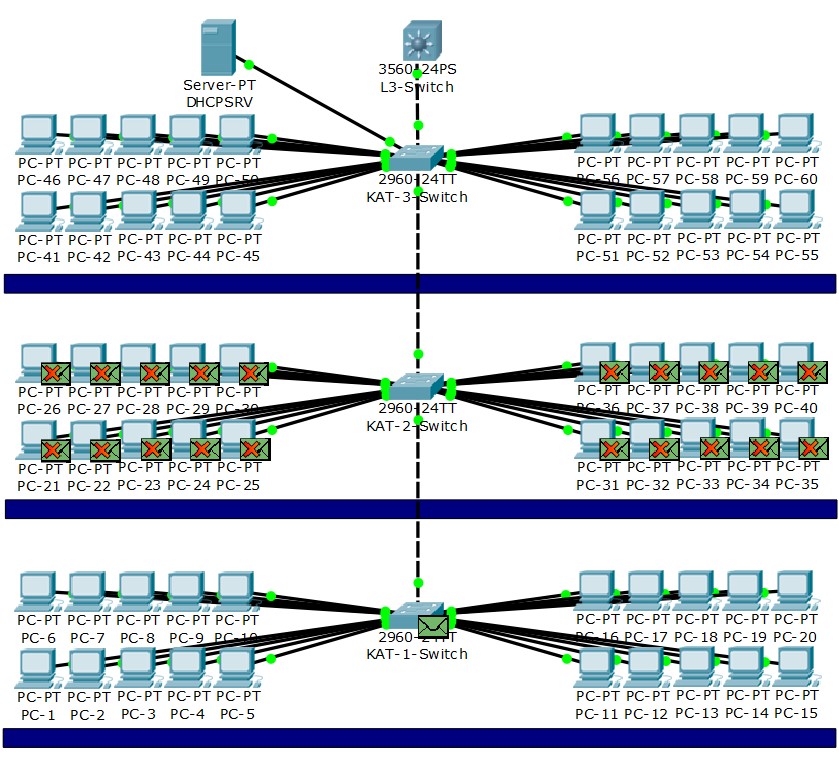
6- Finally, the ARP request reached all computers on the 1st floor. The computers other than PC-20 did not reply because the Target IP Address did not belong to them. PC-20, however, processed the ARP request because the Target IP Address in the message was its own IP address.
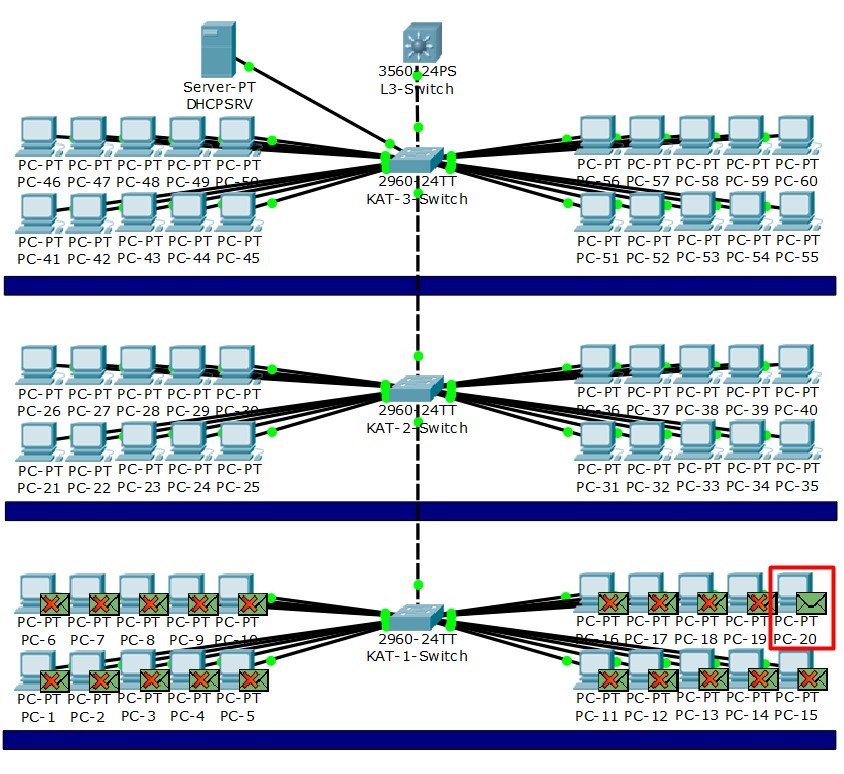
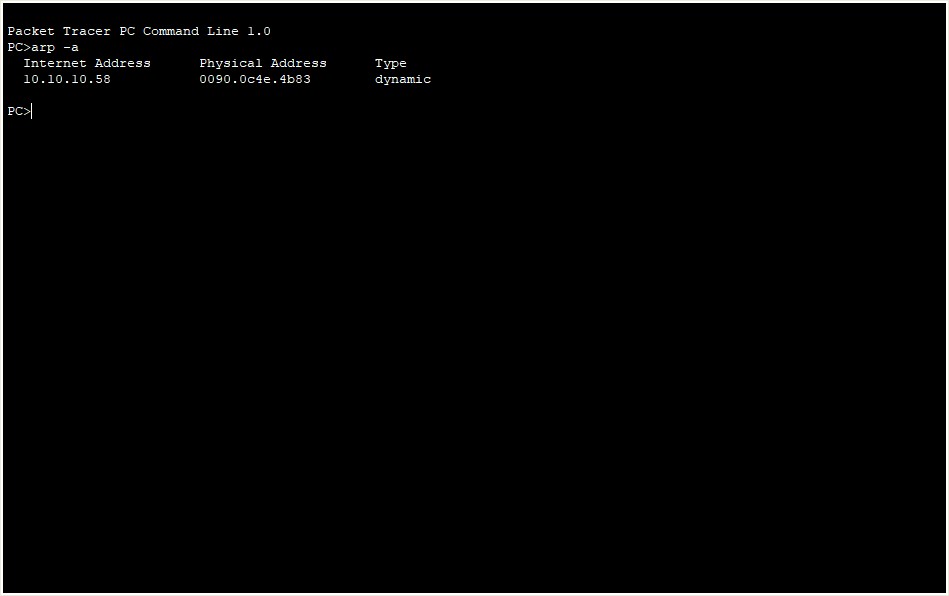
7- Up to this point, the ARP request stage took place. PC-20 learned the IP address and MAC address of PC-46 from the Sender IP Address and Sender MAC Address fields in the ARP request it received, and wrote this mapping to its own ARP table. As a result, it did not need to generate a separate ARP request for PC-46 when sending the reply. To view the entries in the ARP table, it is enough to run the arp -a command in CMD (Command Prompt).
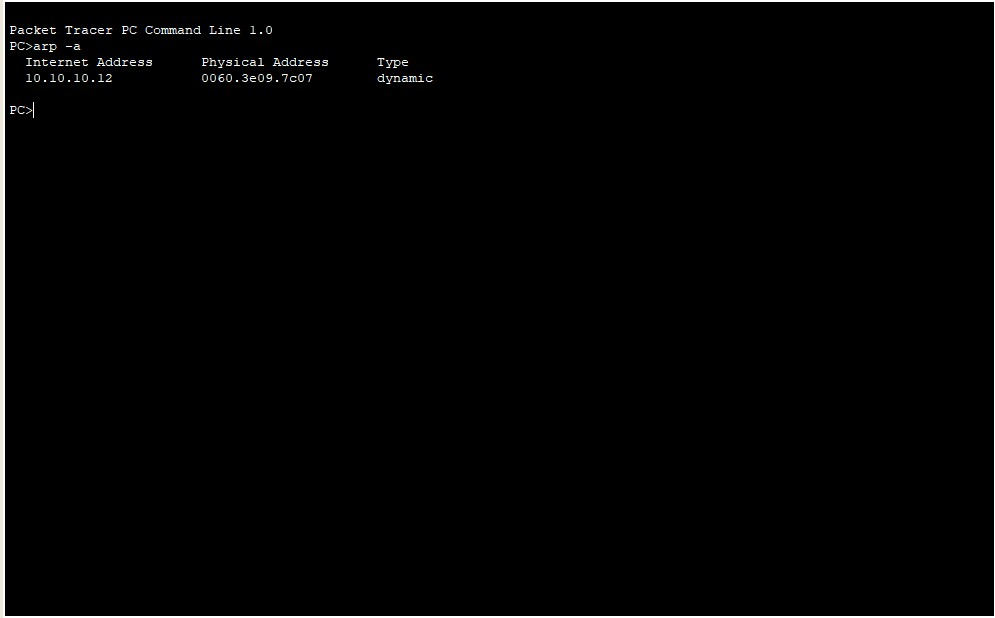
8- PC-20 answers the ARP request it received with an ARP reply. This time the sender and target fields swap places, and PC-20 writes its own MAC address to the Sender MAC Address field. The content of the frame that carries the ARP reply is as follows.
|
Layer |
Field |
Value |
Details |
|
Ethernet header |
Source MAC Address |
00-90-0C-4E-4B-83 |
MAC address of PC-20 |
|
Ethernet header |
Destination MAC Address |
00-60-3E-09-7C-07 |
MAC address of PC-46 |
|
ARP message |
Opcode |
2 |
ARP reply |
|
ARP message |
Sender MAC Address |
00-90-0C-4E-4B-83 |
MAC address of PC-20 |
|
ARP message |
Sender IP Address |
10.10.10.58 |
IP address of PC-20 |
|
ARP message |
Target MAC Address |
00-60-3E-09-7C-07 |
MAC address of PC-46 |
|
ARP message |
Target IP Address |
10.10.10.12 |
IP address of PC-46 |
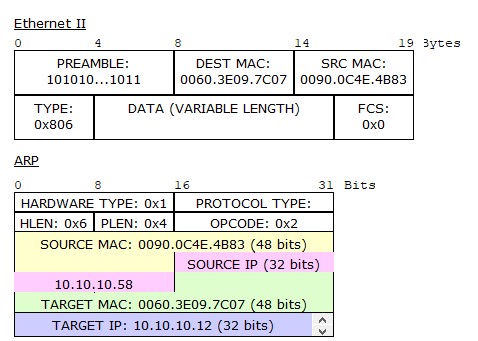
9- PC-20 sends the ARP reply directly to the MAC address of PC-46 because it already knows this address from the ARP request. The switches on the path have also learned which port PC-46 is behind, from the source MAC address of the frame when the request passed through. For this reason, the ARP reply is forwarded only out of the ports that lead to PC-46. Note that because the reply goes as a unicast, no new broadcast occurs on the network.
10- PC-46 learned the IP address and MAC address of PC-20 from the Sender IP Address and Sender MAC Address fields in the ARP reply it received, and wrote this mapping to its own ARP table. The data packet that was held can now be sent with the MAC address of PC-20 written to the Destination MAC Address field.
The Difference Between the Switch MAC Address Table and the ARP Table
While the ARP request and the ARP reply travel across the network, the switches also fill their own tables. However, this table is not an ARP table but a MAC address table, and it works on a different logic. A Layer 2 switch does not need the ARP message inside the frame or the IP addresses to learn a MAC address and to make its forwarding decision. The Ethernet header is enough. It writes the source MAC address of every incoming frame to its table, mapped to the port the frame arrived on. It also makes the forwarding decision based on the destination MAC address. If the address is in the table, it sends the frame only out of the relevant port. If the address is not in the table or is the broadcast address, it sends the frame out of the other ports in the same VLAN, except the port it arrived on.
There is 1 exception to this behaviour. If Dynamic ARP Inspection (DAI) is enabled on the switch, the switch also inspects the content of the ARP message. I explain this feature in the last section of the article.
|
Property |
ARP Table |
MAC Address Table |
|
Device that keeps it |
Devices that have an IP address (computer, router, Layer 3 switch) |
Switch |
|
Mapping kept |
IP address and MAC address |
MAC address and port (together with the VLAN information) |
|
Learning method |
ARP request and ARP reply messages |
Source MAC address of incoming frames |
|
Purpose |
To fill in the Destination MAC Address field of the frame to be sent |
To decide which port the frame leaves from |
ARP When the Destination Is on a Different Network
In the example so far, the source and the destination were on the same network. The general rule is this: the Destination MAC Address field of the frame contains the MAC address of the next device that the packet will be delivered to, that is, the next hop. The source device applies the subnet mask to the destination IP address and to its own IP address to determine whether the destination is on its own network. If the destination is on the same network, the next hop is the destination itself. If the destination is on a different network, the next hop is the gateway in the selected route. If no specific route is defined, this device is the default gateway.
When the destination is on a different network, the source device does not look for the MAC address of the destination, because the ARP request goes out as a broadcast and the router does not forward this broadcast to the other network. If its ARP table has a valid entry for the gateway, it uses that entry directly. If there is no entry, it sends an ARP request for the IP address of the gateway. The MAC address of the gateway is written to the Destination MAC Address field of the frame, while the destination IP address inside the packet stays unchanged and continues to point to the actual destination.
The router that receives the packet makes the same decision for its own outgoing link and, if necessary, runs the ARP process itself on that side. For this reason, the ARP table of a computer that communicates with dozens of destinations on different networks does not contain a separate entry for each of those destinations. A single entry for the gateway is enough to reach all of them. In addition to this, the table can also contain entries for other devices on the same network.
ARP Cache
The ARP cache is the cache in memory where the resolved IP address and MAC address mappings are kept, and it is the ARP table itself that the arp -a command displays. When a device resolves an IP address to a MAC address, it writes this information to the cache and, as long as the entry is valid, does not generate another broadcast ARP request for the same destination.
There are 2 types of entries in the cache. Entries learned through ARP are marked as dynamic and lose their validity after a certain period of time. Entries added manually are kept as static and do not lose their validity over time.
Lifetime of ARP Cache Entries
The limited lifetime of dynamic entries allows changes on the network to be reflected automatically. When the network interface card of a device is replaced or an IP address is assigned to another device, the old mapping becomes invalid after a period of time and is resolved again. This period varies by operating system and device.
|
Platform |
Table |
Default Behaviour |
|
Windows (Windows Vista and later) |
ARP cache |
An unused entry moves to the Stale state after a randomly determined period of between 15 and 45 seconds |
|
Cisco IOS |
ARP table |
14400 seconds (4 hours) |
|
Cisco IOS |
MAC address table |
300 seconds (5 minutes) |
On Windows the period is not fixed. The base value of 30 seconds is multiplied by a random factor between 0.5 and 1.5. Stale does not mean that the entry has been deleted. It shows that reachability has not been confirmed recently, and the entry can remain in the cache in this state. When a packet is to be sent again to a destination in the Stale state, Windows verifies the address again with an ARP request. For this reason, the period of 15 to 45 seconds must not be read as the time after which the entry disappears from the arp -a output.
Populating the ARP Cache with Ping
To see at once how the cache is filled, I send Echo Request packets with the ping command to the broadcast IP address of the network ID that the IP address configured on the network interface card (NIC) belongs to. This exercise is not a performance setting. Because dynamic entries are not permanent, a cache that is filled in advance does not remove later ARP traffic. My aim is to show the result of the ARP process on the cache all together.
1- On an example computer, I open CMD (Command Prompt) and check the ARP cache with the arp -a command.

2- I send Echo Request packets to the broadcast IP address with the ping command. Because this packet goes out with FF-FF-FF-FF-FF-FF directly in the Destination MAC Address field, no ARP request is needed on the sending side. The ARP traffic is generated by the computers that will reply. They need to know my MAC address to send an Echo Reply, and every computer that has no valid entry for me in its cache sends an ARP request for my IP address. In this example the caches of the computers are empty, so a short period of heavy broadcast traffic occurs on the network. A computer that already knows my mapping can return an Echo Reply without sending a new ARP request.
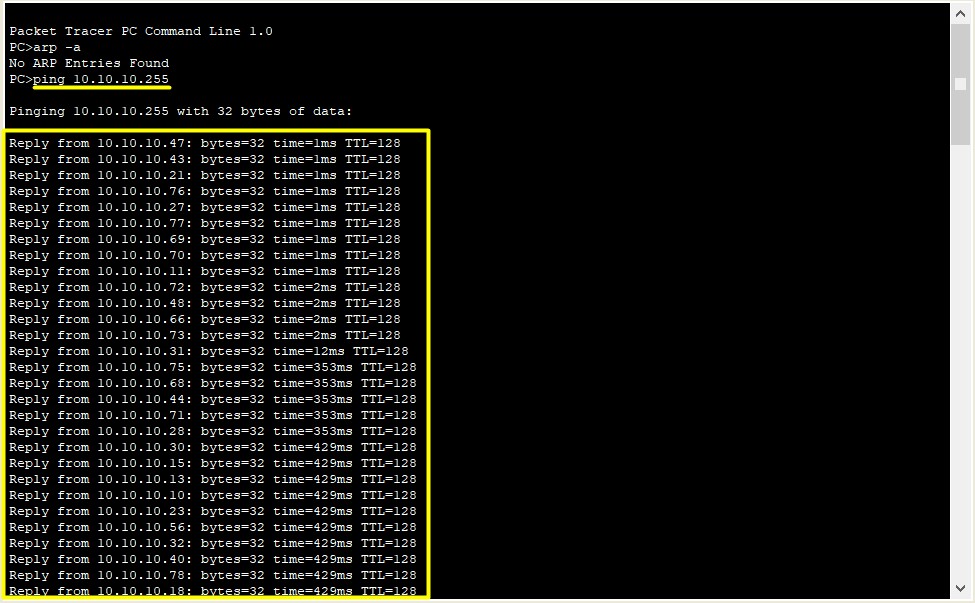
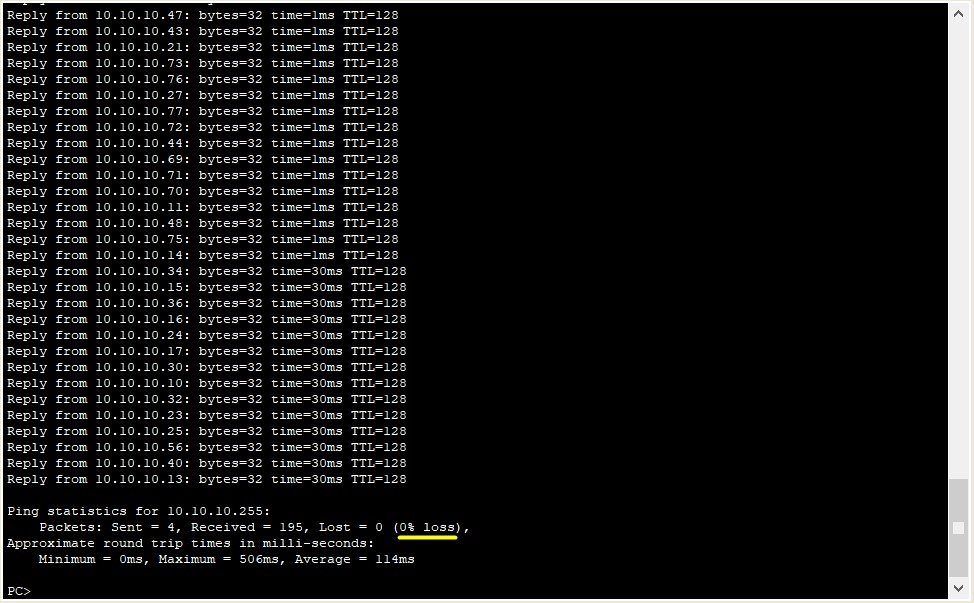
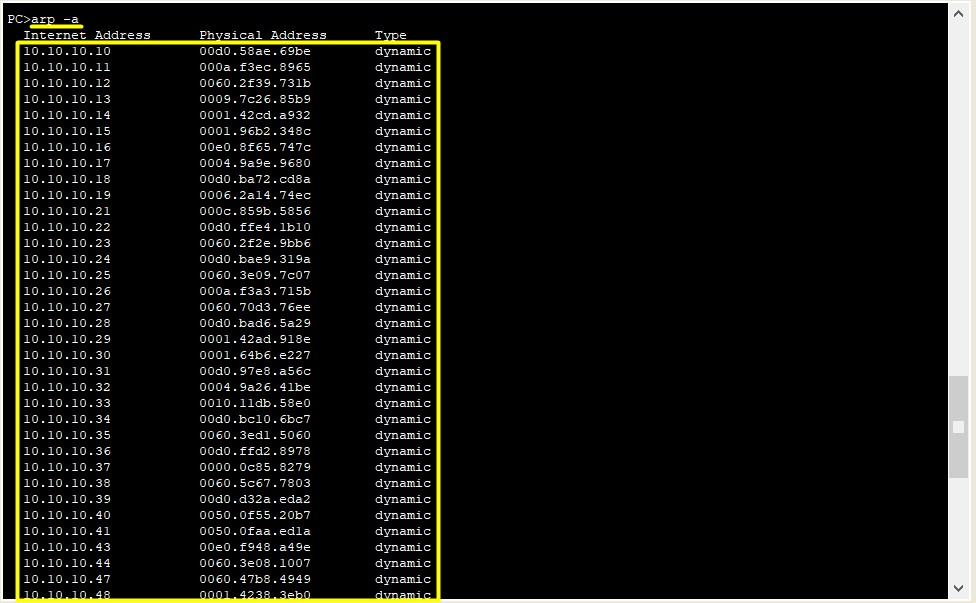
3- Because the target of every ARP request that reaches me is my computer, I write the IP address and MAC address of the sending computer to the cache, as PC-20 did in step 7 of the previous section. When I run the arp -a command again on the same computer, the IP addresses and MAC addresses of the computers that sent me an ARP request are cached.
Checkpoint
In the arp -a output, the computers that sent an ARP request to learn my MAC address must appear as entries of the dynamic type. Receiving an Echo Reply does not, on its own, show that a new entry will be created for that IP address.
I carried out this exercise on the PCs in Packet Tracer. RFC 1122 allows Echo Request packets that arrive at the broadcast address to be left unanswered, so the same result may not be obtained in a real environment.
Pinging an IP Block with a FOR Loop on Windows
In a real Windows environment, sending an Echo Request to each address in the IP block individually gives a more reliable result than using the broadcast IP address. I do this in a single line with a FOR loop. The command is run in CMD and, as written below, is for the 10.10.10.0 network that uses a /24 subnet mask. In your own environment, you must change the first 3 octets of the IP address and, if necessary, the range to match your network.
For /L %i in (1,1,254) do Ping -n 2 -w 250 10.10.10.%i | FIND /i "TTL="
|
Parameter |
Description |
For |
The loop command. The ping operation is repeated inside this loop for each IP address. |
/L |
Specifies that the loop runs over a range of numbers. The range is given in brackets with the start, step and end values. |
%i |
The loop variable. Another letter can be used instead of "i". If the command is written to a .bat file, it must be used in the form %%i. |
(1,1,254) |
The variable starts at 1, increases by 1 each time and continues up to 254. It covers all usable host addresses in a /24 network. |
-n 2 |
Sets the number of Echo Requests sent to each IP address to 2. If the parameter is not given, ping sends 4 Echo Requests, each with an ICMP data field of 32 bytes. |
-w 250 |
Sets the timeout, in milliseconds, to wait for each Echo Reply. |
10.10.10.%i |
%i represents the 4th octet of the IP address and takes the next value on each pass of the loop. |
FIND /i "TTL=" |
Shows only the lines in the output that contain TTL=, that is, the lines where an Echo Reply was returned. Filtering by the word "Reply" gives a misleading result because it also matches the lines that report "Destination host unreachable". |
After the loop finishes, I check the cache with the arp -a command. There is 1 detail to note here. A device that does not answer Echo Requests because of a firewall does not appear in the ping output, but if it is on the same network, an entry for it is created in the ARP cache because it answers the ARP request. An entry that is newly created after the loop shows that a device answering ARP exists at that IP address, even if ICMP is blocked.
This interpretation must be made only for newly learned entries. An old entry that was already in the table, or a static entry, does not on its own show that the device is reachable at that moment.
Gratuitous ARP, Proxy ARP and ARP Spoofing
ARP has several more special uses besides address resolution. Gratuitous ARP is an ARP message that a device sends for its own IP address without anyone asking. RFC 5227 names this message ARP Announcement. In the message, both the Sender IP Address and the Target IP Address fields carry the announced address. In situations such as a network interface card replacement or a failover, it makes the other devices update the existing mapping in their ARP tables.
The message used to test for an IP address conflict is the ARP Probe. Before claiming the address it wants to use, the device sends an ARP request in which the Sender IP Address field is 0.0.0.0 and the Target IP Address field is the candidate address. Leaving the Sender IP Address field empty prevents the caches of other devices from being updated with wrong information if the address is in use on another device. Gratuitous ARP on its own is not a reliable conflict test.
Proxy ARP is when a router answers an ARP request with its own MAC address on behalf of a device on another network. The asking device believes the destination is on its own network and sends the frame to the router, and the router then routes the packet to the actual destination.
The same flexibility also brings a security vulnerability. ARP has no authentication, and devices can update their tables with the mapping in an incoming ARP message even if they did not send a request themselves. In an ARP spoofing (ARP cache poisoning) attack, the attacker uses forged ARP messages to map its own MAC address to the IP address of another device, most often the default gateway. The victim computer starts to send its traffic to the attacker, and the attacker can monitor or modify the communication between the 2 parties.
The countermeasure on Cisco switches is the Dynamic ARP Inspection (DAI) feature. DAI is enabled per VLAN and separates ports into trusted and untrusted. ARP messages that arrive on trusted ports are forwarded without inspection. The IP address and MAC address mapping in every ARP message that arrives on an untrusted port is validated, and messages found to be invalid are dropped. In environments that use DHCP, validation is done against the DHCP snooping binding table. In environments that do not use DHCP, or for devices with a static IP address, an ARP ACL applied to the VLAN is used.
If a device that uses a static IP address is connected to an untrusted port and there is no valid binding entry or permitting ARP ACL for this device, its ARP messages are dropped when DAI is enabled and the device loses network access.
This article walked through how ARP resolves an IP address to a MAC address, how an ARP request spreads by broadcast on a network with no VLAN configured, and how the ARP reply returns as a unicast, step by step on an example network. It then covered the difference between the switch MAC address table and the ARP table, the next hop logic when the destination is on a different network, the lifetime of ARP cache entries and how the cache is filled with ping. The last section summarised gratuitous ARP, ARP Probe, proxy ARP and ARP spoofing.
I hope you find it useful...
Feel free to share your thoughts and questions about this article in the comments below. Every contribution helps the content reach more people and makes for a more useful discussion.