In an Active Directory environment with more than 1 domain controller, it does not matter on which of the domain's writable domain controllers I change a user's password or group membership. The replication mechanism carries the change to the other domain controllers, and after a short time each of them serves the same data. When this mechanism fails, the situation changes quickly: an account that was unlocked in 1 site still appears locked in the other site, a newly created user cannot be found on some domain controllers, and DNS records differ from one domain controller to another.
The fastest way to see whether replication is healthy is the repadmin tool. In this article, I first examine the repadmin /replsummary output and what the fields in the output mean. I then move on to the replicated data itself, that is, the Active Directory partitions and the replication scope of each one. In the final sections, I check the replication status per partner with repadmin /showrepl and trigger replication manually with repadmin /syncall.
repadmin is available on every domain controller that has the Active Directory Domain Services role installed. To use it on a server other than a domain controller, or on a management computer, the AD DS tools in RSAT must be installed. I run the commands in a Command Prompt or PowerShell session opened as administrator.
Repadmin requires administrator credentials on every domain controller that the command targets. Members of the Domain Admins group have sufficient permissions to run the command on the domain controllers in their own domain. For the /syncall command, which triggers replication, the Replication Synchronization permission on the relevant naming context is checked. In the default configuration, the Enterprise Admins group can start manual replication between all domain controllers in the forest, and the domain's Administrators group can do so within its own domain. These permissions can also be delegated to a separate group, so membership of the administrator groups is not the only way.
My Active Directory site structure is as follows:
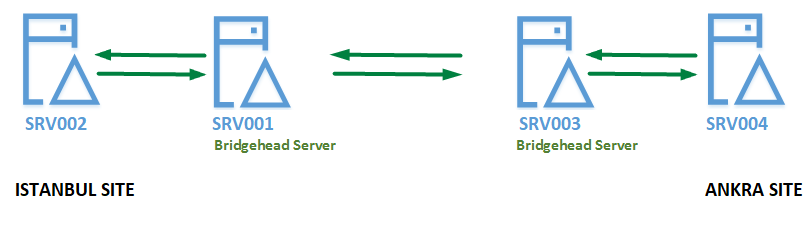
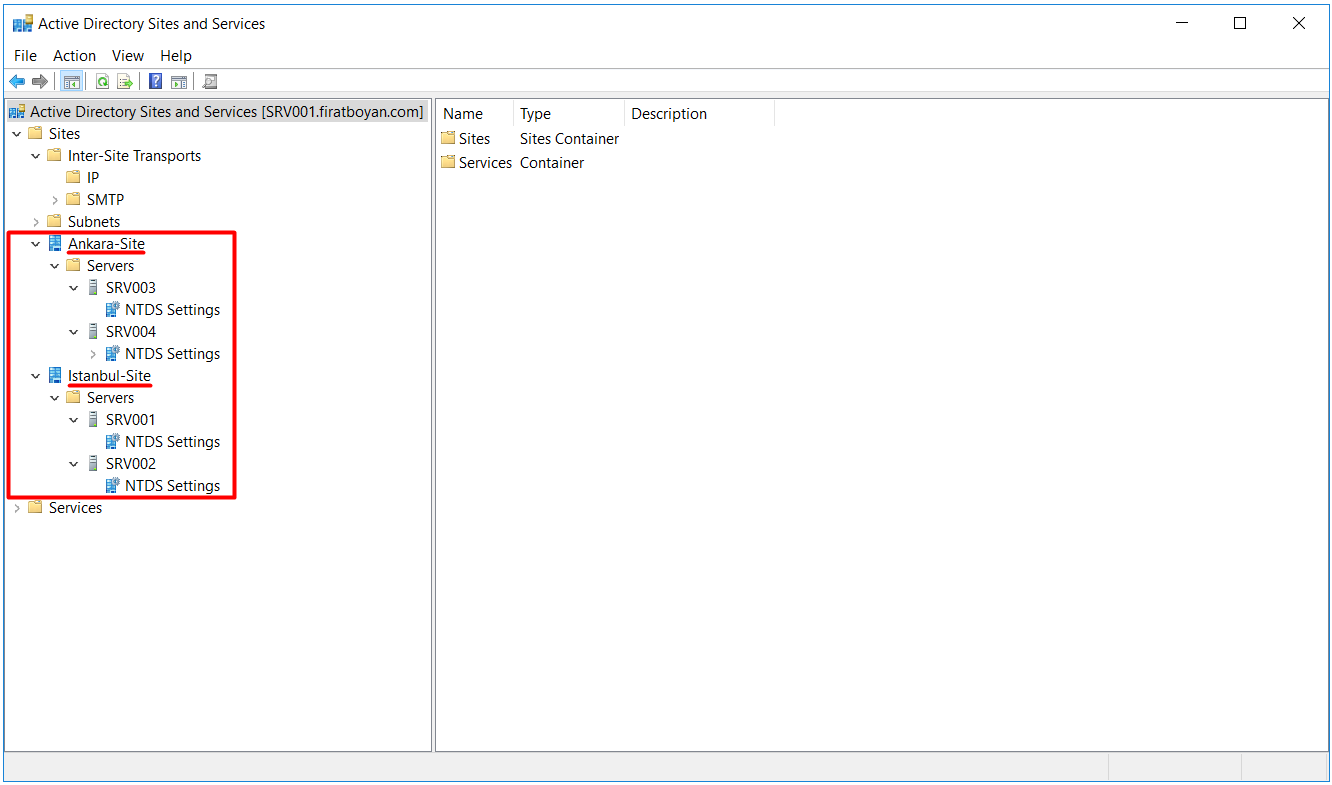
Monitoring the Replication Summary with the Repadmin /replsummary Command
The repadmin /replsummary command connects to the domain controllers in the forest one by one and summarises the replication status from the source (Source DSA) and destination (Destination DSA) perspectives. When I run the command, I get the replication summary of my 4 domain controllers, which are in the site topology in Active Directory Sites and Services.
repadmin /replsummary
In my environment, the command without parameters returns the 2 tables together. Microsoft's command reference, however, states that when no parameter is given, Repadmin displays the table with the fewest partner errors. To request both directions explicitly, the command must be run as repadmin /replsummary * /bysrc /bydest. With this usage, the Source DSA table is listed first, followed by the Destination DSA table.
|
Source DSA |
Largest Delta |
fails/total |
%% |
error |
|
SRV001 |
18m:21s |
0/10 |
0 |
|
|
SRV002 |
16m:16s |
0/5 |
0 |
|
|
SRV003 |
16m:16s |
0/10 |
0 |
|
|
SRV004 |
18m:20s |
0/5 |
0 |
|
|
Destination DSA |
Largest Delta |
fails/total |
%% |
error |
|
SRV001 |
16m:17s |
0/10 |
0 |
|
|
SRV002 |
15m:58s |
0/5 |
0 |
|
|
SRV003 |
18m:22s |
0/10 |
0 |
|
|
SRV004 |
11m:12s |
0/5 |
0 |
|
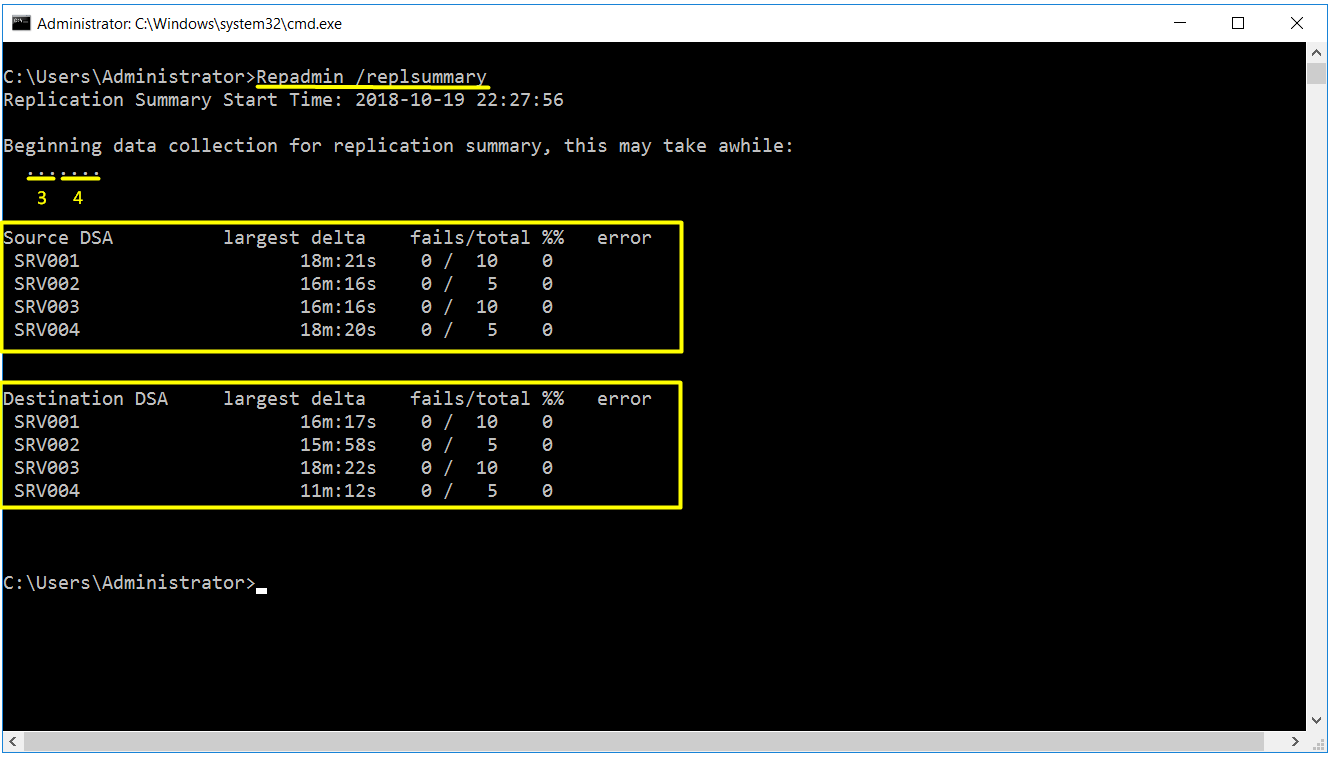
Checkpoint
In both tables, the fails value is 0 and the error column is empty. All summarised replication relationships of the 4 domain controllers succeeded on the last attempt.
Source DSA and Destination DSA
The Directory System Agent (DSA) is the service on a domain controller that handles access to the directory database and replication. In replication output, the term DSA refers in practice to the domain controller itself. In a replication relationship, the side that provides the change is called the Source DSA, and the side that receives the change is called the Destination DSA.
In the output, I see that each domain controller appears in both tables. The reason is that Active Directory works with the multi-master replication model. In this model, every writable domain controller accepts changes to the directory, and these changes are passed to its partners. Therefore, the same domain controller is the Source DSA in 1 relationship and the Destination DSA in another.
1- Source DSA: When a user's password is changed on SRV001, the source of this change is SRV001. Its partners receive the change from SRV001. The Source DSA table summarises the status of the replication relationships in which each domain controller is the source.
2- Destination DSA: The domain controller that receives the change writes the incoming data to its own database and, if the same attribute was changed in 2 different places, resolves the conflict. The Destination DSA table summarises the status of the replication relationships in which each domain controller receives data from its partners.
Active Directory replication is pull-based. The side that requests and pulls the replication data is always the destination domain controller. What changes is the trigger for this pull: within the same site, it is the change notification sent by the source domain controller, and between sites, by default, it is the site link schedule. For this reason, when I look for a problem, I check the Destination DSA table first. After I find the destination that reports an error, I use repadmin /showrepl to examine which source that destination cannot receive data from.
Largest Delta
Largest Delta shows the age of the replication relationship that has gone the longest without a successful replication, among the relationships summarised for a domain controller. The value is not an average. It gives the worst case for that domain controller.
✅ Difference from Replication Latency: Largest Delta tells you when a replication relationship last ran successfully. How long a specific change takes to reach the destination after passing through more than 1 domain controller is a separate measurement. To verify whether a specific change has arrived, you need to check the value of that object on the destination domain controller.
✅ Comparison with the Expected Interval: The value is neither good nor bad on its own. It is interpreted according to how often replication should run on that relationship.
The expected interval depends on whether the partner is in the same site. Between domain controllers in the same site, replication is triggered by change notification. When a change is made on a domain controller, by default a notification is sent to the first partner after 15 seconds and then to the other partners at 3-second intervals, and the partners pull the change. Even when there are no changes at all, the default schedule of intra-site connection objects provides for 1 synchronisation per hour.
Between different sites, replication runs according to the schedule on the site link. The default interval is 180 minutes, and it can be reduced to a minimum of 15 minutes. If change notification is also enabled on the site link, inter-site replication is triggered by notification as well, in the same way as within a site.
In my output, the highest value is 18m:22s. It is within the expected interval for both intra-site and inter-site relationships. When I see a domain controller whose Largest Delta value clearly exceeds the site link interval, I examine that domain controller separately, even if the fails column is 0.
fails/total, %% and error
|
Field |
Description |
|
largest delta |
The longest time since the last successful replication among the replication relationships summarised for the domain controller |
|
fails/total |
Number of replication relationships whose last attempt failed / total number of replication relationships summarised |
|
%% |
Ratio of failed relationships to the total |
|
error |
The last error code and description that blocks replication, for example (1722) The RPC server is unavailable. |
The total value is not the number of attempts in a specific time period. In the Destination DSA table, this value is the total of the inbound partners from which that domain controller receives data under each naming context (partition). In other words, the number of partners is counted separately for each partition and all of them are added together.
In my environment, SRV001 receives each of the 5 partitions from 2 partners: SRV002 in the same site and SRV003 in the Ankara site. 2 partners for each partition make 10 in total, and I see 0/10 for SRV001 in the output. The value is the same for SRV003. For SRV002 and SRV004 I see 0/5, which means these 2 domain controllers receive each of the 5 partitions from 1 partner.
For this reason, different total values on different domain controllers are not a sign of a problem. The value reflects the partner relationships in the topology. Because each partner does not have to replicate the same set of partitions, in different topologies the count must be done per partition. This value is also not the number of connection objects under NTDS Settings. A connection object carries the replication of more than 1 partition.
Replication frequency does not change this number. Network problems appear primarily in the fails and error columns. If a partner remains unreachable for a long time, the Knowledge Consistency Checker (KCC) can create temporary connections to other partners, and in that case the number of summarised relationships can also change.
Active Directory Partitions and Their Replication Scopes
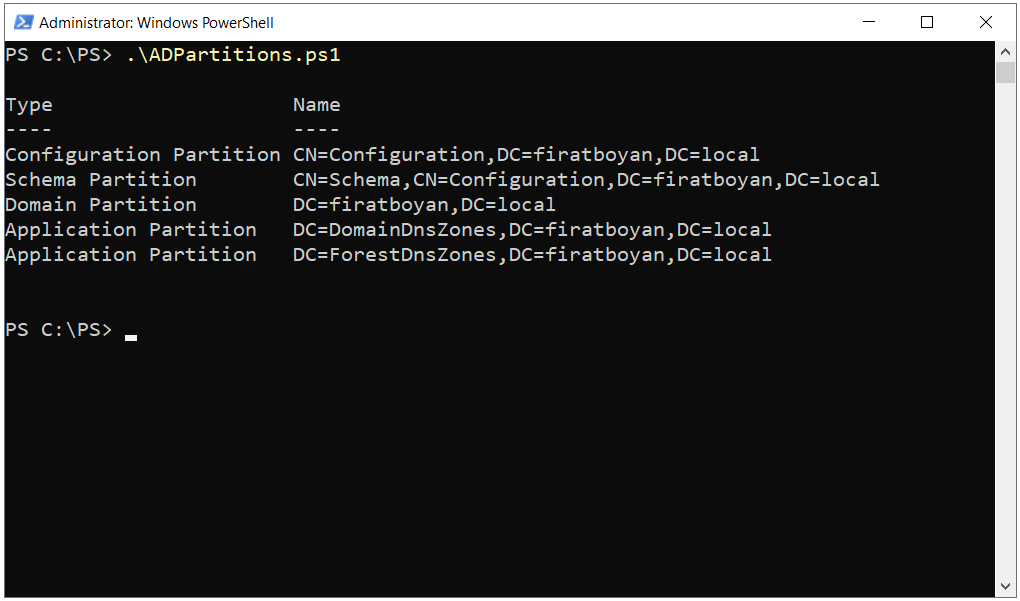
To read replication output correctly, you need to know what is replicated. Active Directory data is stored in the NTDS.dit database on every domain controller. The data in this database is divided into logical sections called partitions (naming contexts). Partitions are not separate files. All of them are inside the same NTDS.dit file. The purpose of the separation is to define the replication scope: the domain controllers to which each partition is replicated are defined separately.
The schema and configuration partitions exist on all domain controllers in the forest, and the domain partition exists on the domain controllers of the relevant domain. When Active Directory-integrated DNS is used, the DomainDnsZones and ForestDnsZones application partitions are added to these. This is why I see 5 partitions in total in my single-domain environment. In a forest that contains more than 1 domain, each domain brings its own domain partition and its own DomainDnsZones partition, so the number across the forest increases.
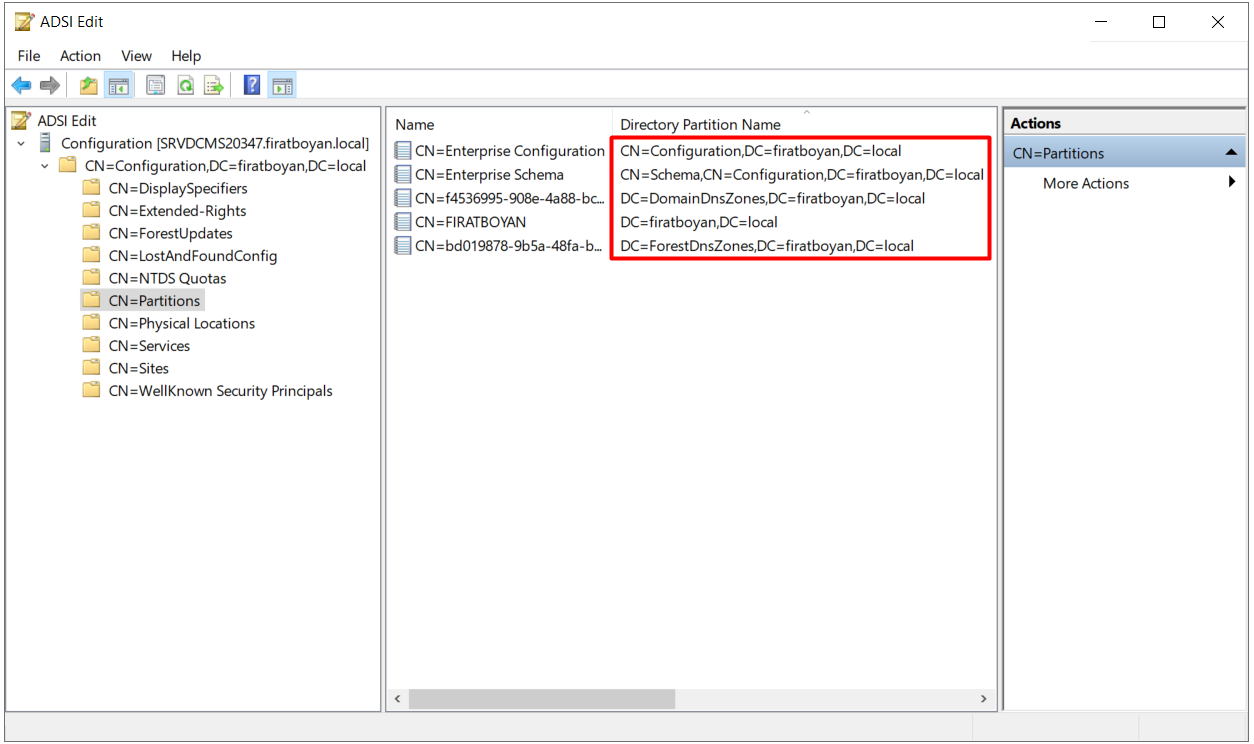
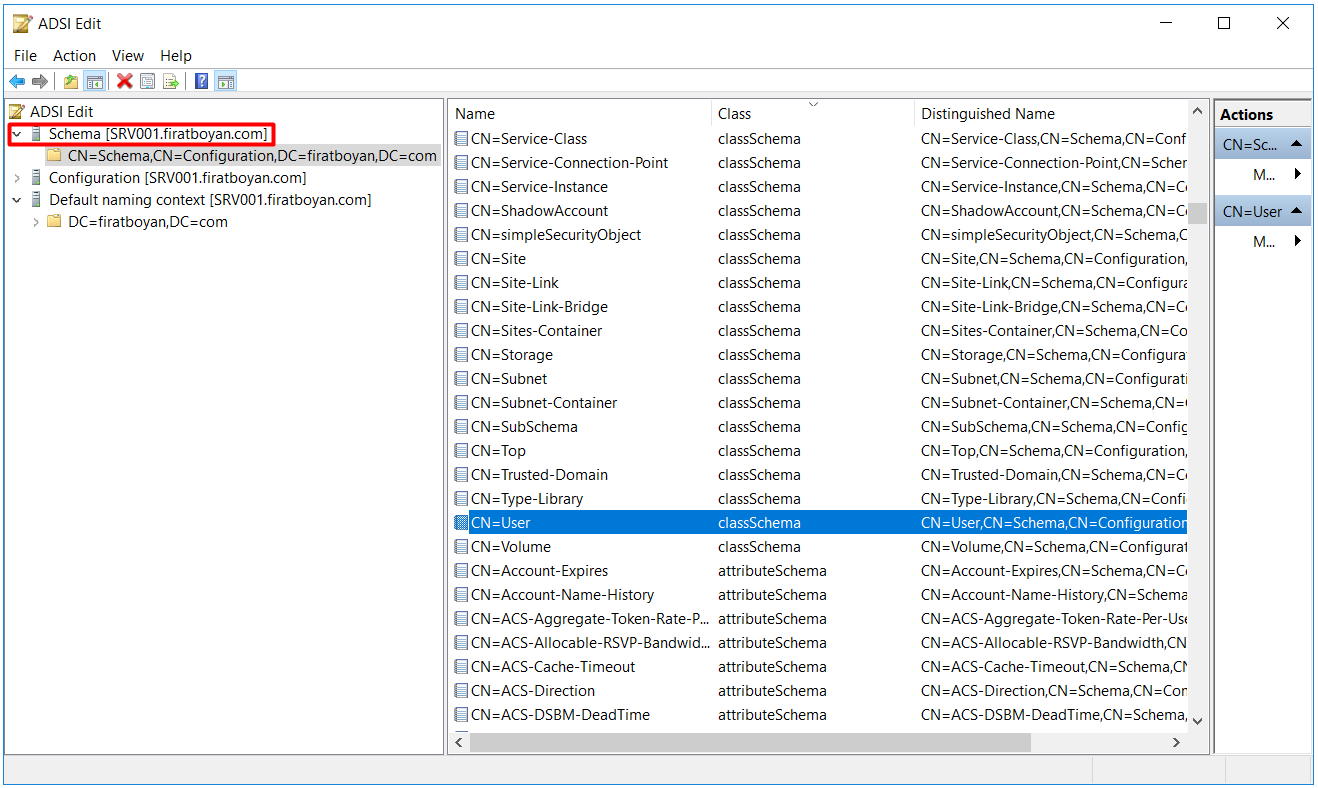
1- Schema Partition
user, computer and group are object classes defined in the Active Directory schema. Every user, computer or group object created in the directory is an instance of the relevant class. Each class defines which fields objects of that type can have. These fields are called attributes. Class and attribute definitions are stored in the schema partition. All domain controllers in the forest use this definition as the basis for operations on objects. For this reason, the object structure that 1 domain controller accepts is the same for the other domain controllers in the forest.
For example, a user object has fields such as givenName, sn, mail and telephoneNumber. These fields can be used because they are defined in the schema for the user class. A domain controller does not allow an operation with an undefined field or with a value that does not match the syntax of the field.
Schema Changes, Replication and Consistency
Changes to the schema are different from ordinary object operations. Operations such as adding a new class or defining a new attribute for an existing class are performed on the domain controller that holds the schema master FSMO role, with an account that is a member of the Schema Admins group. A definition added to the schema cannot be deleted later. It can only be deactivated. Because conflicting schema changes made on 2 different domain controllers at the same time could not be reversed, write permission is deliberately given to a single domain controller.
After the change is written to the schema partition on the schema master, the standard replication mechanism starts and the updated schema information is distributed to all other domain controllers in the forest. In other words, writes to the schema are made from a single point, and distribution uses the same replication infrastructure as the other partitions.
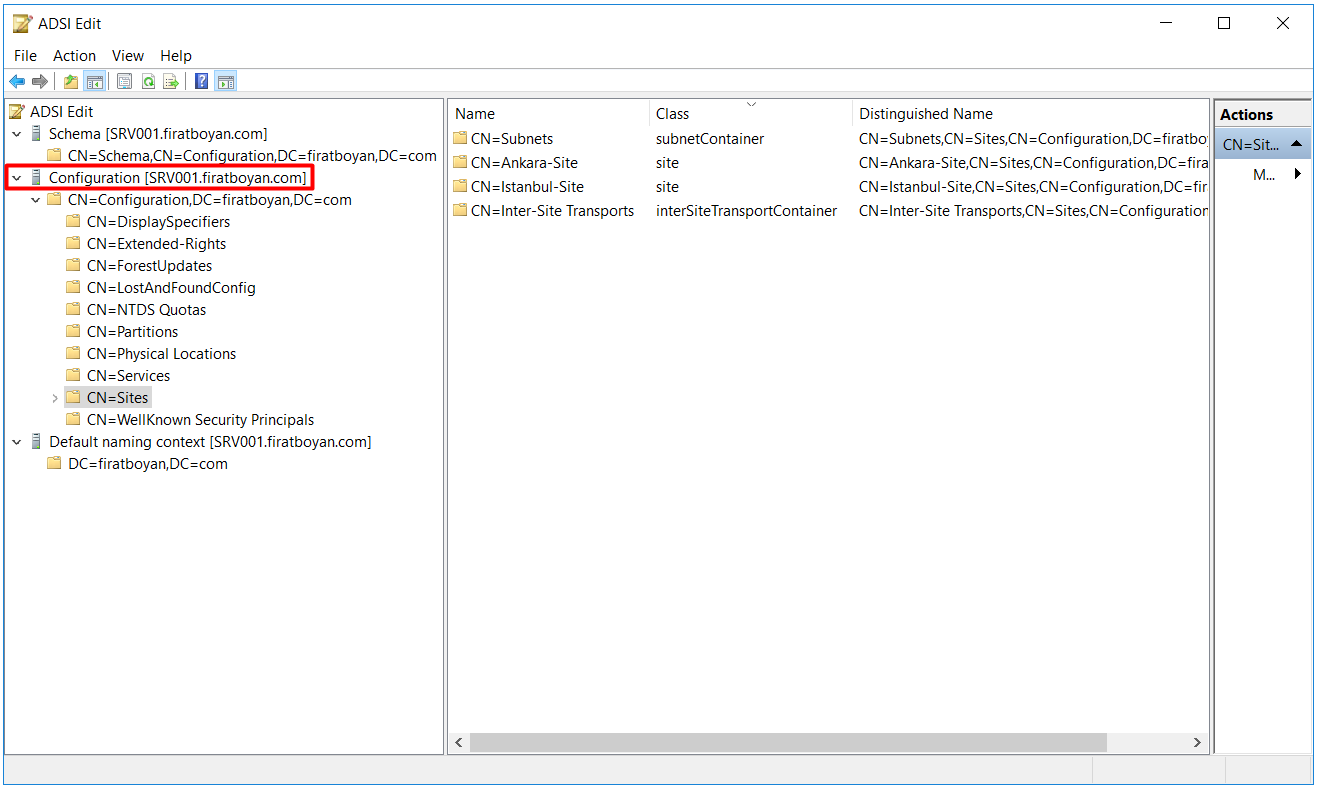
2- Configuration Partition
The configuration partition stores the configuration information for the physical and logical structure of the forest. Which site each domain controller is in, which subnets are associated with the sites, the site links and the connection objects between domain controllers are all in this partition.
When a domain controller starts, it determines its own site and its replication partners from the objects defined in the configuration partition. The same information is also used to direct clients to the nearest domain controller according to their subnet.
All domain controllers in the forest hold a copy of this partition. This is also what keeps the site structure, the replication topology and the domain controller locations consistent across the forest.
Changes in the Configuration Partition, Replication and Consistency
Operations such as adding a site, defining a subnet, creating a site link or changing connection objects are written directly to the configuration partition. Unlike user or computer objects, these changes affect how all domain controllers operate.
The configuration partition is managed with the multi-master replication model. A configuration change made on any writable domain controller also reaches the other domain controllers in the forest when replication completes. The exception is adding a new domain or application partition to the forest, or removing one. These operations are carried out on the domain controller that holds the domain naming master FSMO role.
When a site or subnet definition is changed, domain controllers read the current information from the configuration partition. Replication partners and site-based replication behaviour are reshaped according to this current configuration.
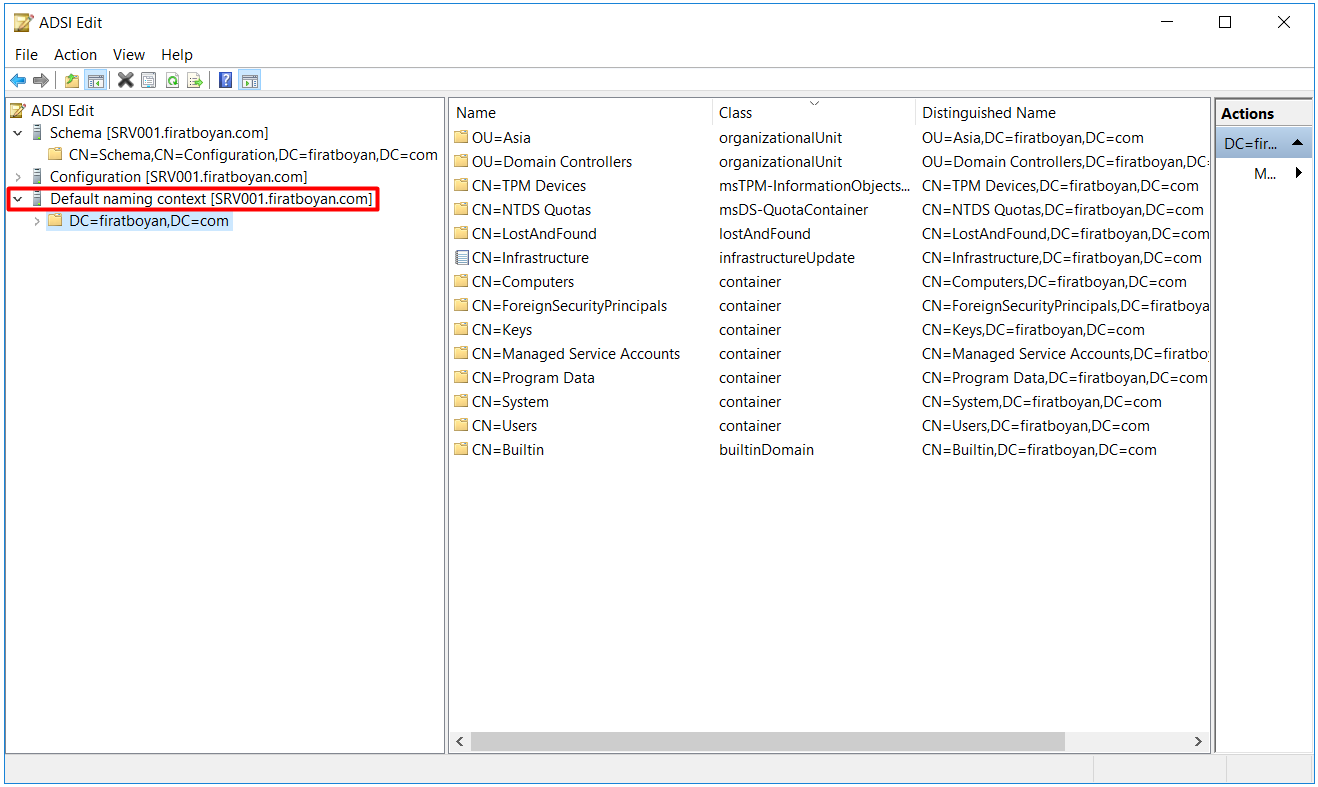
3- Domain Partition (Naming Context)
The domain partition is the section that contains the user, group and computer accounts of a domain. Information that is managed daily in the domain, such as user and computer names, password information, group memberships and whether accounts are active or locked, is stored here.
When a user, group or computer is created, the record is added to the domain partition of the domain in which it was created. Operations such as changing a password, editing group membership or disabling an account are also performed on the same partition. This is the partition that changes most often in daily operations.
Object Changes in the Domain Partition, Replication and Consistency
Changes in the domain partition work with the multi-master replication model. No matter which writable domain controller of the abc.local domain I create a user on, this change spreads to the other domain controllers of the abc.local domain. The domain controllers of the other domains in the forest do not hold a writable copy of this partition.
Some operations in the domain partition require FSMO coordination. The RID master distributes the RID pools required to generate SIDs when users are created. The PDC emulator is the point to which password changes are replicated with priority. The PDC emulator in the forest root domain is also the authoritative time source of the forest.
Keeping object references between domains up to date is the task of the infrastructure master. If Active Directory Recycle Bin is enabled, this behaviour changes: each domain controller updates its own cross-domain references itself, and the infrastructure master role has no task left in this area. These roles are not central points that manage the domain partition. They take part in specific operations.
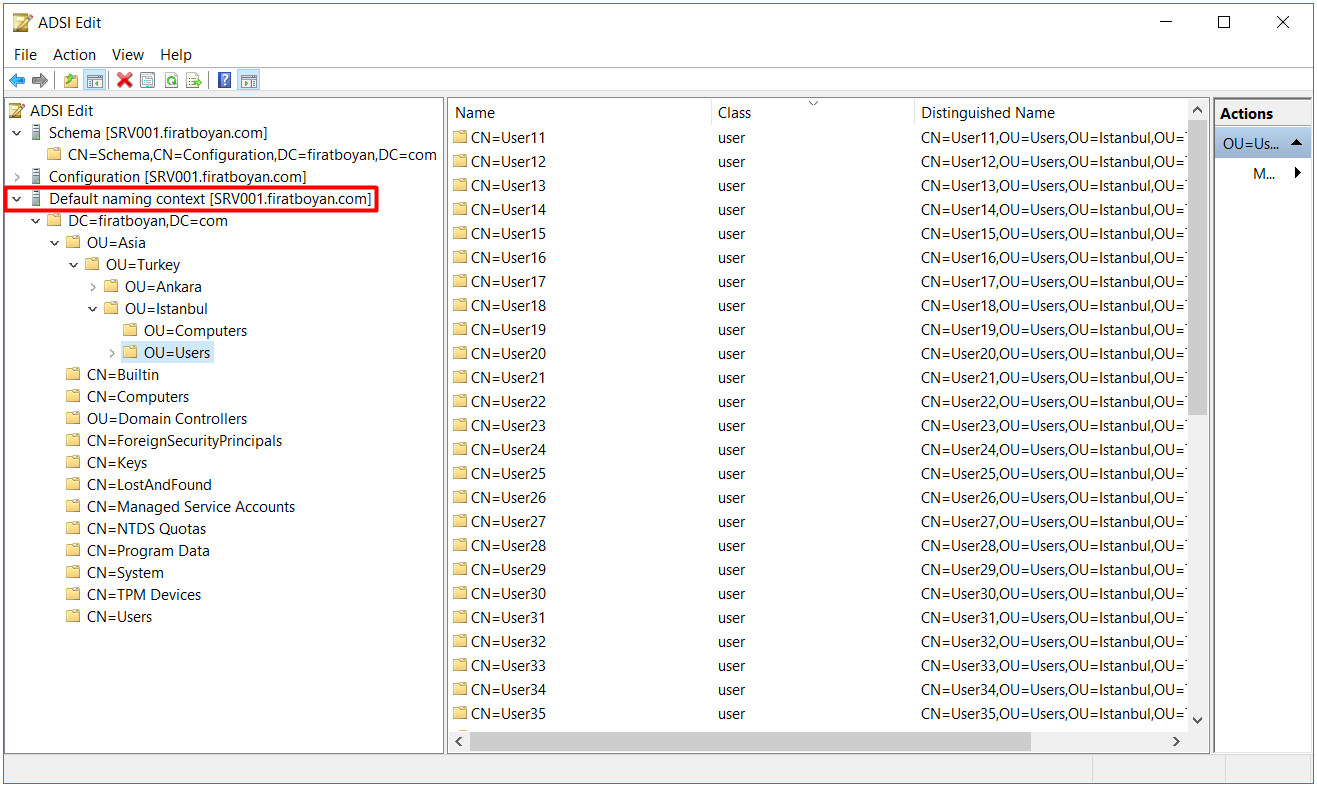
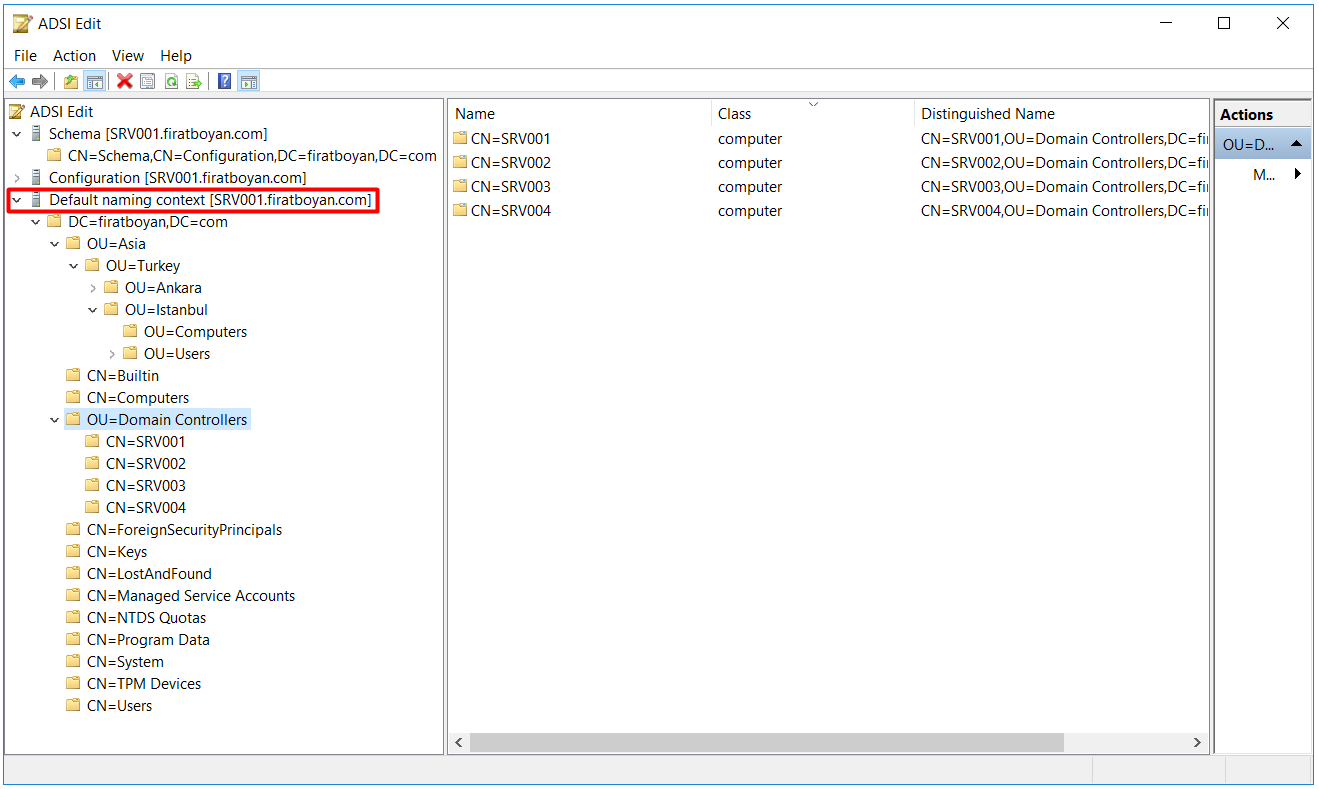
4- Application Partition (DomainDnsZones)
In an Active Directory environment, DNS is a mandatory infrastructure that allows clients and domain controllers to find each other. When a user signs in, when a computer joins the domain or when 2 domain controllers start replication, all of these operations depend on DNS records.
The information stored in DNS consists of 2 main structures: DNS zones and the DNS records in these zones. For example, abc.local is a DNS zone, and this zone contains A records for name-to-IP mappings, SRV records for service discovery and NS records that define the authoritative servers. Clients find domain controllers through SRV records.
In environments that use Active Directory-integrated DNS, this information is not stored in files but in the Active Directory database. The zone replication scope setting determines which partition the zone is stored in. The default option stores the zone in the application partition named DomainDnsZones. There is also an older option that keeps the zone in the domain partition, but it is rarely chosen because in that case the DNS data is also replicated to domain controllers that do not run the DNS service.
DomainDnsZones is the application partition that stores the DNS zones and records of a domain. The DNS zone of the abc.local domain is stored under this partition and is replicated between the domain controllers that run the DNS Server service in the abc.local domain. In this way, the DNS data stays within the domain boundary, and no unnecessary replication traffic is generated to domain controllers that are not DNS servers.
DomainDnsZones Changes, Replication and Consistency
Operations such as adding a new A record, updating an SRV record or deleting a DNS record are written directly to the DomainDnsZones application partition. These changes do not affect user, group or computer accounts. They shape DNS name resolution and service discovery.
In terms of replication, DomainDnsZones is domain-scoped. A DNS record change made on a domain controller in the abc.local domain is replicated to the other domain controllers of the same domain that run the DNS Server service. Another domain in the same forest does not receive a copy of this partition.
There is no separate replication infrastructure for DNS records. DomainDnsZones content is replicated with the standard replication mechanism, on a per-change basis, in the same way as other Active Directory data. This is why I see the DomainDnsZones line together with the other partitions in repadmin output.
Ordinary DNS record changes are multi-master, which means they do not go through a single FSMO role holder. An update can be made on any domain controller that hosts the zone and holds a writable copy of the relevant partition. An RODC that runs the DNS Server service, however, cannot write records to its own local copy. It refers the update request to a writable DNS server. Nevertheless, each application partition has its own infrastructure master role holder, in the same way as the domain partition. This information is stored in the fSMORoleOwner attribute of the CN=Infrastructure object at the root of the partition.
5- Application Partition (ForestDnsZones)
ForestDnsZones is the application partition that stores the DNS zones and records that concern the whole forest. It does not hold DNS information for a single domain, but the DNS information that is common to all domains in the forest.
The best-known content of this partition is the _msdcs.{Forest Root Domain} DNS zone. Here, {Forest Root Domain} is the name of the forest root domain. This zone contains records for domain controllers, global catalog servers and the service discovery mechanisms used across the forest. Domain controllers in different domains find each other for replication through these records.
ForestDnsZones content is replicated to all domain controllers in the forest that run the DNS Server service. In this way, every DNS server, in whichever domain it is, holds a local copy of the records required at forest level. This is also the scope that Microsoft recommends for the _msdcs zone.
ForestDnsZones Changes, Replication and Consistency
Operations such as adding, updating or deleting an SRV record under the _msdcs zone are written directly to the ForestDnsZones application partition. These changes affect service discovery across the forest, not in a single domain.
The difference from DomainDnsZones is the replication scope. A change made in ForestDnsZones is not limited by domain boundaries. It reaches all domain controllers in the forest that run the DNS Server service. Replication again uses the standard Active Directory replication mechanism. Record changes are multi-master here as well, and this partition also has its own infrastructure master role holder.
ForestDnsZones and DomainDnsZones Comparison
|
Item |
DomainDnsZones |
ForestDnsZones |
|
Partition Type |
Application partition |
Application partition |
|
Scope |
Domain-based |
Forest-based |
|
Purpose |
Store domain-specific DNS records |
Store DNS records common to the whole forest |
|
Typical DNS Zone |
abc.local |
_msdcs.{Forest Root Domain} |
|
Most Common Use |
Clients finding the domain controllers in their own domain |
Finding domain controllers and global catalog servers across the forest |
|
Replication Scope |
Domain controllers that run the DNS Server service in the relevant domain |
All domain controllers that run the DNS Server service in the forest |
|
Sharing Between Domains |
No |
Yes |
|
DNS Record Writes |
Multi-master, does not go through a single FSMO role holder |
Multi-master, does not go through a single FSMO role holder |
|
Infrastructure Master Role Holder |
Yes, specific to the partition |
Yes, specific to the partition |
|
If the Wrong Zone Scope Is Selected |
If a domain-specific zone is moved to forest scope, it is replicated to more domain controllers than necessary. |
If the _msdcs zone is narrowed to domain scope, the DNS servers in the other domains do not receive a local copy of the zone. If the records cannot be resolved in another way, service discovery is affected. |
Checking Replication with the repadmin /showrepl Command
/replsummary gives me the overall status. To see which partition was replicated from which partner, when it was last replicated and with what result, I use the repadmin /showrepl command. The command lists, per partition, the Inbound Neighbors of the domain controller on which it is run, that is, the partners from which it receives data. The list is not limited to the site. Partners in a different site also appear in the same output.
repadmin /showreps is the old name of the /showrepl command and produces the same output. I captured the output below with this old name. In current use, /showrepl is preferred.
When I run the command on SRV001, I see which domain controllers SRV001 receives data from for the 5 partitions and the result of the last replication attempts.
Istanbul-Site\SRV001
DSA Options: IS_GC
Site Options: (none)
DSA object GUID: f42d2421-571f-4dfa-9ae1-2f3deba10b0a
DSA invocationID: a6222a96-0436-4c77-ab99-760b5704b1af

==== INBOUND NEIGHBORS ======================================

DC=firatboyan,DC=com
    Ankara-Site\SRV003 via RPC
        DSA object GUID: 0190eb97-9d22-4d35-a429-049745c79191
        Last attempt @ 2018-10-19 22:11:40 was successful.
    Istanbul-Site\SRV002 via RPC
        DSA object GUID: 256bf523-564f-459c-8590-3e7bd5851642
        Last attempt @ 2018-10-19 23:00:30 was successful.

CN=Configuration,DC=firatboyan,DC=com
    Ankara-Site\SRV003 via RPC
        DSA object GUID: 0190eb97-9d22-4d35-a429-049745c79191
        Last attempt @ 2018-10-19 22:11:40 was successful.
    Istanbul-Site\SRV002 via RPC
        DSA object GUID: 256bf523-564f-459c-8590-3e7bd5851642
        Last attempt @ 2018-10-19 23:00:30 was successful.

CN=Schema,CN=Configuration,DC=firatboyan,DC=com
    Ankara-Site\SRV003 via RPC
        DSA object GUID: 0190eb97-9d22-4d35-a429-049745c79191
        Last attempt @ 2018-10-19 22:11:40 was successful.
    Istanbul-Site\SRV002 via RPC
        DSA object GUID: 256bf523-564f-459c-8590-3e7bd5851642
        Last attempt @ 2018-10-19 23:00:30 was successful.

DC=DomainDnsZones,DC=firatboyan,DC=com
    Ankara-Site\SRV003 via RPC
        DSA object GUID: 0190eb97-9d22-4d35-a429-049745c79191
        Last attempt @ 2018-10-19 22:11:40 was successful.
    Istanbul-Site\SRV002 via RPC
        DSA object GUID: 256bf523-564f-459c-8590-3e7bd5851642
        Last attempt @ 2018-10-19 23:25:33 was successful.

DC=ForestDnsZones,DC=firatboyan,DC=com
    Ankara-Site\SRV003 via RPC
        DSA object GUID: 0190eb97-9d22-4d35-a429-049745c79191
        Last attempt @ 2018-10-19 22:11:40 was successful.
    Istanbul-Site\SRV002 via RPC
        DSA object GUID: 256bf523-564f-459c-8590-3e7bd5851642
        Last attempt @ 2018-10-19 23:25:30 was successful.
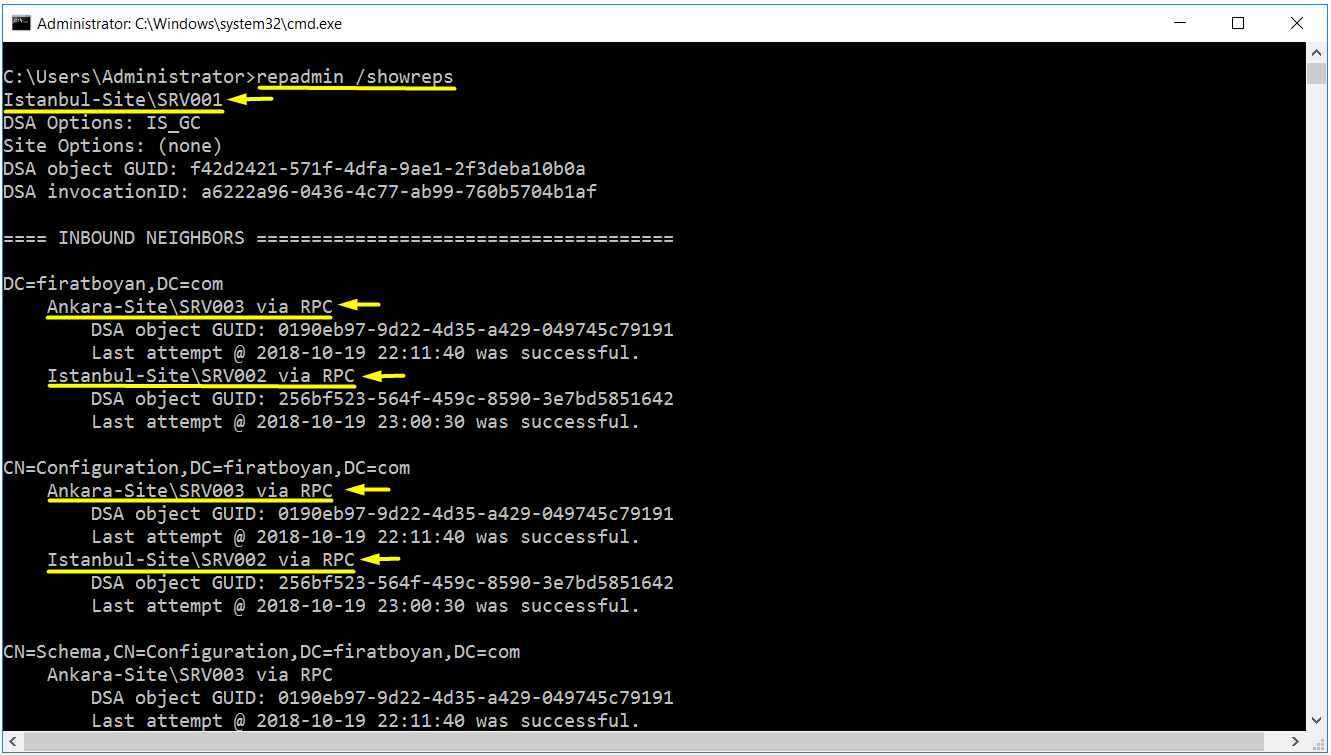
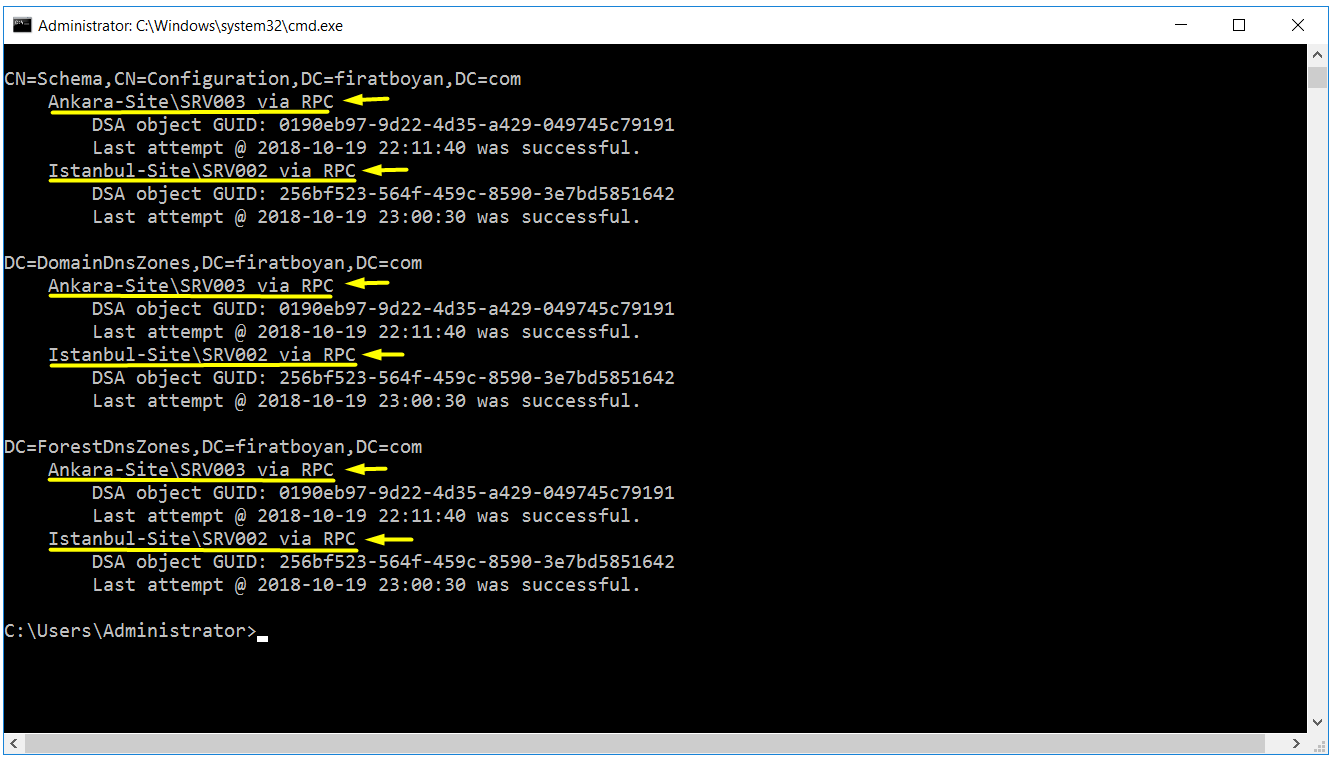
The output confirms the count I made in the /replsummary section. 2 inbound partners are listed under each of the 5 naming contexts: Ankara-Site\SRV003 and Istanbul-Site\SRV002. The 10 partner lines in total correspond to the 0/10 value I saw for SRV001 in the Destination DSA table.
The timestamps also show the site difference. All SRV003 lines carry the time 22:11:40, while the SRV002 lines are between 23:00 and 23:25. Replication with the partner in the other site follows the site link schedule. Replication with the partner in the same site is triggered much more often by change notification.
Checkpoint
In every partner line under every naming context, I see the text Last attempt ... was successful. In a failed relationship, this line is replaced by the error code, the number of consecutive failures and the time of the last successful replication.
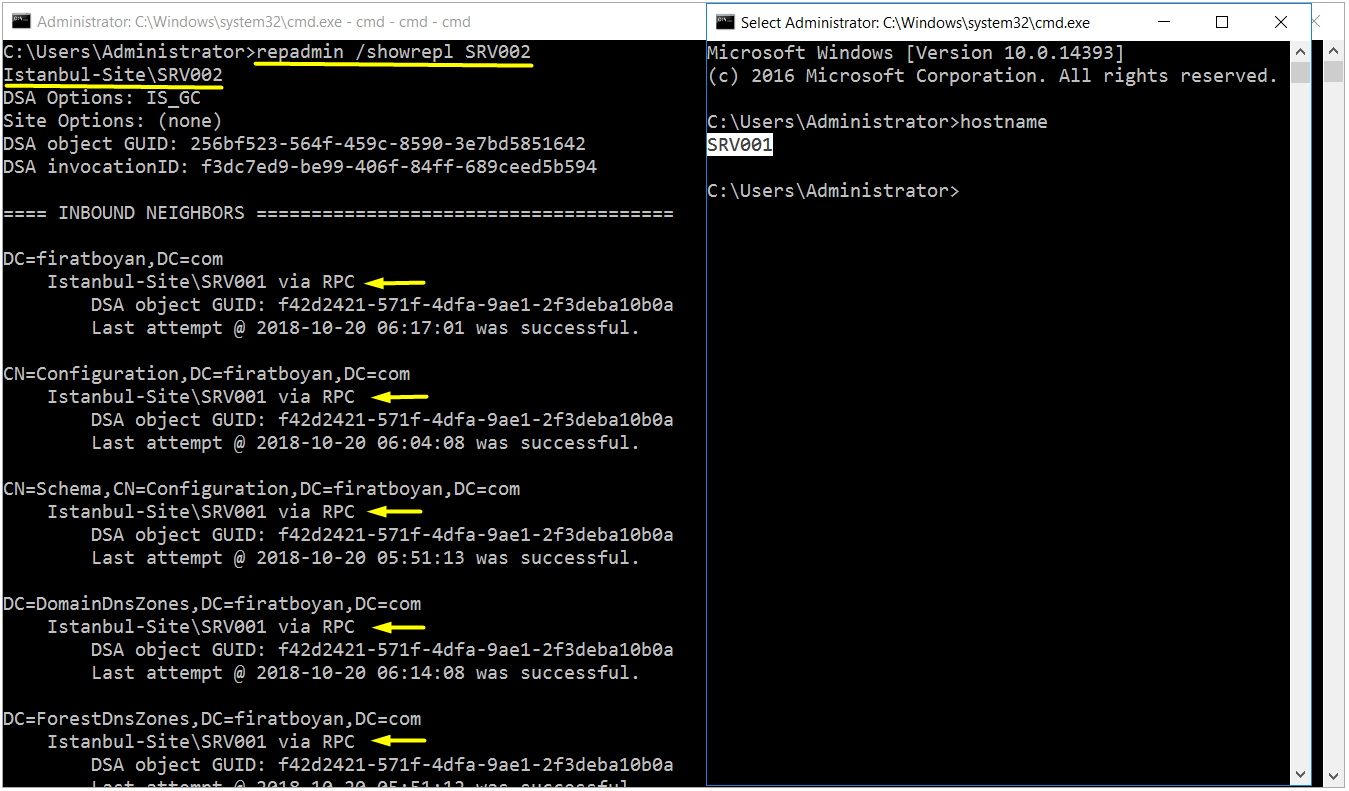
I do not need to connect to another domain controller to run the command for it. I can query it remotely by adding the domain controller name to the end of the command. When I run repadmin /showrepl SRV002 on SRV001, I get the domain controllers from which SRV002 receives data and the results of these replications.
repadmin /showrepl SRV002
Manual Replication with the repadmin /syncall Command
There are situations in which I need to trigger replication without waiting for the schedule: when I want a change to reach the other site immediately after I unlock an account, after a schema extension, or when I want to see the result after I fix a replication problem. This can be done in Active Directory Sites and Services, but I have to use the Replicate Now option one by one for every connection object under NTDS Settings of every domain controller.
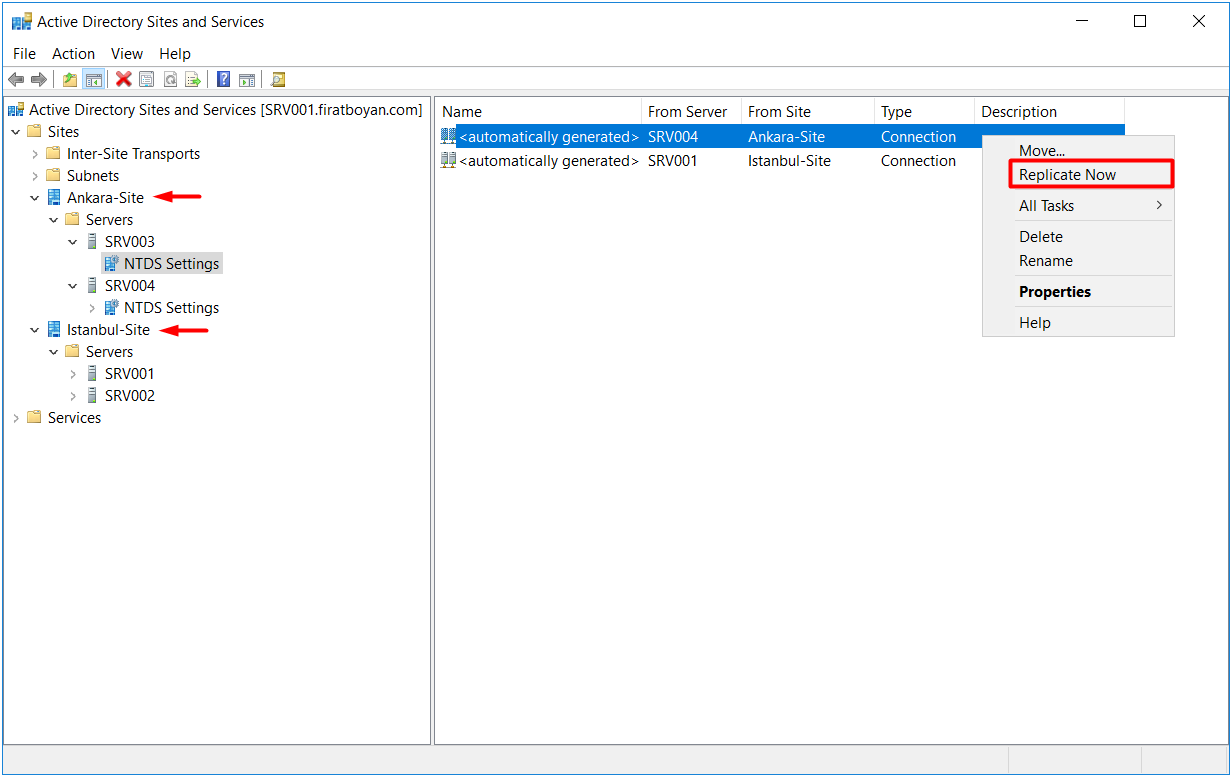
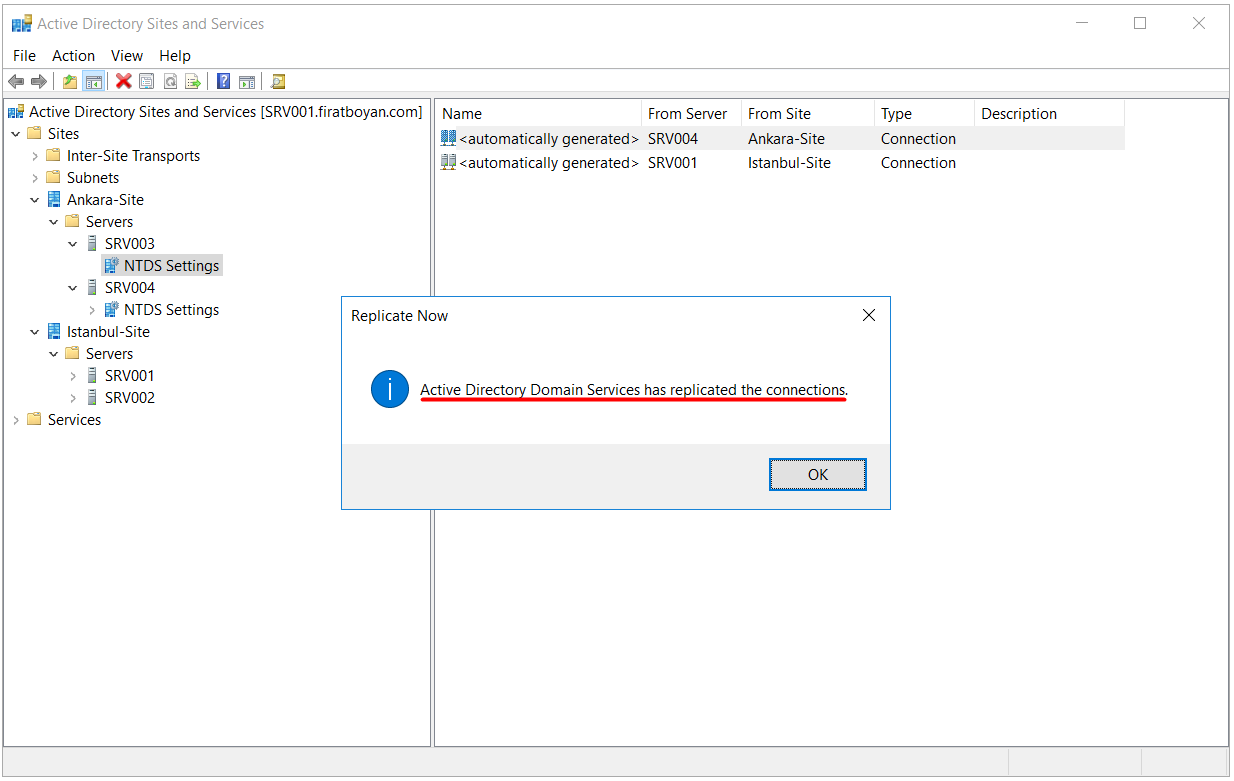
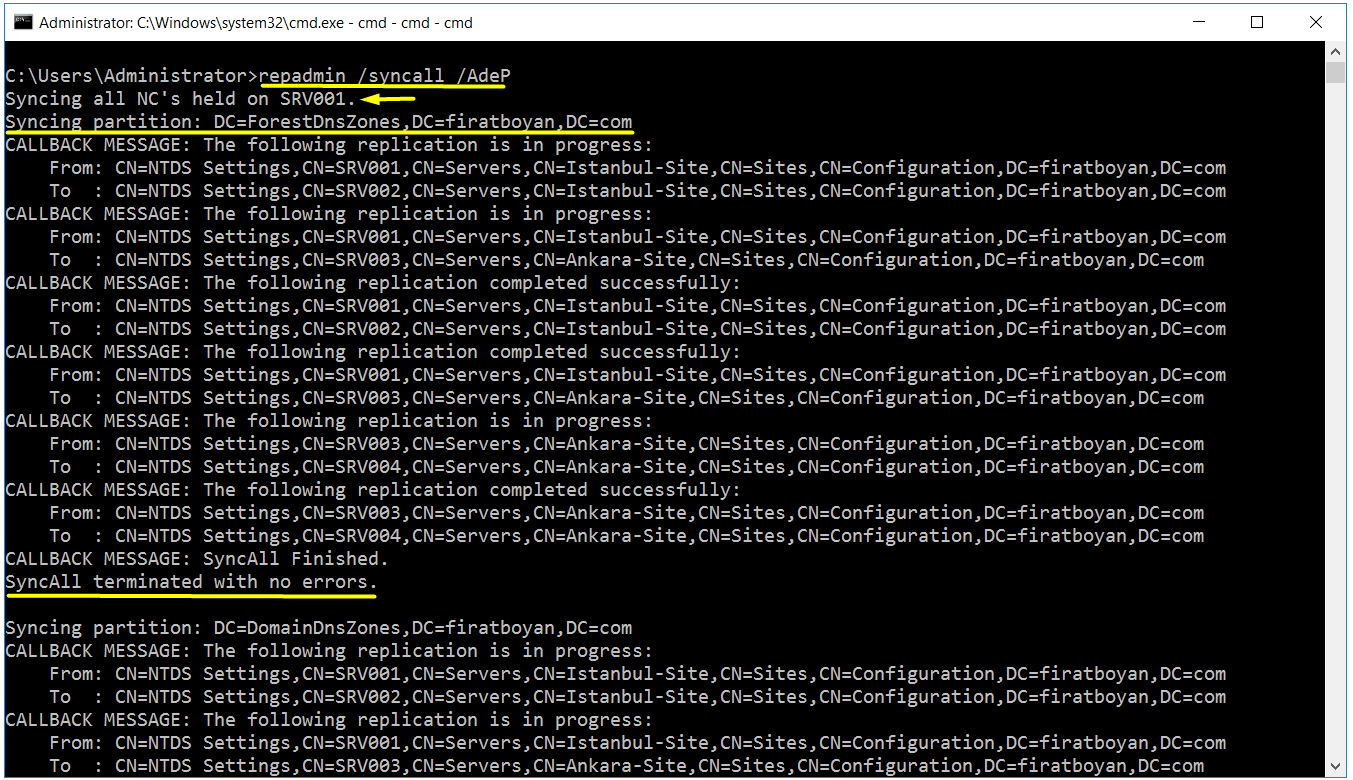
To do the same job with a single command, I use repadmin /syncall. The command synchronises the specified domain controller with all of its replication partners. If no domain controller name is given, the domain controller on which the command is run is used.
repadmin /syncall /AdeP
/syncall triggers the replication of pending changes. It does not copy the database from the beginning, and it does not fix a replication error caused by DNS, the network or permissions by itself. On a relationship that reports an error, the command returns the same error.
Parameters
/AdeP at the end of the command is a combination of 4 separate switches. The switches are case-sensitive, so I pay attention to how I type them.
|
Parameter |
Description |
/A |
Synchronises all naming contexts (partitions) held by the specified domain controller. |
/d |
Shows servers by distinguished name instead of GUID in messages. Makes the output easier to read. |
/e |
Includes domain controllers in all sites. Without this switch, the command does not synchronise domain controllers in other sites. |
/P |
Pushes changes outward from the specified domain controller. |
/q |
Quiet mode. Suppresses the callback messages produced at each step. To see only fatal errors, the upper-case /Q is used. |
The /e switch starts replication traffic in all sites. In environments with many sites and low-bandwidth WAN links, this effect must be taken into account before the command is run during working hours.
Why Is Push Replication Used?
Active Directory replication always works with pull logic: the side that requests and pulls the data is the destination domain controller. The /P switch does not change this mechanism. It sets the direction of synchronisation. Without the switch, the command makes the specified domain controller receive the changes from its partners. With /P, the changes are pushed outward from the specified domain controller. I use this switch when I know which domain controller I made the change on and I want that change to reach the others.
» Urgent Situations: When a change made on a domain controller, such as unlocking or disabling an account, must reach the other sites without waiting for the schedule.
» Structural Changes: After changes that affect the whole forest, such as a schema extension or site configuration, when I want to be sure that all domain controllers are up to date before I move on to the next step.
» Synchronisation: When the data on a specific domain controller must be made consistent with the others immediately.
Running It on All Domain Controllers
The repadmin /syncall /AdeP command is centred on a single domain controller. In a distributed site structure, if I want every writable domain controller in the domain to push its own changes outward, I use the following PowerShell line, which runs the command for the writable domain controllers in turn. The command requires the ActiveDirectory PowerShell module.
Get-ADDomainController -Server 'firatboyan.com' -Filter * | Where-Object { -not $_.IsReadOnly } | ForEach-Object { repadmin /syncall $_.HostName /AdePq }
The command works as follows:
1- Get-ADDomainController -Server 'firatboyan.com' -Filter * returns the domain controllers in the specified domain. If the -Server parameter is not given, the cmdlet uses the domain of the computer on which PowerShell runs, not the domain of the signed-in user. Writing the target domain explicitly removes this ambiguity. In your own environment, you need to write your own domain name instead of firatboyan.com.
2- The Where-Object { -not $_.IsReadOnly } expression removes read-only domain controllers (RODC) from the list. A directory change cannot be originated on an RODC and an RODC does not perform outbound replication, so it has no changes to push outward. Because all 4 domain controllers in my environment are writable, this filter does not change the result, but it is required in environments that have an RODC.
3- The ForEach-Object loop runs the repadmin /syncall command separately for each remaining domain controller. The $_.HostName expression returns the DNS name of the domain controller.
4- The /A switch synchronises all naming contexts held by each domain controller. For this reason, I do not write a naming context in the command.
5- The /q switch suppresses the intermediate messages produced for each domain controller, so errors are easier to see in the output.
Checkpoint
The command completes without producing an error message. When I then run repadmin /replsummary again, I see that the Largest Delta values have dropped below a few minutes and that the fails column remains 0.
Replicating a Single Partition
I do not always need to synchronise all partitions. If I made a change only in DNS records or only in the schema, I remove the /A switch and give the distinguished name (DN) of the relevant partition as the naming context. The syntax of the command is repadmin /syncall {Domain Controller} {Naming Context} {Switches}. If no naming context is written and /A is not used either, the command runs on the configuration partition.
The following example synchronises the ForestDnsZones partition on SRV001 towards the partners in all sites.
repadmin /syncall SRV001 DC=ForestDnsZones,DC=firatboyan,DC=com /deP
The naming context values of the partitions in my environment are as follows. These values are the same as the partition headings in the repadmin /showrepl output. In your own environment, they change according to the domain name.
|
Partition |
Naming Context |
|
ForestDnsZones |
DC=ForestDnsZones,DC=firatboyan,DC=com |
|
DomainDnsZones |
DC=DomainDnsZones,DC=firatboyan,DC=com |
|
Schema |
CN=Schema,CN=Configuration,DC=firatboyan,DC=com |
|
Configuration |
CN=Configuration,DC=firatboyan,DC=com |
|
Domain |
DC=firatboyan,DC=com |
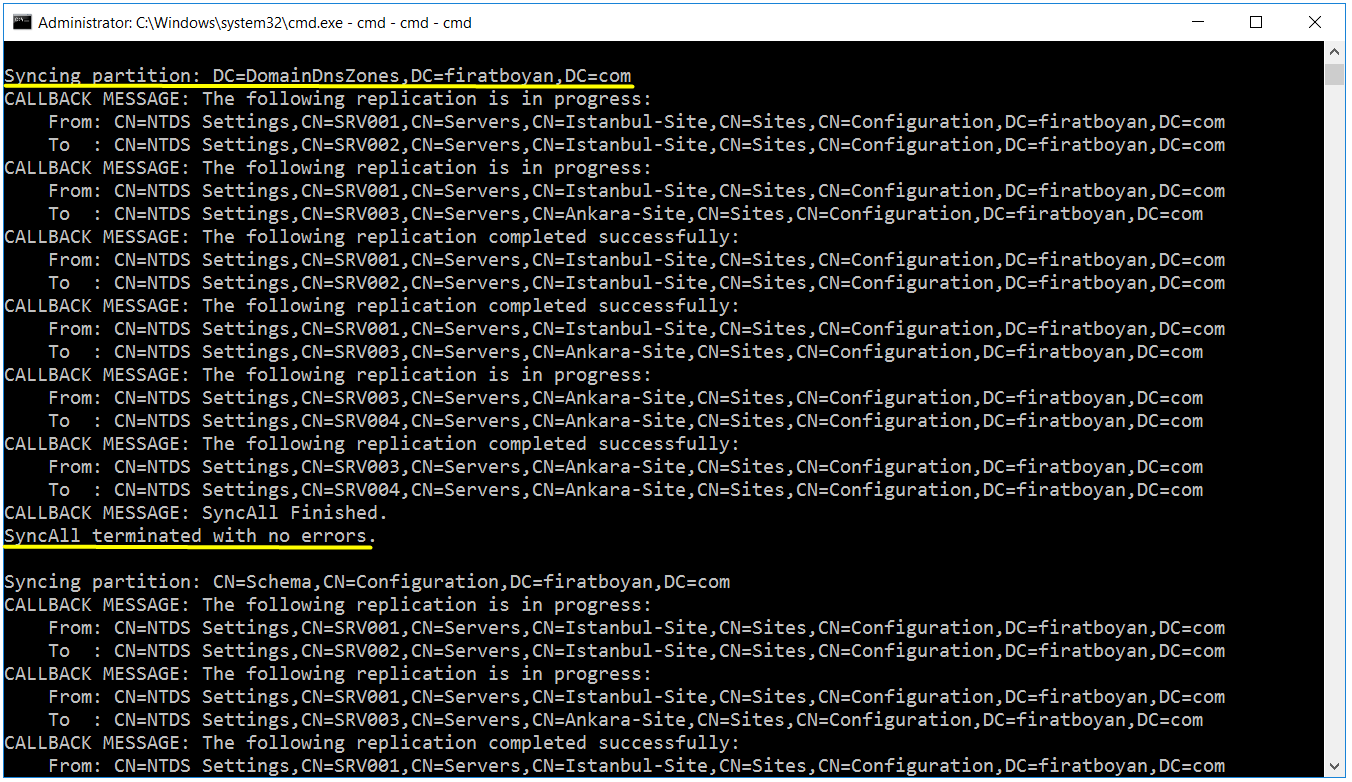
Active Directory ForestDnsZones Application Partition Replication
All domain controllers in the forest completed the replication of the ForestDnsZones application partition successfully.
Active Directory DomainDnsZones Application Partition Replication
Replication of the DomainDnsZones application partition also completed without errors on all domain controllers.
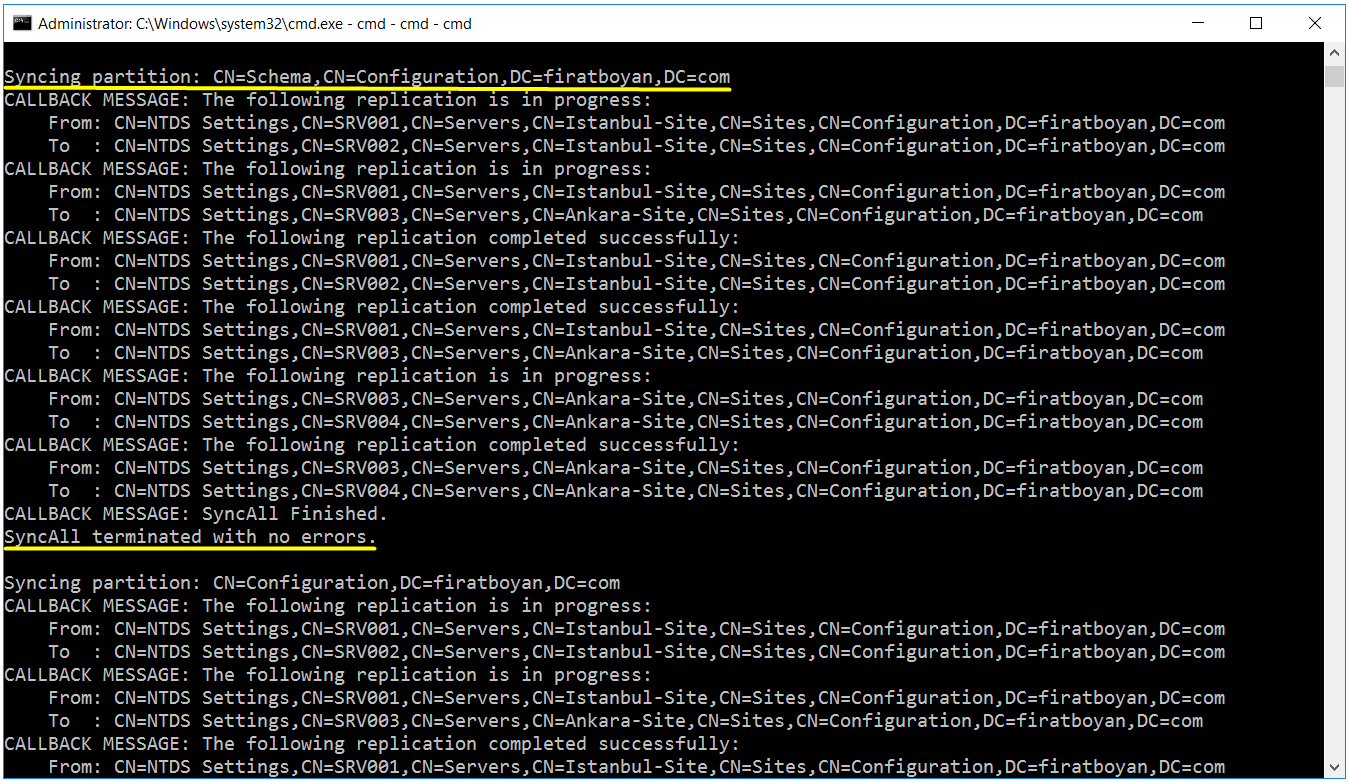
Active Directory Schema Partition Replication
Replication for the schema partition completed successfully on all domain controllers in the forest.
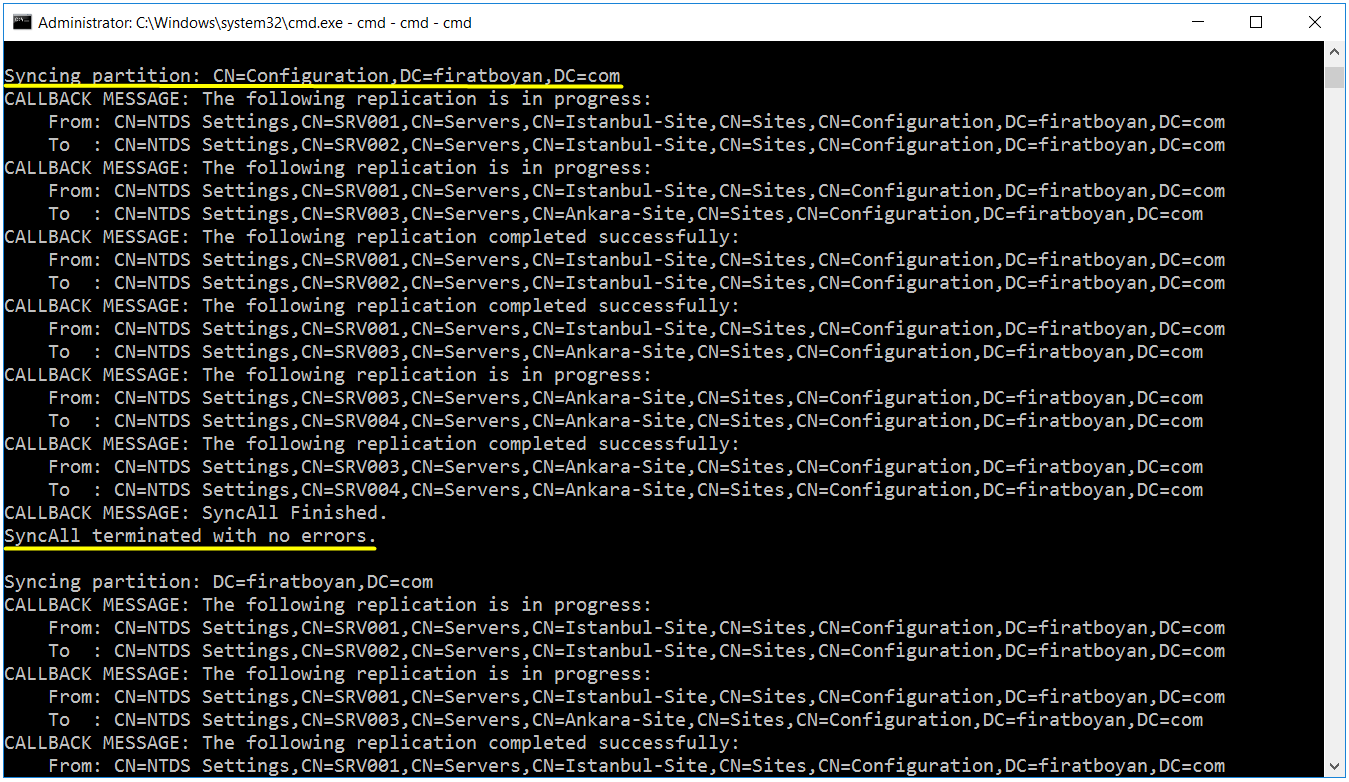
Active Directory Configuration Partition Replication
All domain controllers completed the replication of the configuration partition successfully.
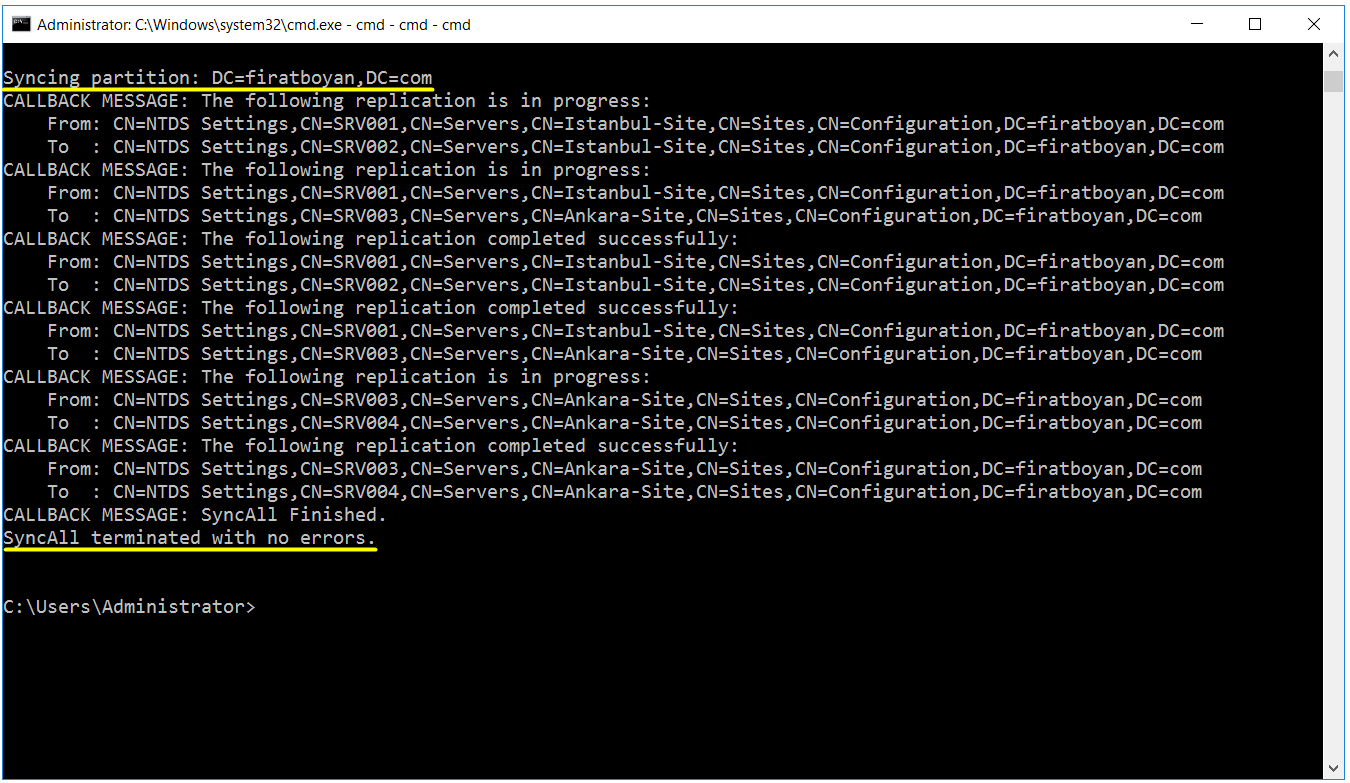
Active Directory Domain Partition Replication
Finally, replication of the domain partition also completed without errors on all domain controllers in the forest.
This article covered how I monitor Active Directory replication with repadmin and how I trigger it manually when required. Using the figures from my own environment, I examined that the Largest Delta value in the /replsummary output shows the age of the relationship that has gone the longest without a successful replication, and that the total value is not a number of attempts but the sum of the partner counts under each naming context. I explained that the reason the schema, configuration, domain, DomainDnsZones and ForestDnsZones partitions are kept separate is the replication scope, which domain controllers each of them is replicated to, and in which operations the FSMO roles are involved. After checking the status per partner with /showrepl, I showed the parameters of the /syncall command, what the push direction means and how the command is used for a single partition.
I hope you find it useful...
Feel free to share your thoughts and questions about this article in the comments below. Every contribution helps the content reach more people and makes for a more useful discussion.