Kerberos is the default authentication method in an Active Directory environment. It is the protocol that runs in the background when a user switches on the computer in the morning and types the password, opens a file share, connects to an intranet application or accesses Exchange Server with Outlook. It became the Active Directory standard with Windows 2000 Server and has replaced NTLM since then.
The reason it is more secure than NTLM is simple. In NTLM, the server must forward the client's response to the domain controller for validation on every authentication, whereas in Kerberos the password and its derivatives never leave the client. In NTLM only the client proves its identity, whereas in Kerberos both the server and the client can prove theirs. In NTLM every access goes to the domain controller and back, whereas in Kerberos a ticket obtained once is reused for its lifetime.
Although it is so widely used and so much better than NTLM, many system administrators do not know how Kerberos works internally. Nobody notices it while it works, and when it fails, it is not clear what has happened. A missing SPN, a system clock that differs from the domain controller by more than 5 minutes or a service running under the wrong account usually appears to the user as an Access Denied error that explains nothing. To find where the problem is, you need to be able to read the network trace, the Security log entries and the klist output. For that, you must know what the protocol sends at each step.
The logic of Kerberos fits into 3 sentences.
✔ The password never travels over the network.
✔ The client cannot open any ticket; only the KDC and the target service can open tickets.
✔ The user's identity and group memberships are carried inside the ticket.
With these 3 sentences in mind, steps such as AS-REQ, TGS-REQ and AP-REQ stop being abbreviations to memorise; each one becomes part of a simple chain where specific data is encrypted with a specific key.
This article describes the classic on-premises Active Directory scenario. The domain controller holds the KDC role, the client runs Windows, and the target service is a domain-joined file server. The encryption type used throughout is AES256, the default in current environments. In hybrid environments, sessions on the Microsoft Entra ID side use different protocols; however, access to on-premises file servers, SQL Servers and Exchange Server still uses Kerberos. Therefore, you need to know this flow as long as a single domain-joined resource exists.
The sections below cover the process from the moment the user types the password until access to the file share is granted, in 6 steps. First, they explain how the domain controller works as the Key Distribution Center (KDC) and the role of the Local Security Authority Subsystem Service (LSASS) on the client side. Then the AS-REQ / AS-REP, TGS-REQ / TGS-REP and AP-REQ / AP-REP steps are covered in order. Each step describes what is sent, which key is used, what the other side checks and which entry is created in the Security log when an error occurs. At the end of the article, the whole flow is collected in a single table.
The Basics
In the Kerberos flow, the domain controller works as the Key Distribution Center (KDC). This role is performed by the Kerberos Key Distribution Center service on the domain controller, which appears under the same name in services.msc. The service is installed automatically with the domain controller role, starts as Automatic and does not need manual management. A domain controller where it is not running does not exist as far as Kerberos is concerned. The screenshots in this article come from a lab environment with 1 domain controller; because the share is on the DC, the target service appears as ABCISTSRVDC01 in the images.
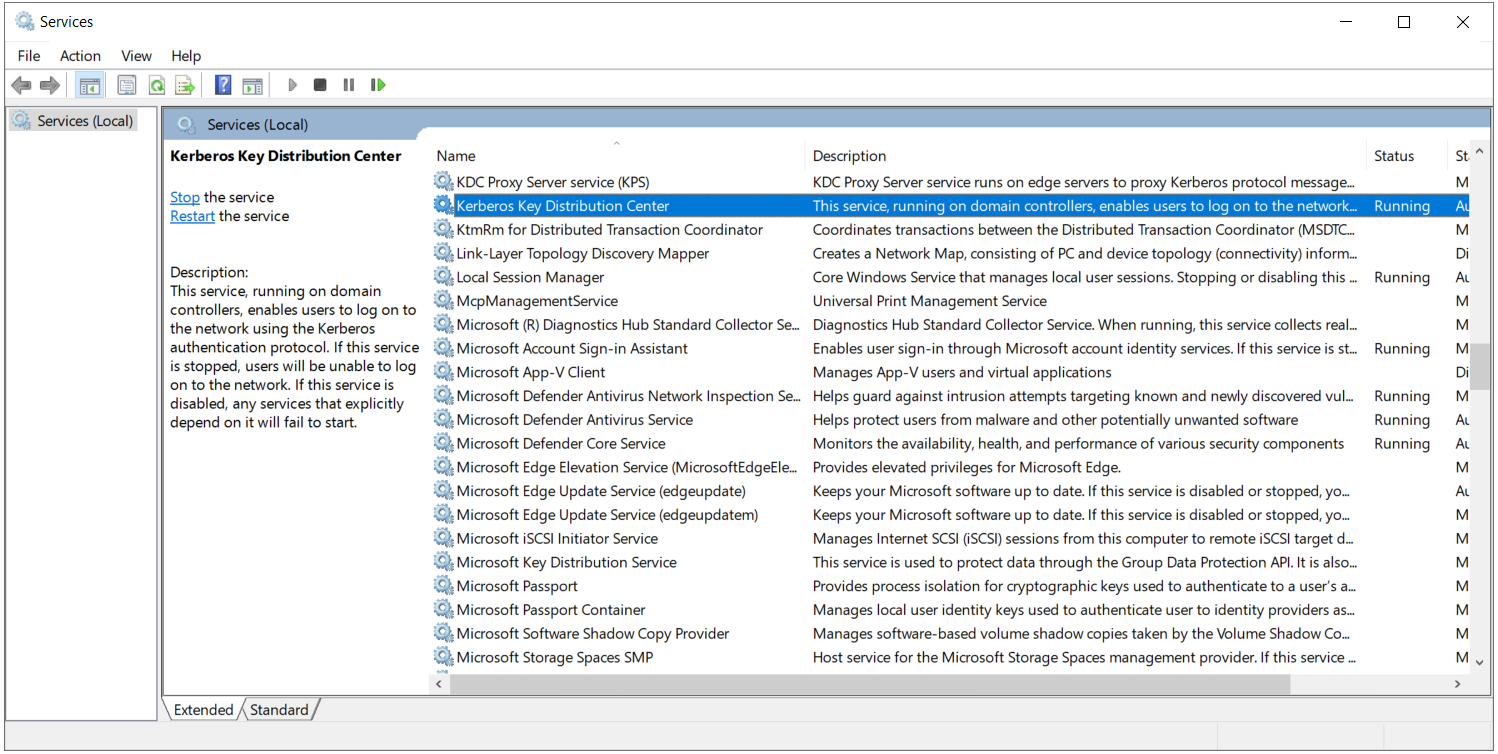
Although the KDC looks like a single service, it logically consists of 2 sub-services.
1. Authentication Service (AS): Verifies the user's identity with the password and issues a Ticket Granting Ticket (TGT) in return.
2. Ticket Granting Service (TGS): Issues a service ticket (ST) for the target service to a client that holds a valid TGT.
Both services run in the same process and listen on the same TCP and UDP port 88; they are distinguished by the type of the incoming request. The diagram below shows the 6 steps between the client, the KDC and the target service in order and with their numbers; the following sections follow these numbers.
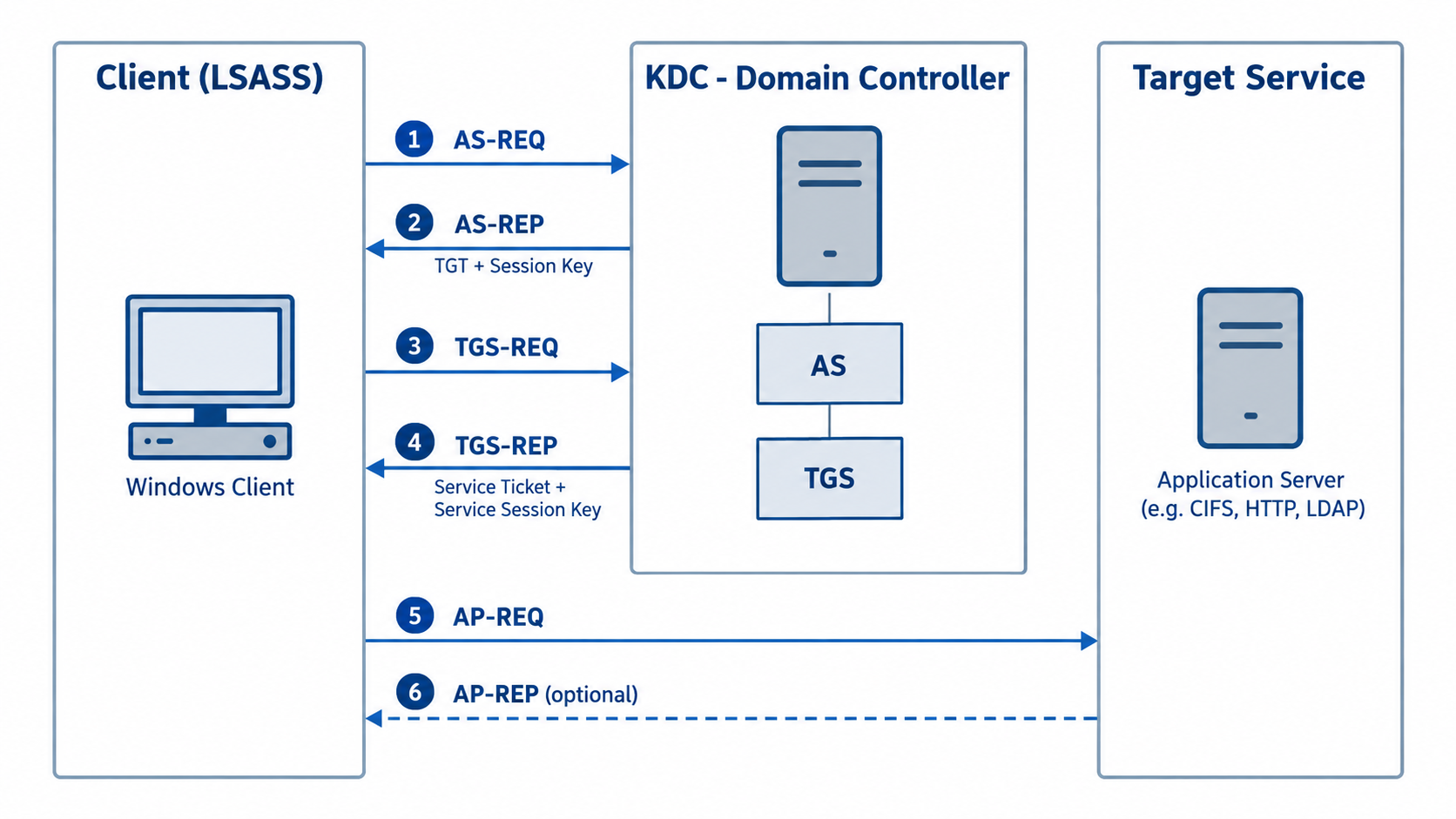
These 2 sub-services and the target service divide the 6 steps of the flow into 3 pairs. Each pair uses the output of the previous one as its input.
1. AS pair (steps 1 and 2): The client talks to the AS sub-service of the KDC. A TGT is produced from the password. The encryption key is the derived key, which is derived from the password.
2. TGS pair (steps 3 and 4): The client talks to the TGS sub-service of the KDC. A service ticket is produced from the TGT. The encryption key is the session key delivered in the AS-REP.
3. AP pair (steps 5 and 6): The KDC is not involved; the client talks directly to the target service. The service ticket is presented. The encryption key is the service session key delivered in the TGS-REP.
The key changes in each pair; the key provided by one step unlocks the next step.
Its name comes from Kerberos, the 3-headed dog that guards the gate of Hades in Greek mythology. In the protocol, which was designed at MIT as part of Project Athena, the 3 heads are usually associated with the client, the KDC and the target service; the AS, TGS and AP message pairs are the conversations between these parties.
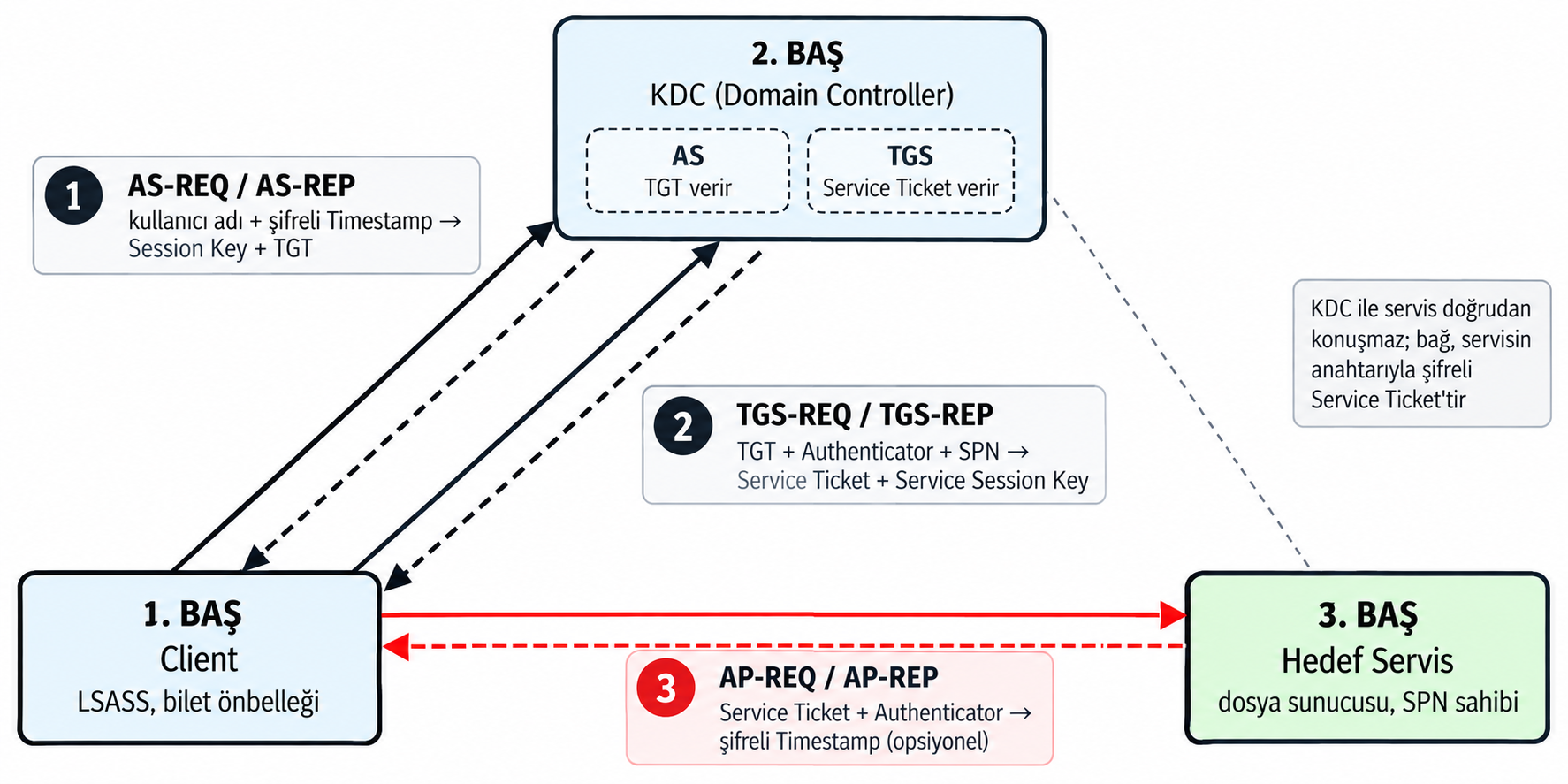
The Client box in both images contains the text Local Security Authority Subsystem Service (LSASS) because lsass.exe, the system process responsible for authentication in Windows, runs the whole Kerberos flow on the client side.
1. Keys and tickets are kept only in memory: The derived key derived from the password, the session keys received from the KDC, the TGT and the service ticket stay in the protected memory of LSASS; they are not written to disk or to the registry. When the user signs out, this memory is cleared and all cached tickets are deleted. The lifetime of keys and tickets is limited to the session.
2. Access goes through SSPI: Outlook, Explorer or a browser does not build Kerberos packets itself. It requests the ticket for the target service from LSASS through the SSPI (Security Support Provider Interface). If the cache holds a valid ticket, LSASS returns it; otherwise it obtains a new ticket from the KDC and places it in the cache. In this way, the authentication logic sits in 1 central place, not in the application.
3. Troubleshooting is done in the LSASS cache: For a Kerberos problem, you examine the LSASS ticket cache, not the application. If access to a service fails, this cache shows whether the ticket for that service was obtained, its encryption type and its validity period. The klist command lists the contents of the cache, and klist purge clears the cache and triggers the flow from the start.
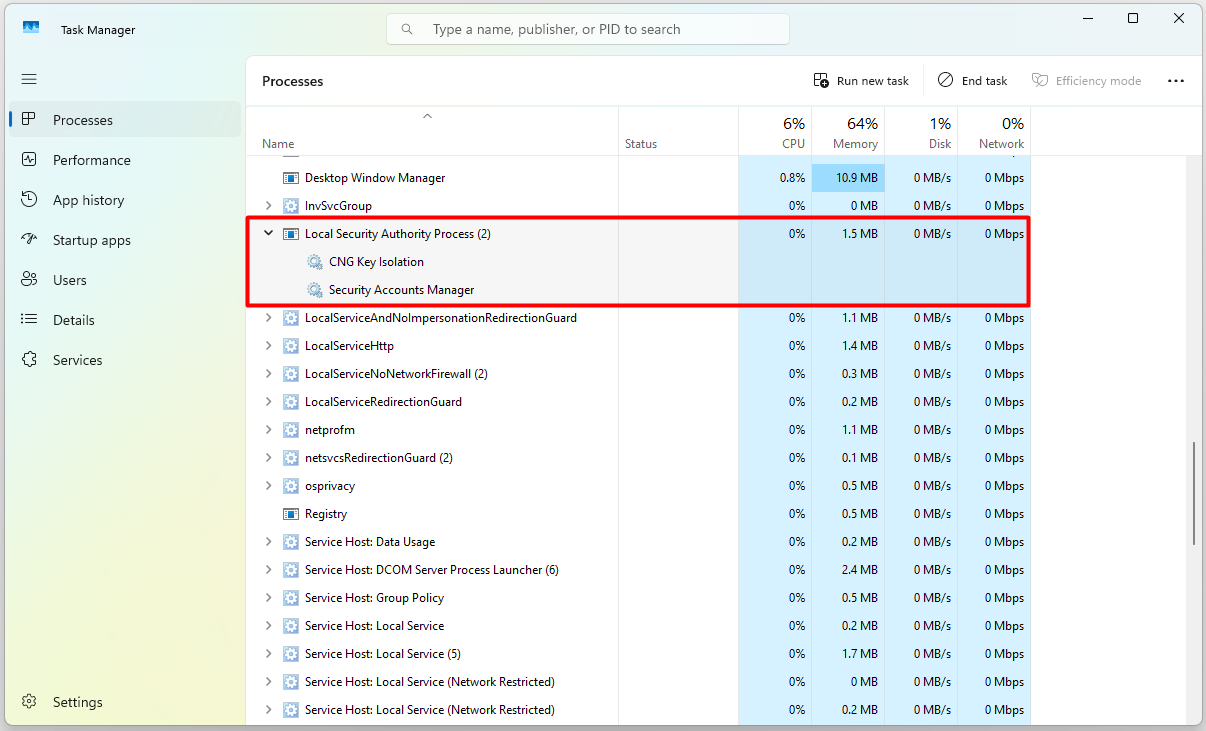
In Windows 11, this process is listed on the Processes tab of Task Manager under the display name Local Security Authority Process. When you click the arrow on its left and expand the row, the 2 Windows services hosted by this process appear under it: CNG Key Isolation and Security Accounts Manager. Because Task Manager shows the services running inside a process under that process, the number in brackets next to the process name (2 in the example) is the number of hosted services.
On the Details tab, the same process is listed by its file name, lsass.exe. The SYSTEM value in the User name column shows that the process runs under the operating system account, not a user account; for this reason, the signed-in user has no direct access to their own keys and tickets, which all stay in the memory of this process.
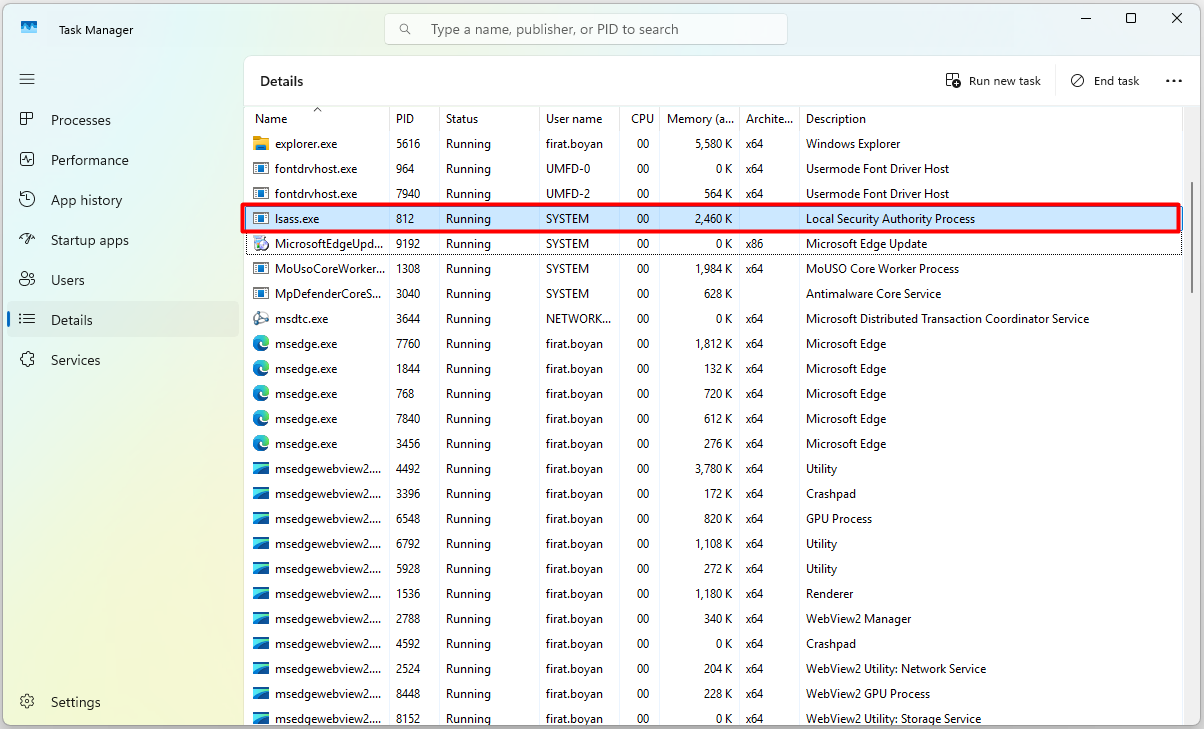
Kerberos does not appear as a separate row in this list, because in Windows Kerberos runs as a Security Support Provider (SSP), not as a service. An SSP is a DLL file that implements a specific authentication protocol and is loaded into the memory of lsass.exe when it starts. This file is kerberos.dll for Kerberos and msv1_0.dll for NTLM. Applications do not talk to these DLLs directly; they send requests to LSASS through a common interface, the Security Support Provider Interface (SSPI), and LSASS routes each request to the appropriate SSP. For this reason, looking for a Kerberos service in Task Manager gives no result; Kerberos is lsass.exe itself.
This can be seen in practice with Sysinternals Process Explorer. When lsass.exe is selected in the upper pane and the lower pane is switched to the DLL view, the file C:\Windows\System32\kerberos.dll is listed among the modules loaded into the process memory, and the Description column shows Kerberos Security Package. This is direct proof that Kerberos is not a separate process or service but a library loaded into lsass.exe.
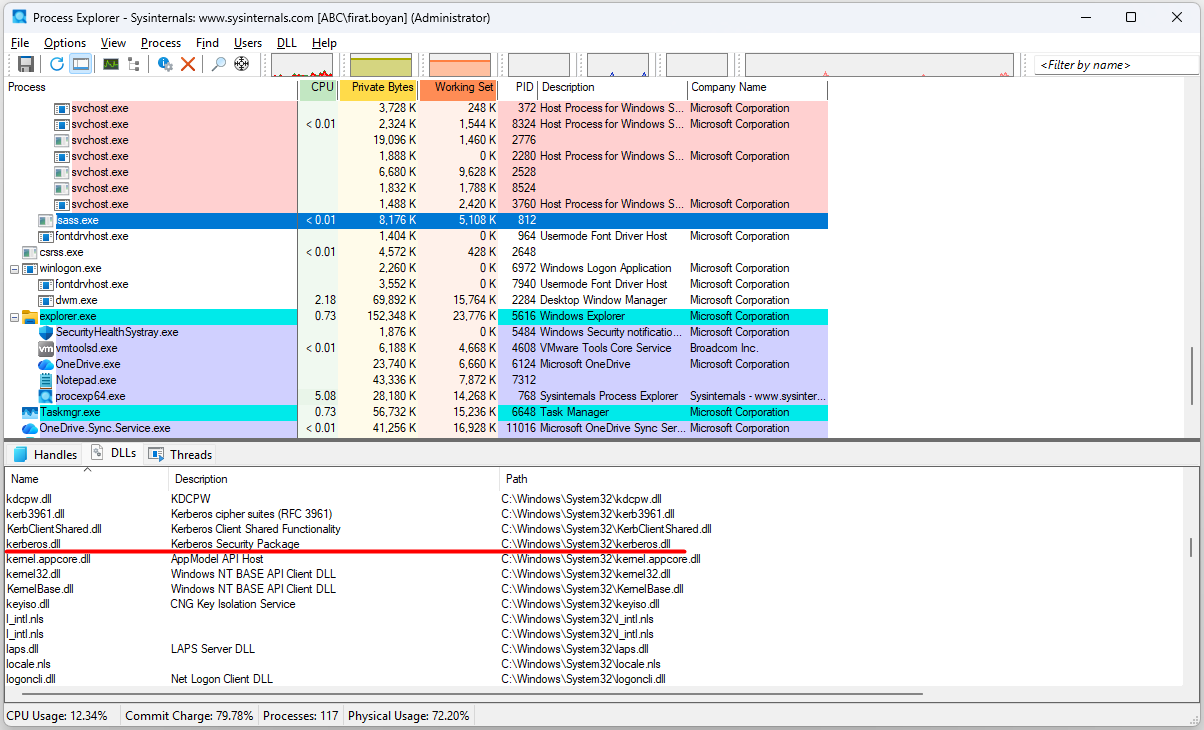
Going 1 step further and examining the functions that the file exports shows that kerberos.dll is not just a file loaded into memory but a module containing the code blocks that process the Kerberos protocol. A DLL presents a function table (export table) to the outside; the operating system and other components can reach the code inside the DLL only through the entry points declared in this table.
Because this table is stored inside the file in binary form, it cannot be read directly; viewing it in readable form requires a tool that parses the Portable Executable (PE) file structure. I used the Dependencies tool here. When kerberos.dll is opened with this tool, the Export list in the lower right pane directly shows the functions that the file exports and through which LSASS triggers Kerberos operations.
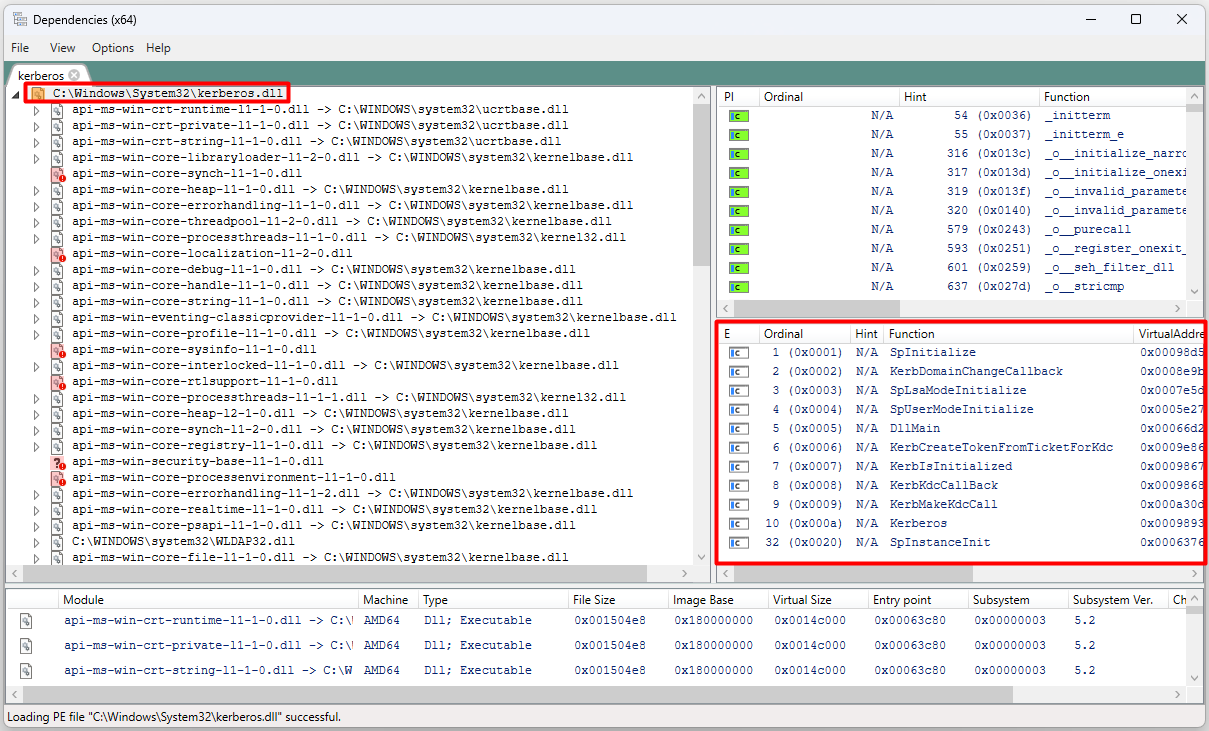
The main (E) export functions in the lower right pane are as follows:
👉 SpLsaModeInitialize and SpUserModeInitialize are the entry functions through which LSASS registers kerberos.dll as a security package when it starts.
👉 KerbMakeKdcCall and KerbKdcCallBack allow LSASS to talk to the KDC; AS-REQ and TGS-REQ requests reach the DC through these functions.
👉 KerbCreateTokenFromTicketForKdc relates to generating a token from a Kerberos ticket.
The list contains no function named exactly AS-REQ or TGS-REQ. The actual code for these steps runs inside the DLL, in private functions that are not exported. The export list only shows through which entry points LSASS enters this library; it is sufficient as proof that the Kerberos logic resides in kerberos.dll.
From this point on, the 6 steps are covered one by one. Each step shows which side sends what, what the other side checks and which entry in the Security log records the operation. The first step is the AS-REQ, which starts the moment the user types the password.
1. Authentication Service Request (AS-REQ)
Client Side
The flow starts when the user types the Username and Password on the Windows sign-in screen. The sign-in screen passes this information to LSASS, and everything after that takes place inside LSASS.
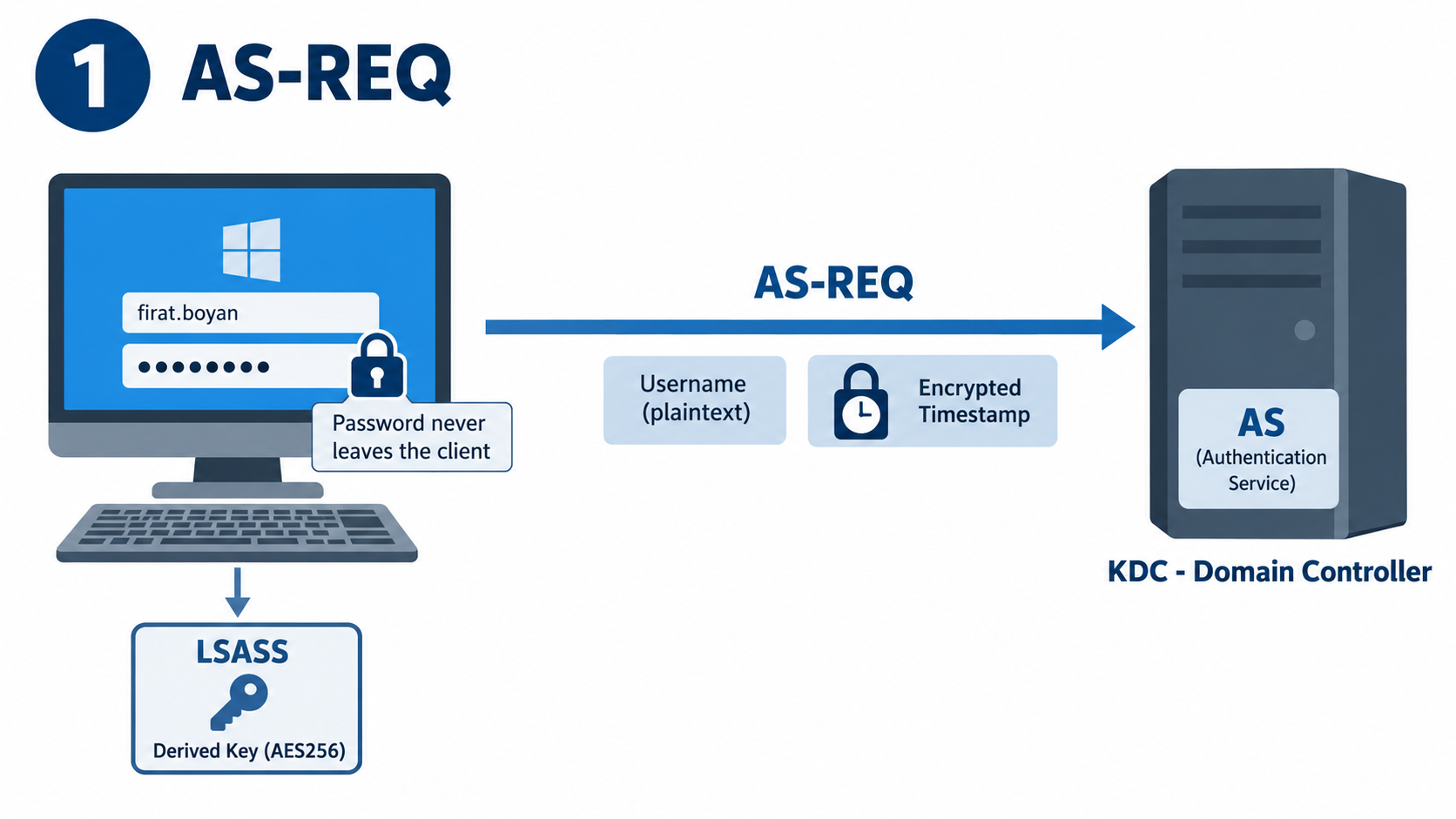
👤 Username: For example firat.boyan, goes to the KDC as plaintext, that is, unencrypted. This is not a security weakness. At this stage there is no secure session or shared session key established between the client and the KDC yet; and because the key needed for encryption is derived from the user's identity anyway, the KDC must know which account is involved before it starts processing. The Active Directory database contains thousands of accounts, and each account has its own key. If the username is not sent, the KDC cannot know which account's key to use to decrypt the request. In short, the username is not secret information; what is secret is the key that belongs to that account and never goes onto the network.
🔑 Password: For example P@ssw0rd!, never goes onto the network in any form. The password itself is sent to the KDC neither in plaintext nor encrypted; the client side uses only a key that is mathematically derived from the password. For this derivation and all later cryptographic operations, LSASS runs the following 5-step process.
1. The derived key is generated: LSASS combines the password with a salt and produces an AES256-based derived key. For user accounts, the salt is the upper-case realm name combined with the username, such as ABC.Localfirat.boyan. Because of the salt, 2 different users with the same password have different keys.
2. The key is kept in memory: The derived key is not written to disk; it is kept only in the memory of LSASS.
3. The key is constant: As long as the password does not change, the derived key for the same user is always the same, because the derivation function is deterministic.
✅ An example AES256 derived key is shown below.
0x9A 4F B3 12 7D E8 6C 5A 99 23 88 1F 74 20 5D 67
  3E 42 91 56 AA 7B 44 98 FE 1A C0 11 3F 9D 2C 77
4. The timestamp is created: LSASS produces a timestamp from the current system time.
5. The timestamp is encrypted: The timestamp is encrypted with the derived key. The resulting encrypted data is called the cipher, and this cipher takes the place of the password in the request sent to the KDC.
✅ An example cipher is shown below.
0x09 D2 F6 BE D5 DA 49 61 AF 86 C5 2E FC 46 8D 0D
0xB2 A5 82 21 FE 55 2E 31 AA C8 E5 1D 96 08 A8 57
0xD2 F6 EA E5 9D AA 2D 3A D4 AF 74 CB 48 29 D5 C6
0xF9 60 A0 D9 DB 82 F9 49
As a result, the AS-REQ consists of 2 parts: the username in plaintext and the timestamp encrypted with the derived key.
This encrypted timestamp is the pre-authentication mechanism. The first versions of Kerberos did not have this step; anyone could request a TGT for any username and run offline password guessing against the returned response. Pre-authentication closes this gap and is mandatory by default in Active Directory. It can be disabled only per account, with the Do not require Kerberos preauthentication option in the account properties. Because this option makes the attack known as AS-REP Roasting possible, it must not be used in a production environment.
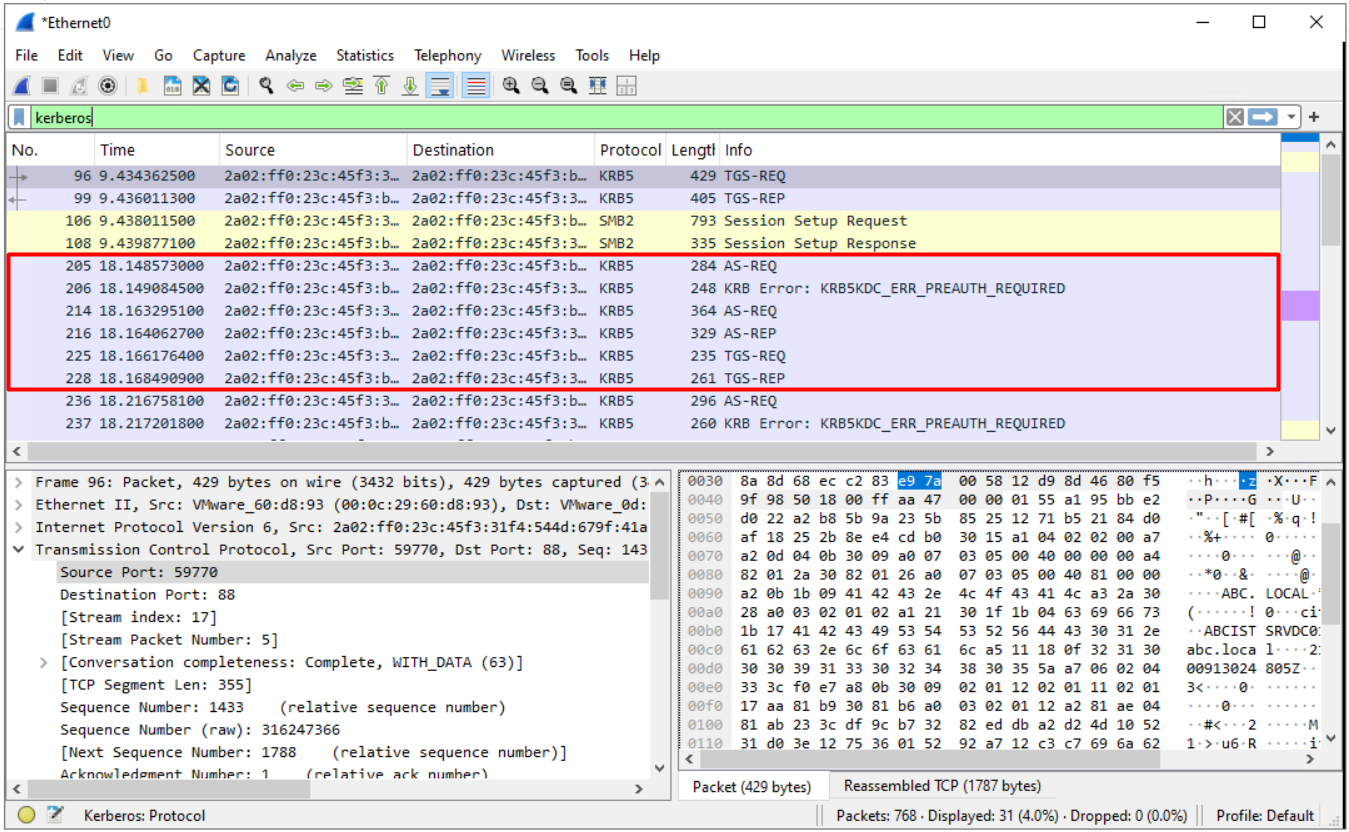
A network trace shows that the Windows client sends the AS-REQ 2 times. The first request goes without the encrypted timestamp. The KDC replies with the KDC_ERR_PREAUTH_REQUIRED error, and inside this error it reports the encryption type and the salt value that the client must use. The client sends the second request with the encrypted timestamp, and the actual verification takes place in this second request.
Authentication Service Side
The AS matches the incoming request to the account in the NTDS.DIT database by username and reads the account's key. When a user's password is set for the first time or changed, Active Directory stores the AES256 and AES128 keys in the supplementalCredentials attribute of the account, and the NT hash, which is the RC4 key, in the unicodePwd attribute. Therefore, the AS does not derive the key again on every request; it directly uses the AES256 key already stored in the database. This key is identical to the derived key that the client derived from its own password, because both sides used the same password, the same salt and the same derivation function.
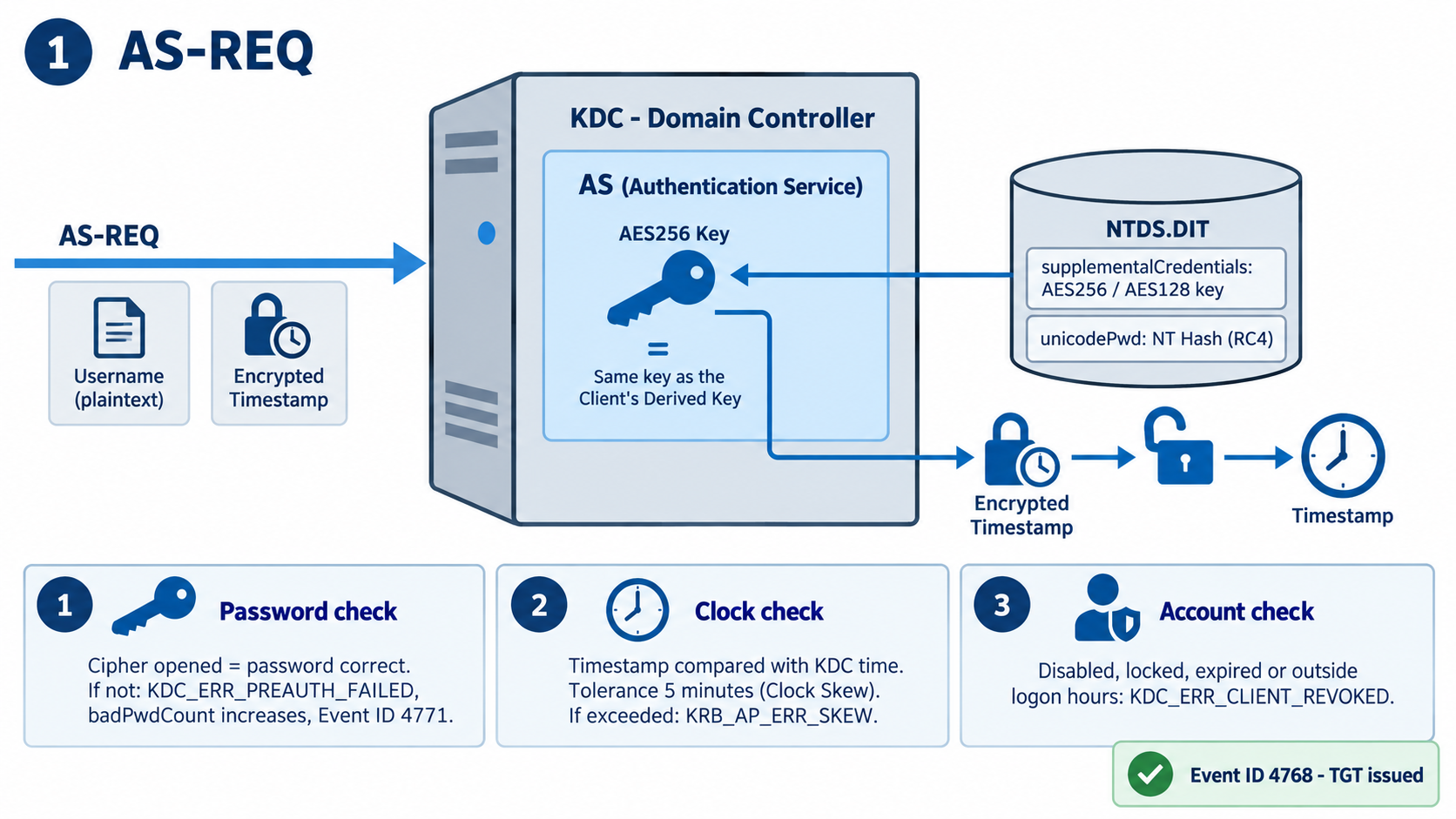
The AS opens the cipher with this key, extracts the timestamp and performs 3 separate checks.
1. Password check: The fact that the cipher can be opened proves that the user entered the correct password. If a wrong password had been entered, the client would have produced a different derived key, the key held by the KDC would not have opened the cipher, and KDC_ERR_PREAUTH_FAILED would have been returned. In that case, the badPwdCount value of the account increases and Event ID 4771 is written to the Security log of the domain controller. When you investigate account lockouts, the Client Address field in 4771 entries shows which machine sent the wrong password.
2. Time check: The decrypted timestamp is compared with the KDC's own clock. The default tolerance is 5 minutes, and this value is called the clock skew. The purpose is to prevent a captured AS-REQ packet from being sent again later, that is, a replay attack. If the difference between the client and the domain controller exceeds 5 minutes, KRB_AP_ERR_SKEW is returned and the user cannot sign in even with the correct password. Reverted snapshots on virtual machines and a broken Windows Time hierarchy are the most common causes of this error.
3. Account check: If the account is disabled, locked out, expired or outside its logon hours, no TGT is issued and KDC_ERR_CLIENT_REVOKED is returned.
When all 3 checks pass, Event ID 4768 is written to the Security log. This entry shows that a TGT was issued for that user, and it is the most direct way to track on which domain controller and with which encryption type the user authenticated.
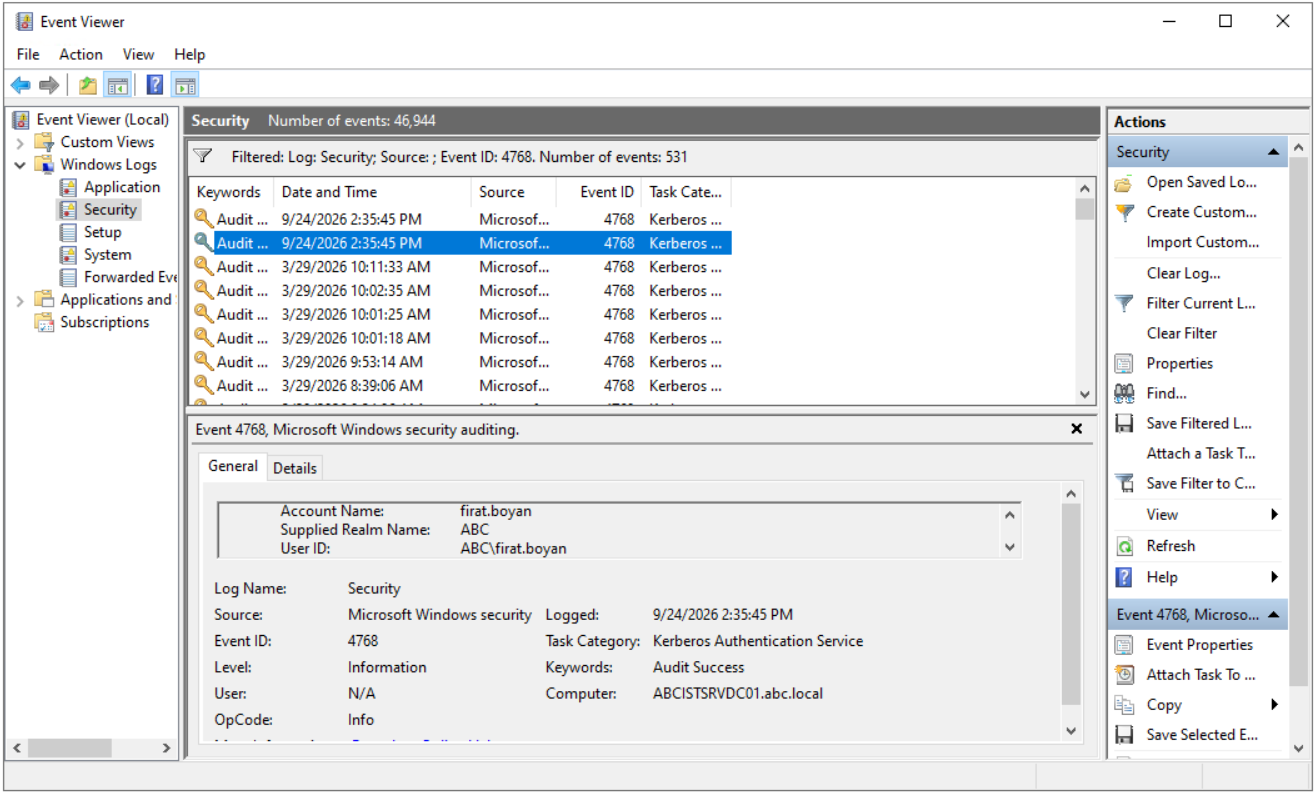
A Kerberos authentication ticket (TGT) was requested.

Account Information:
    Account Name:                   firat.boyan
    Supplied Realm Name:            ABC
    User ID:                        ABC\firat.boyan
    MSDS-SupportedEncryptionTypes:  0x27 (DES, RC4, AES-Sk)
    Available Keys:                 AES-SHA1, RC4

Service Information:
    Service Name:                   krbtgt
    Service ID:                     ABC\krbtgt
    MSDS-SupportedEncryptionTypes:  0x1F (DES, RC4, AES128-SHA96, AES256-SHA96)
    Available Keys:                 AES-SHA1, RC4

Domain Controller Information:
    MSDS-SupportedEncryptionTypes:  0x1F (DES, RC4, AES128-SHA96, AES256-SHA96)
    Available Keys:                 AES-SHA1, RC4

Network Information:
    Client Address:                 2a02:ff0:23c:45f3:31f4:544d:679f:41a
    Client Port:                    62164
    Advertized Etypes:
        AES256-CTS-HMAC-SHA1-96
        AES128-CTS-HMAC-SHA1-96
        RC4-HMAC-NT
        DES-CBC-MD5

Additional Information:
    Ticket Options:                 0x40810010
    Result Code:                    0x0
    Ticket Encryption Type:         0x12
    Session Encryption Type:        0x12
    Pre-Authentication Type:        2
    Pre-Authentication EncryptionType: 0x12
The fields to note in the entry are listed in the table below.
|
Field |
Value |
Meaning |
Client Address |
Client IP |
Address of the machine that the request came from. It is the same as the source address in the Wireshark trace. |
Result Code |
0x0 |
The request succeeded. |
Ticket Encryption Type |
0x12 |
The TGT is encrypted with AES256. |
Pre-Authentication Type |
2 |
Verification was done with an encrypted timestamp. |
Advertized Etypes |
Etype list |
Encryption types supported by the client. From these, the KDC selects the strongest one that matches the msDS-SupportedEncryptionTypes value of the account. |
The whole purpose of the AS-REQ fits into 1 sentence. The client says "I am this person and I know the password"; the AS verifies this by opening the cipher with the same key. The password has not travelled over the network even once in this process.
2. Authentication Service Response (AS-REP)
When verification succeeds, the AS returns 2 pieces of data to the client.
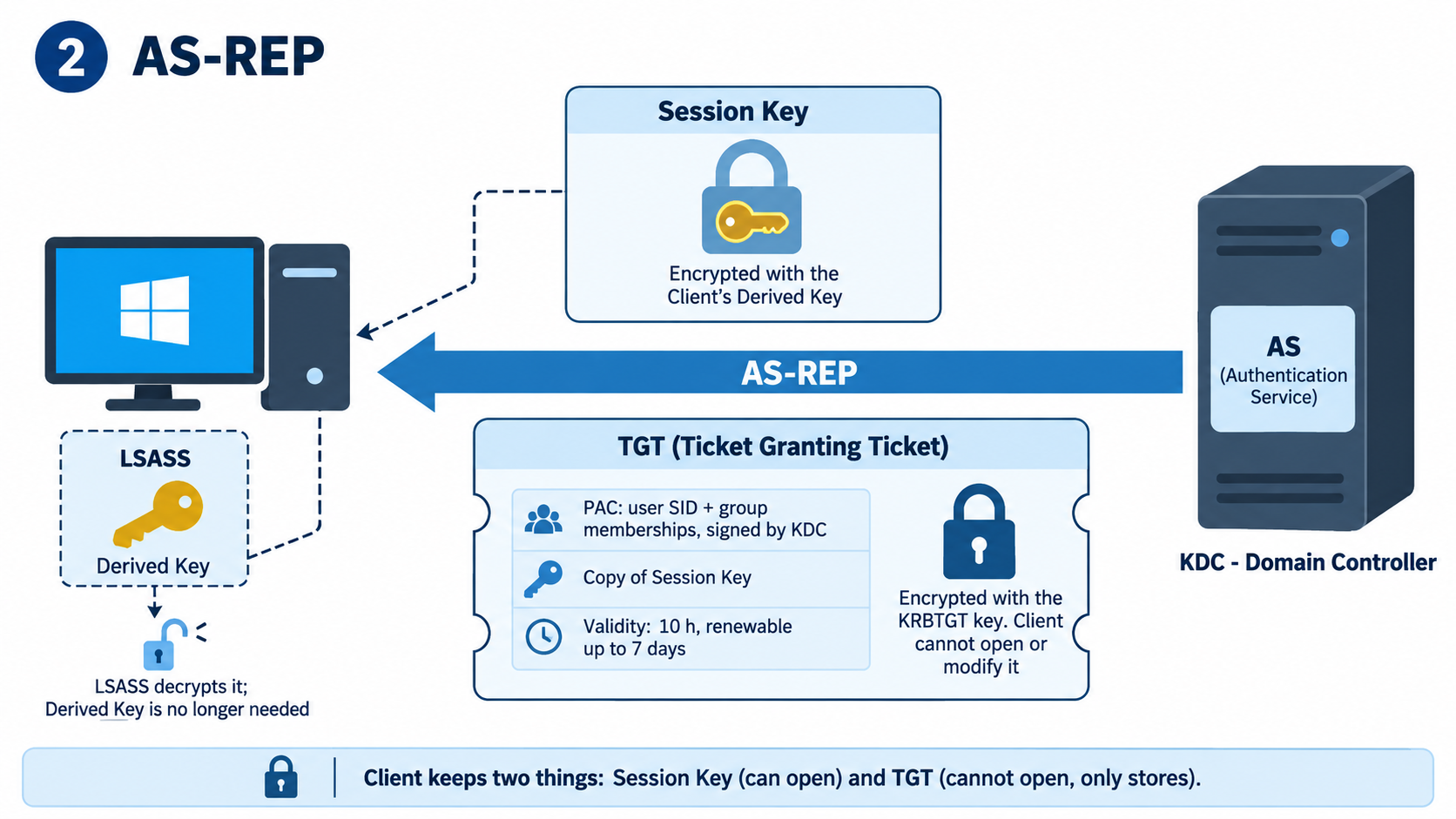
1. Session key: A temporary symmetric key that the AS generates randomly and that is used in the later communication between the client and the TGS. It is sent encrypted with the client's derived key; therefore only a client that knows the correct password can open it. LSASS decrypts it with the derived key in its memory and obtains the raw session key. From this point, the derived key has no further role; the password and the key derived from it are not used again in the flow.
2. TGT (Ticket Granting Ticket): The ticket that proves the KDC has verified the user's identity. It contains 3 things. The user's SID and group memberships; this information is carried in a Windows-specific structure called the PAC (Privilege Attribute Certificate), which is signed by the KDC, and the client cannot produce this signature. A copy of the session key. The validity period of the ticket.
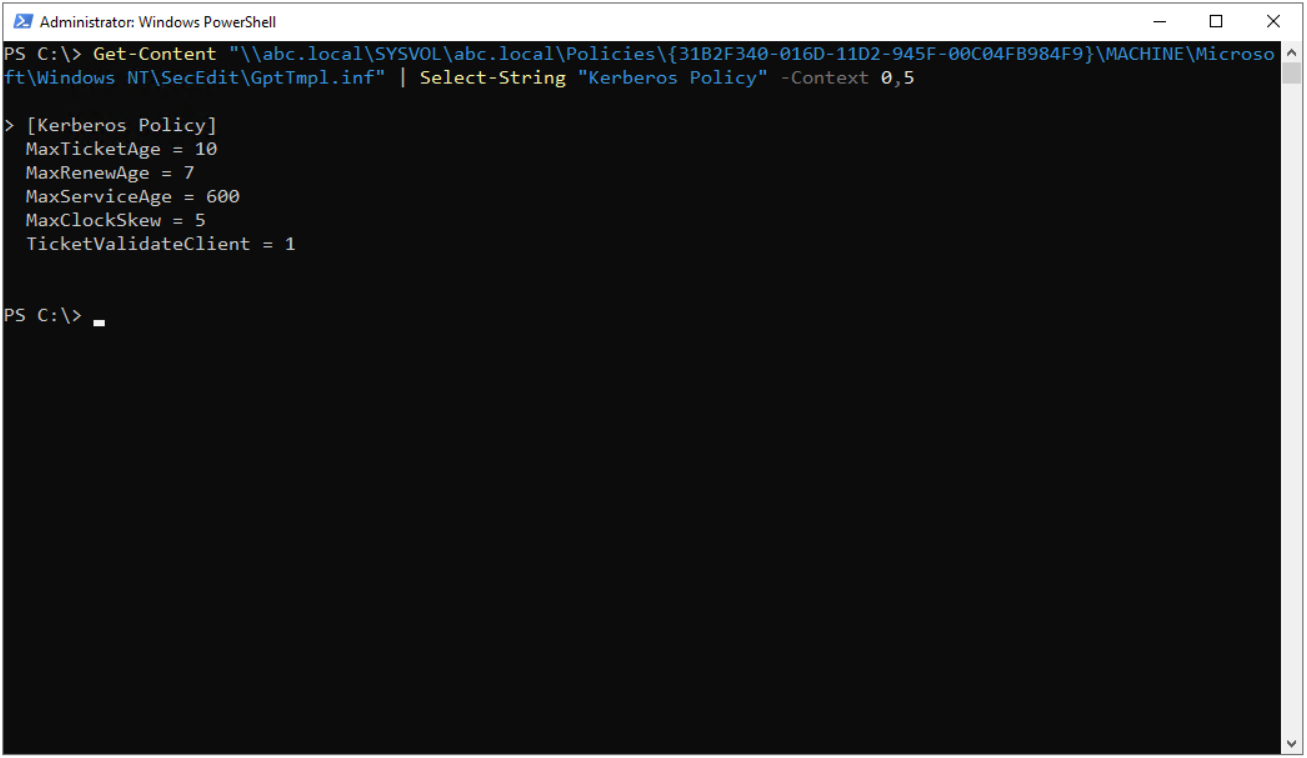
In the default Kerberos policy, a TGT is valid for 10 hours and can be renewed for up to 7 days. These values are kept in the Kerberos Policy section under the Default Domain Policy. To read them directly from the policy file in SYSVOL without opening Group Policy Management Editor, you can use the following command on the domain controller. The GUID in the command is the fixed identifier of the Default Domain Policy, which is the same in every domain.
Get-Content "\\abc.Local\SYSVOL\abc.Local\Policies\{31B2F340-016D-11D2-945F-00C04FB984F9}\MACHINE\Microsoft\Windows NT\SecEdit\GptTmpl.inf" | Select-String "Kerberos Policy" -Context 0,5
The command output returns 5 values.
[Kerberos Policy]
MaxTicketAge = 10
MaxRenewAge = 7
MaxServiceAge = 600
MaxClockSkew = 5
TicketValidateClient = 1
The meaning of the values in the command output is given in the table below.
|
Parameter |
Meaning |
Default |
MaxTicketAge |
TGT lifetime in hours |
10 |
MaxRenewAge |
TGT renewal period in days |
7 |
MaxServiceAge |
Service ticket lifetime in minutes |
600 |
MaxClockSkew |
Permitted time difference between the client and the KDC in minutes |
5 |
TicketValidateClient |
Whether the KDC rechecks the status of the user account on every service ticket request |
1 (enabled) |
These values can be changed with Group Policy; however, the defaults reflect the balance recommended by Microsoft and must not be changed in a production environment without a concrete reason.
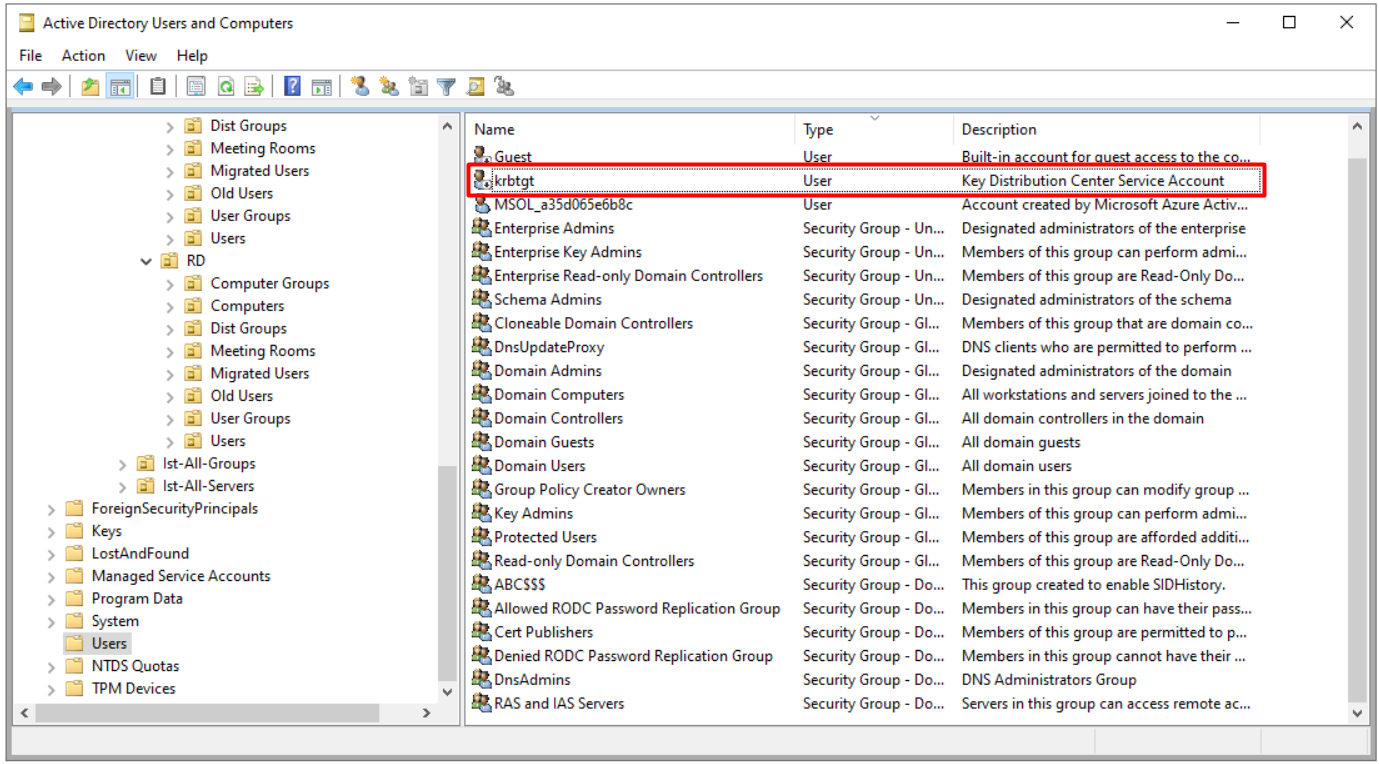
The most important property of the TGT is that it is encrypted with the long-term key of the KRBTGT account. KRBTGT is a special account that exists automatically in every Active Directory domain and appears disabled; only domain controllers know its key. The account appears in the Users container in Active Directory Users and Computers with the description Key Distribution Center Service Account.
The fact that the KRBTGT key exists only on domain controllers has 2 consequences.
1. The client cannot open the TGT: The client can neither read nor change the contents of the TGT. It stores the ticket as it is and presents it to the TGS in the later steps.
2. The password is not requested again: The purpose of the TGT is to allow the user to obtain service tickets during its lifetime without being asked for the password again on every service access.
The password of the KRBTGT account determines the key that encrypts all TGTs, and its compromise leads to the creation of forged TGTs. Microsoft recommends resetting this password 2 times, waiting for replication to complete between the resets.
When the AS-REP is complete, the client holds 2 things. The session key, which it can open and keeps in LSASS memory, and the TGT, which it cannot open but stores. The current state of the ticket cache can be viewed on the client with the following command.
klist lists all tickets obtained in that session with their numbers. The screenshot below is the output taken immediately after sign-in and contains 2 tickets.
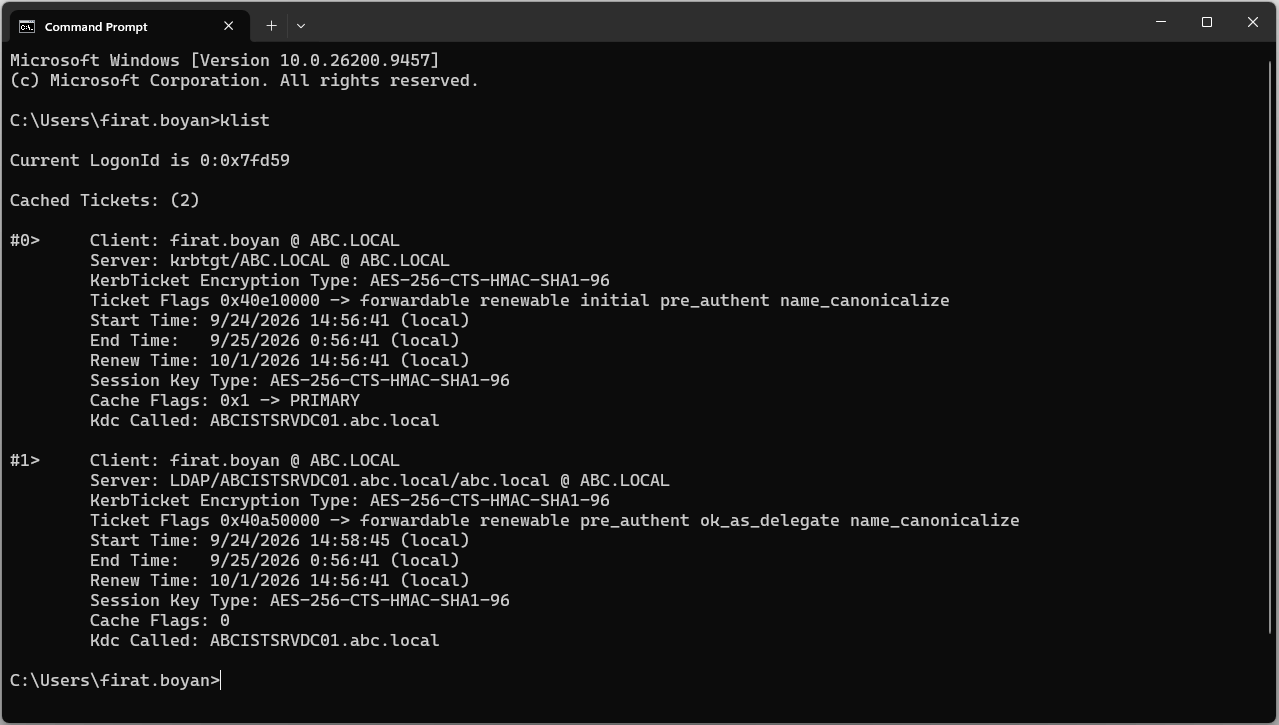
Ticket #0 - Ticket Granting Ticket (TGT)
|
Field |
Value |
Description |
|
Server |
krbtgt/ABC.Local |
A line that starts with krbtgt is always a TGT; the ticket is addressed to the KDC. |
|
KerbTicket Encryption Type |
AES-256-CTS-HMAC-SHA1-96 |
The ticket is encrypted with AES256. |
|
Ticket Flags |
initial |
The ticket was obtained by password verification, that is, as a result of the AS-REP. |
|
Start Time, End Time |
10 hours |
The MaxTicketAge value in the Kerberos policy. |
|
Renew Time |
7 days |
The MaxRenewAge value in the Kerberos policy. |
|
Cache Flags |
PRIMARY |
This ticket is the primary ticket of the session, and all later service ticket requests are made with it. |
|
Kdc Called |
ABCISTSRVDC01.abc.Local |
This is the domain controller that issued the ticket. |
Ticket #1 - Service Ticket (ST)
|
Field |
Value |
Description |
|
Server |
LDAP/ABCISTSRVDC01.abc.Local/abc.Local |
A service ticket obtained for the LDAP service of the domain controller. It is normal for this ticket to exist although the user has not accessed the share yet; during sign-in, Windows connects to the DC over LDAP to read Group Policy and obtains a ticket for this. |
|
KerbTicket Encryption Type |
AES-256-CTS-HMAC-SHA1-96 |
The ticket is encrypted with AES256. |
|
Ticket Flags |
no initial |
The ticket was obtained by presenting the TGT, not with the password. |
|
Cache Flags |
0 |
This ticket is not the primary ticket. |
If RC4-HMAC appears in the KerbTicket Encryption Type field, check the msDS-SupportedEncryptionTypes attribute of the account concerned and the encryption policy on the domain controller. Microsoft recommends AES and classifies RC4 as a legacy algorithm.
3. Ticket Granting Service Request (TGS-REQ)
Client Side
Some time after signing in, the user wants to access a share on a file server, an intranet application or a SQL Server. For this, LSASS sends the TGS a request that consists of 3 parts.
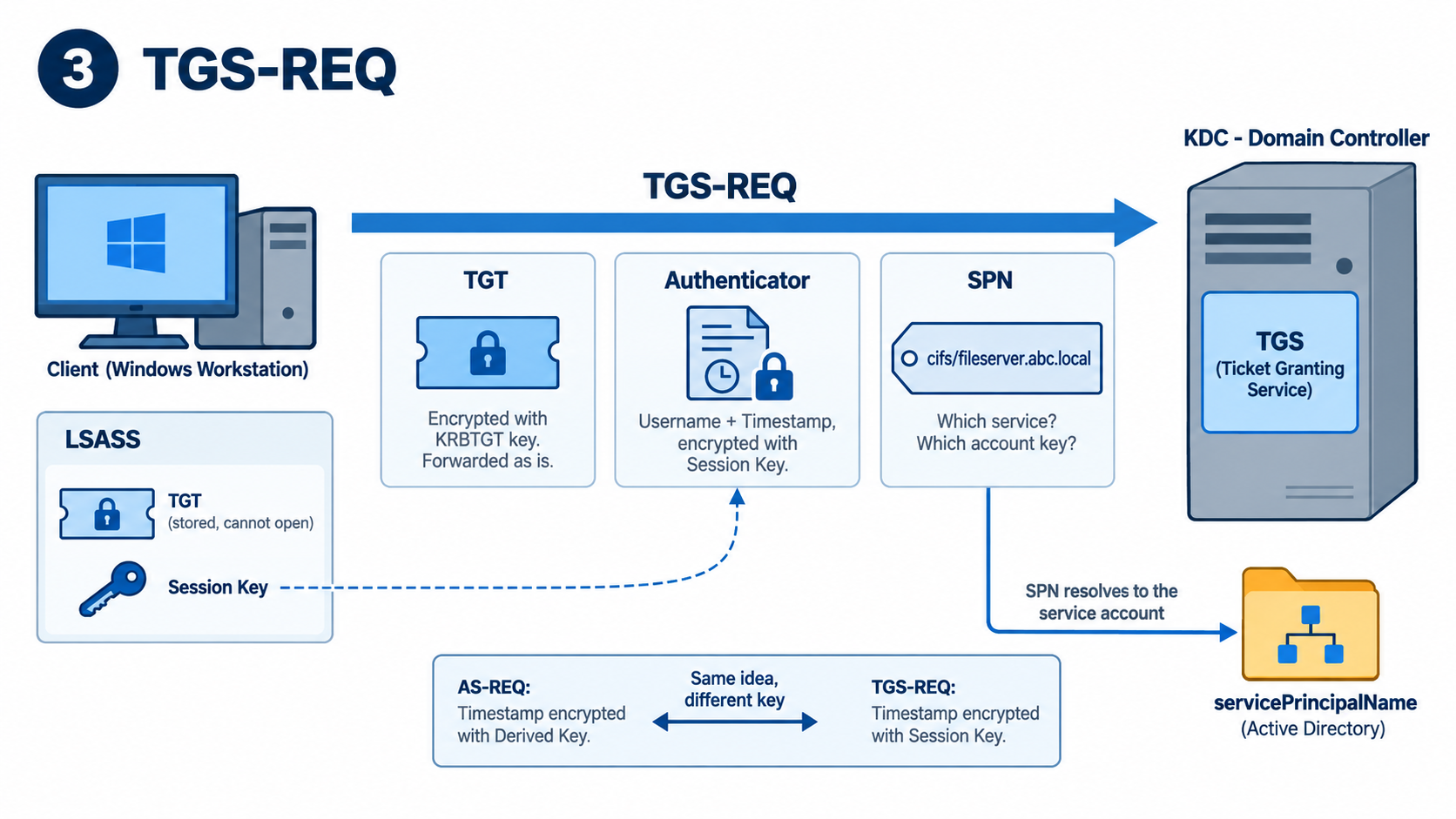
1. TGT: The ticket obtained in the AS-REP and encrypted with the KRBTGT key. The client cannot open it and forwards it as it is. Presenting the TGT here is the way to tell the KDC "my identity has already been verified, and here is the proof".
2. Authenticator: LSASS encrypts this structure, which contains the username and a current timestamp, with the session key it holds. The authenticator proves that the client really has the session key, that is, that it is the real client able to open the AS-REP and not someone who copied the TGT from the network. The timestamp inside it provides the same replay attack protection as in the AS-REQ.
An encrypted timestamp was also sent in the AS-REQ, and the logic is the same; the difference is the key used. The AS-REQ uses the derived key derived from the password, whereas the TGS-REQ uses the session key issued by the KDC.
3. SPN (Service Principal Name): The name of the service to be accessed. It is written in a form such as HTTP/portal.abc.Local or CIFS/fileserver.abc.Local.
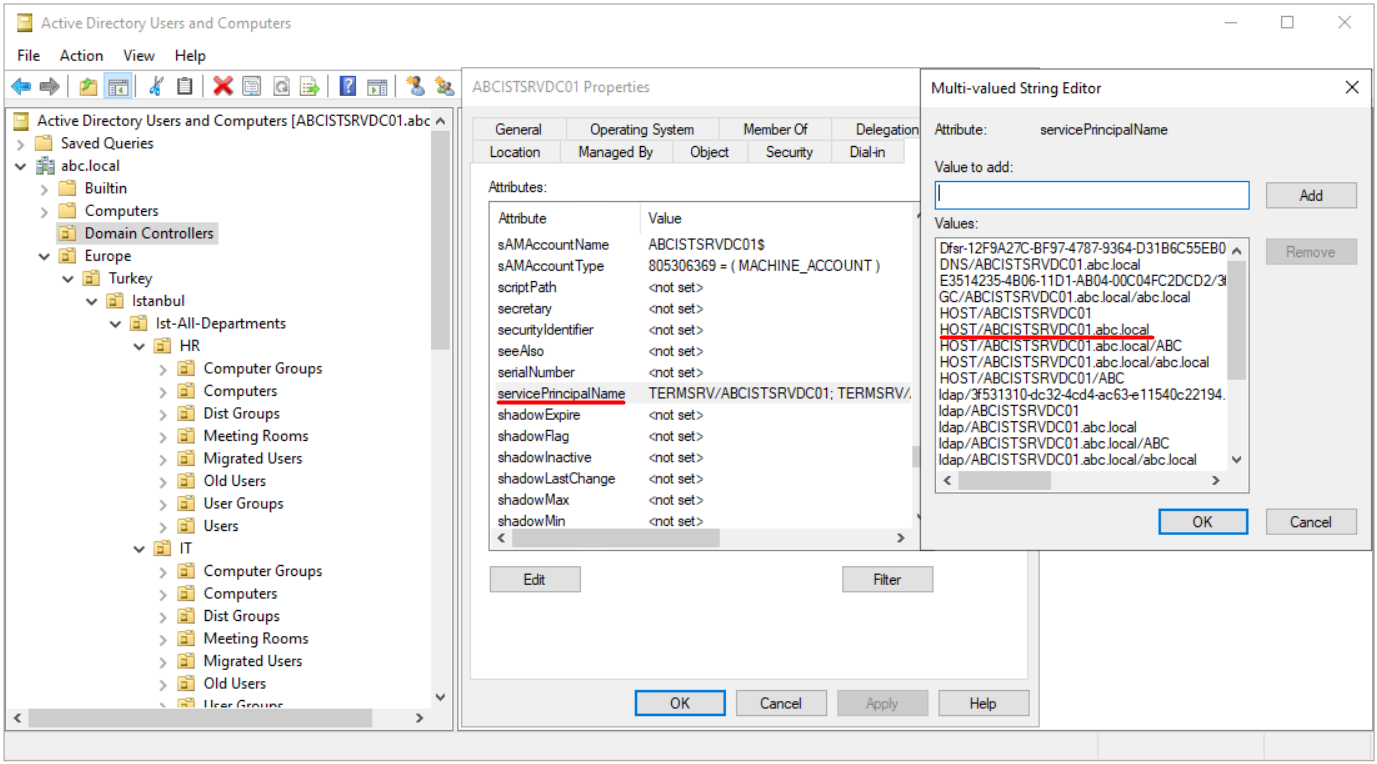
Every SPN is registered to an account in Active Directory, and this registration is kept in the servicePrincipalName attribute of the account. If the service runs as Local System or Network Service, the SPN is on the computer account; if it runs under a domain account, the SPN is on that account.
By looking at the SPN, the TGS learns 2 things: which service to prepare the ticket for and which account's key to encrypt it with. Without the SPN, the TGS cannot know either of these and cannot produce a ticket.
For a file share, the computer account does not need an SPN that starts with CIFS. Active Directory maps CIFS to the HOST SPN automatically; for this reason, the HOST/fileserver.abc.Local record is sufficient for a file share. The image below shows the servicePrincipalName values of ABCISTSRVDC01, the target server in the lab environment, and the underlined HOST/ABCISTSRVDC01.abc.Local record.
Ticket Granting Service Side
The TGS processes the incoming request in 4 steps.
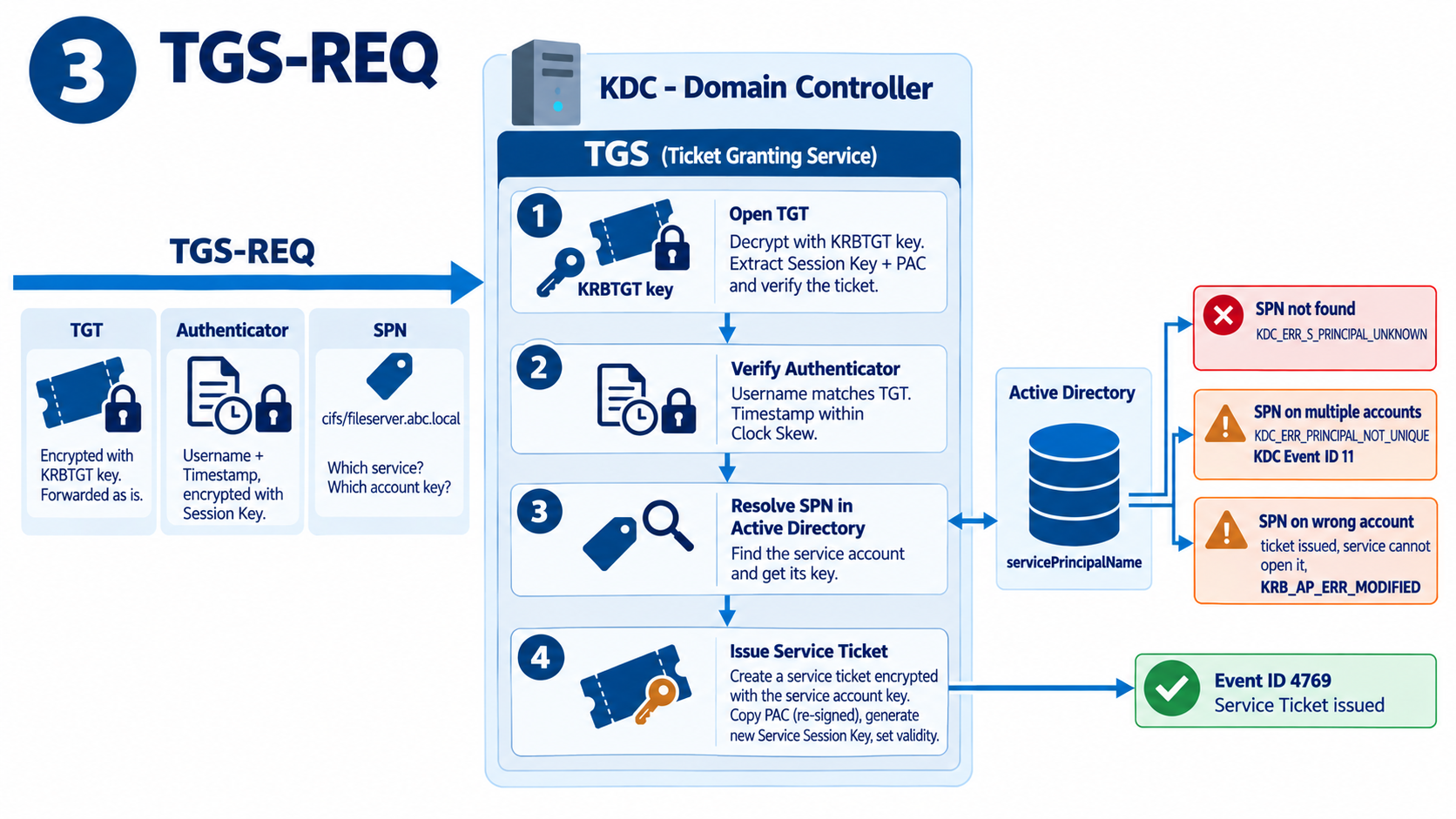 1. The TGT is opened: The TGS opens the TGT with the KRBTGT key and extracts the session key and the PAC from it.
2. The authenticator is verified: The authenticator is decrypted with this session key; the TGS checks that the username inside it matches the one in the TGT and that the timestamp is within the clock skew limit. When these 2 steps pass, the TGS is sure that the other party holds both a valid TGT and the session key that belongs to that TGT.
3. The SPN is resolved: The TGS searches Active Directory for the requested SPN and finds the account it is registered to. There are 3 separate error scenarios related to the SPN, and each one shows a different symptom. If the SPN is not registered on any account, the KDC returns KDC_ERR_S_PRINCIPAL_UNKNOWN; this is the most common Kerberos error in real environments. If the SPN is registered on more than 1 account, the KDC cannot decide which key to use, returns KDC_ERR_PRINCIPAL_NOT_UNIQUE, and KDC Event ID 11 is written to the System log of the domain controller. If the SPN is registered on the wrong account, the KDC encrypts the ticket with that account's key; the ticket reaches the client without a problem, but the target service cannot open it with its own key and KRB_AP_ERR_MODIFIED occurs. In all 3 cases, the result on the user side is usually a fallback to NTLM or denied access.
A duplicate SPN means that the KDC cannot uniquely identify the target service account, and it leads to the KDC_ERR_PRINCIPAL_NOT_UNIQUE error. An SPN registered on the wrong account is a separate problem; in this case KRB_AP_ERR_MODIFIED occurs because the target service cannot decrypt a ticket encrypted with the wrong account's key. Before you add an SPN, check the existing registrations across the forest with setspn.
The following commands are used to examine SPN registrations and detect duplicates. The first command lists the SPNs registered on the specified account, the second queries which account holds a specific SPN, and the third searches for duplicate SPNs across the forest. Any authorised user in the domain is sufficient for listing and querying; adding or deleting an SPN requires write permission on the account concerned, which in practice means Domain Admins membership or the Validated Write to Service Principal Name right delegated on the account.
setspn -L ABCISTSRVDC01
setspn -Q cifs/ABCISTSRVDC01.abc.Local
setspn -X -F
4. The service ticket is issued: If the checks succeed, the TGS produces a service ticket for the target service. The ticket contains the PAC, which is copied from the TGT and signed again, a new service session key to be used between the client and the target service, and the validity period of the ticket.
This operation is written to the Security log of the domain controller as Event ID 4769. In the entry, the Service Name field shows which account the service ticket was issued for (for example ABCISTSRVDC01$); when needed, the full requested SPN is examined in the network trace. The Ticket Encryption Type field shows which algorithm encrypted the ticket. The most practical way to find tickets encrypted with RC4 is to filter 4769 entries by this field.
4. Ticket Granting Service Response (TGS-REP)
The reply that the TGS returns to the client also consists of 2 parts.
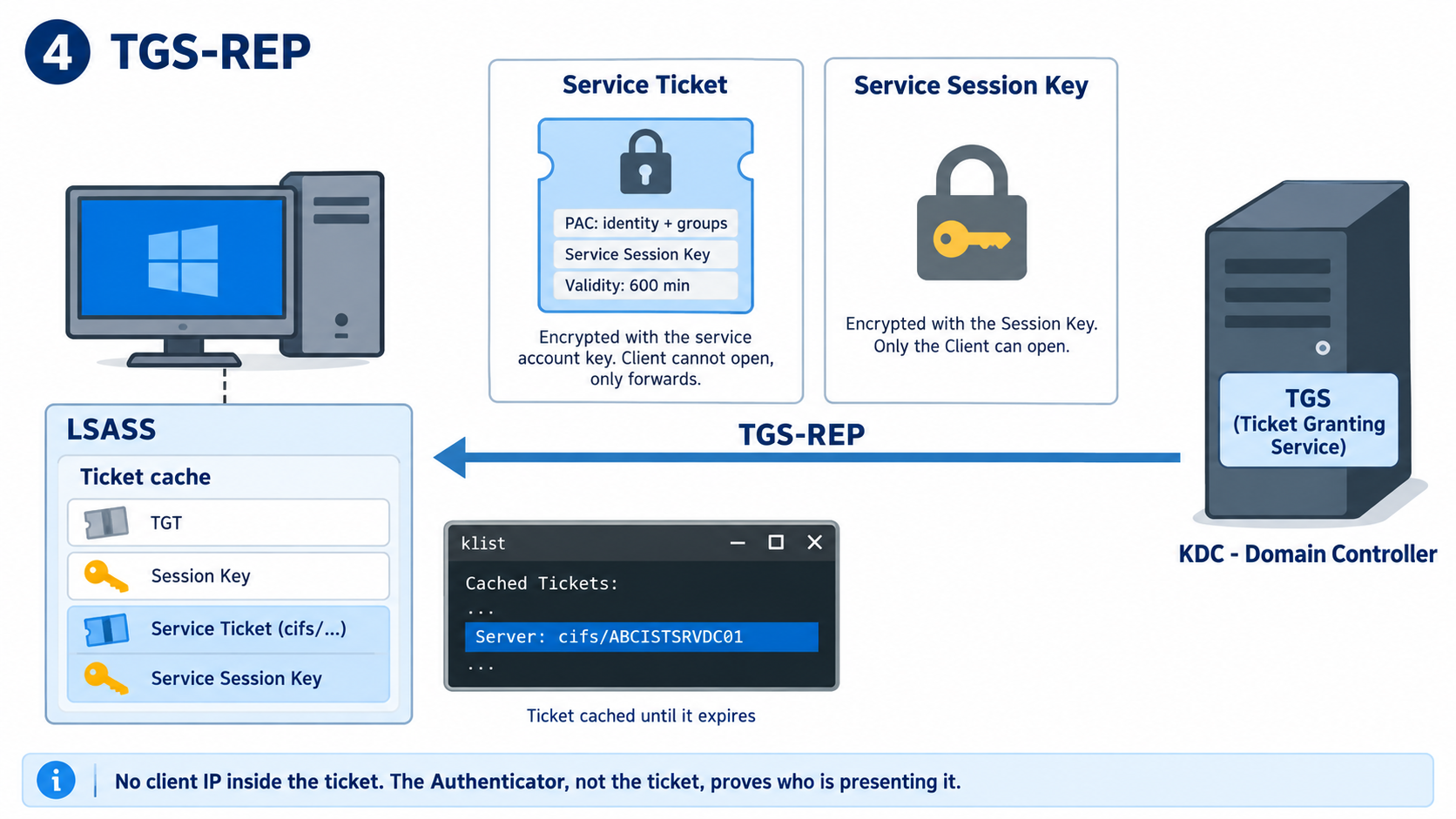
1. Service ticket: The ticket encrypted with the account key of the target service. The client cannot see the contents of this ticket; as with the TGT, it stores it as it is and forwards it to the target service. The ticket contains the PAC that carries the client's identity and authorisation information, the service session key shared between the client and the service, and the validity period of the ticket. The default period is 600 minutes, and this value comes from the Maximum lifetime for service ticket setting in the Kerberos policy.
The Windows KDC does not add the client's IP address to tickets. A ticket is valid no matter which machine presents it; the protection comes from the authenticator, which must be presented together with the ticket.
2. Service session key: The new key to be used between the client and the target service. It is sent encrypted with the session key shared between the client and the TGS; therefore only the client that holds that session key can open it. What makes a ticket copied from the network useless to an attacker is not the ticket itself but the authenticator, which must be presented with that ticket and can be produced only by the party that holds the service session key.
The client places the service ticket it receives in the ticket cache in LSASS memory. Until the ticket expires, the client does not go back to the TGS for each access to the same service; the cached ticket is used directly. The line starting with cifs/ that appears in the klist output after you access the share is the result of this caching. If you need to clear the cache during troubleshooting, use the klist purge command; it deletes only the tickets in the session of the user who runs it, and on the next access LSASS runs the whole flow from the start.
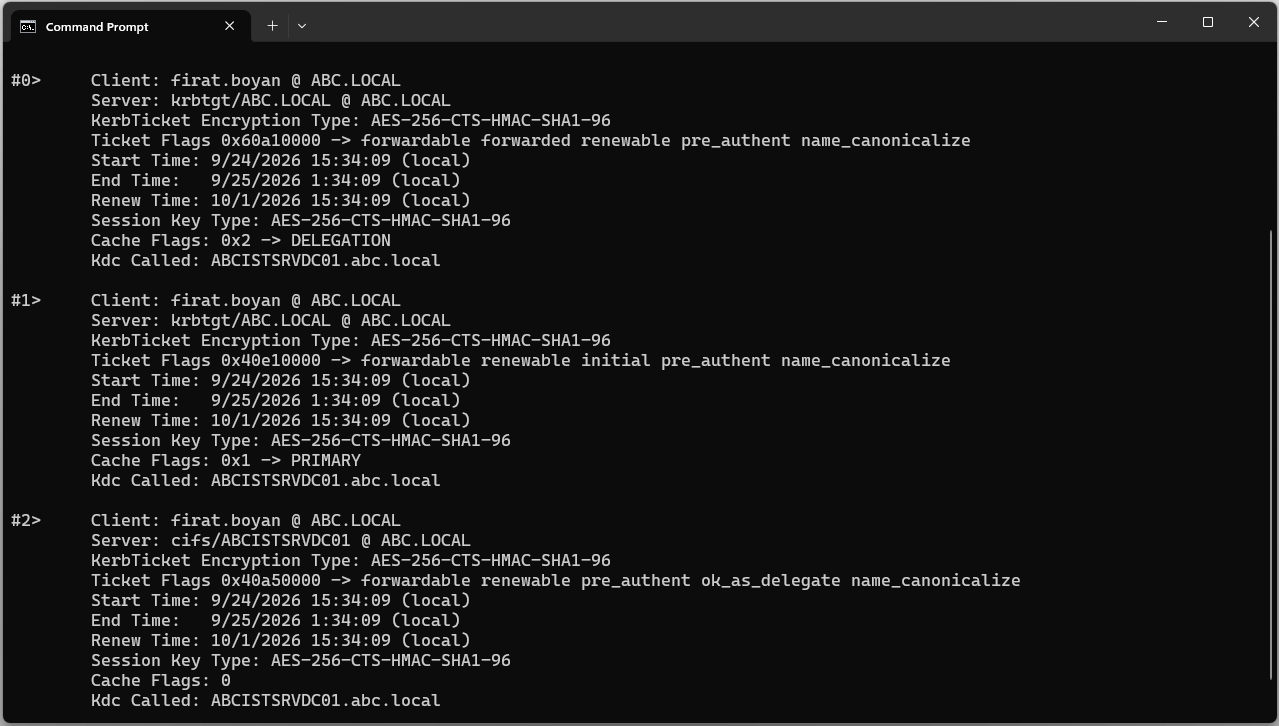
The screen shows 2 krbtgt tickets. Ticket #1 (Cache Flags PRIMARY) is the actual TGT obtained at sign-in. Ticket #0 (Ticket Flags forwarded, Cache Flags DELEGATION) is a forwarded TGT that was obtained separately from the KDC and issued to be passed to the target server.
In this lab environment, the fact that the target server is a domain controller and is trusted for delegation (ok_as_delegate) is one of the conditions that make it possible to obtain the forwarded TGT. However, this is not automatic behaviour that occurs on every connection; the client policy, whether the user account is eligible for delegation and the security context that the application requests through SSPI are also decisive. The DELEGATION ticket on the screen is the result of the Kerberos delegation behaviour in this environment.
When the TGS-REP is complete, the client again holds 2 things: the service ticket, which it cannot open but forwards to the service, and the service session key, which it can open. From this point, communication with the KDC ends; the remaining steps take place between the client and the target service.
5. Application Request (AP-REQ)
Client Side
This is the last mandatory step of the process. The client now talks directly to the target service, not to the KDC. LSASS sends 2 parts to the target service.
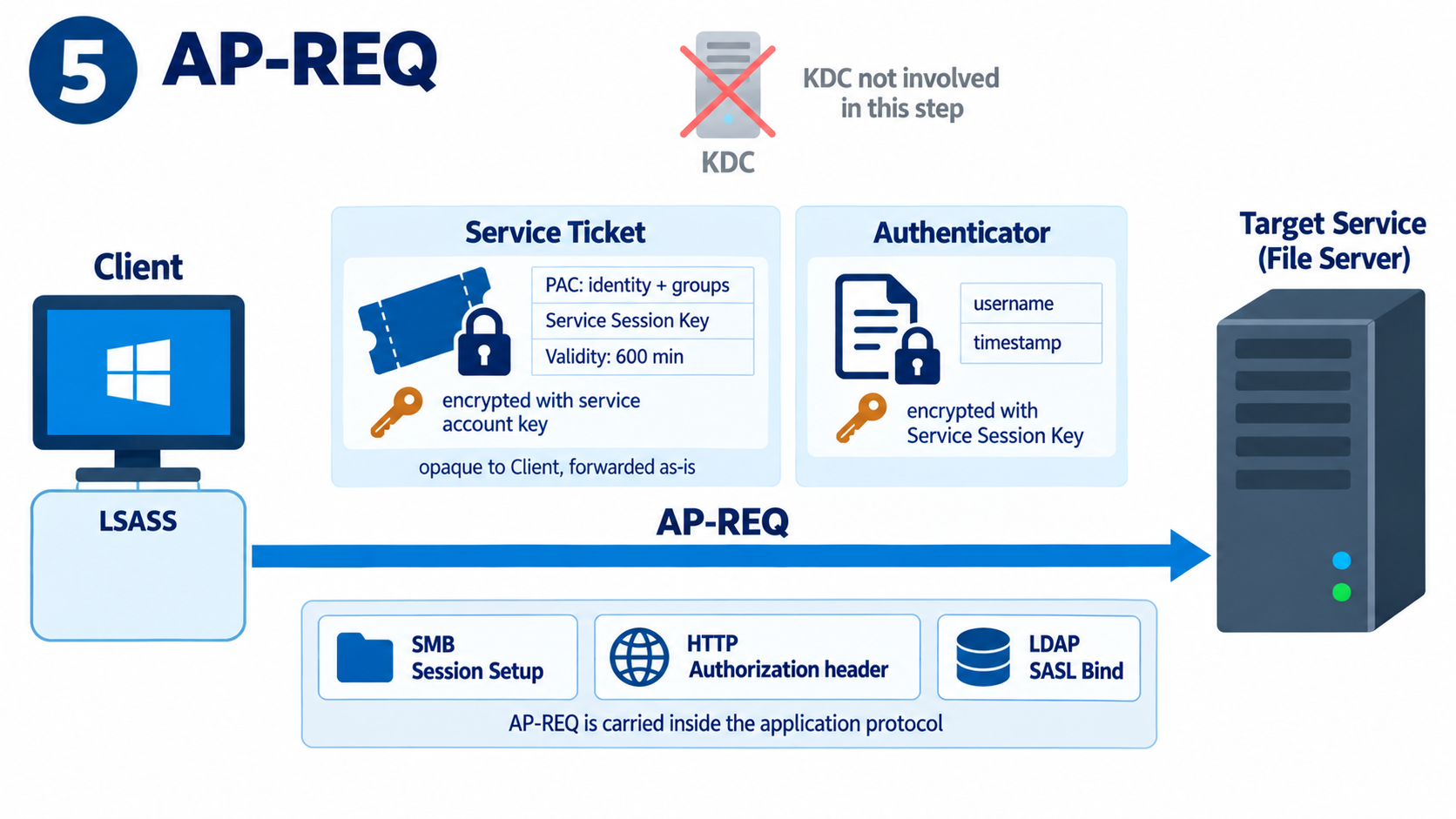
1. Service ticket: The ticket obtained from the TGS and encrypted with the target service's own key. The client cannot open it and forwards it as it is.
2. Authenticator: Data that contains the username and a current timestamp and is encrypted with the service session key. It works on the same logic as the authenticator in the TGS-REQ; the only difference is that the service session key is used for encryption instead of the session key.
These 2 parts are carried in the authentication field of the protocol in use. The Session Setup packet in SMB, the Authorization header in HTTP and the SASL bind in LDAP perform this function.
Target Service Side
The target service processes the incoming packet in the following order.
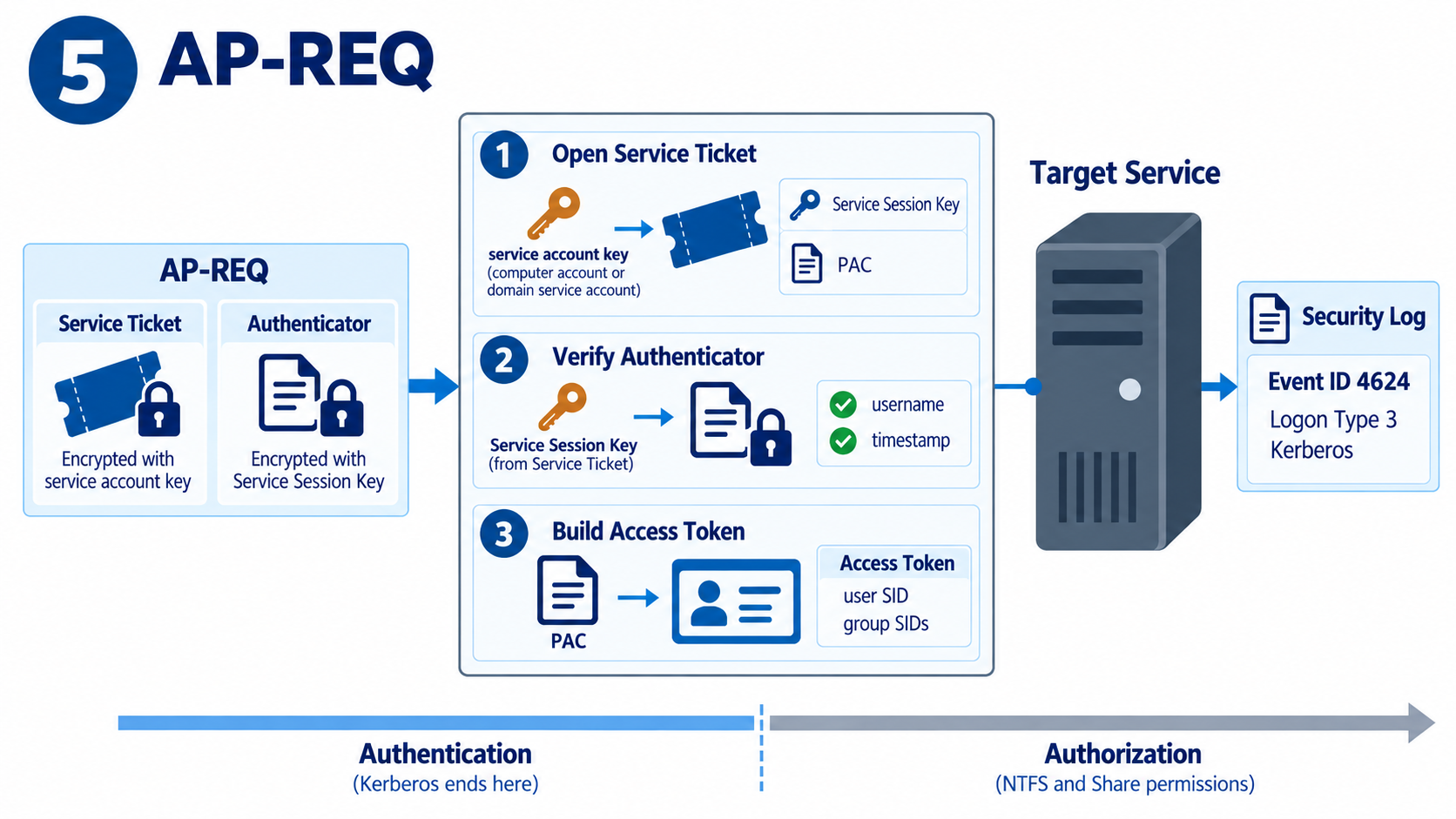
1. The service ticket is opened: The service opens the ticket with its own account key. If it runs under Local System or Network Service, this key belongs to the computer account; if it runs under a domain service account, the key belongs to that account. If the SPN is registered on the wrong account, the ticket is encrypted with the wrong key and cannot be opened.
2. The authenticator is verified: The service session key and the PAC are extracted from the ticket. The authenticator is decrypted with this key; the username and the timestamp are checked.
3. The access token is generated: An access token is created for the user from the Security Identifier (SID) and group information in the PAC. When the service ticket and the authenticator are verified, Kerberos authentication is complete, and what follows is the authorisation stage. The permissions that the user has on the share are determined by the intersection of the groups in this token with the NTFS and share permissions. A valid Kerberos ticket does not guarantee that the user is authorised to access the resource.
The record of this step appears in the Security log of the target server as Event ID 4624. In this entry, the Logon Type field is expected to be 3 and the Authentication Package field is expected to be Kerberos.
If the Authentication Package field shows NTLM instead of Kerberos, the Kerberos flow has failed at some point, even if the user was able to access the resource. In that case, the problem is usually in the SPN registration, in DNS or in name resolution.
Accessing the share by IP address instead of hostname also makes the client fall back to NTLM in the default configuration, because no SPN is registered for an IP address and the client cannot request a Kerberos ticket. The TryIPSPN setting introduced with Windows 10 and Windows Server 2016 allows Kerberos over IP, but this setting is disabled by default.
Get-WinEvent -FilterHashtable @{LogName='Security'; Id=4624; StartTime=(Get-Date).AddMinutes(-5)} | Where-Object { $_.Properties[5].Value -eq 'firat.boyan' } | Select-Object TimeCreated, RecordId, @{n='Type';e={$_.Properties[8].Value}}, @{n='AuthPkg';e={$_.Properties[10].Value}} | Format-Table -AutoSize
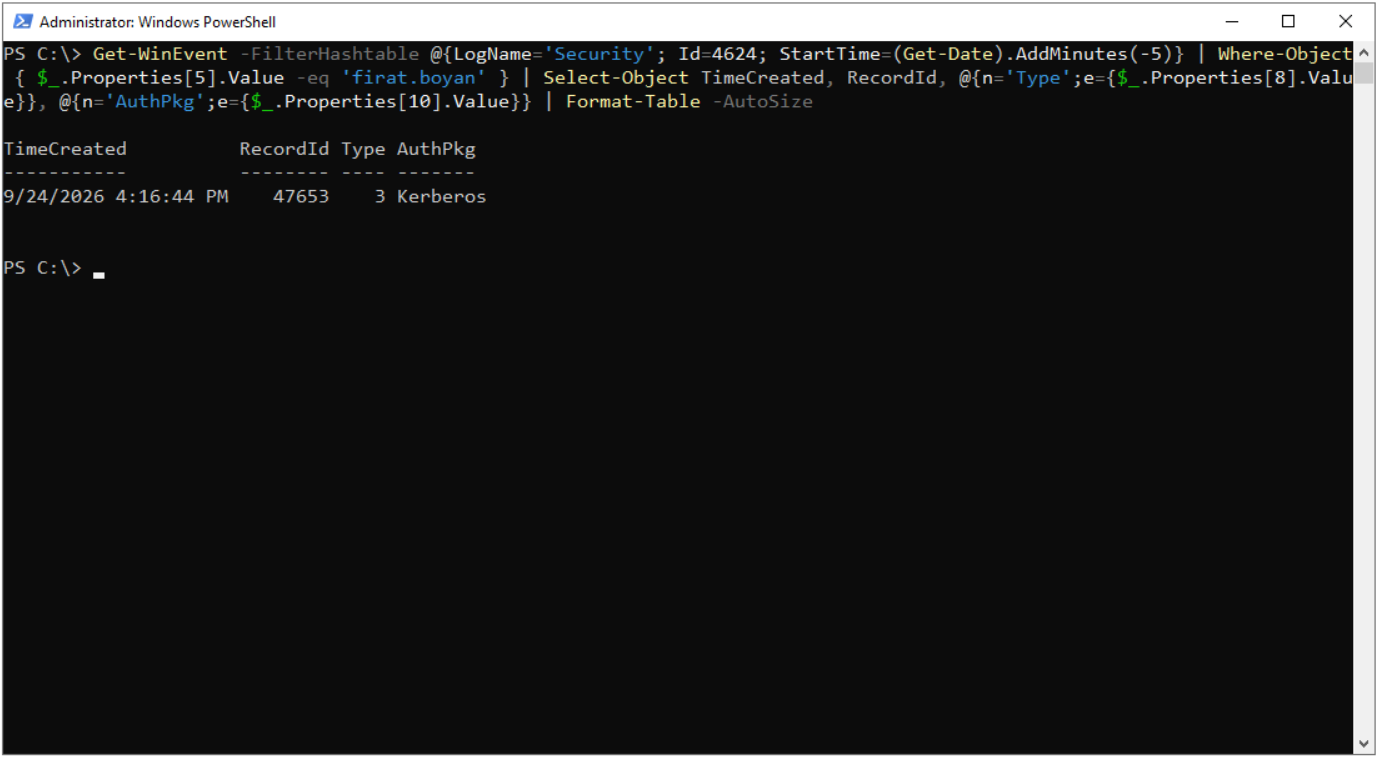
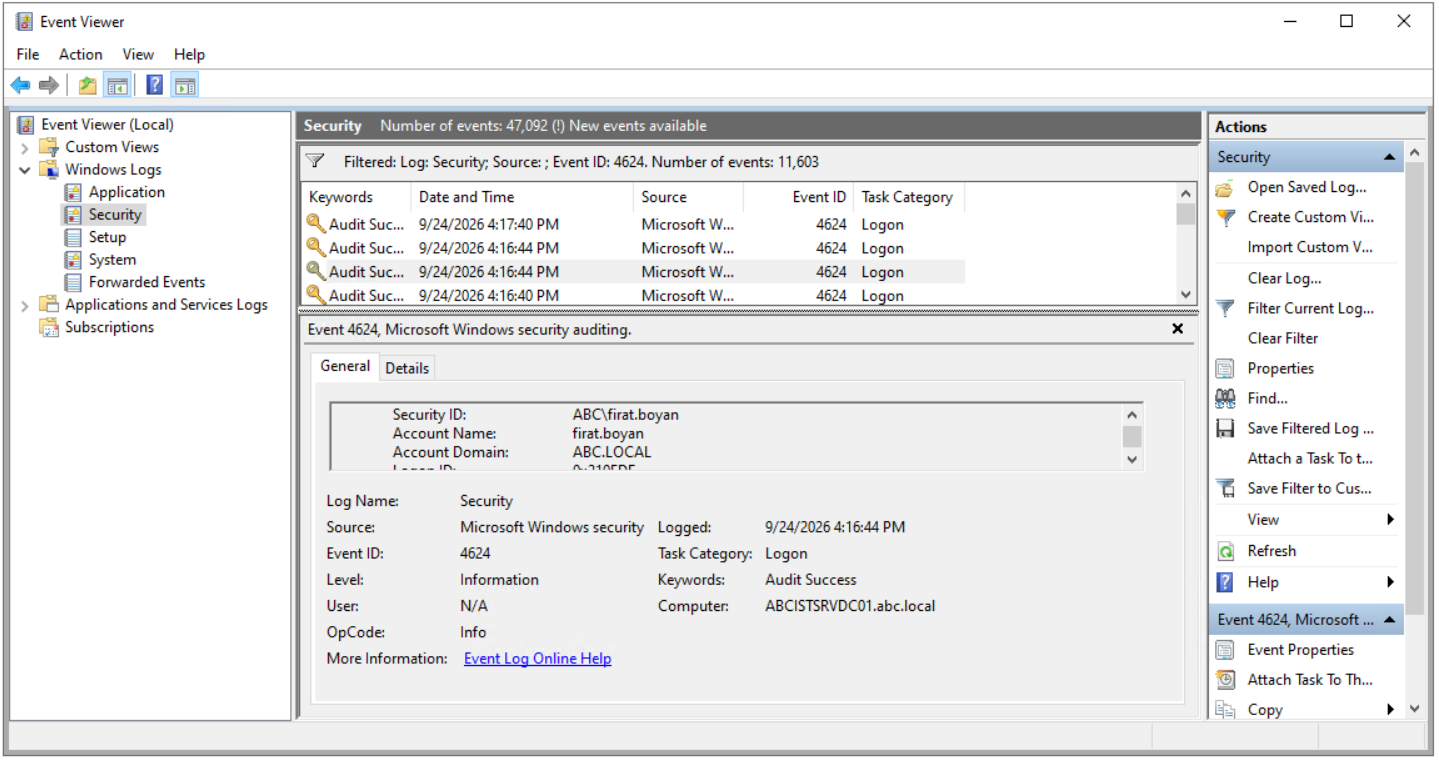
For the entry to be recorded on the target server, the Logon subcategory under Advanced Audit Policy must be enabled for Success. You can search for the entry manually in Event Viewer or find it directly with the PowerShell command above. The command lists the 4624 entries created for the specified user in the last 5 minutes with their Logon Type and Authentication Package information; search for the returned RecordId value with Find in Event Viewer to go to the entry.
The full content of the entry is as follows.
An account was successfully logged on.

Subject:
    Security ID:                NULL SID
    Account Name:               -
    Account Domain:             -
    Logon ID:                   0x0

Logon Information:
    Logon Type:                 3
    Restricted Admin Mode:      -
    Virtual Account:            No
    Elevated Token:             Yes

Impersonation Level:            Delegation

New Logon:
    Security ID:                ABC\firat.boyan
    Account Name:               firat.boyan
    Account Domain:             ABC.Local
    Logon ID:                   0x210EDF
    Linked Logon ID:            0x0
    Network Account Name:       -
    Network Account Domain:     -
    Logon GUID:                 {a757f453-5a84-828a-7cc7-030fc27545be}

Process Information:
    Process ID:                 0x0
    Process Name:               -

Network Information:
    Workstation Name:           -
    Source Network Address:     2a02:ff0:23c:45f3:d893:715a:7d27:a615
    Source Port:                55505

Detailed Authentication Information:
    Logon Process:              Kerberos
    Authentication Package:     Kerberos
    Transited Services:         -
    Package Name (NTLM only):   -
    Key Length:                 0

This event is generated when a logon session is created. It is generated on the computer that was accessed.

The subject fields indicate the account on the Local system which requested the logon. This is most commonly a service such as the Server service, or a Local Process such as Winlogon.exe or Services.exe.

The logon type field indicates the kind of logon that occurred. The most common types are 2 (interactive) and 3 (network).

The New Logon fields indicate the account for whom the new logon was created, i.e. the account that was logged on.

The network fields indicate where a remote logon request originated. Workstation name is not always available and may be left blank in some cases.

The impersonation level field indicates the extent to which a Process in the logon session can impersonate.

The authentication information fields provide detailed information about this specific logon request.
    - Logon GUID is a unique identifier that can be used to correlate this event with a KDC event.
    - Transited services indicate which intermediate services have participated in this logon request.
    - Package name indicates which sub-protocol was used among the NTLM protocols.
    - Key length indicates the length of the generated session key. This will be 0 if no session key was requested.
The fields to note in the entry are listed in the table below.
|
Field |
Value |
Meaning |
Logon Type |
3 |
The access came over the network (network logon). This is the expected value for share, HTTP and LDAP access. |
New Logon / Account Name |
firat.boyan |
The user identity extracted from the PAC in the service ticket. The Subject section is empty because the session was created by a ticket from the network, not by a local user. |
Logon Process |
Kerberos |
The logon process that created the session. If NTLM appears, the Kerberos flow has failed. |
Authentication Package |
Kerberos |
The package that performed the authentication. This field and the one above it together prove that Kerberos was used. |
Impersonation Level |
Delegation |
The Delegation level allows the target server to use the user's security context on remote systems as well, on behalf of the user. Whether this level occurs depends on the Kerberos delegation configuration and the security context requested by the client. |
Source Network Address |
Client IP |
Address of the machine that the request came from. Because of IPv6 temporary addresses, it may not be identical to the Client Address in 4768. |
Logon GUID |
GUID |
Where applicable, it is used to correlate the 4624 entry on the target server with the 4769 entry on the domain controller. However, the Logon GUID may not always be recorded or may contain a value of all zeros; do not assume that it always matches in the 2 entries. |
6. Application Response (AP-REP)
Step 6 of the flow is optional and takes place only when mutual authentication is requested. In this case, the target service also proves its identity to the client.
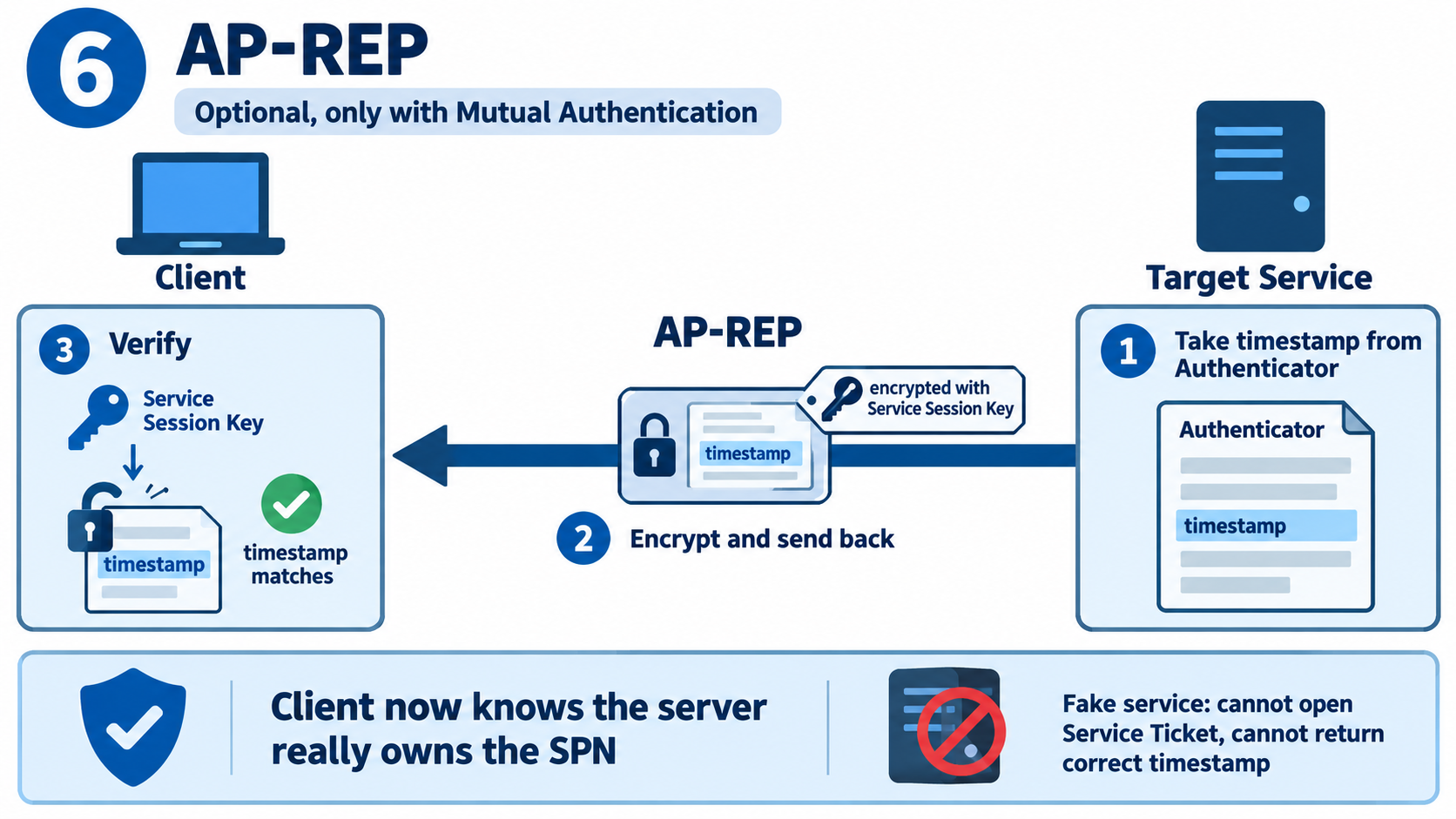
1. The service takes the timestamp: The service takes the timestamp that it extracted from the authenticator received in the AP-REQ.
2. The service encrypts the timestamp and returns it: This timestamp is encrypted with the service session key and sent back to the client.
3. The client verifies: The client opens it with the service session key it holds and verifies that the timestamp matches the one it sent.
In this way, the client is sure that the server it is talking to really owns that SPN. A fake service cannot open the service ticket, so it cannot obtain the service session key and cannot return the correct timestamp. Most Windows clients request mutual authentication when they connect over Kerberos; the fact that NTLM has no such mechanism at all is one of the concrete reasons for preferring Kerberos.
Flow Summary Table
|
Step |
Direction |
Sent |
Key used |
AS-REQ |
Client to AS |
Username and encrypted timestamp |
The timestamp is encrypted with the derived key |
AS-REP |
AS to client |
Encrypted session key and TGT |
The session key is encrypted with the derived key; the TGT with the KRBTGT key |
TGS-REQ |
Client to TGS |
TGT, authenticator and SPN |
The authenticator is encrypted with the session key |
TGS-REP |
TGS to client |
Service ticket and service session key |
The service ticket is encrypted with the service account key; the service session key with the session key |
AP-REQ |
Client to service |
Service ticket and authenticator |
The authenticator is encrypted with the service session key |
AP-REP |
Service to client |
Encrypted timestamp, optional |
The timestamp is encrypted with the service session key |
Conclusion
The password never travels over the network. The client and the KDC each know the same derived key independently; verification is done when the timestamp encrypted with this key can be opened on the other side. The password is used only in the first step and only to derive a key; every later step relies on a temporary key that was shared securely in the previous step.
The client cannot open any ticket. Only the KDC opens the TGT, and only the target service opens the service ticket. The client's job is to store the tickets, forward them to the right place and prove each time that it is the real owner of the ticket by producing an authenticator with the session key it holds.
The user's identity and group information is carried inside the ticket as the PAC. The Windows access token on the target server is generated from this PAC; therefore, when a user is added to a group, existing tickets continue to carry the old group information. A new TGT obtained after klist purge brings the current PAC, and later access to remote servers uses the new groups; however, the access token of the existing session on the client is not refreshed. If local permissions also need to be updated, the user must sign out and sign in again.
The TGS resolves the SPN to the account in Active Directory and encrypts the service ticket with that account's key. A missing SPN, a duplicate SPN or an SPN registered on the wrong account is the most common cause of Kerberos errors. When you meet a Kerberos problem in a real environment, to find which part of this chain has failed, check in order the time difference, the SPN registration, encryption type compatibility and the 4768, 4769, 4771 and 4624 entries on the domain controller and the target server. These 4 checks are enough to identify the large majority of Kerberos-related access problems on site.
I hope you find it useful...
Feel free to share your thoughts and questions about this article in the comments below. Every contribution helps the content reach more people and makes for a more useful discussion.