When a domain join is started in an Active Directory environment, a DNS-based resolution flow is triggered through the core services of the operating system. The domain name that was entered is interpreted on the client, and the matching DNS SRV (Service Record) queries are generated automatically. For the process to continue, resolution is performed through the DNS query, SRV and host (A) records, and the suitable domain controller to connect to is identified. From this stage, service discovery, authentication, secure channel setup and Group Policy processing take place on the client in that order.
The operating system directs this process according to specific conditions. Which API is called, which DLL is loaded and which port is used are determined by the responses received from the environment. Each step is shaped by the information that the previous step returned. A domain join is a structure that progresses through operating system services that depend on each other and run at the same time. When the operation completes, the domain membership of the client is defined and a sustainable trust relationship is started through the machine account. The operating system uses this structure as the basic trust relationship for Kerberos ticket operations, Group Policy application and secure channel continuity.
In this article, I examine step by step which steps the operating system follows to carry out the domain join process, which components are involved and when, and how the DNS-based resolution flow relates to the internal system services.
1- Entering the Domain Information
To join a computer to a domain, I click the Change... button in the System Properties window and reach the Computer Name/Domain Changes screen. On this screen, I select the Domain option and enter the target domain name together with its suffix. My Active Directory domain is abc.local.
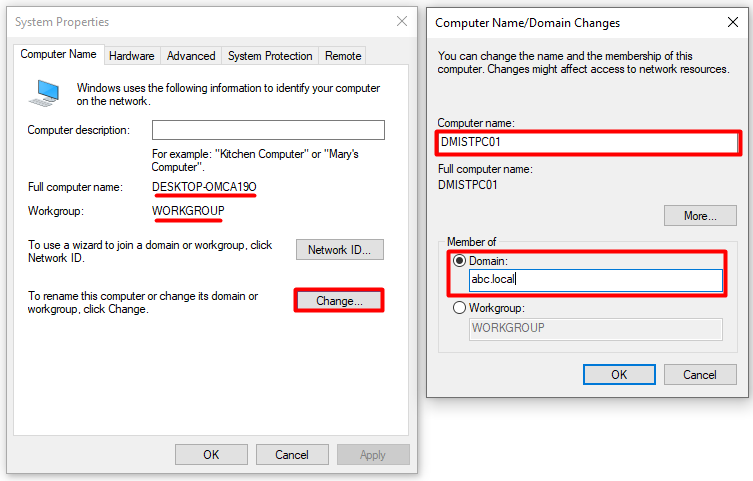
The system treats this field as a Fully Qualified Domain Name (FQDN). Based on this information, Windows starts a resolution process to locate the domain controllers through DNS. During the process, the Netlogon service becomes active and generates the DNS queries required for DC discovery.
The current host name is DESKTOP-OMCA19O. I assign DMISTPC01 as the new host name and prepare to leave the WORKGROUP structure and move to the abc.local domain. This step is the first point at which the whole domain join process is triggered.
Although the .local suffix still works, Microsoft does not recommend it for new deployments because of mDNS (Bonjour) conflicts. In newly built environments, a registered subdomain that belongs to the organisation (e.g. ad.firma.com) is preferred.
2- Starting the DC Discovery Process
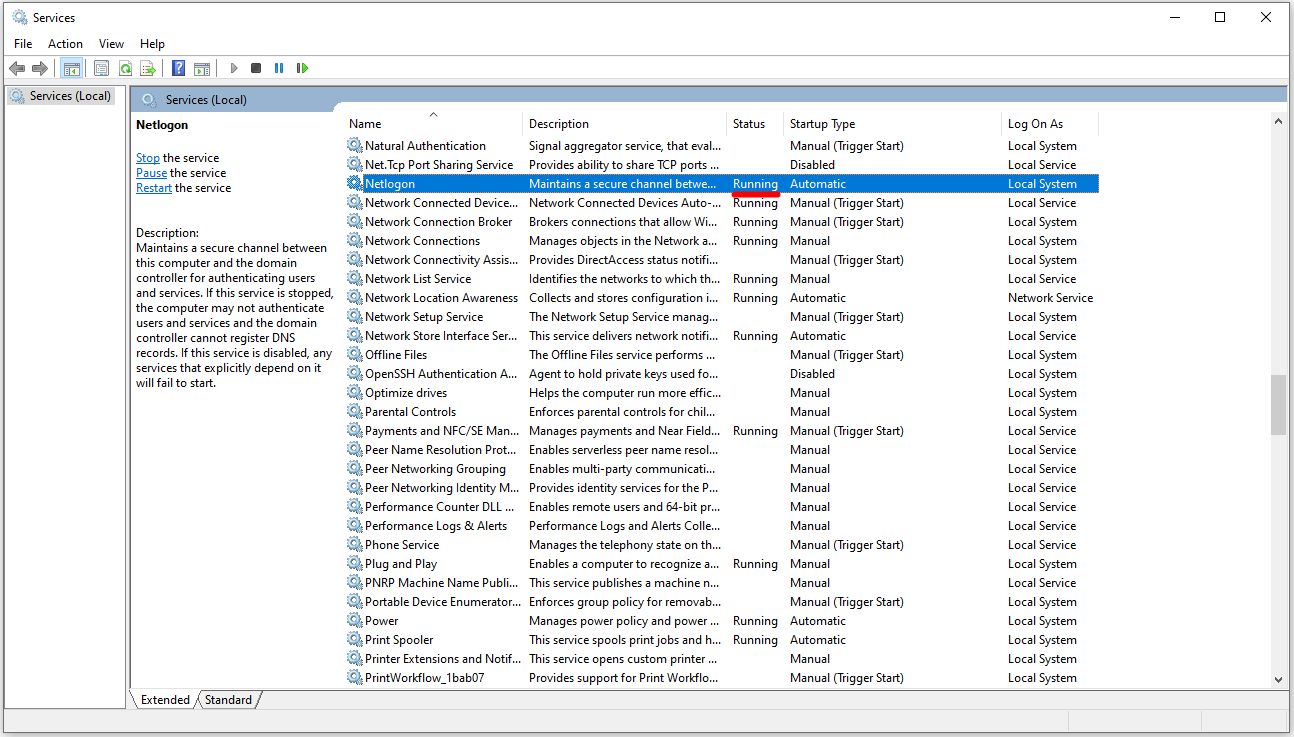
The component that technically triggers the SRV record query over DNS on the client is the Netlogon service. Once the client is a domain member, this service becomes active for operations such as authentication and DC discovery, and runs in sync with the core services of the system.
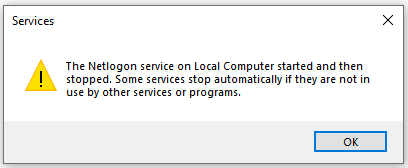
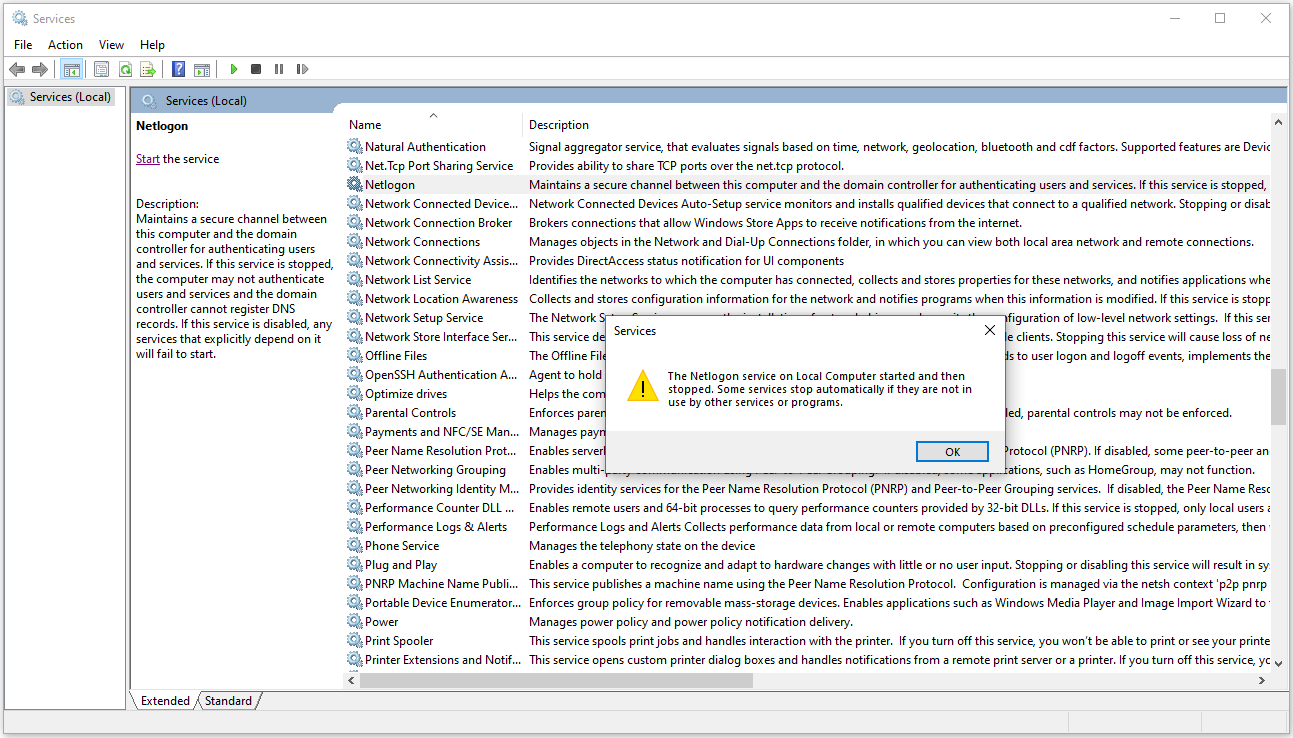
However, on machines that are not yet joined to a domain, that is, machines running in a workgroup, the Netlogon service is inactive by default. When I try to start it manually from Services.msc, the service appears to run for a moment and then stops immediately. The reason is that a machine in a workgroup has no secure channel to establish and no trust relationship to verify. Netlogon stops by itself because it sees no need to run. This behaviour is not an error, it is a design choice.
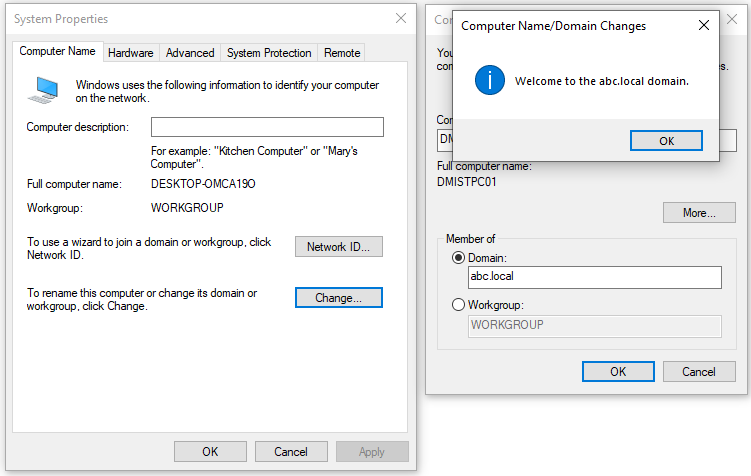
When I start the domain join, the credentials that I entered for the join, that is, the user name and password values, are verified on the domain controller. This verification takes place through calls made from the client to the DC over the SAMR and LSARPC RPC channels. After the DC verifies the identity of the user, it checks whether the user has the Add workstations to domain user right or the delegated Create Computer objects permission on the target OU. Authorisation takes place on the DC at this point. SSPI on the client only handles the selection of the authentication package and token generation.
When authentication completes, the Netlogon service becomes active automatically and no manual intervention is needed. The process continues by itself. To determine which domain controller the client will communicate with, Netlogon calls the DsGetDcName() API internally, and the technical flow required for DC selection begins.
In the technical flow of DC discovery, the client queries the DNS SRV record of the target domain. This query is started to find a suitable domain controller, and the resolution is carried out through dnsapi.dll, the DNS resolver module that runs on the client. DC discovery continues with the response that it receives.
Normally, this whole flow runs silently in the background and is not visible to the user. When I want to follow the flow closely, I enable the debug log feature of the Netlogon service on the domain controller from CMD.
nltest /dbflag:0x2080ffff
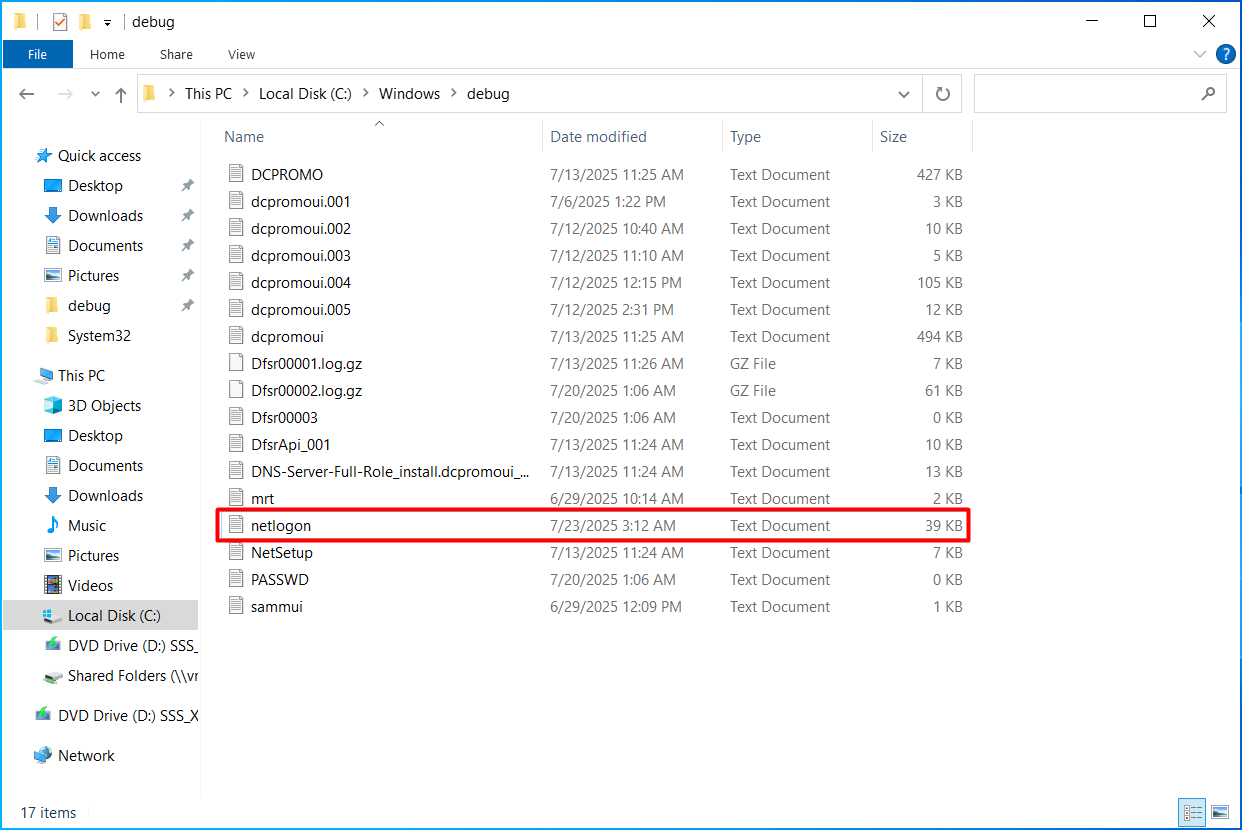
This command records directly which SRV records are queried, how the DsGetDcName() call is processed and which steps the process goes through. The trace output is kept in the C:\Windows\debug\netlogon.log file. I can follow all the details of DC discovery, in particular the SRV queries, from this file.
After enabling the debug log feature, I recommend disabling it with the command below so that the log does not grow unnecessarily.
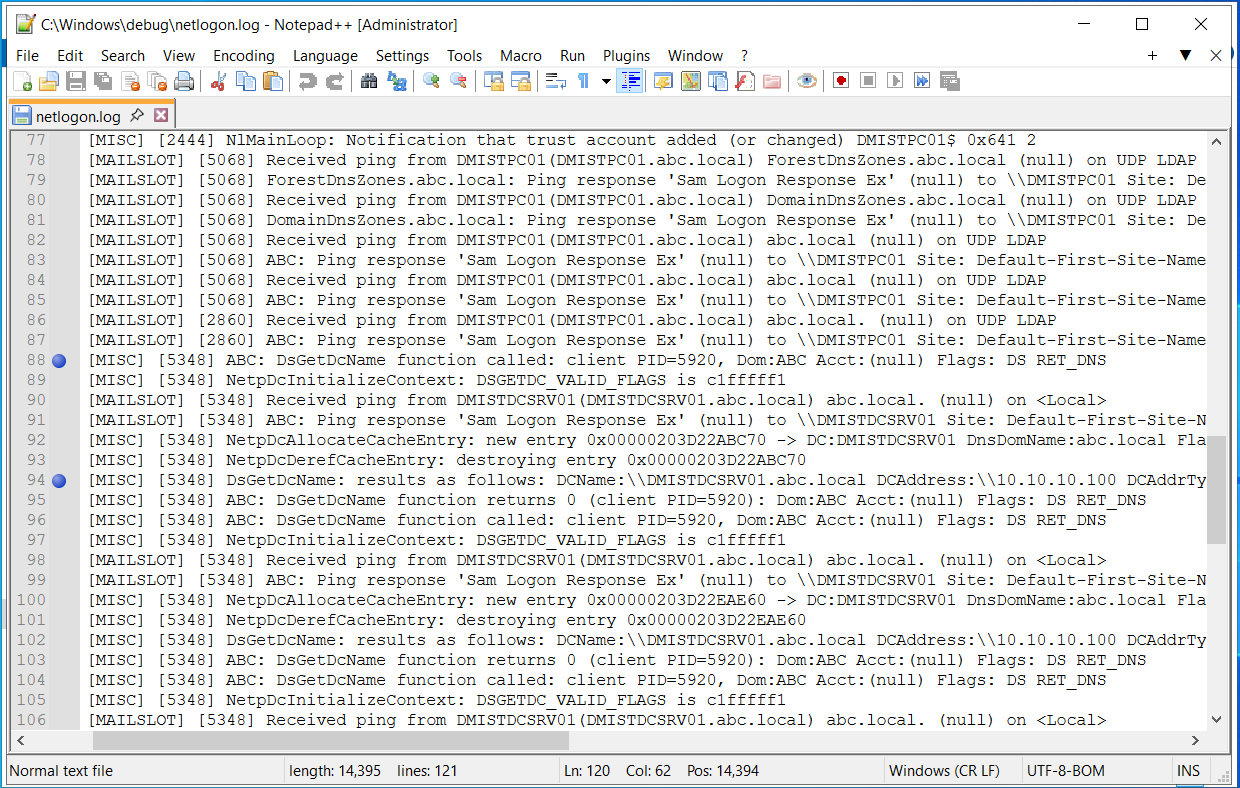
The log entry contains details such as which SRV record was queried over DNS, how many domain controllers were found and which one was selected. The DsGetDcName() API is at the centre of the DC discovery process and acts as a coordinator that brings the other subsystems into operation one after another as needed.
The following line in the netlogon.log file clearly shows that the Netlogon service on the DMISTPC01 computer called the DsGetDcName() function to trigger the DC Locator process for the domain with the NetBIOS name ABC.
07/23 03:52:39 [MISC] [5348] ABC: DsGetDcName function called: Client PID=5920, Dom:ABC Acct:(null) Flags: DS_RETURN_DNS_NAME
The DS_RETURN_DNS_NAME flag at the end of the call line forces the result to be returned in DNS name format instead of as a NetBIOS name. In other words, the client expects an FQDN such as DMISTDCSRV01.abc.local in the returned DCName field. The modern DC Locator flow uses this flag almost always.
After the function runs, the result line in the log entries shows which domain controller was selected and what the basic parameters of this DC are. This data technically confirms that DsGetDcName() identified a target DC successfully and provided details such as the address to connect to, the site information and the IP address type.
07/23 03:52:39 [MISC] [5348] DsGetDcName: results as follows:
DCName:           \\DMISTDCSRV01.abc.local
DCAddress:        \\10.10.10.100
DCAddrType:       0x1
DomainName:       abc.local
DnsForestName:    abc.local
Flags:            0xe003f3fd
DcSiteName:       Default-First-Site-Name
ClientSiteName:   Default-First-Site-Name
The part that I have described so far is a flow that summarises how the domain join looks from the user side and which basic components become active in the background. The images and explanations were used to show how the process progresses step by step. From here, I move on to the deeper technical part.
My focus is now the DsGetDcName() API. This API is called through the Netlogon service and is at the centre of the mechanism that determines which domain controller to connect to. I start to understand the process at the lowest level by examining how the parameters are processed, what the returned structures mean and which DLLs become active in which order.
DsGetDcName() API Prototype
DsGetDcName() is the API that the Netlogon service calls and that determines which domain controller a client connects to. In an Active Directory environment, DC discovery is carried out by this API and is supported by DNS-based queries.
When the function runs, it takes parameters such as ComputerName, DomainName, DomainGuid, SiteName and Flags. These parameters determine the scope of the DNS query and the behaviour of the function. Which information the API looks for, or which type of domain controller it selects, is directed by these inputs.
When it completes successfully, the function returns a DOMAIN_CONTROLLER_INFO structure that contains detailed information about a suitable domain controller. This structure contains the following technical information about the DC:
✔ The host name of the DC (e.g. SRVDC01.abc.local).
✔ The IPv4 / IPv6 address of the DC.
✔ The name of the Active Directory site where the DC is located.
✔ The FQDN value of the DC.
✔ The GUID of the DC.
✔ The capabilities of the DC in the Flags field (for example DS_GC_FLAG, DS_DS_FLAG, DS_WRITABLE_FLAG, DS_KDC_FLAG, DS_PDC_FLAG, DS_TIMESERV_FLAG).
✔ Other identity information, such as the NetBIOS name used in communication with the client.
DsGetDcName() is an API that is at the centre of the domain controller selection process and can behave differently depending on the parameters that it receives.
|
Parameter |
Description |
LPCWSTR ComputerName |
The name of the computer on which DC discovery is performed. When NULL is passed, the operation runs on the local machine. The domain join flow uses NULL almost always. |
LPCWSTR DomainName |
The FQDN of the target domain. The API uses this information to look for the DCs of that domain. |
GUID *DomainGuid |
The unique GUID value of the target domain. It is not needed in most cases and is left as NULL. It can be used if the domain name has changed or if direct access through the GUID is required. |
LPCWSTR SiteName |
Specifies the Active Directory site in which to look for a DC. It is usually left as NULL, and the DC side determines the site match according to the IP/subnet information of the client. |
ULONG Flags |
The control flags that manage the behaviour of the API. For example:
• DS_GC_SERVER_REQUIRED: The Global Catalog SRV record is queried.
• DS_RETURN_DNS_NAME: The result is returned as an FQDN.
• DS_FORCE_REDISCOVERY: The cache is ignored and a new discovery is performed.
• DS_WRITABLE_REQUIRED: A writable DC is returned (RODCs are excluded). |
PDOMAIN_CONTROLLER_INFO DomainControllerInfo |
The result structure returned for the DC that was found. It contains the DC host name, IP address, AD site, FQDN, Flags and other identity information. |
DsGetDcName() results are cached by Netlogon. If a stale cache is suspected of causing the wrong DC to be selected, rediscovery can be triggered with the DS_FORCE_REDISCOVERY flag or the nltest /dsgetdc: /force command.
The LPCWSTR DomainName parameter is the key input that determines which domain name is queried in the DNS query process. It does not start the DNS query directly, but it defines the target of the query and so forms the starting point of the process.
DsGetDcName() Call and DLL Interaction
DsGetDcName() does not do all the work alone. It is only the main API of the DC discovery process. While it runs, it hands the operations that it needs to different DLLs in the system and completes the process by calling the existing functions in these DLLs.
The basic logic is this: the DLLs are the hands that do the work, and the parameters are the instructions that tell these hands "what to do". Decisions such as which domain is queried, which site has priority or which type of DC is looked for are determined by the parameters passed to the API. The DLLs become active according to these instructions.
For example, when a DNS query is required, Netlogon does not resolve it internally. Instead, based on the information given in the LPCWSTR DomainName parameter, it calls the DnsQuery_W() function in dnsapi.dll. In this way, the correct records are queried over DNS and the results are passed back to the Netlogon flow. The main focus of this article is exactly the operations carried out in the interaction between this parameter and this DLL.
When a module uses the existing functions of another module by calling them from outside, this is called a function call in software architecture.
The table below describes the main DLL components that become active during the DsGetDcName() call and the functional roles of these components.
|
DLL Name |
Description |
netlogon.dll |
Contains functions such as DC Locator and DsGetDcName(). The logic for domain discovery and for starting the secure channel runs here. |
dnsapi.dll |
Becomes active when DNS resolution is required during the DsGetDcName() call, and carries out the SRV and A record queries through the DnsQuery_W() functions. |
secur32.dll |
The SSPI entry point. It receives authentication requests and directs them to the appropriate authentication provider (Kerberos or NTLM). |
kerberos.dll |
If authentication is performed with Kerberos, it manages TGT generation and the AS-REQ / AS-REP and TGS-REQ / TGS-REP ticket exchange processes. |
msv1_0.dll |
If NTLM is used, it manages the challenge/response flow. |
During the process, the DLL components do not all become active at the same time or in a fixed order. netlogon.dll is the core component that manages the overall control flow. The other DLLs are brought into operation only when the need arises. When DNS resolution is required, dnsapi.dll is called, and when the secure channel is to be established, secur32.dll becomes active. If the environment is Kerberos-based, the authentication tasks run through kerberos.dll. If NTLM is preferred, these tasks are taken over by msv1_0.dll.
Each DLL becomes active only in situations that fall within its own functional scope, and according to the conditions of the context. DsGetDcName() is not a component that manages the system directly. It works like a control mechanism that determines which function must become active under which condition.
All of these DLL files are located in the C:\Windows\System32 directory.
The Relationship Between secur32.dll and kerberos.dll
When a user wants to sign in or a computer starts the process of joining a domain, the authentication request is not sent directly to the Kerberos or NTLM protocol. The request is first received by secur32.dll. This component is the SSPI entry point that determines which authentication mechanism suits the environment.
The operating system does not have to know in advance which protocol will be used. secur32.dll selects the most suitable mechanism by looking at the package that is called (Negotiate, Kerberos, NTLM) and at the configuration of the environment. If Kerberos is suitable, the process continues through kerberos.dll with the ticket exchange steps. If NTLM is suitable, the authentication flow runs through msv1_0.dll.
With this structure, the decision process is managed from a single point and only the services that are needed become active. After the decision stage completes, control leaves secur32.dll, the DLL of the selected protocol takes over the process, and the authentication operations continue in the background according to the protocol.
The technical flow can look abstract. To make the logic easier to understand, I use an analogy from daily life:
➔ Windows first goes to secur32.dll, which works like a ticket office clerk, and says:
"Connect me to the domain. Use whichever protocol is suitable."
➔ secur32.dll looks at the environment and decides:
"Kerberos is suitable in this environment, I am directing you there."
or
"Kerberos is not suitable at the moment, you will continue with NTLM."
➔ If Kerberos is suitable, it calls kerberos.dll:
"Prepare a TGT for this one, start the AS-REQ process."
➔ If NTLM is selected, control passes to msv1_0.dll and the challenge/response flow starts.
With this structure, the system runs only the protocols that are needed, without bringing unnecessary components into operation. In this way, the Windows authentication architecture operates in a balanced way in terms of both performance and security.
In the first moments of the domain join, the machine account does not exist yet and the SPNs have not been written, so a Kerberos service ticket cannot be obtained. For this reason, the initial authentication runs largely over NTLM. Kerberos becomes active after the join completes and replication settles.
DNS Query: SRV Record
To identify which domain controllers provide service in the Active Directory environment, the client sends an SRV record query to the DNS server. The query is directed at _ldap._tcp.dc._msdcs.abc.local and is sent over UDP 53 by default. This SRV record is used only for the purpose of DC Locator and is located in the _msdcs.abc.local DNS zone. It is the reference point for determining which servers act as domain controllers in operations such as a domain join.
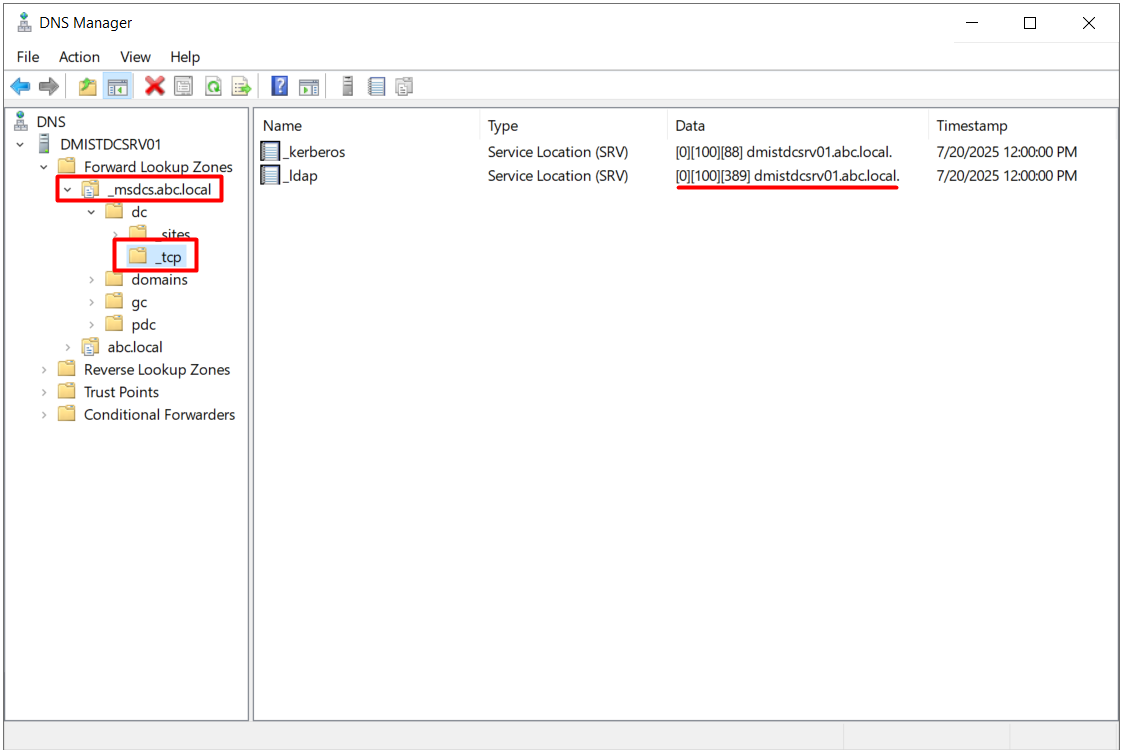
In response to this request, the DNS server replies with SRV records that contain the FQDNs of the DCs of the domain, the LDAP port 389 number, and the Priority and Weight values. This data is evaluated on the client to decide which DC to connect to.
DNS queries start over UDP 53 by default. Without EDNS0, when the response exceeds the 512-byte limit, it is marked with the TC (Truncation) flag and the client sends the same query again over TCP 53. In environments with many DCs, SRV responses often trigger this fallback.
Example SRV Record Response
When the client sends an SRV record query to the DNS server to learn the DC information, the response can contain more than 1 record. Each SRV record carries the information of a different DC, and the system evaluates these records to select the DC to connect to.
Each record in the response contains the Priority, Weight, LDAP port 389 and target FQDN information. The record with the lowest Priority value is preferred, and records at the same Priority level share the load according to their Weight ratio. This structure is used for load balancing and high availability when the environment has more than 1 DC.
An example response to this query is shown below.
_ldap._tcp.dc._msdcs.abc.local  SRV  Priority 0   Weight 100  Port 389  Target dc01.abc.local
_ldap._tcp.dc._msdcs.abc.local  SRV  Priority 0   Weight 100  Port 389  Target dc02.abc.local
_ldap._tcp.dc._msdcs.abc.local  SRV  Priority 10  Weight 50   Port 389  Target dc03.abc.local
The system interprets SRV record responses according to specific rules. The client takes these rules into account when it decides which DC to connect to:
✔ The dc01 and dc02 records have the same Priority value, which is 0. For this reason, load balancing is applied between them. The target with the higher Weight value has the advantage for the connection.
✔ Because the Priority value of the dc03 record is 10, it is treated as a backup target. It is used if the other records fail.
✔ After the Windows client receives the SRV responses, it sorts them first by Priority and then, among the records with the same Priority value, by Weight. The DC to connect to is selected according to this order.
If there is more than 1 DC, the SRV records of all of them are collected, and the SRV response delivers the FQDN and Priority/Weight information of all DCs to the client.
Priority and Weight values do not have to be configured differently in every environment. In many environments, all DCs are defined with the same Priority and Weight values and the client performs the load balancing randomly. If specific DCs must be given priority, or traffic must be directed through weight differences, these values can be changed deliberately with the LdapSrvPriority and LdapSrvWeight registry values on the DC.
CLDAP Ping and Site Determination
After the client evaluates the DC FQDNs returned in the SRV response in Priority/Weight order, it sends a CLDAP (Connectionless LDAP) ping to each target. This ping is an LDAP search request made over UDP 389, and it measures whether the target DC really responds.
The DC that answers the ping also returns, in the response, the ClientSiteName information that corresponds to the IP address of the client. The DC produces this information from the subnet → site mapping in its own Active Directory Sites and Services configuration. In other words, the real site of the client is determined by the first DC that responds.
From this point, the client can behave in 2 ways:
✔ If the first DC that responds is in the site determined for the client, the client continues the connection with this DC.
✔ If the first DC that responds is not in the site of the client, the client then makes a site-aware SRV query.
_ldap._tcp.._sites.dc._msdcs.abc.local
With the site-aware SRV query, the client receives the list of DCs in its own site and establishes the connection with a DC in this site. In this way, domain join traffic does not go to DCs in remote sites unnecessarily. This mechanism is the basic optimisation that prevents WAN traffic in multi-branch environments.
DNS Query: Host (A) Record
The FQDNs obtained through the SRV records determine which DC the system goes to. However, an FQDN is only a name. To establish the connection, the IP address that this name corresponds to must be known. For this purpose, a host (A) record query is sent directly to the DNS server.
As a result of the SRV query, the client obtains the FQDN of the DC (for example dc01.abc.local). This information is not enough alone, because directory services such as LDAP communicate directly over IP. To learn which IP address dc01.abc.local corresponds to, the client sends a host (A) query to the DNS server. The query is started by the DNS resolver component of the client, and the IPv4 address of the given FQDN, or its IPv6 address if one exists, is returned.
The returned IP address identifies the domain controller target that the client physically connects to. An LDAP session is opened to this address over TCP 389 to access the directory services. Operations such as creating the computer object, opening the authentication session and retrieving the Group Policy data are carried out over this connection. Resolving the A record is a mandatory step for the domain join process to complete successfully.
There is a detail that I must pay attention to at this point:
✔ The system does not scan all the host (A) records in the forward lookup zone.
✔ A host (A) query is made only for the DC FQDNs returned in response to the _ldap._tcp.dc._msdcs.abc.local SRV query.
With this structure, the operation is free of unnecessary queries and proceeds by focusing only on the target DCs.
The client queries only the host (A) records of the FQDNs returned in the SRV response. No bulk scan is performed across the forward lookup zone.
To see this process more concretely, an example DNS resolution flow proceeds as follows: the client sends an SRV query to _ldap._tcp.dc._msdcs.abc.local. The response from the DNS server contains the FQDNs of the DCs. After it receives this response, the client starts an A record query only for specific DCs.
A?  dc01.abc.local   →   10.10.10.100
A?  dc02.abc.local   →   10.10.10.101
If no query was made for dc03, this FQDN may not have responded at the CLDAP ping stage, or it may have remained outside the targets to be called in the Priority/Weight order. This selectivity is important for preventing unnecessary DNS queries and keeping name resolution traffic simple. Resolving only the targets in the SRV response, instead of querying all the A records in the forward lookup zone, makes the process both efficient and secure.
After the client resolves the SRV and A DNS records and learns the IP address of the domain controller, it moves to the actual connection stage. Name resolution is considered complete at this point, and communication continues over the relevant protocols and ports. The operating system brings the required services into operation in order during the domain join process. This order is shaped by the responses from the environment and the requirements at that moment.
Completing the Process
This article covered the technical steps that a client follows in the process of joining an Active Directory domain, together with all of their components. When the operation is started, the Netlogon service, which becomes active in the background, reaches the DNS structures through the DsGetDcName() API call and queries the SRV records in the _ldap._tcp.dc._msdcs. format. These records determine which DC to communicate with. After the CLDAP ping, the client continues the process through the DC that best suits its own site information. When resolution at the DNS layer completes, LSASS on the client prepares the structure that will store the secure channel keys for the machine account.
The physical creation of the computer object takes place on the domain controller. The client contacts the target DC over the LDAP channel, and the machine account is registered with SAMR and LSARPC RPC calls. During this step, attribute values such as DNSHostname and ServicePrincipalName are written. Because the SPNs have not yet propagated at the moment of the first join, authentication proceeds largely over NTLM. After replication and the machine password settle, Kerberos also becomes active and the trust relationship is fully established. At the end of the process, the client is configured so that it can communicate with resources in the domain, process Group Policy Objects and stay connected to the DC over the secure channel.
Considering the services involved in each step, the APIs used, the DNS record types and the protocol-level transitions, it is clear that a domain join is a much more comprehensive infrastructure call than a simple membership action. Without understanding this technical design in the background, it is not possible to interpret correctly why the process can fail from time to time or which details can be followed through the logs. The integrity of the structure can be understood only by going to this depth.
I hope you find it useful...
Feel free to share your thoughts and questions about this article in the comments below. Every contribution helps the content reach more people and makes for a more useful discussion.