When 2 separate Active Directory forests need to see each other, the first obstacle is usually name resolution. When a domain controller in the abc.local forest queries a record that belongs to the xyz.local domain, it cannot find this information in its own zones and sends the query out through the configured forwarder or root hints. With a namespace such as .local, which does not exist on the internet, this query never reaches the correct answer, and the client receives a name resolution error.
The component that solves this problem is the DNS conditional forwarder. A conditional forwarder sends queries for a specific DNS domain name directly to the DNS servers responsible for that domain. It is one of the first components configured in scenarios such as forest trust setup, cross-forest migration with ADMT, Exchange cross-forest coexistence, or infrastructure integration after a merger or acquisition. The trust creation wizard must find the domain controllers of the other forest through SRV records in DNS, and the trust setup does not proceed until name resolution works.
This is also where the difference between a general forwarder and a conditional forwarder becomes clear. A general forwarder sends all queries that the DNS server cannot resolve to a single target. A conditional forwarder applies only to the defined namespace, and internet name resolution continues to work as before. In this way, the resolution needed between the 2 forests is provided without touching the rest of the environment.
The walkthrough below uses 2 single-domain forests running on Windows Server 2022. abc.local is on the source side and xyz.local is on the target side. First, the domain, forest and domain controller details of both environments are collected. Then a conditional forwarder is created on both sides in DNS Manager, the PowerShell equivalent of the same operation is given, and finally name resolution is verified.
How a Conditional Forwarder Works
When a DNS server receives a query from a client, it first checks the zones it is authoritative for and then its cache. If the answer is not in either of these, it checks the conditional forwarder definitions. If the queried name matches a defined namespace, the query is forwarded as a recursive query to the master server list in that definition. If there is no match, the query goes to the general forwarder or to root hints. The diagram below shows the path that an xyz.local query from a client on the abc.local side follows.
Client (abc.local)
   |
   |  Query for xyz.local
   v
abcsrvdc01 - 10.10.10.100
   |  1. Authoritative zone check   -> no match
   |  2. Cache check                -> no record
   |  3. Conditional Forwarder      -> xyz.local matched
   v
xyzsrvdc01 - 172.16.10.100
   |  Authoritative answer from the xyz.local zone
   v
The answer returns to the client through abcsrvdc01 and is cached
A similar need can also be met with a stub zone. The table below summarises the difference between the methods. The main factor in the choice is how often the DNS server list in the other environment changes and who keeps this list up to date.
|
Method |
How It Works |
Typical Use |
|
Forwarder |
Sends all unresolved queries to the defined target |
Internet name resolution through specific DNS servers |
|
Conditional Forwarder |
Sends only the queries for the specified namespace to the defined master servers, and the IP list is maintained manually |
Forest trust, cross-forest migration, name resolution with partner networks |
|
Stub Zone |
Holds the SOA, NS and related A records of the target zone, and learns changes to the NS list automatically |
Environments where the number of domain controllers on the other side changes often |
Collecting the Environment Details
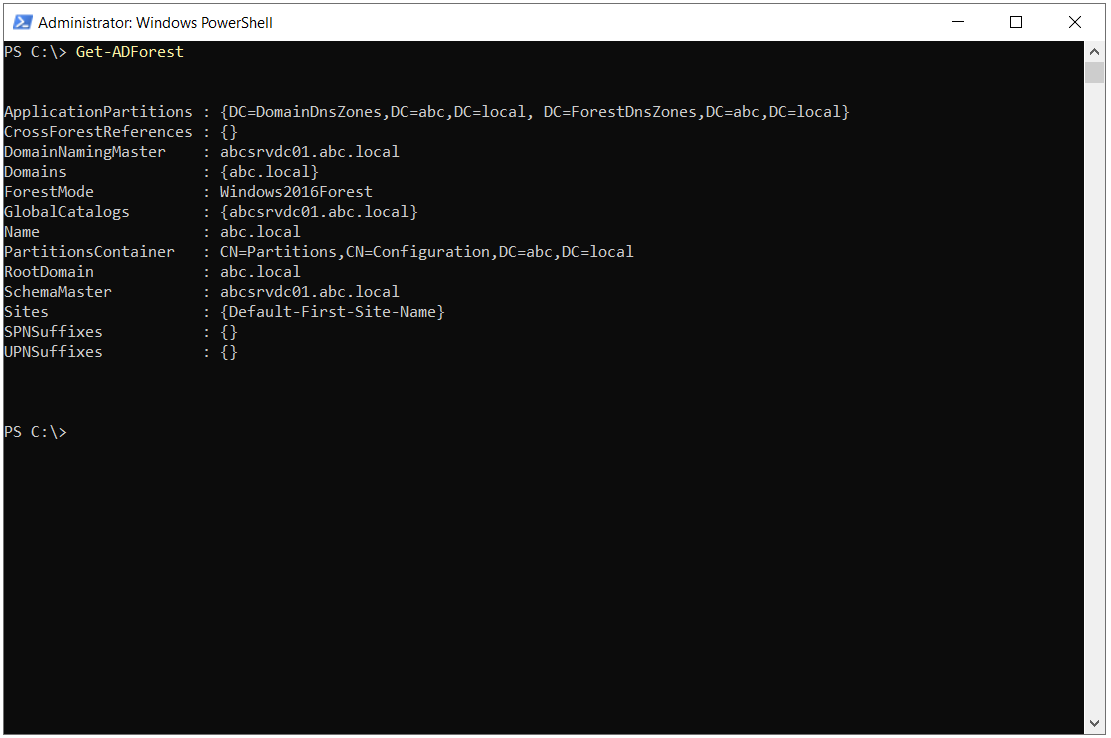
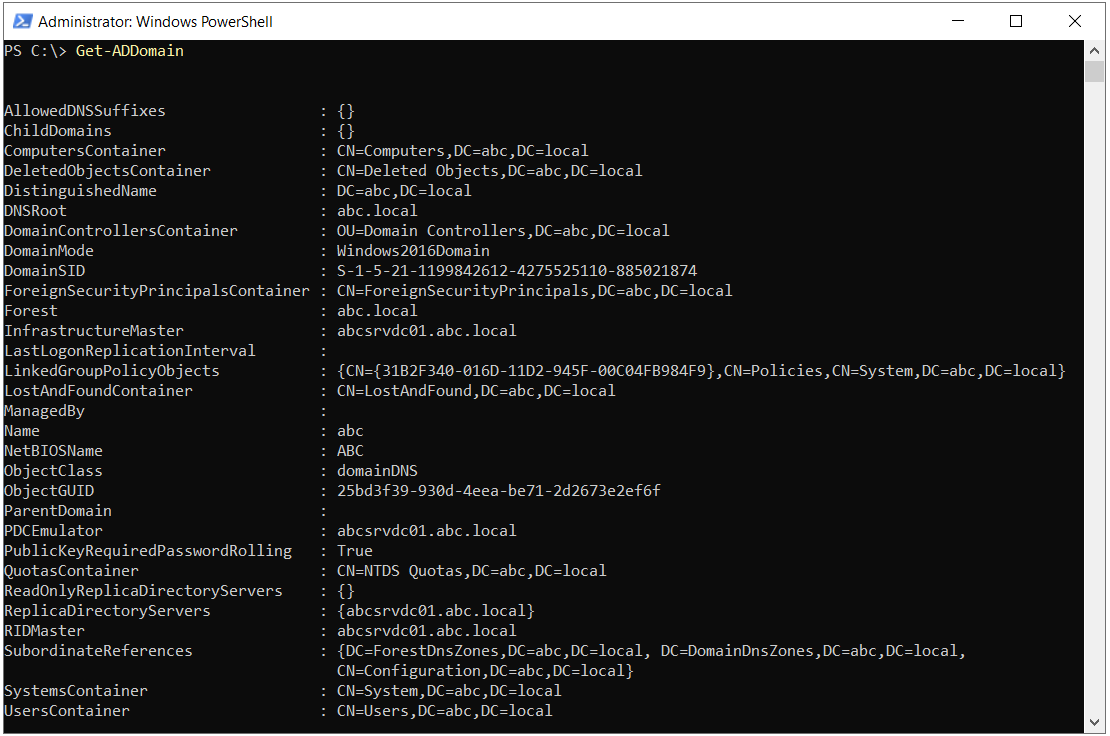
Before a conditional forwarder is defined, it must be clear which namespace is forwarded to which DNS servers. For this, the Get-ADDomain and Get-ADForest commands are run in both environments. The DNSRoot and NetBIOSName values in the Get-ADDomain output, and the Forest and Domains values in the Get-ADForest output, show the namespace to forward and whether the forest contains any other domains. The first 2 screenshots belong to the abc.local environment on the source side.
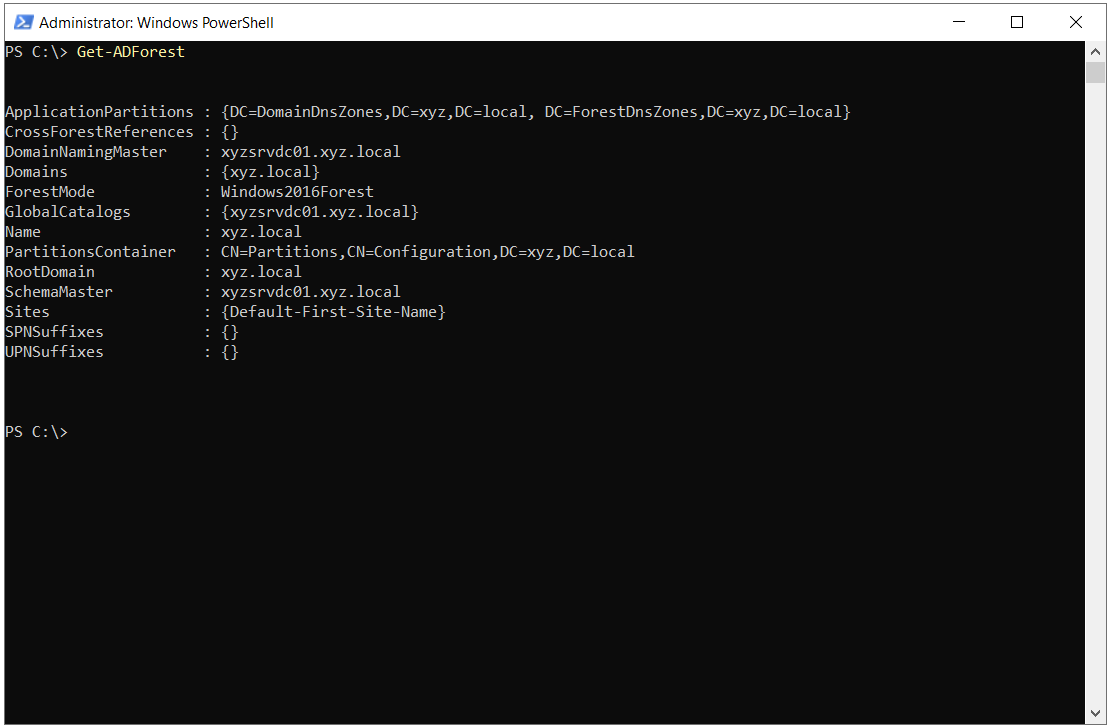
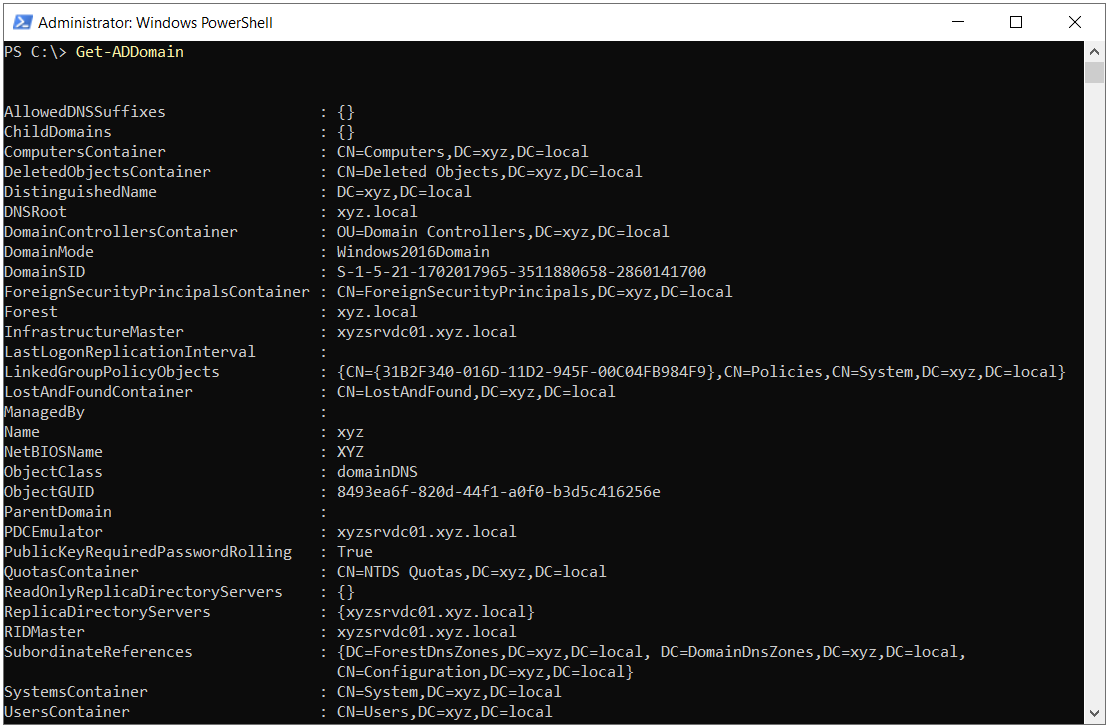
Running the same commands in the xyz.local environment on the target side returns the details of the other forest.
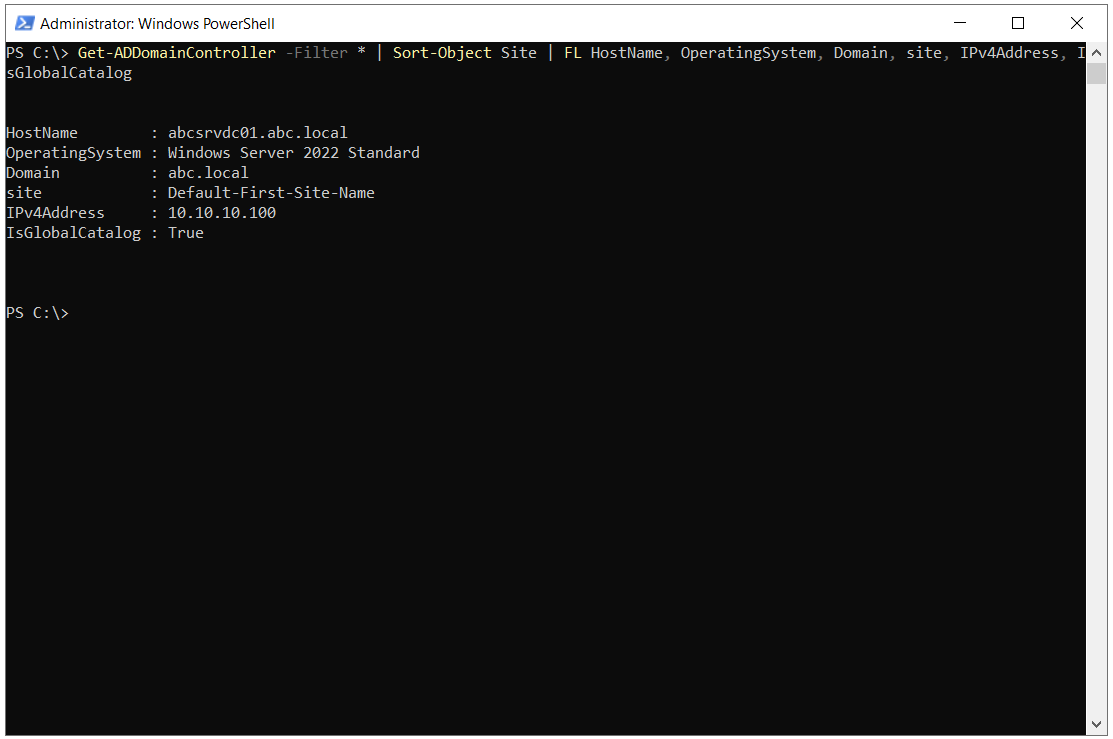
Once the namespace is known, the IP addresses for the master server list are collected. The command below is run on 1 domain controller in each forest and lists all domain controllers in the domain, sorted by site.
Get-ADDomainController -Filter * | Sort-Object Site | Format-List HostName, OperatingSystem, Domain, Site, IPv4Address, IsGlobalCatalog
The command requires the ActiveDirectory PowerShell module, which is installed by default on a domain controller. The table below shows the output from the 2 environments side by side. The values used in the conditional forwarder definition are the Domain and IPv4Address fields.
|
Field |
Source Forest |
Target Forest |
|
HostName |
abcsrvdc01.abc.local |
xyzsrvdc01.xyz.local |
|
OperatingSystem |
Windows Server 2022 Standard |
Windows Server 2022 Standard |
|
Domain |
abc.local |
xyz.local |
|
Site |
Default-First-Site-Name |
Default-First-Site-Name |
|
IPv4Address |
10.10.10.100 |
172.16.10.100 |
|
IsGlobalCatalog |
True |
True |
The screenshot below shows the output on the abc.local side.
The output on the xyz.local side is as follows.
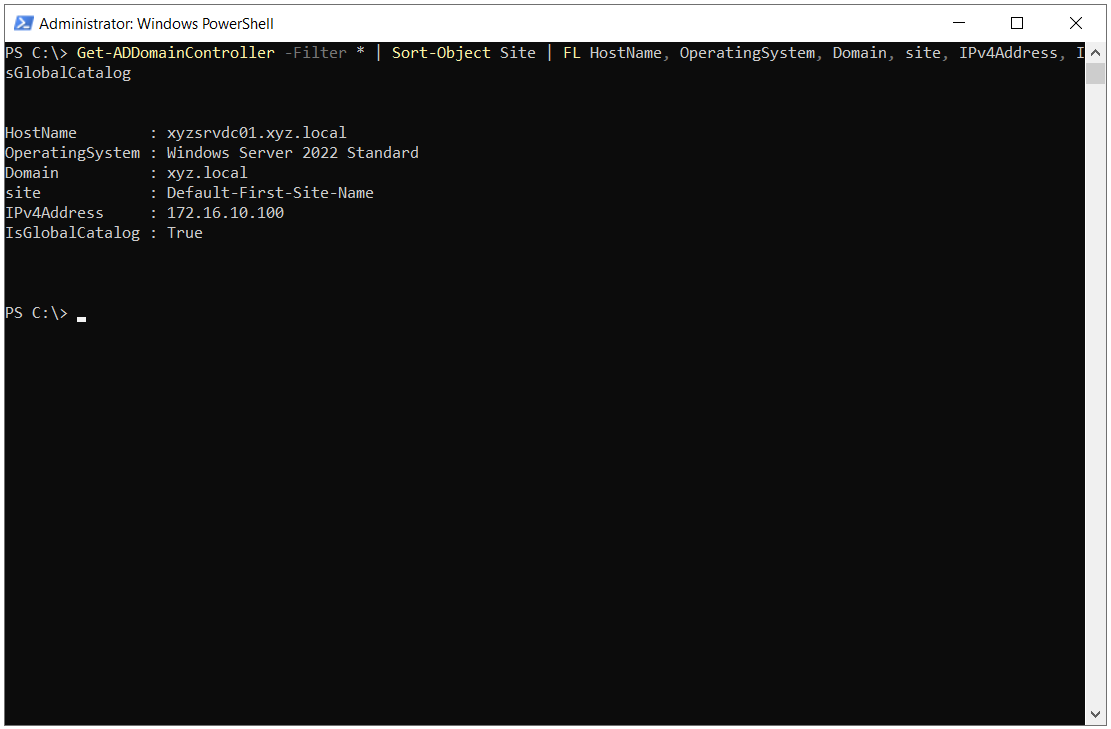
In this environment, each forest has 1 domain controller. In environments with more than 1 domain controller, all domain controllers that run the DNS Server role must be added to the master server list. The Get-ADDomainController output does not show whether a domain controller runs the DNS Server role, so the presence of the DNS role on the servers to be added to the list must be checked separately.
Creating the Conditional Forwarder on the abc.local Side
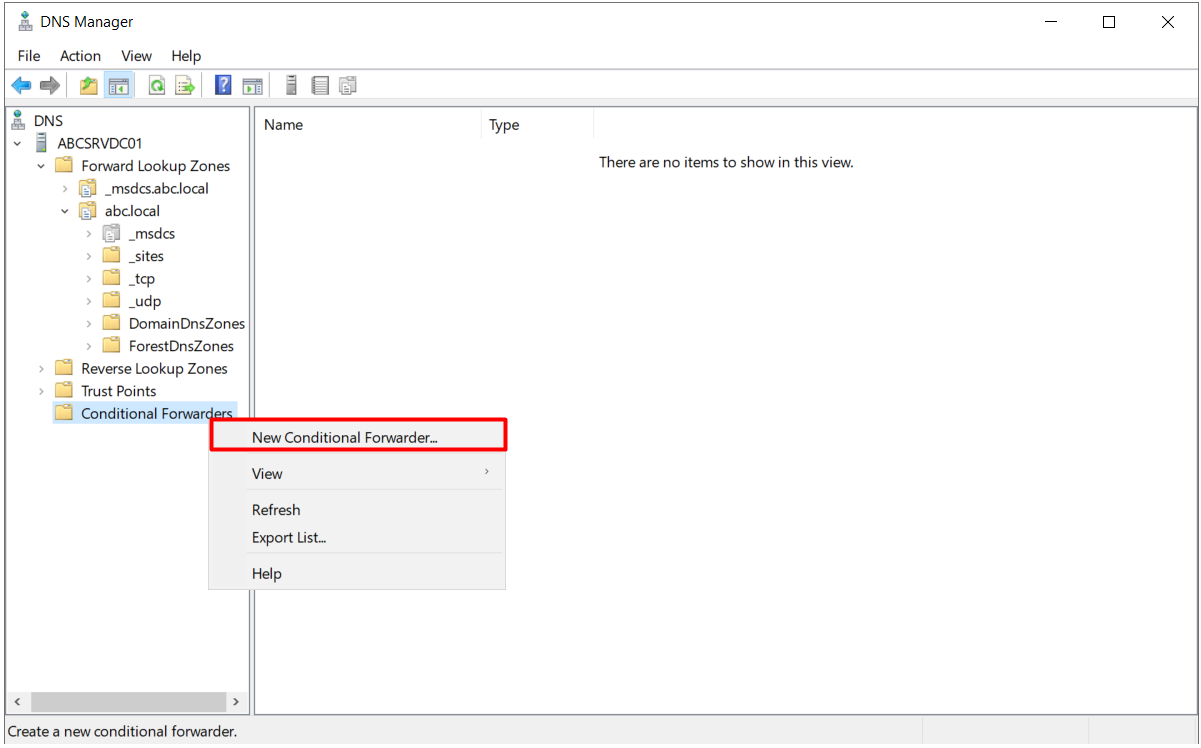
DNS Manager is opened on the domain controller in the abc.local domain, the Conditional Forwarders node in the left pane is right-clicked, and New Conditional Forwarder is selected.
In the window that opens, xyz.local, the namespace to forward, is entered in the DNS Domain field. The IP addresses of the DNS servers in the xyz.local domain, 172.16.10.100 in this environment, are entered in the IP addresses of the master servers field. When an IP address is added, DNS Manager tries to reach this server and shows the result in the Validated column. For the Server FQDN column to be filled in, the IP address must be resolvable through reverse lookup. If there is no reverse lookup zone for the other side, this column may not show a name. This does not prevent forwarding from working. The point to check is whether the server answers DNS queries.
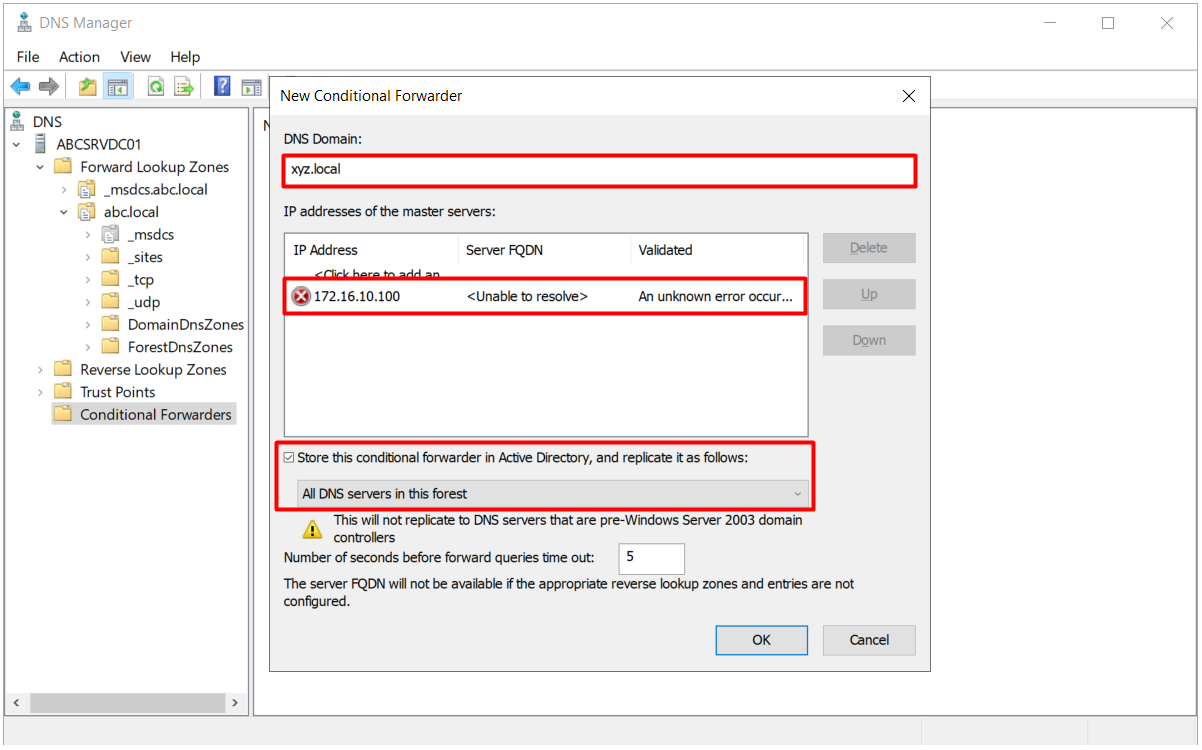
The Store this conditional forwarder in Active Directory option in the lower part of the same window determines where the definition is stored and which DNS servers it is distributed to. In this configuration, the option is selected and the replication scope is set to All DNS servers in this forest. The definition is therefore stored in Active Directory and reaches all domain controllers in the forest that run the DNS Server role through replication. The same definition does not have to be created on each DNS server one by one, and the possibility of different configurations between servers is removed.
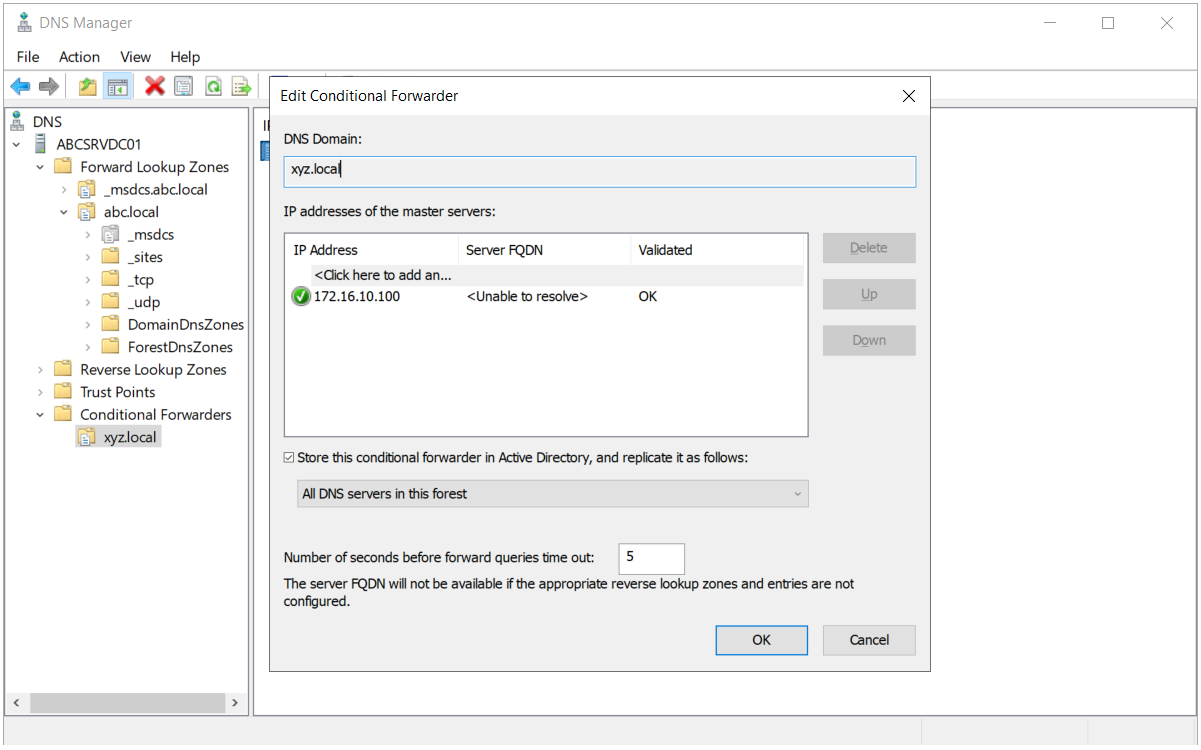
The window also contains the Number of seconds before forward queries time out field. The default value is 5 seconds, and the server waits this long for an answer from each master server in the list. For targets that are reached over a WAN and have high latency, this value may need to be increased.
Replication Scope Options
The table below shows the scopes in the list that becomes available when the Store this conditional forwarder in Active Directory option is selected. Each scope stores the definition in a different application directory partition and, as a result, distributes it to a different group of servers.
|
Option |
Partition Where It Is Stored |
Servers That Receive the Definition |
|
All DNS servers in this forest |
ForestDnsZones |
Domain controllers that run the DNS Server role in all domains in the forest |
|
All DNS servers in this domain |
DomainDnsZones |
Only domain controllers that run the DNS Server role in the relevant domain |
|
All domain controllers in this domain (for Windows 2000 compatibility) |
Domain partition |
All domain controllers in the domain, with or without the DNS role |
If the option is not selected, the definition is stored only in the local configuration of the server where the operation is performed. The definition does not reach DNS servers that are not integrated with Active Directory and run on member servers through replication, and it must be configured separately on these servers.
In a multi-domain forest, the forest scope is preferred if the other environment must be resolvable from all domains. If only a specific domain needs the forwarding, the domain scope provides a more controlled distribution.
Creating the Conditional Forwarder on the xyz.local Side
For name resolution to work in both directions, the same definition is created on the other side. DNS Manager is opened on the domain controller in the xyz.local domain, the Conditional Forwarders node is right-clicked, and New Conditional Forwarder is selected.
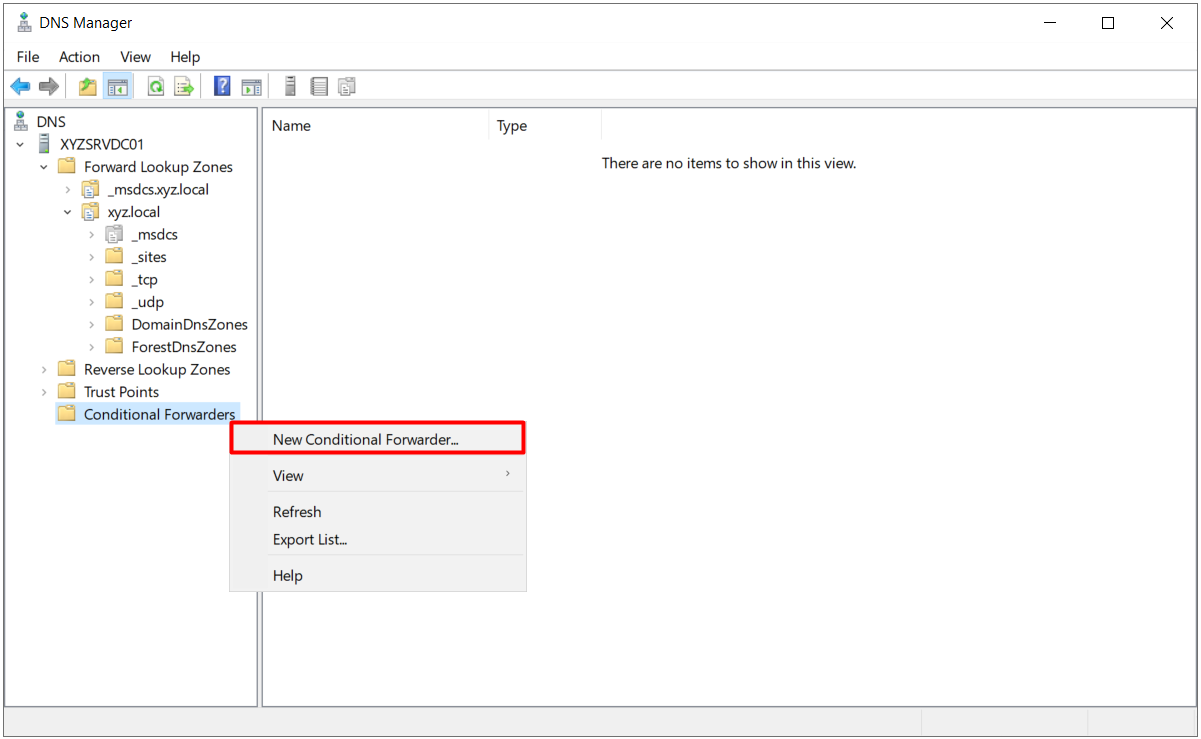
This time, abc.local is entered in the DNS Domain field, and 10.10.10.100, the IP address of the DNS server in the abc.local domain, is entered in the master server list.
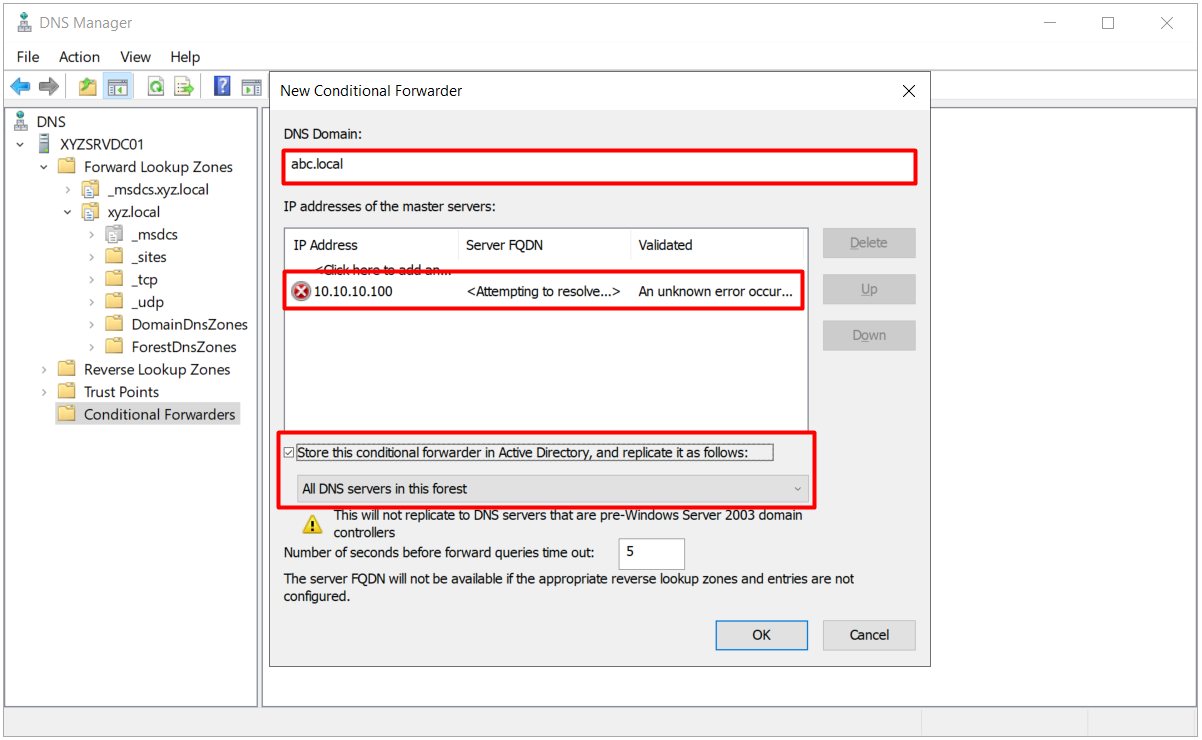
The replication scope is set to All DNS servers in this forest on this side as well, and the definition is saved. When the operation is complete, the abc.local namespace is listed under the Conditional Forwarders node.
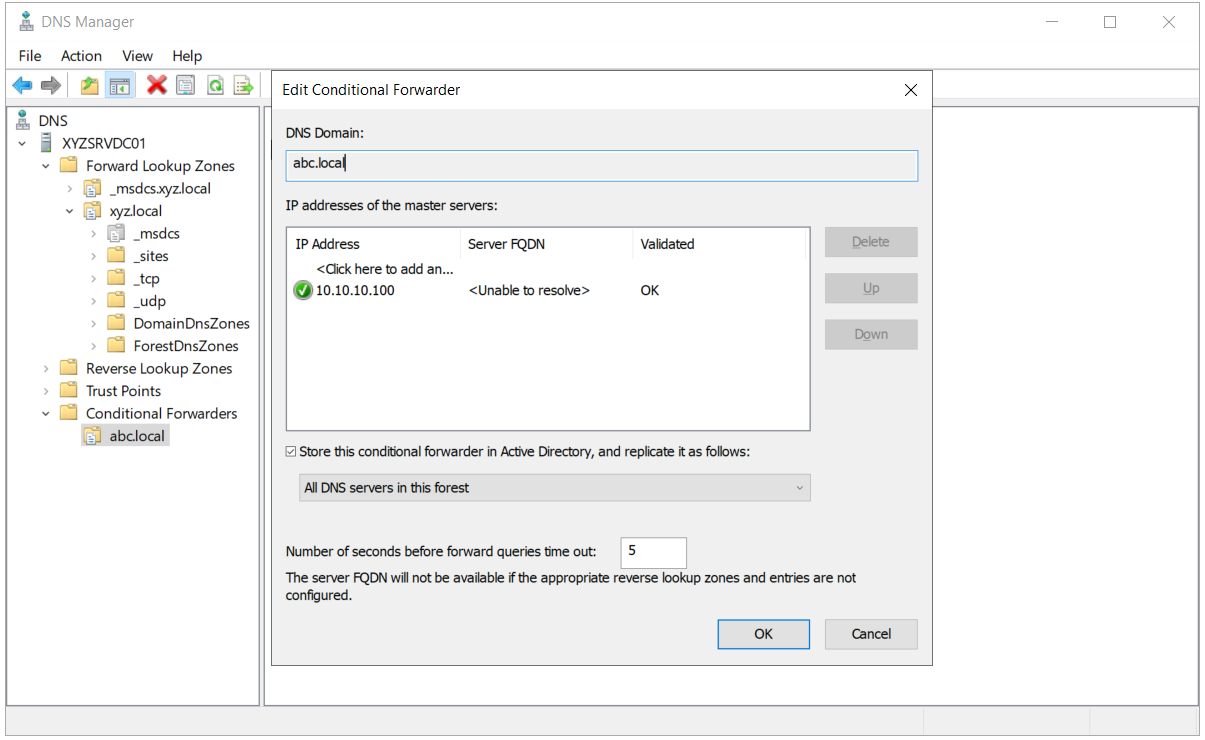
In scenarios such as a forest trust, both sides must be able to resolve the domain controllers of the other forest through DNS. In this configuration, name resolution in both directions is provided by defining a conditional forwarder on each side. A conditional forwarder is not the only way to meet this need. A stub zone, a secondary zone or any other DNS design that resolves the other namespace correctly gives the same result.
Creating a Conditional Forwarder with PowerShell
The same definitions can be created in a single line with PowerShell. The Add-DnsServerConditionalForwarderZone cmdlet is part of the DnsServer PowerShell module. The Forest value of the ReplicationScope parameter corresponds to the All DNS servers in this forest option in DNS Manager, and the Domain value corresponds to the All DNS servers in this domain option. To create a definition at forest scope, the account must have write permission on the ForestDnsZones partition, and Enterprise Admins membership meets this requirement.
# On the domain controller on the abc.local side
Add-DnsServerConditionalForwarderZone -Name "xyz.local" -MasterServers 172.16.10.100 -ReplicationScope "Forest"

# On the domain controller on the xyz.local side
Add-DnsServerConditionalForwarderZone -Name "abc.local" -MasterServers 10.10.10.100 -ReplicationScope "Forest"

# List the conditional forwarder definitions that were created
Get-DnsServerZone | Where-Object ZoneType -eq "Forwarder"
A definition at forest scope is distributed to all DNS servers through replication. If an incorrect IP address is entered, resolution of the namespace is affected across the whole forest. If a zone with the same name already exists, the command returns an error.
When a domain controller is added or removed on the other side, the master server list is updated with the Set-DnsServerConditionalForwarderZone cmdlet. This list is not refreshed automatically, so reporting domain controller changes to the DNS team must be part of the operational process.
Verifying Name Resolution
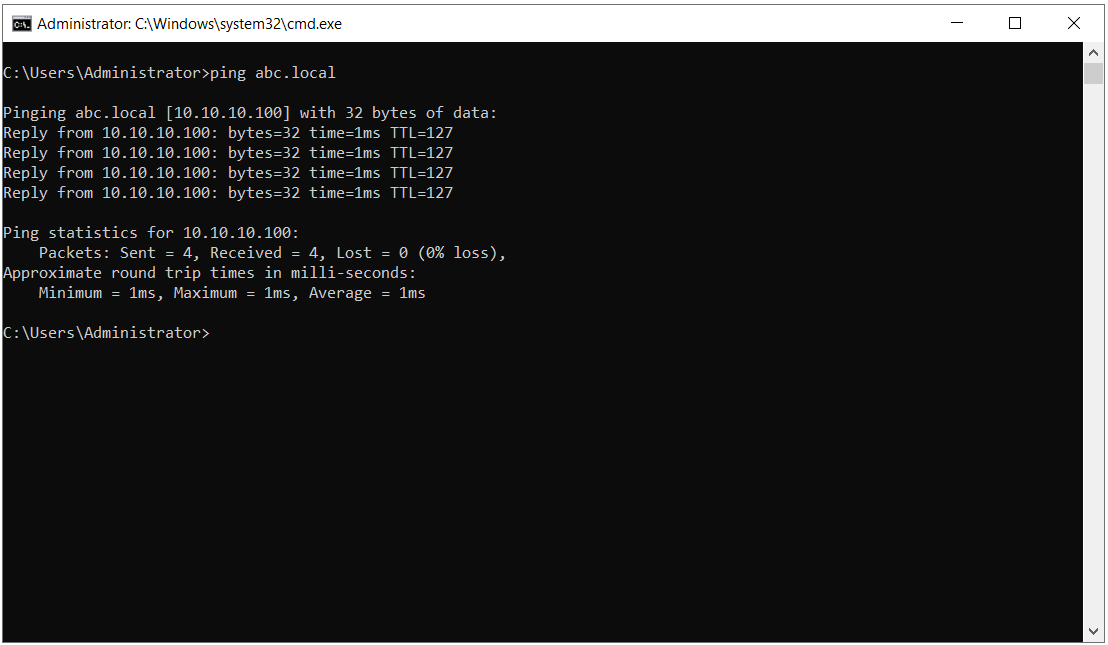
The quickest way to see that the configuration works is to ping the other domain. The ping sent from the server on the xyz.local side to the abc.local domain shows that the name abc.local resolves to 10.10.10.100.
The ping sent from the abc.local side to the xyz.local domain confirms that the name resolves to 172.16.10.100.
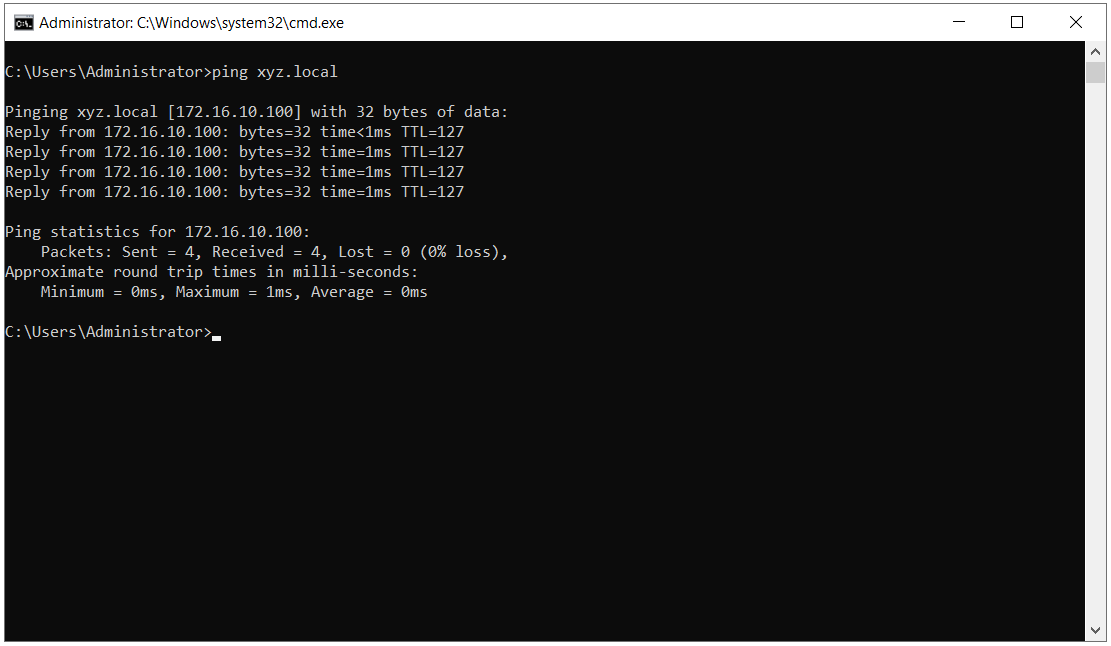
The IP address shown in square brackets in the first line of the ping output is enough to prove that name resolution is successful. If a firewall blocks ICMP traffic on the network, the Reply lines may not appear. This does not indicate a problem in the DNS configuration. It shows that ICMP is blocked. For a more reliable check, a direct DNS query is made with Resolve-DnsName and nslookup. In Active Directory scenarios, in addition to the A record, the SRV records used to locate domain controllers must also be checked, because trust and migration tools find the other side through these records.
# Check xyz.local from the abc.local side
Resolve-DnsName -Name xyz.local
Resolve-DnsName -Name _ldap._tcp.dc._msdcs.xyz.local -Type SRV

# Check abc.local from the xyz.local side
nslookup abc.local
nslookup -type=SRV _ldap._tcp.dc._msdcs.abc.local
If the SRV query returns the domain controllers of the other forest with their hostname, port and priority details, the configuration is ready for trust and migration operations. If the query times out, check that TCP and UDP port 53 are open in both directions between the DNS servers on the 2 sides.
A conditional forwarder is a configuration that takes a few minutes to set up and provides name resolution between 2 forests without disrupting the existing DNS design. The part that needs attention starts after the setup. The master server list does not follow domain controller changes in the other environment automatically. If the other environment changes its number of domain controllers often, a stub zone requires less maintenance. In a stable environment, a conditional forwarder defined at forest scope works for a long time without further intervention.
I hope you find it useful...
Feel free to share your thoughts and questions about this article in the comments below. Every contribution helps the content reach more people and makes for a more useful discussion.