Each copy of a mailbox database is located on a separate Mailbox server within a Database Availability Group (DAG). The active copy serves user requests, while the passive copies stay up to date by receiving the transaction log files generated on the active copy and replaying them into their own database file. The situations that require a passive copy to be removed are well defined. Before a server is removed from DAG membership, no replicated database must remain on it. If the database path is going to be moved, all copies of that database are removed first as well. A passive copy that is no longer needed can be removed in the same way. For maintenance work on the disk that holds the copy, however, temporarily suspending replication for the copy may be enough, depending on the work to be done, and in that case the copy does not need to be removed.
In the steps below, I remove a passive database copy with the Remove-MailboxDatabaseCopy cmdlet, clean up the files left on the server, and verify the result with Get-MailboxDatabaseCopyStatus and Test-ReplicationHealth. This operation does not delete the database. The database continues to run in the Mounted state on the server that holds the active copy, and mailbox access is not affected. What is removed is the configuration of the copy on the selected server and the replication to that copy. If the removed copy is the last passive copy of the database, the database then runs with a single copy and without replication.
In Exchange Server, log-based continuous replication first arrived with Exchange Server 2007. The DAG architecture that we use today and the cmdlets that manage database copies appeared with Exchange Server 2010 and continued with the same logic in later versions.
This article is not tied to a specific Exchange Server version. The Remove-MailboxDatabaseCopy cmdlet and the steps here are the same from Exchange Server 2010, where the DAG was introduced, to Exchange Server SE. The DatabaseRedundancy and DatabaseAvailability checks are not in the test list in the Exchange Server 2010 documentation, but they are in the list for Exchange Server 2013 and later.
1- Pre-Removal Checklist
The table below lists the conditions that must be verified before the copy is removed. If any of them is not met, the cmdlet returns an error or the operation produces an unexpected result.
|
Check |
Expected State |
|
Permission (removing the copy) |
The account that performs the operation has the Database Copies role (the Organization Management role group includes this role). The target database and server are within the scope of the account |
|
Permission (circular logging setting) |
If the setting is going to be changed, the account can run the Set-MailboxDatabase command with the CircularLoggingEnabled parameter on the relevant database |
|
DAG health |
The DAG has quorum, and the cluster and network components are healthy |
|
Type of the copy to be removed |
Passive copy. The active copy cannot be removed with this cmdlet |
|
Circular logging |
Disabled on the database if the last passive copy is going to be removed (CircularLoggingEnabled : False) |
If the DAG is not healthy, for example if the cluster is not running because quorum is lost, no database copy can be removed. If the copy that I want to remove is active at that moment, I must first move the active copy to another DAG member (switchover) and then remove the copy that has become passive. The active copy of a database can only be deleted with Remove-MailboxDatabase after all of its passive copies have been removed, and this means deleting the database itself.
The circular logging condition exists because this feature works with different mechanisms on replicated and non-replicated databases. On a database that has copies, the Microsoft Exchange Replication service manages log truncation, and this is called Continuous Replication Circular Logging (CRCL). On a single-copy database, JET circular logging, which is performed by the Information Store, is in effect. When the last passive copy is removed, the database changes from a replicated state to a non-replicated state. Because these 2 mechanisms cannot be converted into each other, Exchange Server does not allow the last passive copy to be removed while circular logging is enabled.
CRCL is disabled before the last passive copy is removed. On a replicated database, this change is applied dynamically, and the copy can be removed without remounting the active database. The state of the setting is shown by the following command in the Exchange Management Shell (EMS).
Get-MailboxDatabase -Identity MBXSYSDB | Format-List Name,CircularLoggingEnabled
If the value is True, it is disabled with the following command before the copy is removed.
Set-MailboxDatabase -Identity MBXSYSDB -CircularLoggingEnabled $false
This condition applies only when the last passive copy is removed. If the database has more than 1 passive copy and the copy being removed is not the last one, circular logging can stay enabled.
Circular logging can be enabled again after the copy is removed. On a single-copy database, this setting works as JET circular logging. To enable or disable JET circular logging, the database must be dismounted and mounted again after the setting is changed, and the mailboxes in that database cannot be accessed during this time.
2- Removing the Passive Database Copy
Step 1 - Checking the Copy Statuses
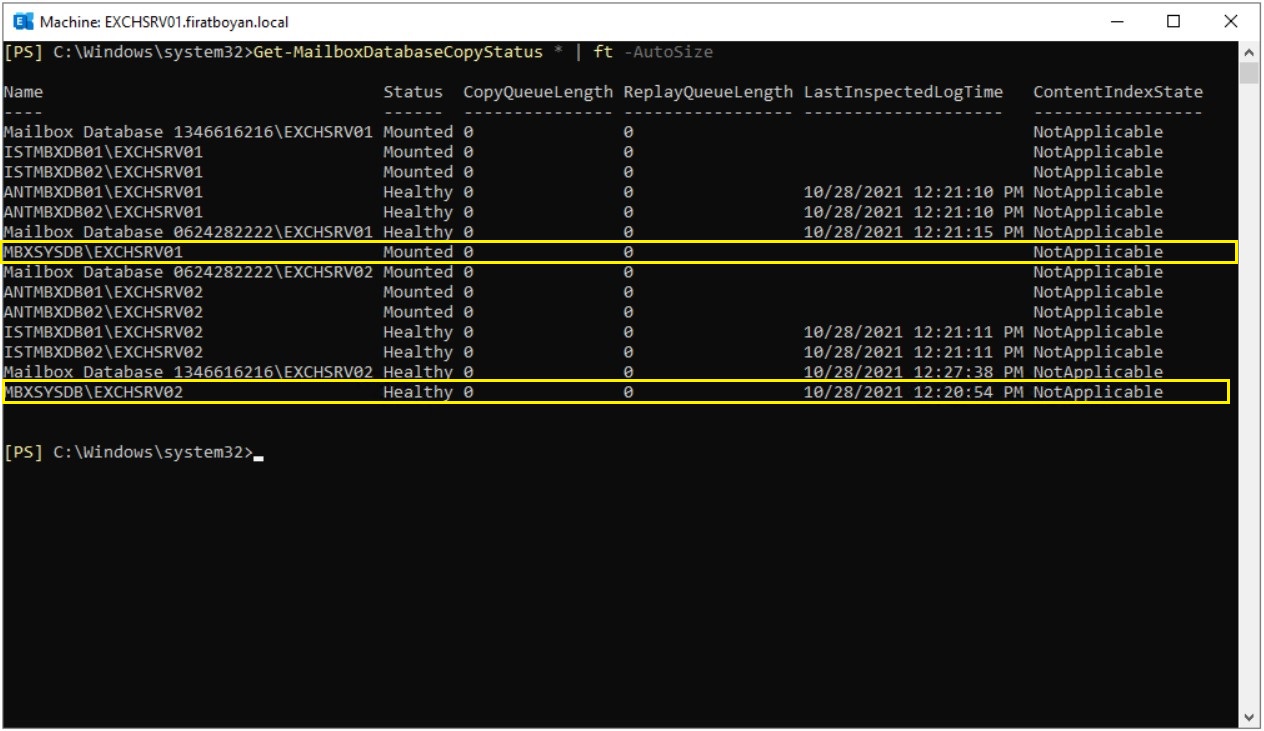
First, I check which servers hold the active and passive copies of the relevant database and what state they are in. The following command lists all database copies in the organisation together with their statuses.
Get-MailboxDatabaseCopyStatus * | ft -AutoSize
In the output, each copy is named in the Database\Server format. According to this, my database named MBXSYSDB is Mounted on the server with the host name EXCHSRV01 and Healthy on the server with the host name EXCHSRV02. Mounted shows that the copy is active and serves user requests. Healthy means that the passive copy receives and replays the log files without any problem, in other words that it keeps up with the active copy.
Checkpoint
The MBXSYSDB\EXCHSRV01 row must show Mounted and the MBXSYSDB\EXCHSRV02 row must show Healthy. If the copy to be removed is in the Mounted state, it cannot be removed with this cmdlet.
Step 2 - Removing the Passive Copy with Remove-MailboxDatabaseCopy
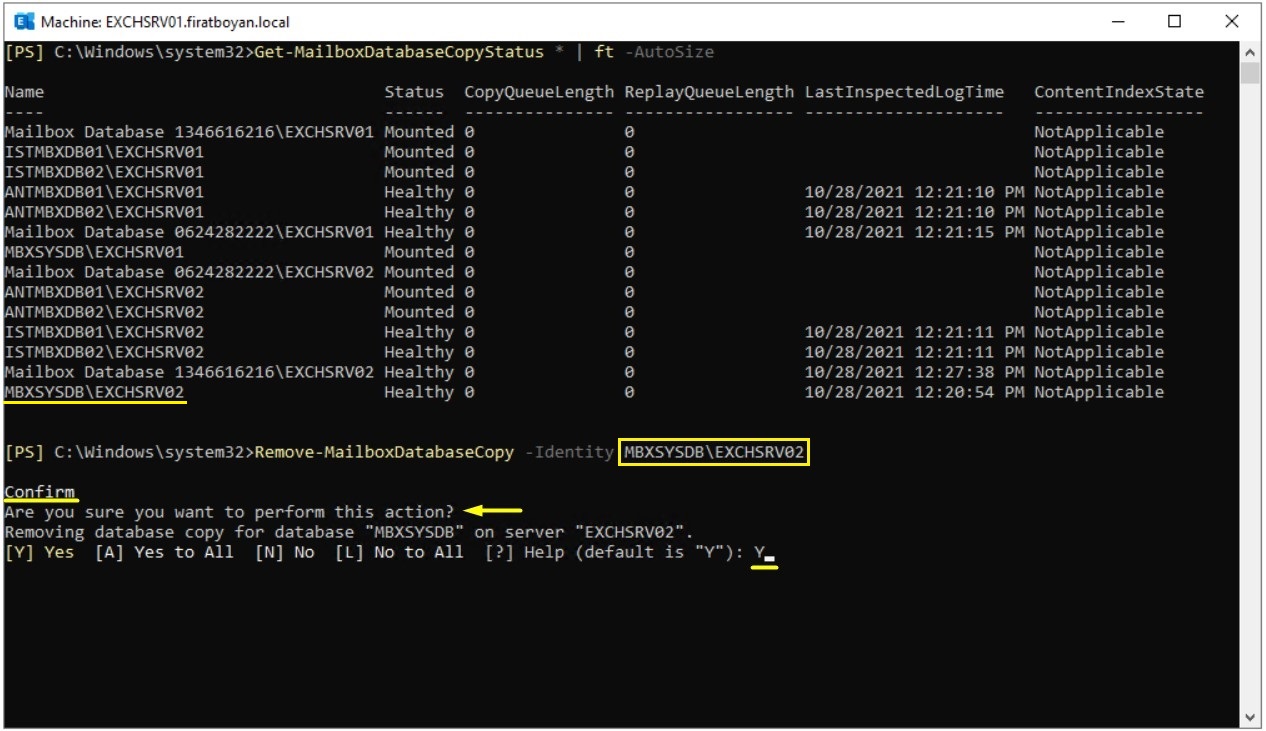
The copy that I am going to remove is the passive (Healthy) copy on EXCHSRV02. I pass the name of the copy to the -Identity parameter in the Database\Server format, as it appears in the Step 1 output.
Remove-MailboxDatabaseCopy -Identity MBXSYSDB\EXCHSRV02
In this example, the only passive copy of MBXSYSDB is removed. After the operation, the database runs with a single copy, and no automatic failover takes place if EXCHSRV01 fails.
I approve the Confirm prompt, which asks for confirmation of the operation, by typing Y (Yes). If you want to remove the copy directly without the confirmation prompt, it is enough to add the -Confirm:$False parameter to the command.
Step 3 - Deleting the Old Database and Log Files
When the command completes, EMS returns a warning which states that the copy has been removed from the server and reminds you that the related files can be deleted manually if required. Remove-MailboxDatabaseCopy removes the configuration of the copy and does not touch the database (.edb) and transaction log files on the disk. Because this copy no longer receives replication, the files are not updated, but they continue to take up space on the disk.
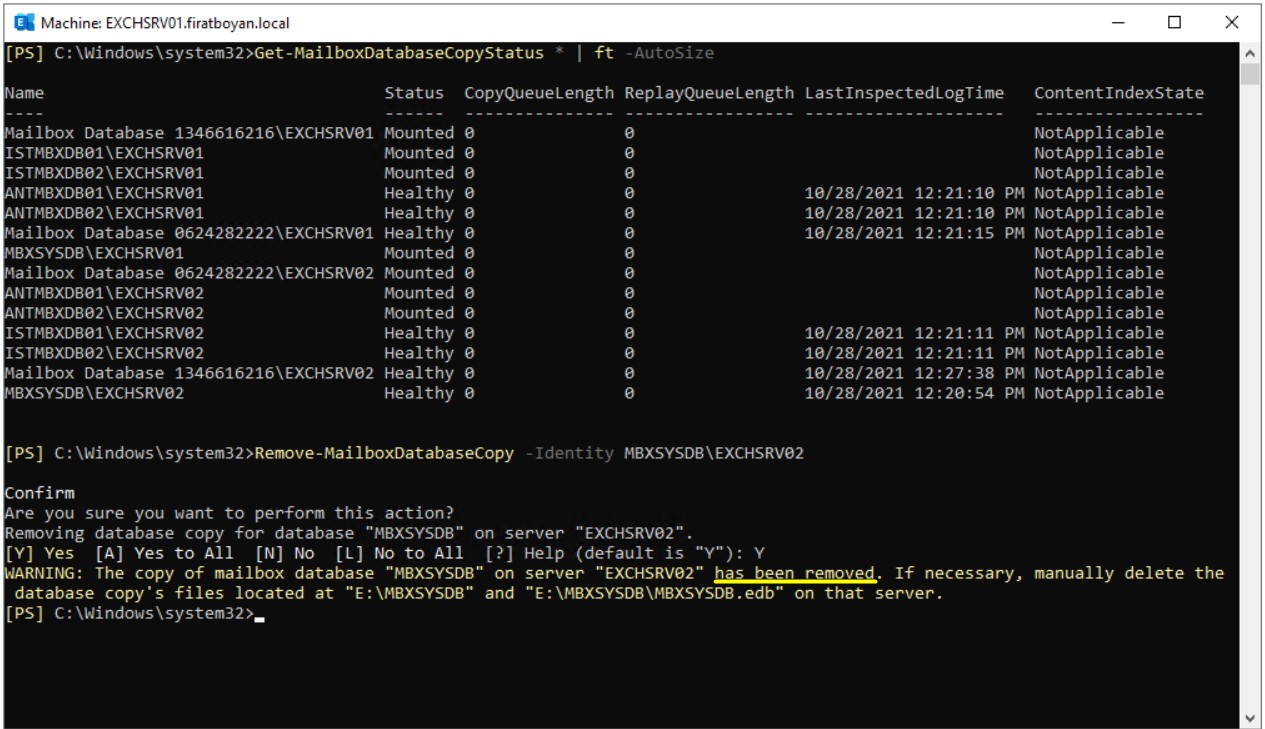
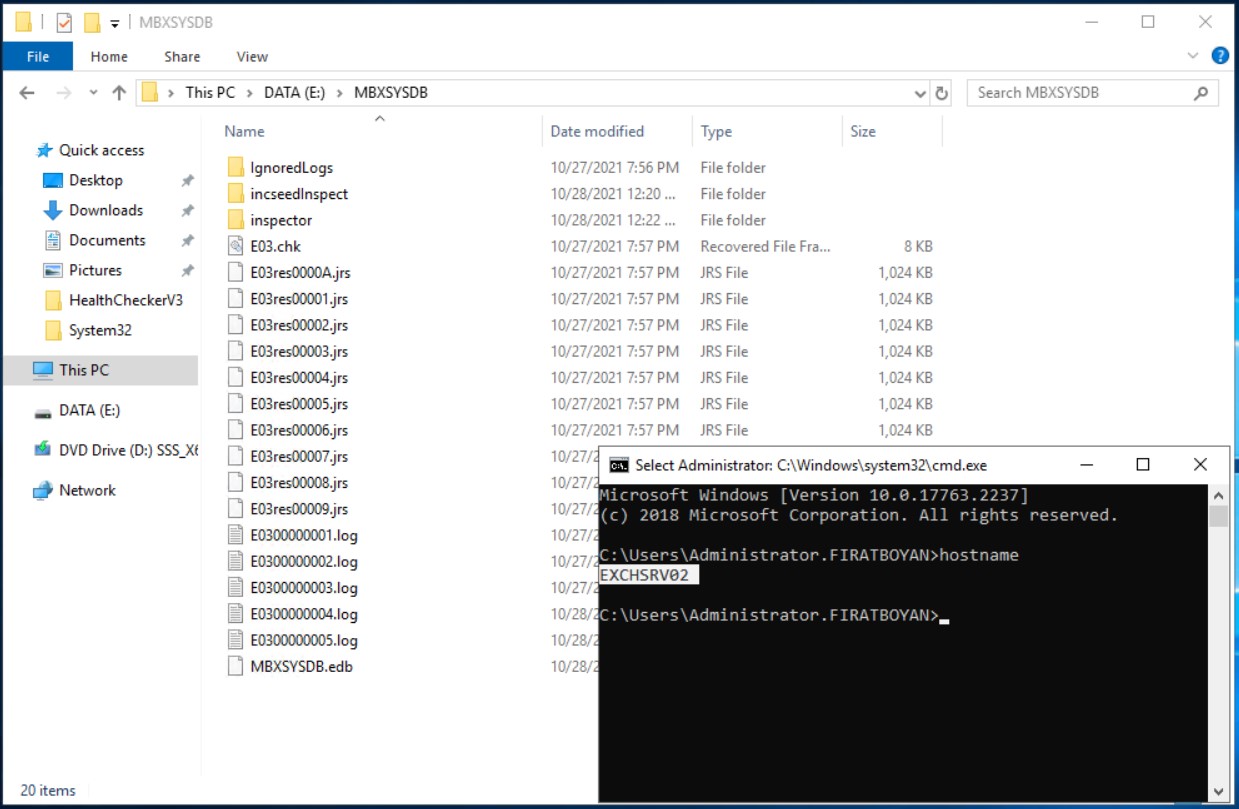
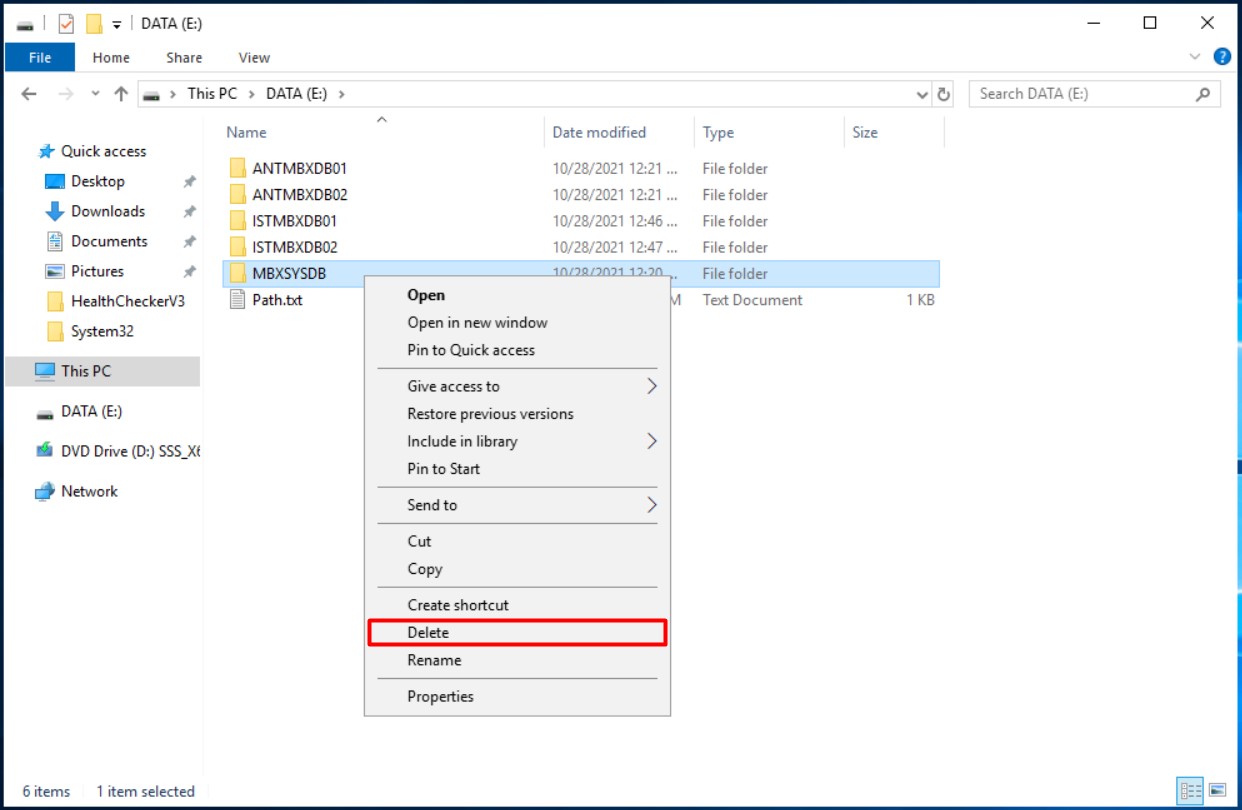
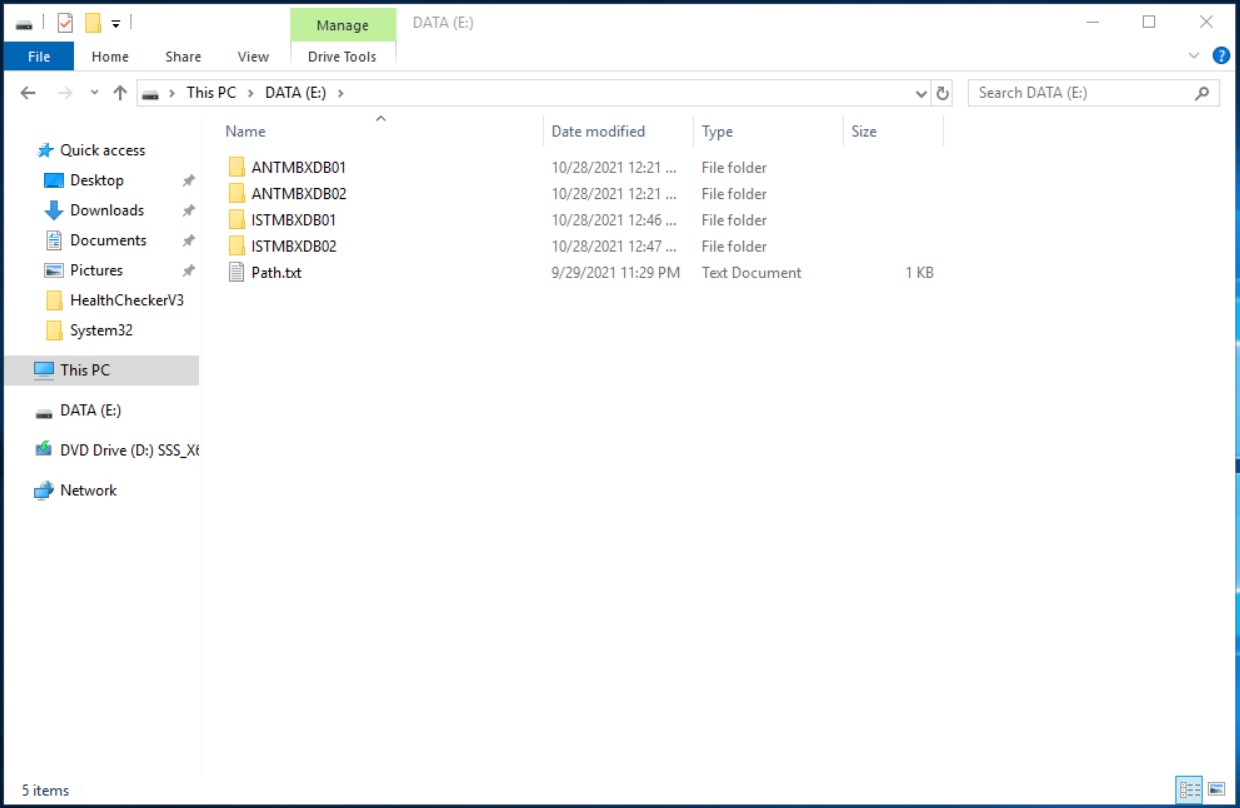
To free up disk space, I go to the database and log directories stated in the warning on EXCHSRV02 and delete the files that belong to MBXSYSDB.
The copies of a database are located in the same directory path on all servers. Make sure that you perform the deletion on the server from which the copy was removed (EXCHSRV02). The files on the server that holds the active copy must not be touched.
3- Verification
Step 4 - Checking the Copy List Again
When I run the Get-MailboxDatabaseCopyStatus command from Step 1 again, I see that the passive copy of MBXSYSDB on EXCHSRV02 is no longer in the list. The database continues to run in the Mounted state on EXCHSRV01.
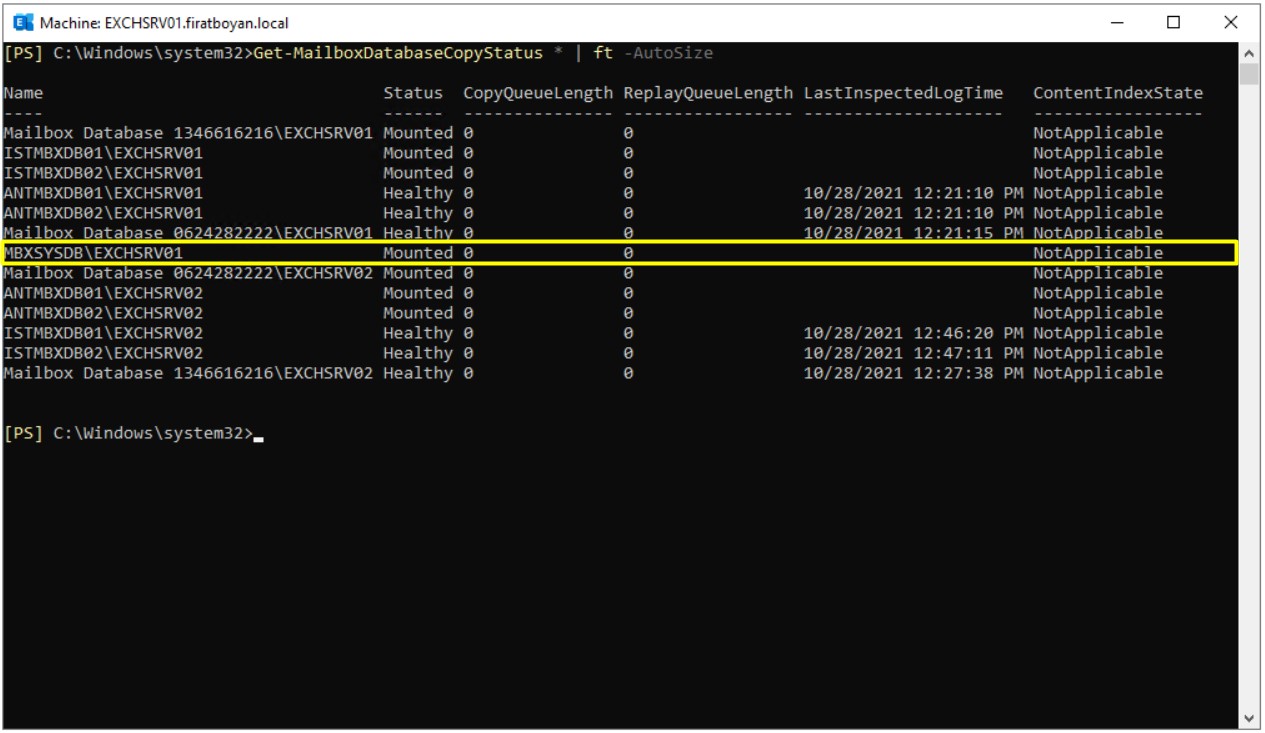
The same result can also be verified on the database object. In the output of the following command, the removed copy must not appear in the DatabaseCopies field.
Get-MailboxDatabase -Identity MBXSYSDB | Format-List DatabaseCopies
Checkpoint
The list must not contain the MBXSYSDB\EXCHSRV02 row, and the MBXSYSDB\EXCHSRV01 row must show Mounted.
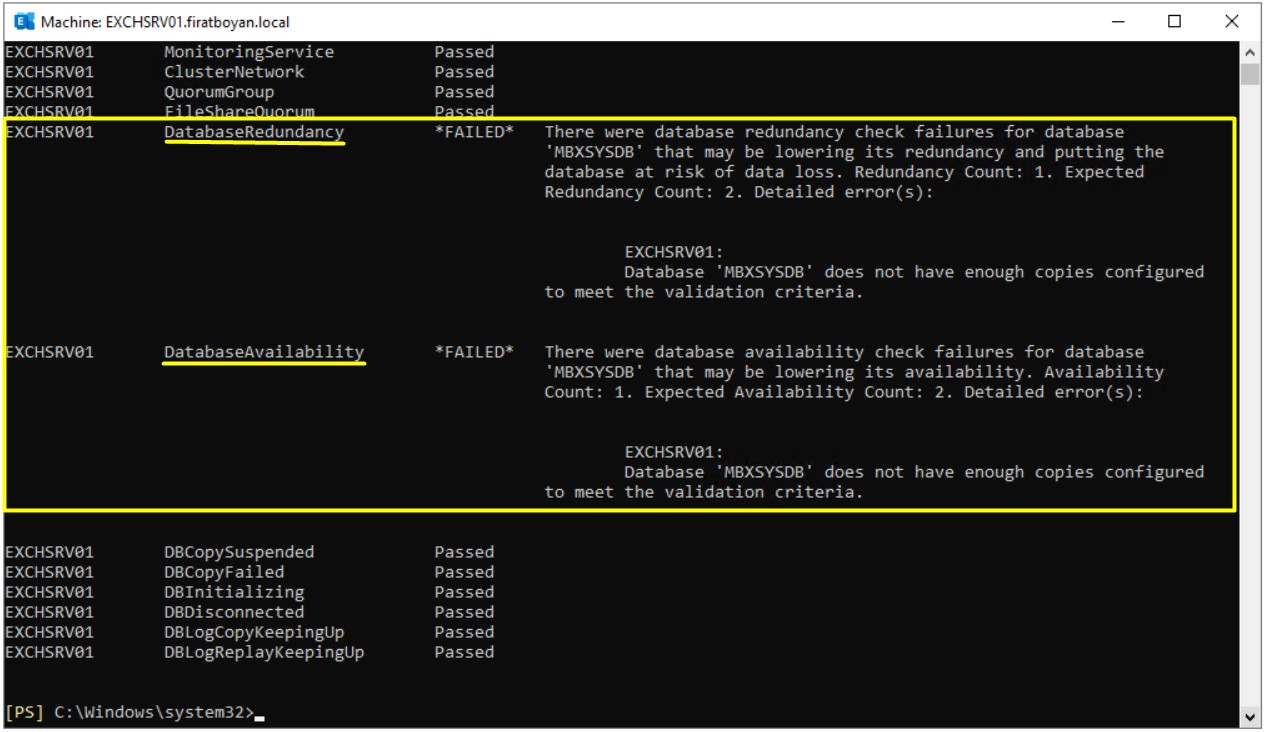
Step 5 - Test-ReplicationHealth on EXCHSRV01
Test-ReplicationHealth runs a series of checks on the specified DAG member to test the replication pipeline, Active Manager, the Cluster service, quorum and the network components. I first test the server with the host name EXCHSRV01, which holds the active copy.
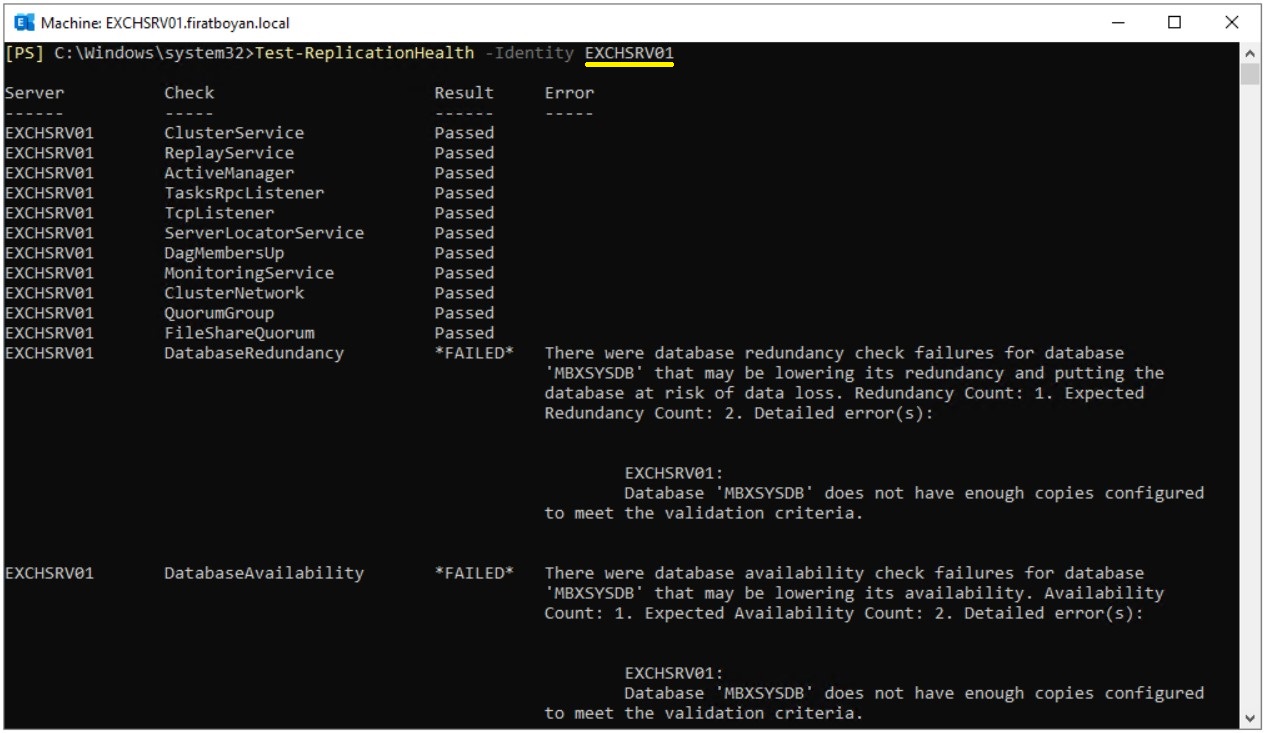
Test-ReplicationHealth -Identity EXCHSRV01
In this example, the DatabaseRedundancy and DatabaseAvailability checks returned FAILED on EXCHSRV01. DatabaseRedundancy verifies the copy redundancy of the databases on the server, and DatabaseAvailability verifies their availability level. Both checks are evaluated across all of the databases on the server. The Error field of the relevant row states which database failed which check.
Because MBXSYSDB has no passive copy left, this result is not a sign of a fault. It is the expected result of the operation. Even so, it must not be treated as a false alarm. Leaving MBXSYSDB with a single copy removes the possibility of automatic failover for this database.
Step 6 - Test-ReplicationHealth on EXCHSRV02
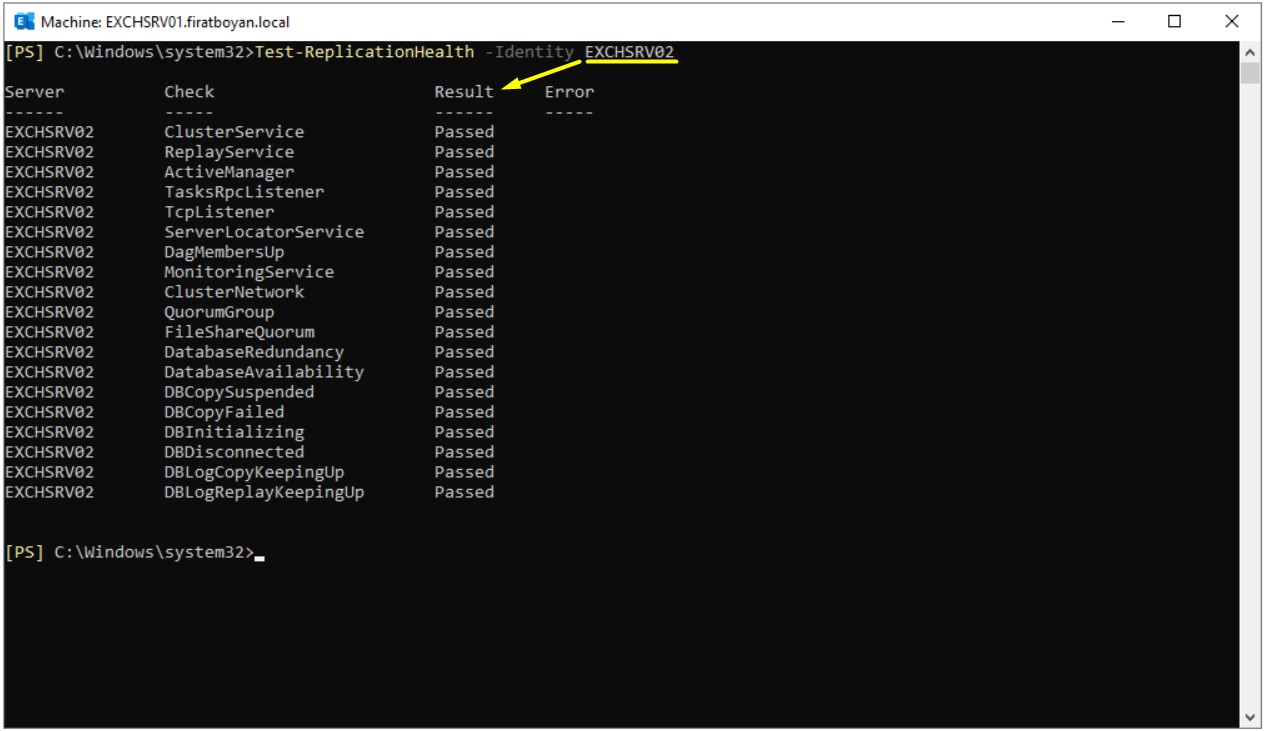
I run the same test for the server with the host name EXCHSRV02, from which the copy was removed.
Test-ReplicationHealth -Identity EXCHSRV02
In this example, all of the checks on EXCHSRV02 passed. MBXSYSDB is no longer hosted on this server. The checks for the cluster, quorum, the network and the other copies on the server return results according to their own conditions.
4- Adding the Copy Back
The removed copy can be added again with Add-MailboxDatabaseCopy, either to the same server or to another member of the DAG. When the copy is added, the database is copied from the active copy to the target server from the beginning (seeding), and the length of this process depends on the database size and the network capacity.
Circular logging must be disabled before the first passive copy is added. If JET circular logging was enabled during the period when the database ran with a single copy, the setting is disabled first, then the database is dismounted and mounted again so that the change is applied, and the copy is added after that.
On a single-copy database, applying the circular logging setting requires a dismount and a mount. Access to the mailboxes in that database is interrupted during this time.
Add-MailboxDatabaseCopy -Identity MBXSYSDB -MailboxServer EXCHSRV02
When the new copy of MBXSYSDB reaches the Healthy state, Test-ReplicationHealth is run again on EXCHSRV01. The other databases evaluated on the server can also affect the result of the DatabaseRedundancy and DatabaseAvailability checks.
This article walked through removing the passive copy of a mailbox database in a DAG with Remove-MailboxDatabaseCopy, cleaning up the database and log files left on the server, and verifying the result with Get-MailboxDatabaseCopyStatus and Test-ReplicationHealth. If the removed copy does not appear in the copy list and the database is in the Mounted state on the active server, the operation is complete. If the database is going to be left with a single copy, the loss of redundancy must be taken into account. If a copy is going to be added again, the seeding time must be taken into account.
I hope you find it useful...
Feel free to share your thoughts and questions about this article in the comments below. Every contribution helps the content reach more people and makes for a more useful discussion.